MOSS-Image spells menus and posters right, if you give it 80 seconds
Apache 2.0 MOSS-Image got every word right in 80 s on one A40. A turbo add-on takes 9 s and slips now and then. About 30 GB on the card.
A menu with four prices is a harder job for an image model than a sunset. Iris-3B, the last image model we tested, drew the chalkboard and dropped the decimal points. MOSS-Image, an open model built for long text inside pictures, got every word right in every text test we gave it. That took about 80 seconds a picture on one rented A40. A community turbo add-on makes the same pictures in about 9 seconds, and now and then gets a word wrong. If your product makes posters, menus or social cards, that is the choice: 80 seconds you can ship, or 9 seconds someone has to proofread. The model and the add-on are under Apache 2.0, so commercial use is covered. With everything loaded it used about 30 GB of the card's memory. Under emulated 16 and 12 GB caps, it made the identical picture. You can run it on a GPU you rent or own.
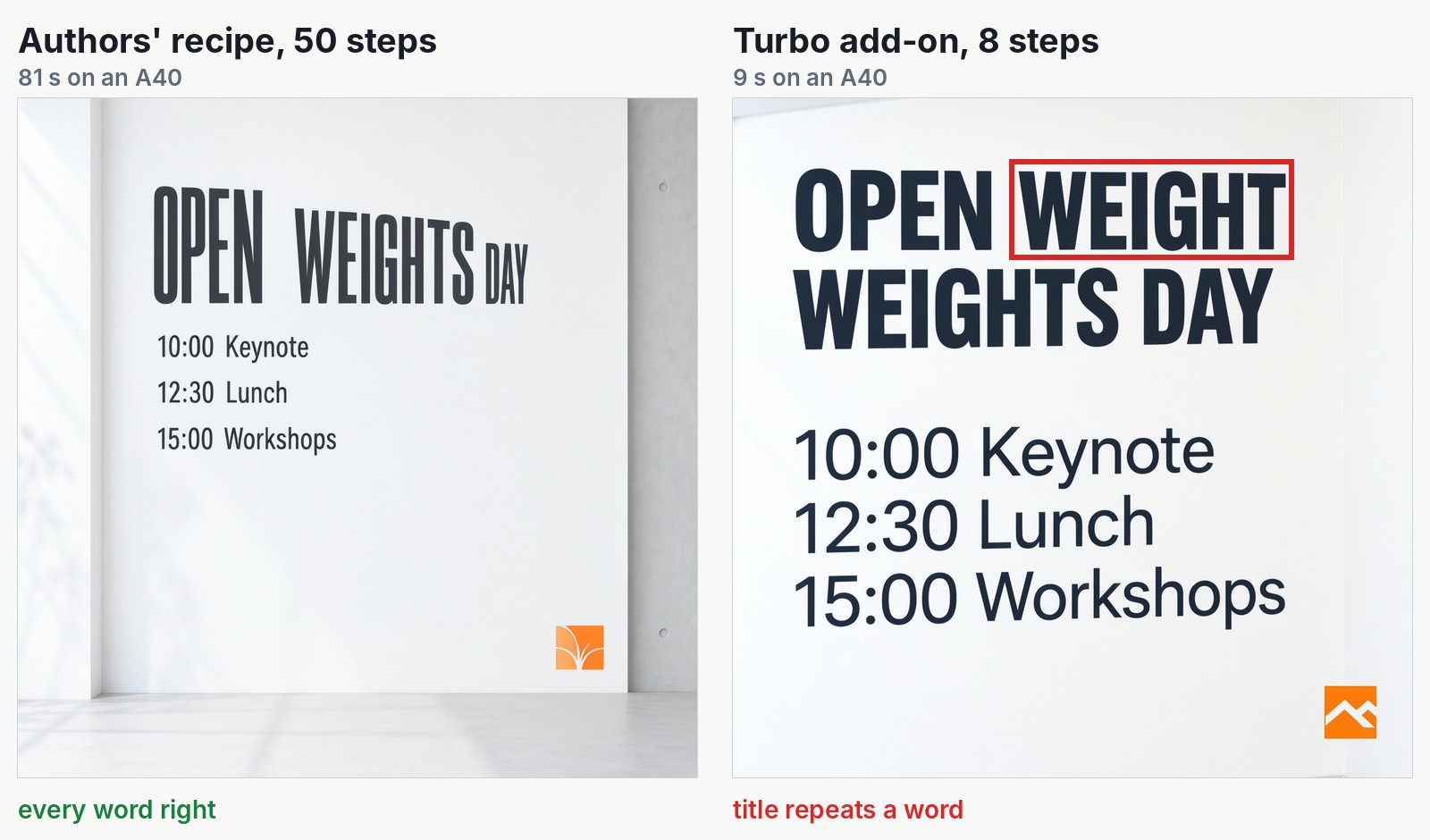
Same prompt, same random start, same loaded model. The red box marks the turbo version's only error on this poster.
An open model built for words and layouts
MOSS-Image comes from OpenMOSS at MOSI.AI. Its authors list text rendering and long prompts as the main features. Think of a full menu with prices, an infographic with a dozen labels or a schedule on a poster: the pictures where image models usually slip.
In their technical report, the authors built their own test of long text inside images. They report that MOSS-Image writes 96.3% of the requested text on average, the best score among models whose files are public. It is their benchmark, so treat it as their claim. Our small test points the same way.
You can also control the layout. Instead of a sentence, you send a short structured description: a caption for the whole picture, then a list of items, each with its text and a box on the canvas. The authors call it experimental. We tried two layouts, and both were followed.
Every word right in 80 seconds, a word to check in 9
We made 22 pictures with MOSS-Image-SFT, one try per prompt and one request at a time. The card was an NVIDIA A40 with 48 GB of memory, rented on our cloud. The prompts were ours: a conference poster, an infographic, a chalkboard menu, a handwritten Chinese note, two layouts, a street photo and a pianist's hands.
The authors' recipe cleans random noise into a picture over 50 steps. It took 78 to 81 seconds per picture of about one megapixel. It wrote every word right on the poster, the infographic, the menu and the Chinese note. The menu read "Espresso 2.50, Cappuccino 3.20, Croissant 2.00, Daily soup 5.50", four prices and four decimal points.
The turbo add-on comes from lodestones. It is a 1.2 GB file laid on top of the original model, and its author labels it work in progress. It gets there in 8 steps instead of 50, in 8.6 to 9.2 seconds, about nine times faster. It got the menu, the Chinese note and both layouts right. It slipped twice in the text we asked for: the poster title above, and "PNG bock" for "PNG back" on the infographic. It also invented half-garbled signs in the street photo. It is a fine draft machine, and a risky one for a price list nobody checks.
About 30 GB on the card, and the same pixels under 16 and 12 GB caps
You probably do not need a 48 GB card. The model is two parts working as a pair. A 17 GB reader, a language model, turns your prompt into a description. A 10 GB painter turns noise into the picture. The reader works for a moment at the start and then sits idle, so it can wait in the computer's main memory.
We capped how much memory the model could use on the A40, to behave like a card with 16 or 12 GB:
| Memory cap | Peak memory on the card | Authors' recipe | Turbo |
|---|---|---|---|
| None (real A40, 48 GB) | about 30 GB | 80 s | 9 s |
| 16 GB (emulated) | about 14 GB | 86 s | 13 s |
| 12 GB (emulated) | about 11 GB | 160 s | 18 s |
The capped runs produced byte for byte the same files as the run with everything on the card. So the 12 GB poster still has every word right, and the turbo poster keeps its repeated word. Plan for about 32 GB of main memory: the capped setups used up to 22 GB of it.
Only the memory size was emulated, not a consumer card's speed, and the fit is not yet confirmed on a real consumer card, because the RTX 3080 Ti, RTX 5080 and RTX 4090 machines we rented could not be set up.
Who should care
- Text that must be right (a menu, a price, a legal line): use the authors' 50-step recipe. It was the only mode with no slips in our test.
- Speed for drafts and previews: use the turbo add-on, and read every word before it ships.
- A smaller GPU: try the 16 GB setup on a 16 or 24 GB card. On a 16 GB card it is tight, with about 2 GB to spare.
- A commercial product: Apache 2.0 on the model and the add-on covers it.
If you just want pictures at your desk, ComfyUI already runs MOSS-Image and is the shorter path. We wanted an API that other programs call, on a card we pick. On InferenceKey, one loaded copy served both the recipe and the turbo add-on, request by request. It was ready 63 seconds after we asked for it.
OpenMOSS built the model, lodestones made the turbo add-on, and we spotted it in a video by AI Search. Our part was the code that serves it, the SDK example, the deployment on InferenceKey and the measurements.
Read the full test, with every picture, the memory ladder and the deployment steps, in our Research post.