Nemotron 3.5 Bolt: a 74B agent model on one GPU, and what the 24 GB means
NVIDIA packed a 74B vision agent model into 22 GB of mostly 2-bit weights. On one A40 it wrote 136 tokens/s with its drafter, 70 without.
Can one rented graphics card run a 74B agent model that reads images? NVIDIA Nemotron 3.5 Bolt 74B-A9B 24GB, released on 15 October, is a 74-billion-parameter model that reads text and images and works as an agent, calling tools to get things done. Its model file is 22.0 GB. We served it on one rented NVIDIA A40, a 48 GB data-center graphics card (GPU), with image reading and its drafter, a small helper model that speeds up writing, switched on.
The "24GB" in the name is NVIDIA's budget for text only: the model, room for about 128,000 tokens of conversation (a token is a piece of a word) for one user, and the drafter. That adds up to 23.83 GB. Our run used about 27 GB (25.2 GiB), but that is not a like-for-like comparison: it includes the image reader, which NVIDIA's budget leaves out. NVIDIA's own setups for llama.cpp, the free program most people use to run models like this on one machine, start at cards with 32 GB.
What we wanted to know is whether a 74B agent model really runs on a single card a small team can rent or buy, and how fast. On a 48 GB data-center card, it does. On a 32 GB consumer card, the size NVIDIA's smaller setup names, it is not proven yet: both of the ones we rented were broken.
| What | Result |
|---|---|
| Model | Nemotron 3.5 Bolt 74B-A9B 24GB by NVIDIA, released 15 October: 74B parameters (the values a model learns in training), 9B of them working on each word, reads text, images and short videos, writes text, calls tools |
| Where it comes from | a slimmed-down version of NVIDIA's 120B Nemotron 3.5 Super VL, then heavily compressed so the file is 85% smaller |
| Download | 22.0 GB model, 1.73 GB image reader, 1.0 GB drafter |
| GPU we used | one NVIDIA A40 with 48 GB, rented on RunPod (an older data-center card) |
| Memory used while serving | about 27 GB of the 48 GB card, a little over half, with image reading, the drafter and room for 98,304 tokens of conversation |
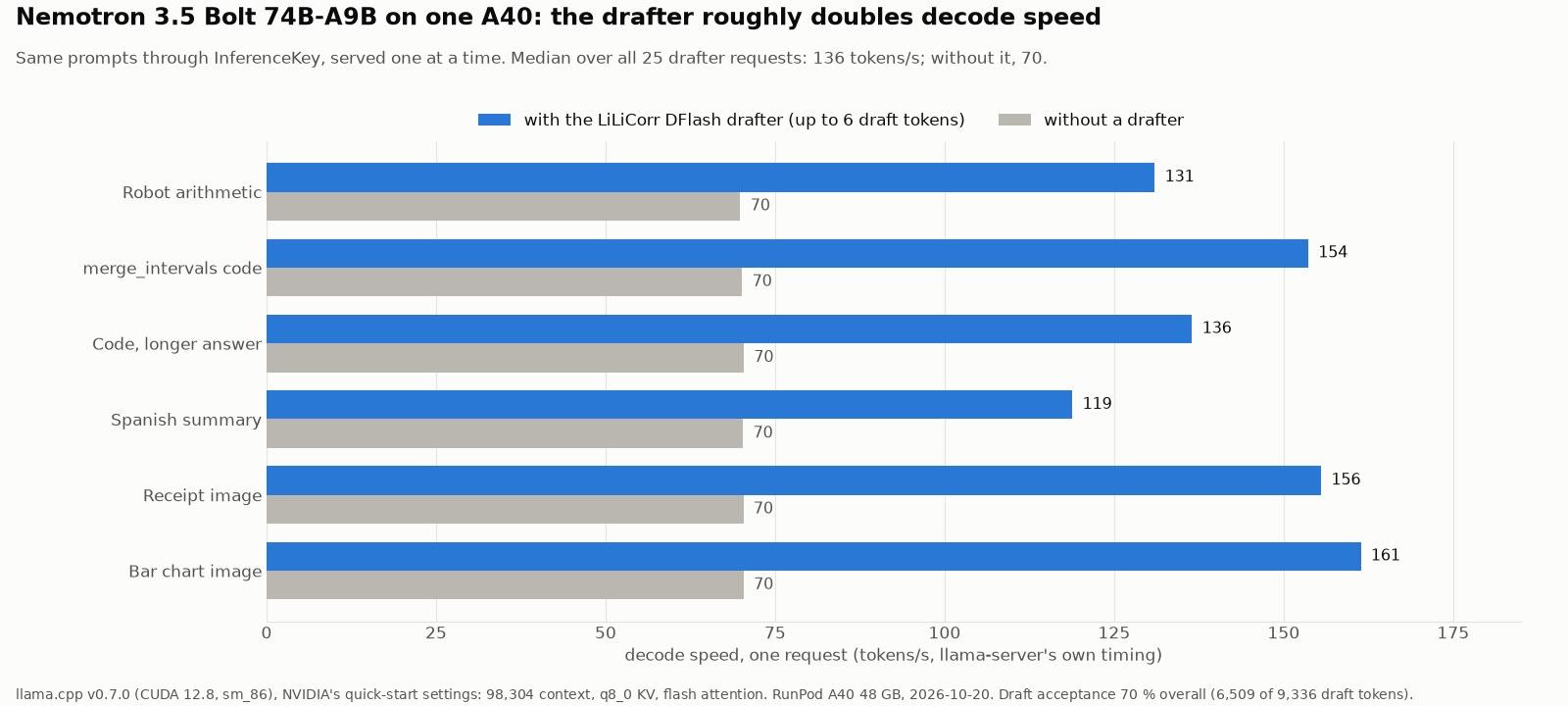
| Writing speed for one user | 136 tokens a second with the drafter, 70 without |
| Quality, NVIDIA's own tests | ahead of Qwen3.6-35B-A3B on most of the agent tests NVIDIA reports (Terminal-Bench 2.1: 51.0 against 44.4), narrowly behind on one, behind on factual knowledge |
| License | OpenMDW-1.1, commercial use allowed |
| The catch | needs a version of llama.cpp (the free program that runs it) from 15 October or newer, and the version our platform installs by default is older |
A smaller team of specialists
Bolt is the small member of a family. Its parent, Nemotron 3.5 Super VL, has 120 billion parameters. Uncompressed, it needs four of NVIDIA's large data-center GPUs (H100), or two of its newest (GB200). We spotted the family in AI Search's news video of 18 October, which covers the parent and calls it "still quite huge".
Both are what is called a mixture of experts. Picture a large team of specialists. For each word, a handful of them are picked to do the work, and the rest wait. That is why the name says A9B: of the 74 billion parameters, about 9 billion do the work on any given word, which keeps it fast.
NVIDIA built Bolt by shrinking the parent's team. A training method learned how many specialists to keep in each part of the model and how big each should be, with the parent checking its answers along the way (the technical report has the details). Each part went from 512 specialists to between 240 and 496, and each word now consults 9 of them instead of 22. The goal was to fit under 24 GB. That training ran on 128 of NVIDIA's data-center GPUs for about 64 hours.
Shrinking cost about 5% of the score: averaged over nine tests, the parent got 57.58 and the shrunk model 54.74, before the extra training NVIDIA then did on images, agent tasks and coding.
Compressed hard, on purpose
Even shrunk, Bolt uncompressed takes 148 GB. NVIDIA ships it heavily compressed, like a photo saved at much lower quality, and it lands at 22.1 GB, 85% smaller. The specialists, which are most of the model, are compressed the hardest. The smaller parts that every word passes through keep more detail.
Compressing a model that hard usually costs it a lot of accuracy. NVIDIA kept training Bolt after compressing it, with the uncompressed version correcting its answers. Some of the loss remains: on Terminal-Bench 2.1, a test of agent work in a terminal, Bolt scores 53.93 uncompressed and 50.98 as downloaded.
24 GB on paper, for text only
On NVIDIA's own arithmetic, the text-only version fits in 24 GB, with 23.83 GB used. How much room that leaves depends on the unit: a 24 GB consumer card holds 24 GiB, so if NVIDIA's figure is in decimal GB there are about 1.9 GB spare, and if it is in GiB about 0.2. NVIDIA budgets the drafter at 0.96 GB, and in our run it cost about 2.4 GB. So whether Bolt fits on a real 24 GB card is still open. We did not try one.
The image reader adds 1.68 GB, which leaves little or no room even on paper. NVIDIA's llama.cpp setups, which load the image reader, start at 32 GB cards.
NVIDIA's model page offers two llama.cpp setups. The smaller one is for graphics cards with 32 GB or more and holds 65,536 tokens of conversation. The larger one is for 48 GB or more and holds 262,144. The quick-start command on the same page sits in between, at 98,304 tokens, and that is the one we ran.
A fast helper that guesses ahead
A model normally writes one token at a time. NVIDIA ships a second, much smaller model with Bolt, the LiLiCorr drafter, about 1.1 billion parameters in a 1.0 GB file. The drafter guesses the next few tokens, and Bolt checks them all in one pass, keeps them up to the first one it disagrees with and writes that one itself. When the guesses are good, several tokens come out for the price of one check.
The drafter guesses a whole block of words at once and checks that the guesses fit together, so more of them are kept. In NVIDIA's tests, each check moved the answer forward by about 4 to 5 tokens, more on code and fewer on prose.
How it scores, by NVIDIA's numbers
All the figures here come from NVIDIA's model page and report. We did not rerun them. Against Qwen3.6-35B-A3B, a smaller open model NVIDIA compares it with:
| Test (what it measures) | Bolt, as downloaded | Qwen3.6-35B-A3B |
|---|---|---|
| Terminal-Bench 2.1 (agent work in a terminal) | 50.98 | 44.38 |
| BrowseComp (finding facts by browsing) | 66.75 | 48.74 |
| GPQA Diamond (graduate-level science) | 86.43 | 83.40 |
| PinchBench (an agent benchmark) | 87.82 | 88.07 |
| AA-Omniscience accuracy (factual recall) | 16.90 | 19.47 |
| AA-Omniscience, answers without making things up | 61.27 | 65.85 |
Bolt wins most of the agent and reasoning tests NVIDIA reports and loses PinchBench by a hair. It also loses on recalling facts, where it makes things up a little more often. On one tool-use test, Qwen's own team reports a much higher score (62.8) than NVIDIA measured for it (51.2), a reminder that these numbers depend on who runs them. Google's Gemma 4 26B-A4B beats Bolt at following detailed instructions (IFBench, 77.25 against 66.17). Shrinking and compressing together cost Bolt about 11 points on Terminal-Bench 2.1: the full-size parent scores 61.94, Bolt as downloaded 50.98.
NVIDIA's own speed test shows Bolt is the slower option: on a Surface laptop with 128 GB of memory, it wrote about 84 tokens a second on coding work, against about 97 for Qwen3.6 and 101 for Gemma 4. So you trade some speed for the stronger agent scores.
What you need to run it
There are two routes. The first is llama.cpp, the free, open-source program that runs models like this one on your own machine. Kartik Gulia, an engineer at NVIDIA, wrote the code that lets llama.cpp run Bolt and its image reader, and llama.cpp's maintainer, ggerganov, accepted it on 15 October (pull request #30520). Anything older cannot load the file.
The second is vLLM, server software built for data centers. For now it needs one specific test version of vLLM, named on NVIDIA's model page. The page is inconsistent about which NVIDIA GPU generations it supports: three in one place, only the newest in another. We did not try this route.
The license is OpenMDW-1.1. It allows use, changes and redistribution for any purpose, puts no limits on what you do with the outputs, and asks you to keep the license and notices when you pass the model on. NVIDIA's model page says it is ready for commercial use.
Running it on InferenceKey
The GPU and the software
We ran it on one NVIDIA A40 with 48 GB, rented on RunPod. We wanted a 32 GB card first, the size NVIDIA's smaller setup names, and got two RTX 5090 machines. Both turned out to have a broken GPU (more below), so the A40 was the fallback. It is an older generation of GPU than the ones NVIDIA's llama.cpp page lists, and it worked anyway.
We used InferenceKey's built-in llama.cpp support, with no custom code in the platform. It builds llama.cpp on the GPU machine and runs one command that downloads the model, the image reader and the drafter. We chose llama.cpp because NVIDIA's official files and recipes are for it. Our command uses the quick start's settings, but fetches the files straight from Hugging Face, the site where NVIDIA publishes them, instead of downloading them first.
It did not work out of the box, though. The worker, the small program InferenceKey puts on each GPU machine, installs a llama.cpp release 1,920 changes older than Bolt's support, and the platform has no way to change that from outside. We logged into the machine and set several things on the worker by hand: the newer llama.cpp version, a faster build and a longer wait before giving up, plus the CUDA compiler path, to be safe.
The steps
Our example script (in the InferenceKey SDK, the Python library for the platform) asks InferenceKey to run the model on your GPU machine, waits until it is ready, asks a reasoning question, reads a receipt from a picture, runs a two-tool refund agent, saves the answers and shuts the model down. The command it runs on the GPU:
llama-server -hf nvidia/NVIDIA-Nemotron-3.5-Bolt-74B-A9B-24GB-GGUF \
  --hf-file NVIDIA-Nemotron-3.5-Bolt-74B-A9B-24GB.gguf \
  --spec-draft-hf nvidia/NVIDIA-Nemotron-3.5-Bolt-74B-A9B-24GB-LiLiCorr-GGUF \
  --spec-type draft-dflash --spec-draft-n-max 6 --spec-draft-ngl 999 -ngl 999 \
  --batch-size 2048 --ubatch-size 512 --ctx-size 98304 --parallel 1 \
  --cache-type-k q8_0 --cache-type-v q8_0 \
  --temp 1.0 --top-p 0.95 --flash-attn on --jinja
Before running it, the worker needs settings added on the GPU machine itself. The example's README lists the three that matter: the llama.cpp version (v0.7.0), the number of build jobs to run in parallel, and a longer wait before the platform gives up on the first start, because building llama.cpp and downloading 24.7 GB can take longer than the default allows. Then you talk to the model through the same chat format as OpenAI's service, tools included. We ran everything from a private copy of InferenceKey on our development machine, never the live service.
What we measured
The receipt answer in 3.4 seconds instead of 7. With the drafter, the answer about the receipt came back in about 3.4 seconds. Without it, 7. Across 25 requests, one at a time, the model wrote about twice as fast with the drafter: a median of 136 tokens a second against 70, never below 110. The bar chart answer, 930 tokens, took under 8 seconds. Part of what it writes is hidden thinking you never see, so the visible answer is shorter than the token count. The drafter's guesses were kept 70% of the time, and the gain was largest on reading images and on one of the two coding tasks.
A little over half the card. With the image reader, the drafter and room for 98,304 tokens, the model used about 27 GB of the A40's 48. Without the drafter it used about 2.4 GB less.
Long documents work, with a slower start. We hid a code in the middle of a document of about 25,000 tokens and another of about 71,000 tokens. Both times the model found it exactly. Reading the 71,000-token document took 58 seconds. On long documents the drafter gets in the way. With the 25,000-token question, the model answered in 17.5 seconds without it and 21.5 seconds with it, because the drafter slows the reading by about a quarter.
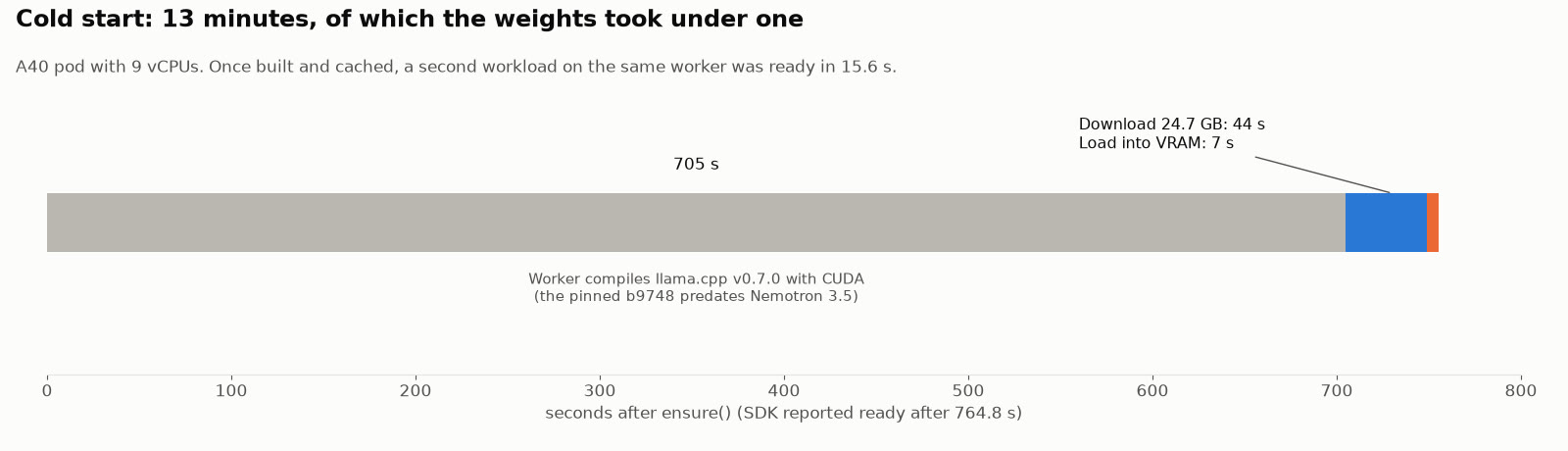
Ready in under 13 minutes, almost all of it compiling. From asking for the model to "ready" took 764.8 seconds on a fresh machine. Downloading the 24.7 GB of files took about 44 seconds and loading them about 7. The other 705 seconds went into building llama.cpp for the GPU on the machine's 9 processor cores. Starting a second copy of the model on the same machine, with llama.cpp already built, took 15.6 seconds.
What it answered
These are our own questions, about 50 requests in all, most asked once, with pictures we drew ourselves. They show behaviour, not benchmark quality.
- A warehouse robot and its battery: 14 meters and 28% battery, right in all 4 runs.
- A small coding task (merging overlapping intervals): correct code, with three tests it wrote itself.
- A two-sentence summary in Spanish: correct and natural.
- A café receipt in a picture: every price and the 15.20 total right in all 5 runs. In 3 of them it wrote the item "Tostada tomate" as "Tostada tomato".
- A bar chart: all five values read right and the total of 270 correct.
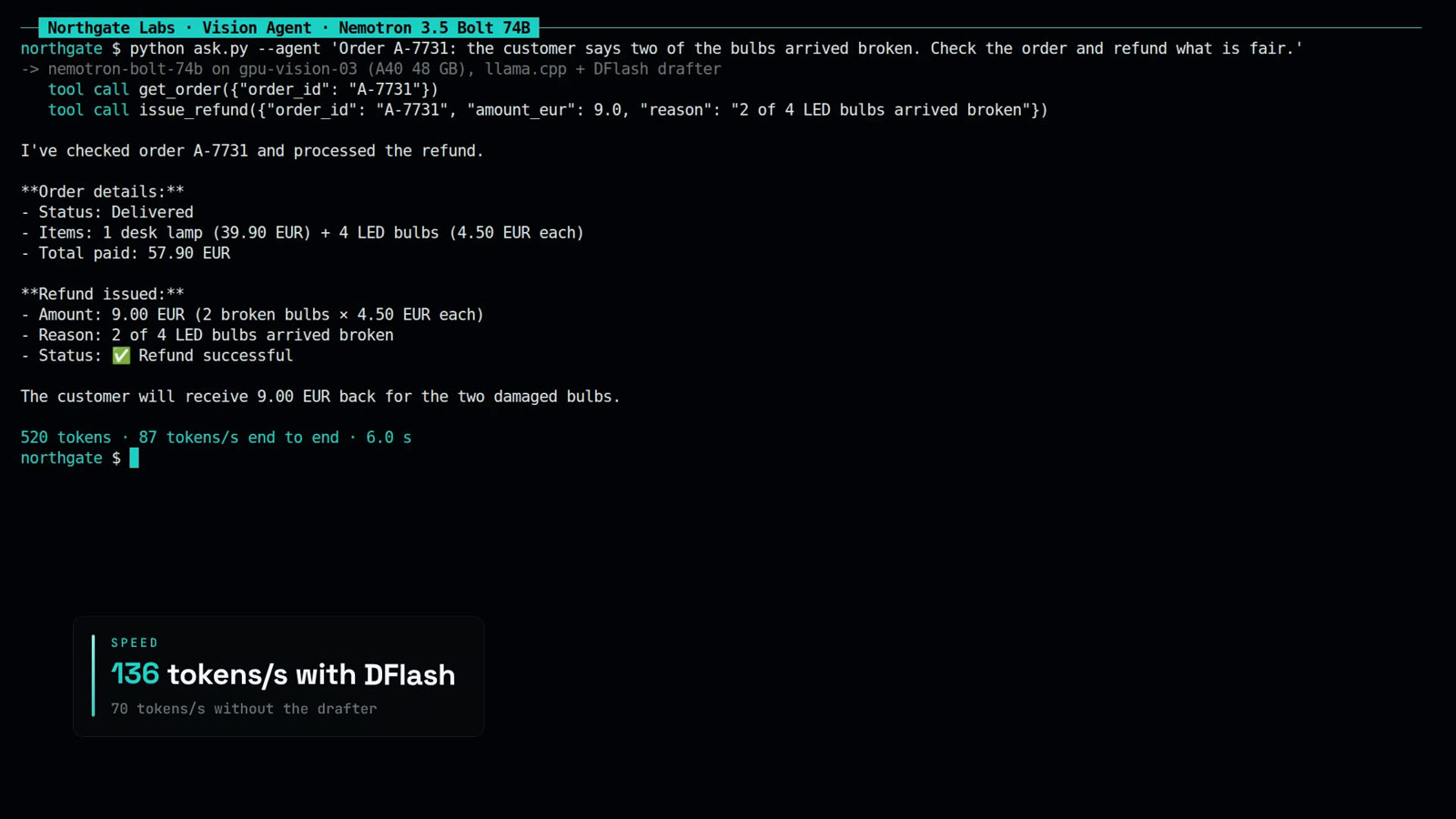
- The refund agent: two of the four light bulbs in an order arrived broken, and the model had one tool to look up the order and one to issue a refund. In all 5 runs it called the order tool, then refunded 9 euros for the two bulbs at 4.50 each, and never refunded the 39.90 euro lamp in the same order. The tool calls came out in the standard OpenAI format every time.
- The hidden code at about 25,000 and 71,000 tokens: found both times.
No answer looped, came back empty or was cut off.
The demo run
In our recorded demo run, the terminal showed 87 tokens a second for the refund agent (520 tokens in 6.0 s). That figure is end to end: it counts the model's hidden thinking and the trip through the platform, so it is lower than the writing speed above.
What went wrong
Most of the problems were in the rented machines and in our own platform, not in the model. The model's one quirk worth noting is how much it thinks before answering (last item below).
- Two broken GPUs reported as healthy. Both RTX 5090 machines landed on the same host. The card showed up, but no program could actually use it. InferenceKey still marked both workers online and the model ready, because nothing in the platform checks that the GPU really works. We deleted them after 5 and 1 minutes. That is why we have no 32 GB numbers.
- Our worker's llama.cpp is too old for this model, and you cannot change it from the platform. The version can only be set on the worker itself, and InferenceKey has no way to pass extra settings to a worker on a rented machine. We logged into the machine, added them by hand and restarted the worker.
- Almost all of the first start-up is building the software. By default our worker builds llama.cpp one job at a time, which is ours to fix. Even with 12 jobs in parallel, which we set by hand, the build took 705 seconds on the A40 machine's 9 cores, 92% of the wait. The same build on a machine with 31 cores took 2 minutes 41 seconds.
- Hidden thinking that costs time you cannot see. The model thinks before answering. When the reply comes back in one piece, InferenceKey drops that thinking text but still counts it: the robot's one-sentence answer took 374 tokens of writing time. The switch on NVIDIA's model page to turn thinking off is not passed through by InferenceKey, so we could not turn it off.
- No speed figures in the reply. llama.cpp reports its own timing, and InferenceKey does not pass it on. Our speed numbers come from the server log on the machine.
- One drafter setting per model. This llama.cpp version cannot switch the drafter on or off per request, so the comparison needed a second copy of the model. Quick, at 15.6 seconds to start, but clumsy.
- Small things: the dashboard showed "No access" for a key that worked, and RunPod had no A40 left in its community pool.
Who did what
NVIDIA did the hard part: it trained the parent, compressed it into Bolt, trained the compressed version, built the LiLiCorr drafter, published the llama.cpp files with ready-to-run recipes, wrote a detailed technical report, and released it all under an open license that allows commercial use. Kartik Gulia of NVIDIA wrote Bolt's support for llama.cpp in #30520, and ggerganov merged it into llama.cpp on the day of the release, which is what lets llama.cpp load it at all. AI Search covered the parent in its news video, and the release also appeared on r/LocalLLaMA.
Our part was the example script, running it end to end through InferenceKey on one A40, and measuring speed, memory, start-up time and how it behaved on our own questions.
What to take away
A 74B agent model that reads images ran on a single 48 GB data-center card, using a little over half of it. For one user it wrote 136 tokens a second, part of it hidden thinking. It called tools correctly on our one refund task. The drafter is what makes it fast: without it, the speed halves. We measured that gain with one request at a time. Drafters often gain less when several requests share the card, and we did not test that.
In plain terms: one 48 GB card, a little over half full, ran this agent model at about twice the speed it manages without the drafter. With our settings it serves one person at a time, so we cannot say how it holds up for a whole team.
The limits are plain. The quality figures are NVIDIA's own, and our checks were about 50 requests of our own. And on NVIDIA's own speed table, smaller models like Qwen3.6-35B-A3B write faster, so you pick Bolt for its agent scores, not for speed.
So the answer is yes on a 48 GB card. On a 32 GB card, the size NVIDIA's smaller setup names, it is still open: we have not run it on one. The 27 GB we measured should leave about 5 GB spare there. The next measurement we owe is how fast it runs on an RTX 5090, a newer 32 GB card than the A40.
For engineers
Model (card, GGUF, drafter, research page, technical report). Released 2026-10-15. Data cutoff May 2026. 74B total, 9B active, Mamba-2/Transformer hybrid LatentMoE, C-RADIO v4-H vision encoder. Input text, images, video (mp4 up to 2 min). Output text. Context up to 256K. 40 Mamba, 40 MoE, 8 attention layers, hidden 4096 (kept from the parent). Star Elastic: budget-conditioned router picks routed-expert count and MoE intermediate width per layer, trained jointly with KL distillation from the frozen parent. Routed experts 512 to 240-496 per layer, intermediate width 2688 to 1536-2560, top-k 22 to 9. Target under 24 GB at batch 1, 128K context. Compression training 72B tokens at 8K plus 48B at 128K, 32 GB200 nodes (128 GPUs), about 64 h. Nine-benchmark mean 57.58 to 54.74 (-2.85, -4.94% relative) before post-training. Post-training: vision adapter re-training, vision-heavy SFT, SLERP merges (80:20, 75:25), MCP-Atlas RL, RLHF, SWE-RL. Languages: English and code primary, also Spanish, French, German, Italian, Japanese. Tool calling. Thinking toggled with chat_template_kwargs.enable_thinking. Sampling temperature 1.0, top_p 0.95. Parent Super VL: BF16 on 4x H100 (TP4) or 2x GB200 (TP2), separate NVFP4 release.
Quantization. Weights only. Routed and shared experts IQ2_XXS (2.0625 bpw), Mamba in/out projections NVFP4, attention, latent MoE, embedding and LM head Q8_0. QAD: 26B tokens, LR 1e-5 with 1.2B-token warmup, cosine to 1e-7 over 25B. Second QAD stage of 10M tokens with a newer teacher. 148 GB BF16 to 22.1 GB (-85.1%). NVIDIA budget (Table 2, batch 1, 131,072 context): weights 22.01 GB (routed experts 17.05), runtime 0.87 (KV FP8 0.54, Mamba SSM 0.08, activations 0.25) = 22.87, plus drafter 0.96 = 23.83 GB. Vision encoder and projector 1.68 GB BF16 excluded (text-only target).
Files. GGUF repo sha e0fecb69: NVIDIA-Nemotron-3.5-Bolt-74B-A9B-24GB.gguf 22,018,326,528 B, mmproj 1,733,692,736 B. Drafter repo sha 182d2987: 998,242,560 B. 24.75 GB total, not gated. Drafter: 1.13B parameters excluding shared embeddings and LM head (LiLiCorr head 37M), five layers, block of 8 positions (7 draft slots), 1,024-token sliding window, attention sinks, GGUF arch dflash. llama.cpp runs it through its DFlash speculative mode (--spec-type draft-dflash). LiLiCorr jointly scores top-K candidates across the draft in one pass, improving on DFlash's independent token selection and DSpark's sequential correction (arXiv 2608.20530). NVIDIA acceptance (vLLM, draft length 7, concurrency 64, SPEED-Bench 880 prompts): mean acceptance length 4.681 (temp 0) / 4.248 (temp 1) NVFP4 drafter, 4.736 / 4.288 BF16. Coding 5.18-5.74, writing 3.36-3.73. AA AgentPerf Local estimated AL: LiLiCorr 4.18, DSpark 3.68.
Recipes (GGUF card). "RTX Spark 64GB or RTX discrete GPU 32GB+": 28GB recipe, 65,536 context, 1 sequence, up to 6 drafts, q8_0 KV. "RTX Spark 128GB or RTX discrete GPU 48GB+": 32GB recipe, 262,144 context, 1 sequence, up to 7 drafts, batch/ubatch 4096/2048, no KV quantization. Quick start: 28GB tuning flags with --ctx-size 98304, loading local files with --model, --mmproj and --spec-draft-model after hf download. We ran the same tuning flags with -hf, --hf-file and --spec-draft-hf instead (-hf fetches the mmproj). Shared flags -ngl 999 --spec-type draft-dflash --spec-draft-ngl 999 --temp 1.0 --top-p 0.95 --flash-attn on --jinja. Build for discrete GPU: cmake -B build -DGGML_CUDA=ON -DGGML_NATIVE=ON then cmake --build build --config Release -j. Card lists Ada Lovelace and Blackwell. Our Ampere sm_86 run worked. vLLM: vllm/vllm-openai:nightly-77154ca6116ae34cbfe314beef1016bde9b63989, TP 1, max len 262144, max seqs 1, 7 speculative tokens, pip install b12x, vllm download-kernels, VLLM_USE_V2_MODEL_RUNNER=1, --enable-auto-tool-choice --tool-call-parser qwen3_coder. Hardware stated as A100/H100/Blackwell in the summary and Blackwell SM120/SM121 in Software Integration. Not tested by us.
llama.cpp. PR #30520 "Add Nemotron Super 3.5 VL and Nemotron Bolt 74B A9B support", opened by frozenblade1224 (Kartik Gulia, NVIDIA), merged by ggerganov 2026-10-15T13:34:57Z (cd0a5b6a). Tag v0.7.0 (620d2225) is one commit later. Our worker's default tag b9748 is 1,920 commits behind the merge. Per-request speculative.n_max is compiled out in v0.7.0.
Benchmarks (Technical Report Table 7, self-reported). Bolt IQ2 / Qwen3.6-35B-A3B BF16 / Gemma4 26B-A4B / Nemotron 3.5 Lightning 30B-A3B: Terminal-Bench 2.1 50.98 / 44.38 / 37.22 / 23.46, BrowseComp 66.75 / 48.74 / 26.30 / 36.81, GPQA Diamond 86.43 / 83.40 / 79.61 / 75.57, GDPVal-AA-V2 28.47 / 25.75 / 15.33 / 18.26, HLE (no tools) 25.30 / 19.56 / 17.42 / 10.47, SciCode 41.02 / 35.33 / 40.28 / 31.38, AA-LCR 64.06 / 61.06 / 57.56 / 49.19, Tau3 Banking 17.01 / 10.52 / 14.02 / 9.48, WebArena (vision) 50.86 / 36.60 / 38.2 / -, MCP-Atlas 52.20 / 51.2 (Qwen self-reports 62.8) / - / 46.4, PinchBench 87.82 / 88.07 / 74.70 / 83.43, AA-Omniscience accuracy 16.90 / 19.47 / 22.17 / 16.63, AA-Omniscience non-hallucination 61.27 / 65.85 / 14.22 / 68.81, IFBench 66.17 / 63.71 / 77.25 / 72.88. Parent Super VL BF16: TB2.1 61.94, BrowseComp 71.50, GPQA 90.78. Bolt BF16 53.93 / 70.00 / 88.83. NVIDIA speed (Table 8, llama.cpp, Windows 11 ARM, RTX Spark Surface Laptop Ultra 128 GB): Bolt IQ2_XXS + LiLiCorr 83.99 TPS SPEED-Bench-Coding, 600.80 s AA AgentPerf Local, Qwen3.6 35B-A3B UD-Q4_K_M + MTP 96.63 / 453.97 s, Gemma 4 26B-A4B UD-Q4_K_M + MTP 100.56 / 480.68 s, Qwen3.8 27B UD-Q4_K_M + DFlash 28.26 / 1043.28 s.
Our setup. RunPod A40 48 GB secure cloud, 46,068 MiB (48.3 GB), driver 595.91.07, compute 8.6, 9 vCPUs, image runpod/pytorch:1.0.2-cu1281-torch280-ubuntu2404 (nvcc 12.8). Worker bootstrapped by a local InferenceKey manager over HTTP and TCP tunnels. Production never touched. Worker env added by hand: INFERENCEKEY_LLAMACPP_TAG=v0.7.0, CMAKE_BUILD_PARALLEL_LEVEL=12, INFERENCEKEY_LLAMACPP_READY_TIMEOUT_SECS=3000, CUDACXX=/usr/local/cuda/bin/nvcc, /usr/local/cuda/bin on PATH (not verified whether cmake finds nvcc without the last two). About 6 minutes went to the two faulty RTX 5090 community pods before the A40 (22.1 minutes). SDK example commit 0c61916b on inferencekey-sdk main. The core of it:
spec = WorkloadSpec(
    name="Nemotron 3.5 Bolt 74B-A9B (llama.cpp, DFlash)",
    slug="nemotron-bolt-74b",
    model="nvidia/NVIDIA-Nemotron-3.5-Bolt-74B-A9B-24GB-GGUF",
    backend=Backend.LLAMACPP,
    command=COMMAND,  # the llama-server line above
    task_type="text2text",
    worker_id=os.environ["IK_WORKER_ID"],
    execution_policy=ExecutionPolicy.FIXED,
    execution_policy_config={"replicas": 1},
)
ref = mgmt.ensure(spec)
mgmt.wait_until_ready(ref.workload_slug, timeout=3600)
Time to ready. ensure() to ready 764.8 s: clone and build v0.7.0 for sm_86 with 12 jobs, 704.7 s (92%). Download about 44 s (about 560 MB/s). Load about 7 s. Second workload (no drafter, cached build) 15.6 s. Same build on the 5090 pod (31 vCPUs, 32 jobs): 2 min 41 s.
Memory and power. llama-server 25,816 MiB (27.1 GB, 25.2 GiB) with drafter (card peak 25,825 of 46,068 MiB), 23,516 MiB (24.7 GB) without. Narrative figures are decimal GB, like the file sizes. Peak power 303.4 W.
Per request (non-streaming /v1/chat/completions, one at a time, decode from llama-server print_timing):
| Case | Out tok DFlash | tok/s DFlash | Acceptance | Round trip s | Out tok no draft | tok/s no draft | Round trip s |
|---|---|---|---|---|---|---|---|
| robot arithmetic | 374 | 130.98 | 0.620 | 3.85 | 458 | 69.87 | 7.05 |
| merge_intervals | 642 | 153.62 | 0.754 | 4.94 | 602 | 70.14 | 9.36 |
| code (2nd sample) | 1,095 | 136.49 | 0.647 | 8.62 | 891 | 70.38 | 13.34 |
| Spanish summary | 414 | 118.84 | 0.545 | 4.27 | 333 | 70.27 | 5.51 |
| receipt image (796 prompt tok) | 394 | 155.52 | 0.783 | 3.42 | 361 | 70.32 | 6.95 |
| bar chart image (1,078 prompt tok) | 930 | 161.37 | 0.813 | 7.89 | 425 | 70.35 | 7.86 |
| tool loop, 3 turns | 101 / 308 / 197 | 131.6 / 140.1 / 128.5 | 0.67 / 0.69 / 0.61 | 6.61 | 85 / 318 / 166 | 70.8 / 70.4 / 70.3 | 10.23 |
| needle, 24,944 prompt tok | 101 | 131.16 | 0.667 | 21.48 | 102 | 63.39 | 17.52 |
| needle, 70,773 prompt tok | 98 | 110.46 | 0.568 | 60.56 | not run |
Decode median 136.5 tok/s over 25 drafter requests (110.5 to 161.9, 200+ token outputs 146.5) against 70.3 over 9 without (63.4 at 25K, 69.9 to 70.8 otherwise): about 1.9x (1.7x to 2.3x per prompt). Decode counts reasoning tokens. Acceptance 69.7% (6,509 of 9,336), median mean accepted length 5.0 of 6. Prefill at 24,944 tokens 1,265 tok/s with drafter, 1,667 without. At 70,773 tokens 1,216 tok/s (58.2 s). SDK example: reasoning answer 3.9 s (265 tokens), receipt 4.4 s, two-tool loop 7.0 s. Demo: receipt 429 tokens in 3.8 s. Refund agent 520 tokens in 6.0 s (87 tok/s end to end, reasoning included). finish_reason: stop everywhere.
Platform issues. (1) Two RTX 5090 community pods on one host: nvidia-smi worked, ggml_cuda_init: failed to initialize CUDA: unknown error, torch.cuda.is_available() False. Manager marked worker online and deployment ready. (2) Pinned llama.cpp b9748 cannot load the model. The RunPod bootstrap writes a fixed env manifest with no field for extra env. (3) cmake --build runs without -j, so the build is serial unless CMAKE_BUILD_PARALLEL_LEVEL is set. (4) Non-streaming responses drop reasoning_content but count it in completion_tokens. chat_template_kwargs not forwarded (robot 374 vs 328 tokens with enable_thinking: false). Streaming not tested. (5) llama-server timings not passed through. (6) Drafter per-request control compiled out, so a second workload. (7) A40 community 409 out of stock, so secure cloud. (8) A remote bootstrap-worker.sh relaunch was killed by its own pkill -f guard once. Relaunched from its directory. (9) Panel shows Access "No access" with a working wildcard key.
Cleanup. Both workloads and all three pods deleted (manager 204, RunPod 404, empty pod list), local stack, tunnels, NATS, database and MinIO bucket removed.
Limits. One GPU model (Ampere A40, 48 GB), no 32 GB card, one request at a time (--parallel 1, concurrency not tested), about 50 requests of our own prompts with synthetic images, mostly one sample each, temperature 1.0. All benchmark and speed comparisons with other models are NVIDIA's. vLLM path not tested. Thinking could not be turned off through our endpoint.
Sources: model card, GGUF card, LiLiCorr drafter, research page, technical report, Nemotron 3.5 Super VL, OpenMDW-1.1, llama.cpp #30520, SDK example, AI Search video, r/LocalLLaMA.