MOSS-Image gets every word right in 80 seconds, and almost every word in 9
Hands-on MOSS-Image test on one A40: every word right in 80 s, 9 s with a turbo add-on, and the same pixels under an emulated 12 GB memory cap.
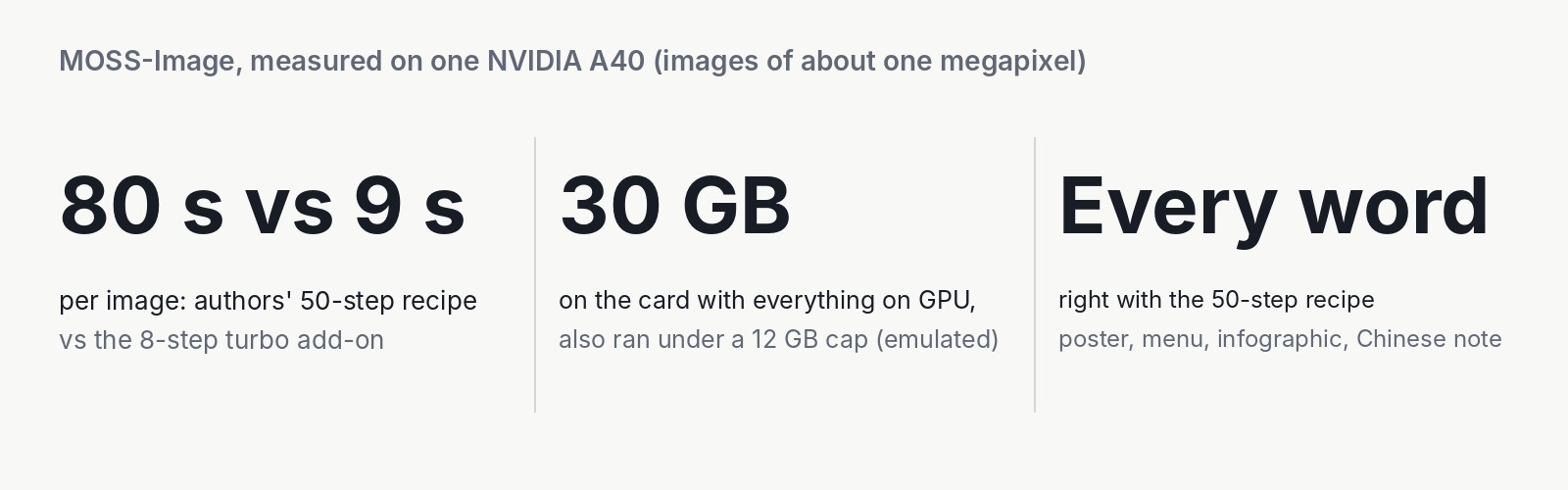
Eighty seconds, every word right. Nine seconds, one word repeated. That is the trade-off we measured with MOSS-Image, an open model built to write long text inside pictures, on one rented A40 graphics card. The 80 seconds are the authors' 50-step recipe. The 9 come from a community turbo add-on that now and then gets a word wrong. The license allows commercial use, so this matters to anyone who makes posters, menus or social cards inside a product. With everything loaded, the model used about 30 GB of the card's memory. When we limited the A40 to 12 GB of memory, it made the identical picture at half the speed. You can deploy it on your own GPU with our SDK example, and this post tells you which setup to pick.
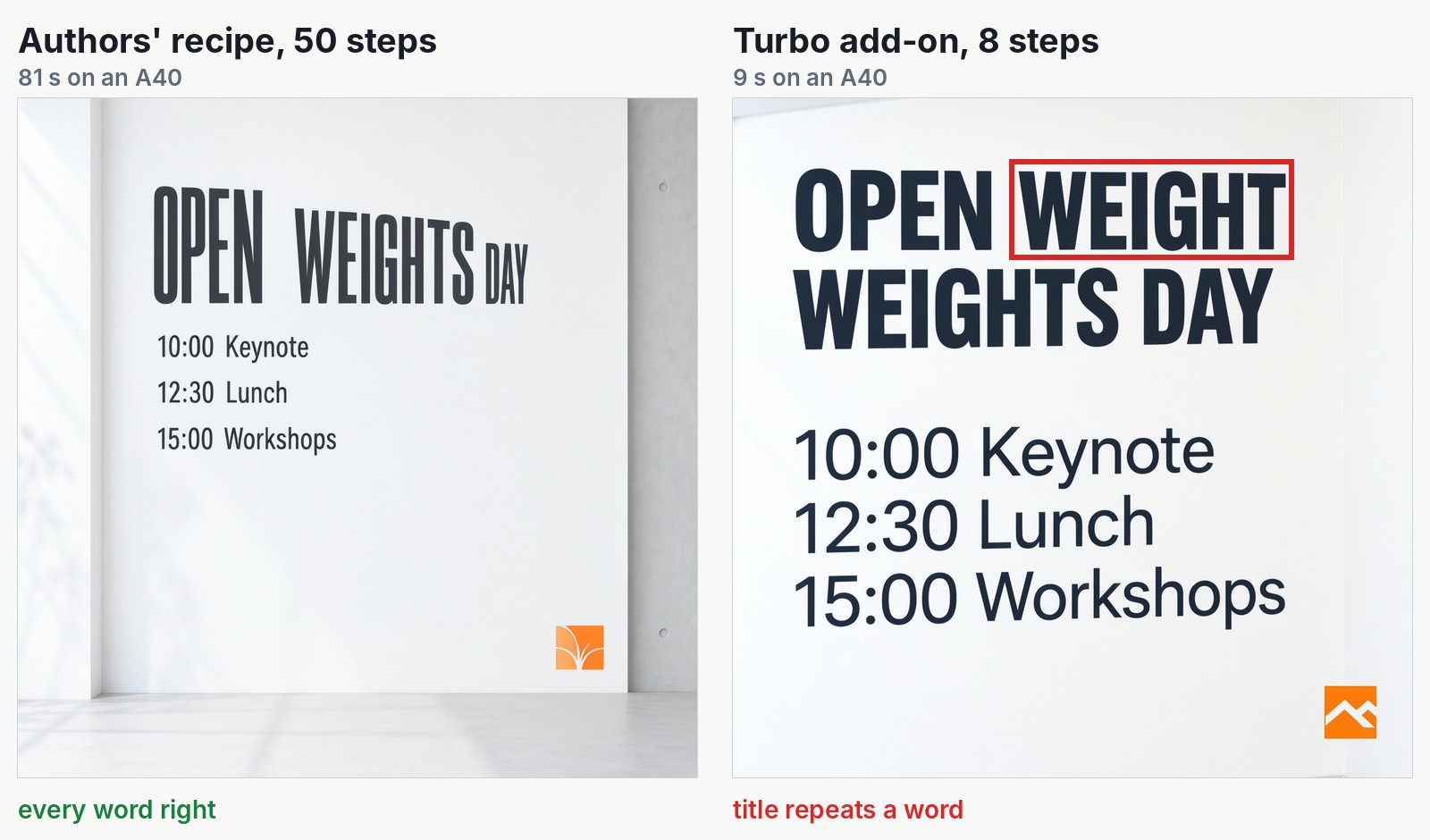
Same prompt, same random start, same loaded model. The red box marks the only error: the turbo title repeats a word.
Built for long text in pictures, with a layout you control
MOSS-Image is built for long text. A full menu with prices, an infographic with a dozen labels or a schedule on a poster is where image models slip: Iris-3B, the last one we tested, dropped the decimal points from a four-line menu. The authors list text rendering and long prompts as the model's main features.
In their technical report, the authors built their own test of long text inside images. They report that MOSS-Image writes 96.3% of the requested text on average, the best score among models whose files are public. It is their benchmark and we read only the abstract, so treat it as their claim. Our small test, below, points the same way.
You can also control the layout. Instead of a sentence, you can send a short structured description. It holds a caption for the whole picture, then a list of items, each with its text and a box on the canvas where it should go. The authors call it experimental. We tried two layouts, and both were followed.
We ran MOSS-Image-SFT, the version given extra training on hand-picked examples.
OpenMOSS built the model, lodestones made the turbo add-on, and we spotted it in a video by AI Search. Our part was the code that serves it, the SDK example, the deployment on InferenceKey and the measurements. Full credits are in the appendix.
The test: one A40, 22 pictures, one try each
We made 22 pictures, one try per prompt, on one A40 and one request at a time. That shows how the model behaves, not where it ranks. We did not try the Base model or several users at once. The full list is in the appendix.
We rented the A40, with 48 GB of memory, on our cloud. We ran the model through a private test copy of InferenceKey, so our production service was never touched. We picked a 48 GB card because the model files alone take about 27 GB, plus room to work.
One copy of the model stayed loaded and served both modes. Each request said which one it wanted: the authors' recipe or the turbo add-on. We wrote our own prompts: a conference poster, an infographic, a chalkboard menu and a handwritten Chinese note from the authors' examples. Then two layouts, a street photo and a pianist's hands. In the afternoon we ran the poster again under memory caps to see how small a card it could live on.
Results: 80 seconds for every word right, 9 seconds with words to check
The authors' recipe got every word right on every text test we gave it. The turbo add-on was about nine times faster. It got two words wrong in the text we asked for (one repeated, one misspelled) and invented half-garbled signs in a street photo, so we would not ship it without a check.
| Authors' recipe (50 steps) | Turbo add-on (8 steps) | |
|---|---|---|
| Time per picture of about one megapixel | 78 to 81 seconds | 8.6 to 9.2 seconds |
| Text | all right: poster, infographic, menu, Chinese note | right: menu, Chinese note, layouts. Wrong: poster title, one infographic label, signs in a photo |
Why the recipe is slow is worth one paragraph, because it is also why turbo exists. The model starts from random noise and cleans it into a picture over 50 steps. At each step it runs twice, once with your prompt and once with none, and keeps the difference to sharpen the picture. That is about 100 passes per picture. The lodestones add-on teaches the model to get there in 8 passes, with no second run. It is a 1.2 GB file laid on top of the original model, and its author labels it work in progress. Think of the recipe as the full studio take with every overdub, and turbo as the one-take live version: usually fine, now and then a bum note.
The poster in the opening is the clearest case. The infographic is the other slip. The authors' recipe wrote every label, including the footer "Median time: 9 seconds". Turbo wrote "PNG bock" for "PNG back".
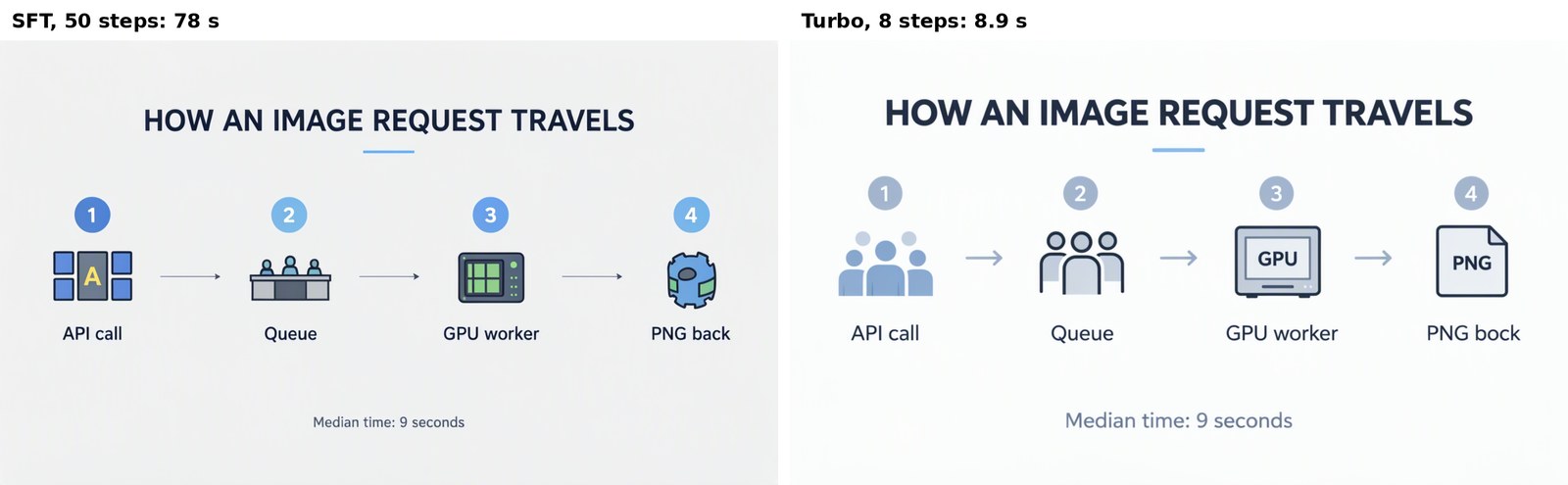
Left, the authors' recipe. Right, turbo with "PNG bock". In InferenceKey's dashboard, with a slightly different prompt, turbo got every label right.
The chalkboard menu matters to us because it tripped Iris-3B, the last image model we tested. Iris dropped decimal points and repeated lines. MOSS-Image wrote "Espresso 2.50, Cappuccino 3.20, Croissant 2.00, Daily soup 5.50" correctly in both modes. The handwritten Chinese note also came out exactly, all three lines, in both modes.
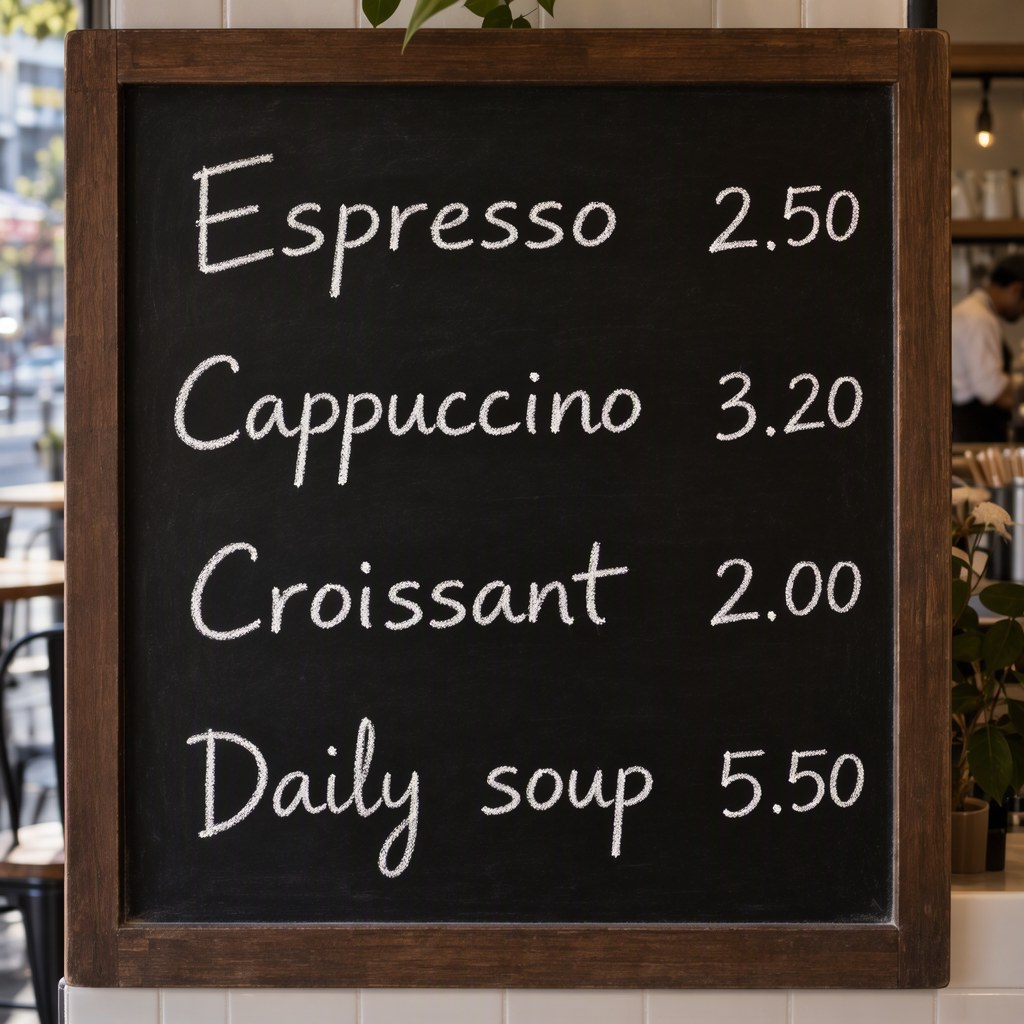
Four prices, four decimal points, no repeated lines.
Layouts and hands held up, turbo pushed to 4 steps did not
Outside text, the model did what we asked. Both layouts were followed and the hands were right. The one thing that broke was our own experiment with fewer steps.
We sent a coffee poster as a layout with three items: a title, a tagline and a cup. Then we sent it again with the boxes moved from the top to the bottom. Everything moved to its new box, spelled right, in both modes.
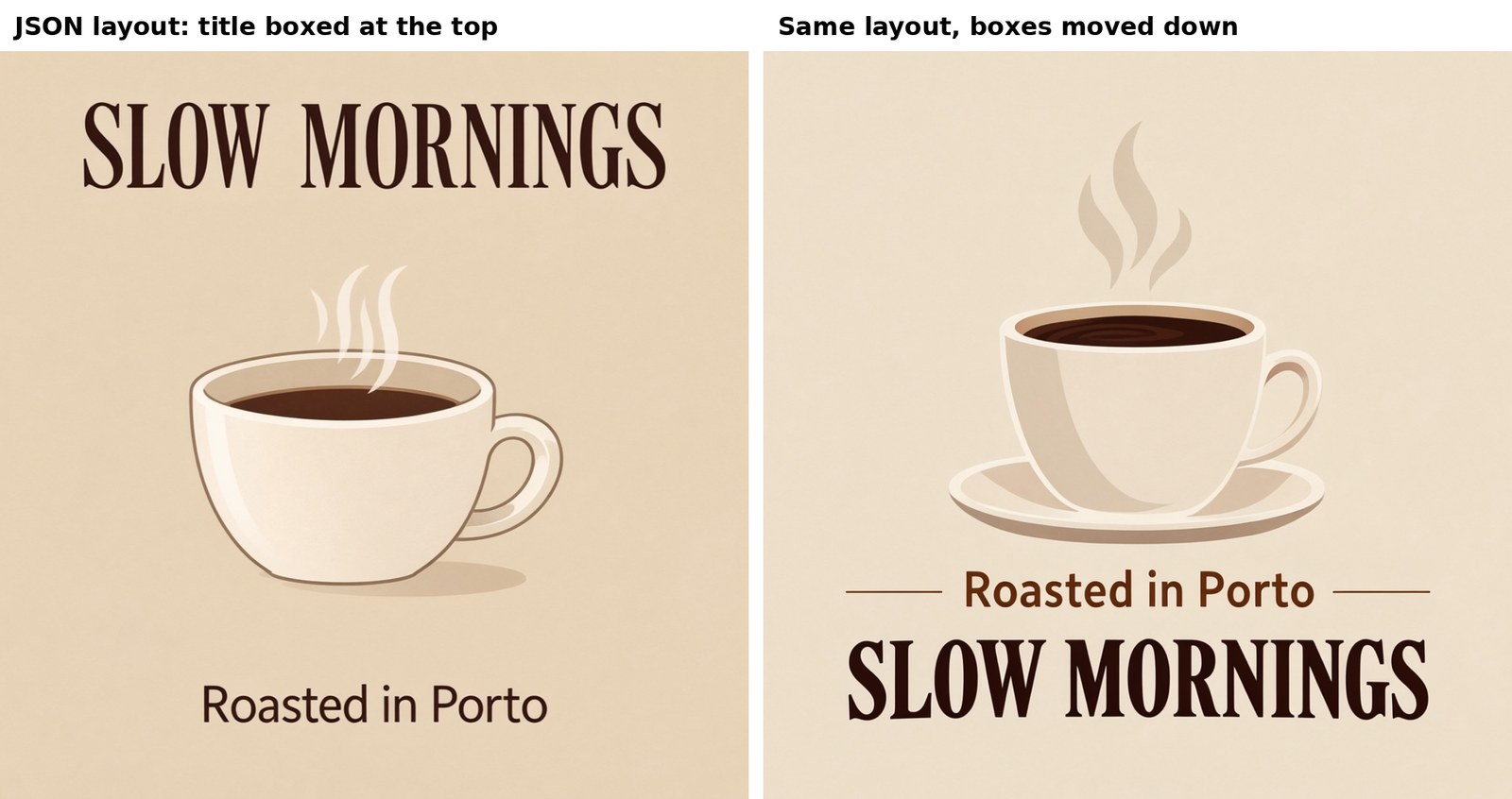
Same layout, boxes moved. The words and the cup followed.
Hands are a classic weak spot for image models. We asked for a pianist's two hands, and the authors' recipe drew them correctly, playing, along with their reflection in the black lacquer behind the keys. The turbo version of the same prompt also drew two plausible hands.
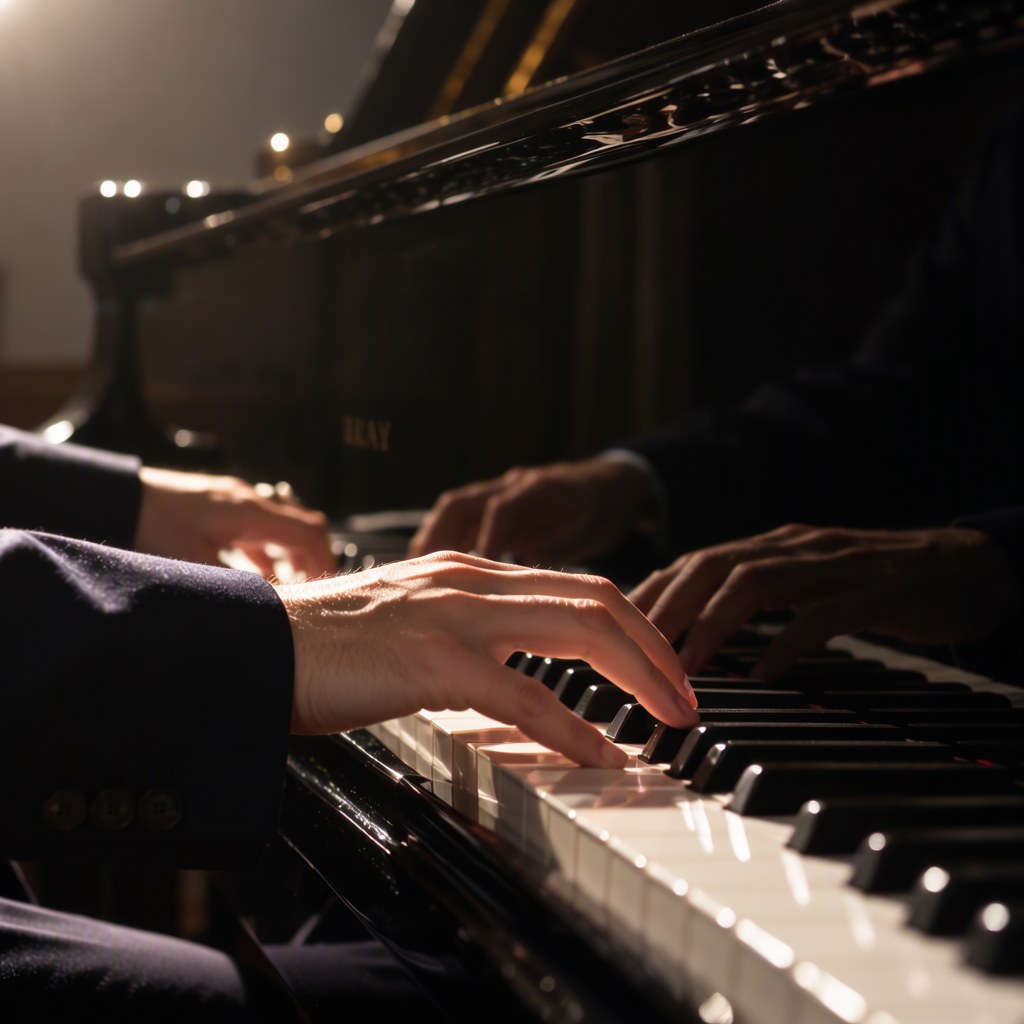
The pair behind the keys is their reflection in the lacquer.
Then we pushed the 8-step add-on to 4 steps to see what happens. It took 5.2 seconds, and the text fell apart: "OPEN WEIGHT DAYDY", and times like "1(.C0". That is the add-on pushed below what it was trained for. We did not test add-ons built for 4 steps.
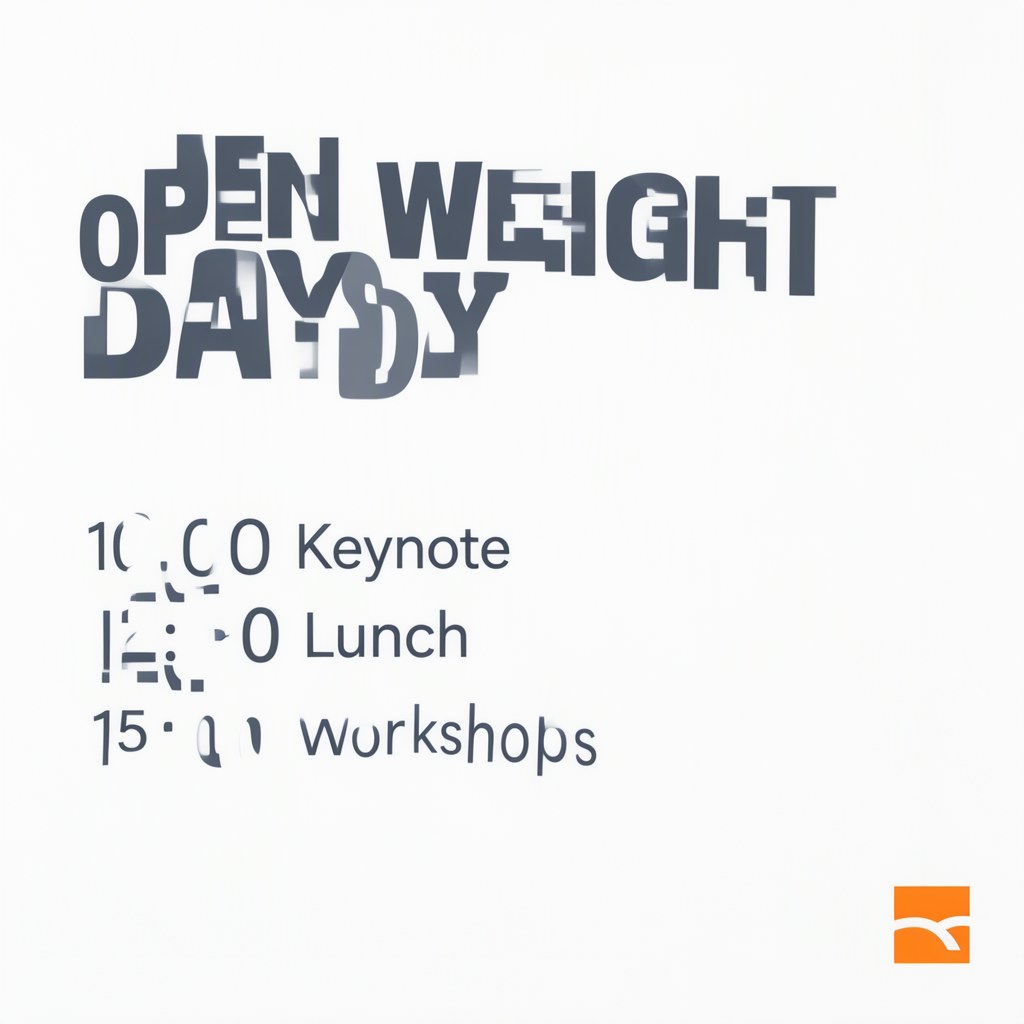
Eight-step add-on, four steps: faster, and the words break.
Which GPU: capped to 12 GB of memory, the A40 gave the same pixels at half the speed
You probably do not need a 48 GB card. We capped how much memory the model could use on the A40, to behave like a card with 16 GB or 12 GB of memory. Under both caps it drew the exact same poster. With the authors' recipe, the 16 GB setup ran at almost full speed and the 12 GB one about twice as slow.
Only the memory size was emulated, not a consumer card's speed or its link to main memory. So those speeds are relative to an A40, not predictions for an RTX 5080 or an RTX 3080 Ti. The fit is the part we trust, and it is not yet confirmed on a real card (see the rough edges below).
The reason it fits is how the model is built. It is two models working as a pair: a reader and a painter. The reader is the 17 GB language model that turns your prompt into a description. The painter is the 10 GB model that cleans noise into a picture over all those steps. The reader works for a moment at the start of each picture and then sits idle. So it can wait in the computer's main memory and pass through the card piece by piece when a prompt arrives. In the 12 GB setup, part of the painter waits there too.
| Memory cap | Peak memory used on the card | Authors' recipe | Turbo |
|---|---|---|---|
| None, everything on the card (real A40, 48 GB) | about 30 GB | 80 s | 9 s |
| 16 GB (emulated), reader in main memory | about 14 GB | 86 s | 13 s |
| 12 GB (emulated), reader and part of the painter in main memory | about 11 GB | 160 s | 18 s |
Peak memory as the card itself reports it. Exact figures are in the appendix.
The outputs were byte for byte the same files as the run with everything on the card. So the 12 GB poster has every word right, and the turbo poster keeps its repeated word. On a 16 GB card it is tight, about 2 GB to spare, less if the card also drives your display; on a 24 GB card it has room. Our SDK example picks the setup from the card's free memory. That automatic choice has not run on a GPU yet: we set each setup by hand.
The other thing to plan for is the computer's main memory. In the 16 and 12 GB setups the process used up to 22 GB of main memory, so give the machine about 32 GB.
On InferenceKey: one loaded copy served both modes, ready in 63 seconds
The card is yours by the hour, and you decide what runs on it. One loaded copy of MOSS-Image served the authors' recipe and the turbo add-on, request by request. It was ready to take requests 63 seconds after we asked for it, on a rented machine that had taken 78 seconds to start and join InferenceKey.
MOSS-Image arrives with its own loading code. InferenceKey's ready-made backends (the code that loads a model once and answers requests) do not run a model's own code. So we wrote our own, a small Python file. On start-up it downloads one fixed version of the model and the add-on, then loads them as the authors do. Of those 63 seconds, the 28 GB download took 29 and loading onto the card took 9. On a slower connection the download is the part that grows.
Each request names its mode, sft or turbo, and the prompt can be a sentence or a layout. The backend speaks the same request format as OpenAI's image API, so existing code can call it. The trip through InferenceKey added about a second per picture on top of the card's work.
Why not ComfyUI, the popular desktop app for image models? It already runs MOSS-Image, and for one person making pictures at a desk it is the shorter path. We wanted an API that other programs call, on a card we pick.
The 90-second recording below shows InferenceKey's dashboard during the test, with the model on the A40. Then the dashboard's image tester makes the chalkboard menu in 9.7 seconds and a wide infographic in 6, every price and label right. The company in the dashboard, Pixelforge Studio, is a made-up demo account.
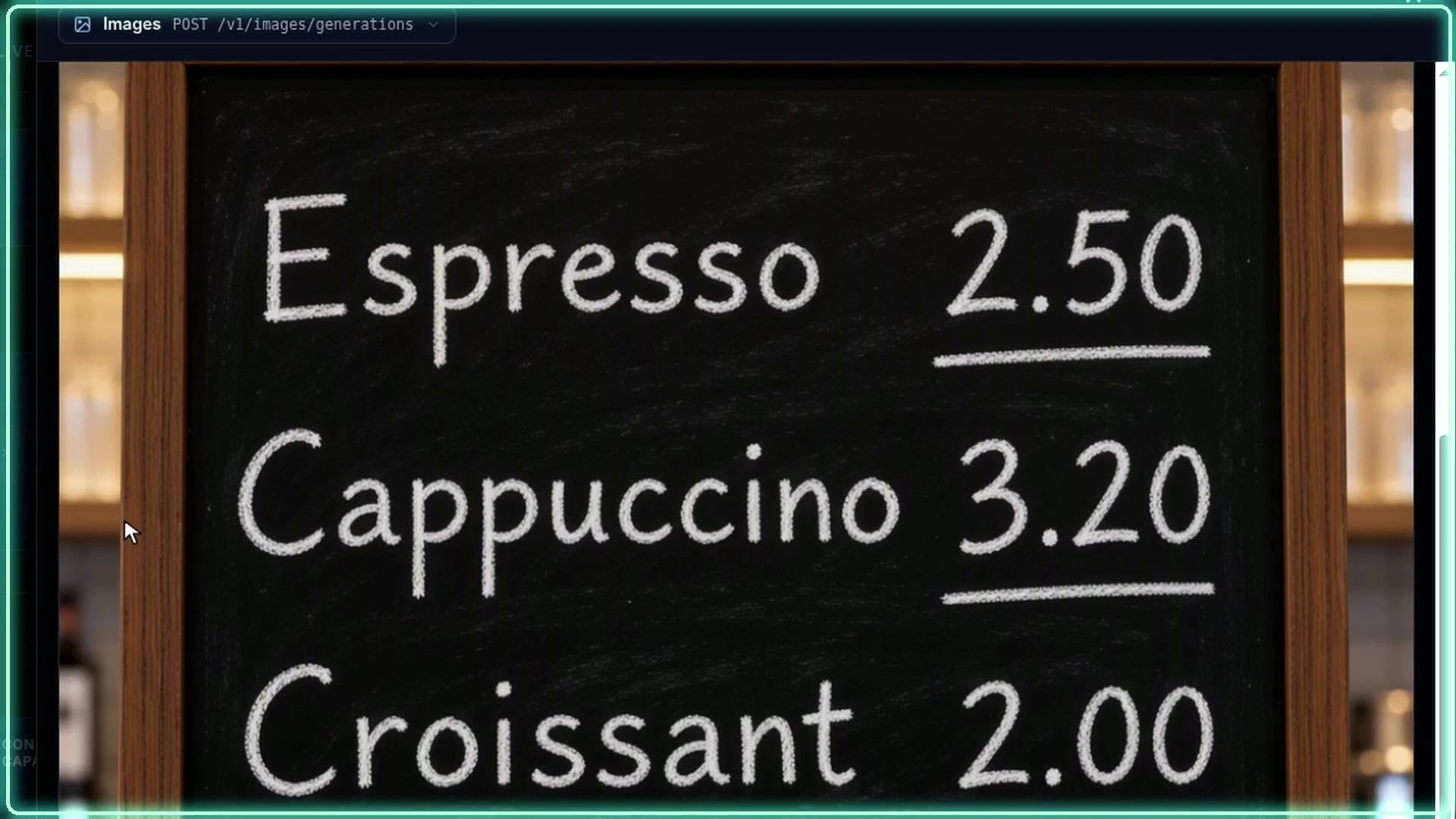
Click to play the MP4 (90 s, narrated).
Two rough edges are ones you would hit too:
- A fixed start-up limit. A backend you write yourself gets 300 seconds to become ready. On a machine InferenceKey rents for you, there is no setting to raise it. A slow link can spend that on the download alone. We raised it by hand. Status: open.
- Some rented consumer cards cannot be set up. Our cloud gave us RTX 3080 Ti, RTX 5080 and RTX 4090 machines when we asked. They lacked the direct connection InferenceKey uses to install itself, so it gave each back after three minutes. Status: open, rentals are not yet filtered for it.
Should you use it? The 50-step recipe when words must be right, turbo for drafts
- If the text must be right (a menu, a price, a legal line), use the authors' 50-step recipe, on a 48 GB card or in the 16 GB setup. It was the only mode with no slips in our test.
- If you need speed (drafts, previews, simple layouts), use the turbo add-on and read every word before it ships.
- If your GPU is small, try the 16 GB setup on a 16 or 24 GB card with 32 GB of main memory.
- If you need a license for a product, Apache 2.0 on the model and the add-on covers it.
To make the same pictures on your own NVIDIA machine, publish the backend once with publish.py and run python main.py from the SDK example (steps in the appendix). It needs the machine connected to an InferenceKey project, downloads about 28 GB on first start and deletes the deployment when it finishes; stop a rented machine yourself. We ran it on a 48 GB card.
For engineers
Model and files
SFT card, Base card, GitHub, technical report, arXiv:2610.23374. The README describes it as "a 5B-parameter base DiT model with high-quality text rendering, layout generation, and efficient fine-tuning", with prompts up to 4K tokens. 42-layer DiT (dim 3072, text_dim 4096, 128 latent channels), Qwen3.5-9B text encoder (Qwen3_5Model, 32 layers, 3 of 4 linear-attention), FLUX.2 small VAE (AutoencoderKLFlux2). Apache-2.0 on both HF repos and on GitHub. Day-0 support in SGLang, vLLM-Omni and ComfyUI. About 1,200 GitHub stars on 21 October. Report abstract: LLTB average text coverage 96.3% (best among open weights, per the authors). We read the abstract only.
| Repo / file | Size |
|---|---|
OpenMOSS-Team/MOSS-Image-SFT @ f972bd4b, total | 27,229,060,886 B |
| transformer, 3 shards, bf16 | about 10.16 GB |
| text_encoder, 4 shards | about 16.79 GB |
| VAE | 249.5 MB |
lodestones 8-step DMD lora_latest.safetensors @ f95df83b | 1,189,176,800 B (fp32, rank 128 / alpha 128) |
Sampling
Card recipe: flow-matching Euler, 50 steps, CFG 3, shift 5, empty negative prompt, negative branch with uncond_skip_layers=[22], two transformer forwards per step. Requires torch >= 2.9, diffusers >= 0.38, transformers >= 5.3. Width and height must be multiples of 16. User guide: 1 to 2 MP recommended, 0.25 to 4 MP possible. Turbo: lora_latest.safetensors applied unmerged at strength 0.7, 8 steps, CFG 1 (no negative branch, so a negative prompt is ignored). The LoRA card calls it a work-in-progress distillation of 50 steps CFG 3 to 8 network evaluations and says the delta is smaller than bf16's rounding step, hence unmerged. Our unmerged application follows the LoRA's demo Space hugging-apps/moss-image-8-step-dmd.
Layout prompt (README and user guide, "Layout Prompts (Experimental)"): summary {meta, canvas, caption} plus items [{label, caption, text?, bbox}], "bbox_format": "yxyx", "bbox_coord_space": "abs_centralized" (pixels from the canvas centre). Pass it through json.dumps(layout, ensure_ascii=False).
Our setup
NVIDIA A40 48 GB on our cloud (46,068 MiB), secure tier, CA-MTL-1, driver 595.91.07, image runpod/pytorch:1.0.7-cu1300-torch291-ubuntu2404-cluster. L40 community tier returned 409 (no stock). Worker bootstrapped by a local InferenceKey manager over HTTP and TCP tunnels, 78 s from the pod POST. Backend venv: Python 3.12.3, torch 2.14.1+cu130, diffusers 0.38.0, transformers 5.3.0, installed by uv. Production never touched.
Deploy step by step
The SDK example (commit a69c6e5 on main). You need an SDK token (ik_sdk_...), an API key (ik_live_...), a project slug, IK_WORKER_ID of a registered NVIDIA worker (CUDA 13 driver, 580+), and for publish.py a tenant id and dashboard session token (or upload dist/*.tar.gz in the dashboard). Plan for about 32 GB of system RAM if the card is smaller than 40 GB.
cp .env.example .env        # SDK token, API key, project, worker id, tenant id, dashboard session token
python -m venv .venv && . .venv/bin/activate
pip install maturin requests
( cd ../../bindings/python && maturin develop --release )
python publish.py           # once: packages backend.py and registers it as "moss-image-text2image"
python main.py              # deploy, wait until ready, make 3 pictures, delete the workload
main.py calls ensure() with ExecutionPolicy.FIXED and 1 replica, wait_until_ready(timeout=3600), sends three POSTs to /v1/images/generations (poster SFT, poster turbo, the README's EXPLORE layout), writes PNGs to ./outputs and deletes the workload on exit unless IK_KEEP_ALIVE=1. Deleting the workload does not stop a rented pod. The first start downloads about 28 GB, and the worker's custom backend ready timeout is 300 s by default. .env.example still mentions a 40 GB+ worker. The README's smaller-card section is the current guidance.
A turbo request (sent to our local manager. The hosted service takes the same shape, though we did not call it):
curl https://cloud.inferencekey.com/endpoint/$INFERENCEKEY_PROJECT/moss-image-sft/v1/images/generations \
  -H "Authorization: Bearer $INFERENCEKEY_API_KEY" -H "Content-Type: application/json" \
  -d '{"prompt": "A clean conference poster on a white wall. Large bold title: OPEN WEIGHTS DAY", "size": "1024x1024", "seed": 42, "mode": "turbo"}'
Backend
backend.py, slug moss-image-text2image, version 0.3.1, pinned revision f972bd4b4b9e3852133cc5da954d87bc32cd8fb9. setup() runs snapshot_download of the pinned revision (skipping assets/), hf_hub_download of the LoRA, DiffusionPipeline.from_pretrained(local, custom_pipeline="pipeline_moss_image", trust_remote_code=True, torch_dtype={"default": bf16, "vae": fp32}), and wraps the 252 block projections (42 blocks x q, k, v, o, ffn_up_gate, ffn_down) with an unmerged LoRA module. process() accepts native input or the OpenAI images body, a string or a layout object, mode sft (50, CFG 3, skip [22]) or turbo (8, CFG 1, LoRA 0.7), draws noise on the CPU from the seed, serializes generation with a lock (LoRA strength is shared state) and returns {data: [{b64_json}]} plus seconds and vram_peak_gib. v0.2.0 adds num_inference_steps as an alias of steps, and routes no mode + guidance_scale 1 + steps <= 16 to turbo. v0.3 adds memory modes gpu, component, lowvram, minimal and auto (thresholds _GPU_MIN_GIB=33.0, _LOWVRAM_MIN_GIB=14.5), env MOSS_MEMORY_MODE, MOSS_VRAM_LIMIT_GIB, MOSS_ACTIVATION_RESERVE_GIB, MOSS_TURBO_LORA. v0.3.1 (auto with 0.5 GiB headroom) never ran on a GPU: the measured runs used v0.3.0 with each mode forced by env.
Time to ready
Morning: ensure() 05:51:47Z, SDK "ready after 63 s": venv 24 s, download 28.4 GB in 28.6 s (about 1 GB/s), load 8.5 s, custom backend ready on port 18000 05:52:52Z. Measured on a worker whose ready timeout had been raised to 2400 s by hand. Hot recycle on republish: 16 s. Afternoon redeploy on a second A40: ensure 09:59:45Z, ready after 60 s, one turbo poster call 11.198 s GPU, 14.0 s round trip, peak allocated 28.72 GiB.
Measurements
GPU time measured in the backend with cuda.synchronize(), one request at a time. Round trip = HTTP client to the local manager.
| Case | Mode / steps | Size | GPU s | Round trip s |
|---|---|---|---|---|
| poster (first call) | SFT 50 | 1024x1024 | 81.06 | 84.2 |
| poster | turbo 8 | 1024x1024 | 9.02 | 9.8 |
| EXPLORE layout | SFT 50 | 1024x1024 | 79.88 | 80.6 |
| Chinese note | SFT 50 / turbo 8 | 1024x1024 | 78.76 / 8.90 | 79.82 / 9.79 |
| infographic | SFT 50 / turbo 8 | 1344x768 | 78.11 / 8.85 | 78.88 / 9.46 |
| Lisbon market | SFT 50 / turbo 8 | 1344x768 | 77.71 / 8.62 | 79.23 / 9.57 |
| chalkboard menu | SFT 50 / turbo 8 | 1024x1024 | 79.10 / 8.78 | 80.49 / 9.83 |
| pianist hands | SFT 50 / turbo 8 | 1024x1024 | 78.83 / 8.87 | 79.94 / 9.70 |
| coffee layout, boxes top | SFT 50 / turbo 8 | 1024x1024 | 79.98 / 9.21 | 81.20 / 9.77 |
| coffee layout, boxes bottom | SFT 50 / turbo 8 | 1024x1024 | 80.08 / 8.94 | 81.18 / 9.52 |
| poster | turbo 4 | 1024x1024 | 5.22 | 5.97 |
| Lisbon market | turbo 8 | 1440x1440 | 17.30 | 19.47 |
| panel tester, chalkboard / infographic | turbo 8 (v0.2.0) | 1024x1024 / 1024x576 | 9.68 / 6.03 |
SFT 77.7 to 81.1 s over 9 images (about 1.6 s per step, two forwards). Turbo 8 steps 8.6 to 9.2 s over 9 images at about 1 MP, about 8.9x faster. Platform overhead 0.6 to 3.1 s, median about 1.1 s (3.1 s on the very first call).
VRAM and power (nvidia-smi every 1 s, 1,342 samples): 25.9 GiB allocated after load. Peak allocated 28.72 GiB at 1024x1024, 28.67 GiB at 1344x768, 31.47 GiB at 1440x1440. Card: 30,361 MiB during 1 MP runs, 33,741 MiB peak (1440x1440 turbo) of 46,068 MiB. Utilization 100%, peak board power 302.6 W against a 300 W limit.
Text, read by hand on every image. SFT: poster "OPEN WEIGHTS DAY / 10:00 Keynote / 12:30 Lunch / 15:00 Workshops", infographic including "Median time: 9 seconds", chalkboard "Espresso 2.50 / Cappuccino 3.20 / Croissant 2.00 / Daily soup 5.50", Chinese note (记得买牛奶和鸡蛋!/ 牛奶两盒,鸡蛋一打。/ 顺便带一袋面包。), all right. Turbo: chalkboard, Chinese note and both layouts right. Errors: poster title "OPEN WEIGHT / WEIGHTS DAY", infographic "PNG bock", partly garbled sign text on the Lisbon market. Turbo at 4 steps: "OPEN WEIGHT DAYDY", times like "1(.C0".
Full VRAM ladder (emulated)
Afternoon, second A40 pod. The cap is torch.cuda.set_per_process_memory_fraction (env MOSS_VRAM_LIMIT_GIB). Same poster, seed 42, 1024x1024, the exact backend.py called in-process, one fresh process per rung, nvidia-smi sampled every 500 ms. Modes: gpu keeps everything resident. component is enable_model_cpu_offload() (the authors' "Component" mode). lowvram keeps the text encoder under accelerate.cpu_offload, streamed per layer for each prompt, with DiT and VAE resident. minimal is lowvram plus only the DiT blocks that fit stay resident, the rest under cpu_offload, and VAE tiling.
| Emulates | Mode / cap | Peak nvidia-smi (torch reserved) | SFT 50 s | Turbo 8 s | Max RSS |
|---|---|---|---|---|---|
| 48 GB (real A40) | gpu, none | 30,359 MiB (29.32 GiB) | 79.55 | 8.82 | 7.3 GB |
| 24 GB | component, 23.0 GiB | 16,403 MiB (15.70 GiB) | 104.46 | 41.19 | 31.5 GB |
| 16 GB | lowvram, 15.0 GiB | 14,433 MiB (13.77 GiB) | 86.17 | 13.17 | 16.8 GB |
| 12 GB | minimal, 11.0 GiB, 31/42 blocks resident | 11,427 MiB (10.83 GiB) | 160.38 | 17.84 | 21.6 GB |
Units: the narrative table divides the nvidia-smi MiB peaks by 1,024 (29.6, 14.1 and 11.2 GiB), which include the CUDA context that the torch cap does not count. In decimal units 14,433 MiB is 15.1 GB and 11,427 MiB is 12.0 GB. The 16 GB rung leaves about 2 GiB of headroom on a 16 GiB card, before anything else (a desktop, another process) takes its share. Untested on real hardware.
All 8 PNGs are byte-identical to the morning poster-sft.png and poster-turbo.png (checked with cmp): noise is drawn on the CPU from the seed and offload only moves weights. Reading: lowvram costs +8% at 50 steps (86.2 against 79.6 s) and +49% in turbo, because the 16.8 GB encoder streams over PCIe for every prompt (twice per SFT image, once per turbo image). minimal is 2.0x slower in both modes: 11 of 42 blocks stream at each of the 100 forwards. component fits 24 GB but not 16 GB and is slower than lowvram, so auto never picks it, and lowvram is the better choice on a 24 GB card too.
Our first ladder attempt failed at load for every capped rung with ValueError: Expected a torch.device with a specified index or an integer, but got:cuda. That was our bug (set_per_process_memory_fraction needs a device index). We fixed it and reran.
Remaining problems and status
- Custom backend ready timeout (
INFERENCEKEY_CUSTOM_BACKEND_READY_TIMEOUT_SECS) defaults to 300 s, and the GPU bootstrap on our cloud writes a fixed manifest with no field for extra env. We appended=2400to/opt/inferencekey/worker.env.manifestover SSH and relaunched the worker. Setup took 37 s, so the default would have sufficed on this host. At 100 MB/s the download alone takes about 280 s. Open. - No per-workload config reaches a custom backend, so SFT against turbo is a request field (
mode). By design here: one loaded copy serves both, and two copies would not fit in 48 GB. - Panel image tester sends only
prompt, size, n, num_inference_steps, guidance_scale, response_format(defaults 20 steps / 4.5 guidance) and no mode. Fixed in backend v0.2.0 (which also switches to turbo when the tester asks for a quick picture), verified after the hot recycle that restarted the running model in 16 s (panel-style body ran as turbo, 6.81 s GPU at 1024x576). - Consumer pods without direct SSH. RTX 5080 16 GB community, RTX 4090 24 GB secure and RTX 3080 Ti 12 GB community pods were created through the manager and each failed after 180 s with
ssh.direct is null, no port 22 mapping. RTX 3060, 3080 Ti, 4070 Ti, 4080, 4080 SUPER, 5080 secure and A4000 had no stock (409). RTX 4060 Ti returned 502 unknown GPU type. The manager'screate_pod_bodydoes not request a public IP. Open. - Cosmetic: the panel's Access column shows "No access" with a working wildcard key. Harmless log warnings: the Qwen3.5 encoder's fast path is not installed (falls back to PyTorch), scheduler config attributes "will be ignored", an
Expected types for transformerwarning naming the same class.
Alternatives we did not test
- lodestones/Kromoss: Base trained further on 704,000 images, a drop-in replacement for SFT, with its own 8-step LoRAs. Its card says 4 steps also works.
- darask0/MOSS-Image_4-step_adapter_lora: a 4-step adapter continued from the lodestones 8-step.
- akhaliq/MOSS-Image-SFT-4-steps: 4-step adapter with a 3-step tier, warm-started from the lodestones 8-step.
- Comfy-Org/MOSS-Image repacks: int8 DiT (5.4 GB) plus w4a8 text encoder (7.3 GB), about 13 GB of files. Comfy-Org states no GPU size. Our bf16 offload already fit the 12 GB cap with identical output, so we did not need them. Their effect on spelling is unknown to us.
All four are Apache 2.0, per their cards. Speed and quality figures on those cards are their authors' claims.
Limits
- One GPU model (A40), one seed per prompt, 22 pictures, our own prompts. Behaviour, not benchmark quality. Quality judgments are ours, from reading every image.
- The 24, 16 and 12 GB results are memory caps on an A40, one prompt, not real cards.
- One request at a time. Not tried:
n> 1, the Base model, ComfyUI, concurrency, quantized files, Kromoss, dedicated 4-step or 3-step adapters, memory caps below 11 GiB, sizes above 1 MP in the offloaded modes. Our 4-step result is the 8-step LoRA run at 4 steps.
Credits
OpenMOSS at MOSI.AI: the model, the Base and SFT releases, the pipeline, the user guide, the layout format and the report. Qwen team: Qwen3.5-9B. Black Forest Labs: the FLUX.2 small VAE. The ComfyUI team: native support, PR #17095. Comfy-Org: the quantized repacks. lodestones: the 8-step LoRA we ran and Kromoss. darask0 and akhaliq: the 4-step and 3-step adapters. The LoRA application follows the Space hugging-apps/moss-image-8-step-dmd. AI Search is where we spotted the model.
Sources: MOSS-Image-SFT card, MOSS-Image-Base card, GitHub repo, user guide, technical report, lodestones 8-step DMD, Comfy-Org repack, Kromoss, SDK example.