EmbeddingGemma 2: one small open model to search text, photos, video and speech
Google's EmbeddingGemma 2 puts text, images, video and audio in one search space. It loaded in 1.4 GB on our 16 GB RTX 2000 Ada.
On the morning of 14 October, on a rented 16 GB graphics card in a data centre in Iceland, we asked a small search index, in English, "how to knead bread dough". The index held twelve files and not a single line of text: six pictures, three short video clips and three voice recordings. Out of the twelve files, only one was about bread, and it came out on top: a recording of a computer voice reading a bread recipe in Spanish.
The model doing the searching is EmbeddingGemma 2, which Google DeepMind released on 6 October under the Apache 2.0 license. It turns text, code, images, video and audio into the same kind of list of numbers, so one search can cross from a sentence to a photo, a clip or a recording. The whole model is a 1.5 GB download.
In short: one model reads five kinds of input and puts them all in the same search space, and it is light enough for an inexpensive rented GPU. The catch is one setting: run it in the wrong number format and, the model card (the documentation Google publishes with the model) warns, the results get worse without any error.
Here is what we measured on that GPU, before we explain any of it:
| EmbeddingGemma 2 on an NVIDIA RTX 2000 Ada (16 GB) | |
|---|---|
| What goes in | text and code, images, video, speech and other audio, or a mix of them in one input |
| What comes out | one list of 768 numbers per input, which can be cut to 512, 256 or 128 |
| Model size | 740 million parameters in total (the learned numbers inside the model, a rough measure of its size), 270 million if you only need text |
| GPU memory, model loaded | 1.4 GB (0.5 GB text only) |
| GPU memory at the busiest moment | 1.5 GB for one image, 2.6 GB for one document near the model's maximum length, about 10 GB for eight long documents at once |
| Model time per request | 36 ms for a search query, 111 ms for an image, 158 ms for 8.6 s of speech, 307 ms for a 6 s clip |
| Our search test | 6 of 6 text queries found the right file among 12 photos, clips and recordings |
| Time from 'start it' to first answer | 78 s the first time, 12 s once the model file (1.5 GB) was already on the machine |
A map where similar things land close together
An embedding is a way to put anything on a map. The model reads a sentence, a photo or a recording and gives it a position, written as a list of numbers (768 of them here). Things that mean the same land close together. Searching is then simple: you place the question on the same map and take whatever sits nearest. This is what many "chat with your documents" systems do under the hood: they find the closest passages first, then hand them to a chatbot.
Many embedding models draw their map from text only. EmbeddingGemma 2 puts every kind of input on one map. A photo of a fox asleep in the snow and the sentence "an animal sleeping in the snow" land near each other, and so does a 6-second video of the same fox. You can also mix things in one input: the model card's example is a product listing with two photos and a video, which comes out as a single position on the map that you can compare with anything else.
Think of a band's hard drive after a tour: rehearsal recordings, gig photos, shaky phone videos from the van, a setlist typed in a notes app. With one map, "the crowd singing the chorus" or "the van at the border" is a question you can ask of all of it from a single text box, as long as the moment was caught on a mic or a camera.
What Google released
The model has three parts, and you only load the ones you need. The text part, which also reads code, is a 270M model. A picture-and-video reader adds 170M and a sound reader adds 300M, for 740M in total. If your search is text only, you skip the other two and keep a 270M model. That is smaller than the first EmbeddingGemma (308M, per Google's docs), which Google says has passed 20 million downloads.
Each input can be about 8,000 tokens long (a token is roughly a word or a piece of one), four times the first version. Pictures, video and sound share that same budget: by default about 29 images, 58 video frames (one per second) or about five and a half minutes of audio fit in one input, according to the model card. It covers more than 100 languages, and in our test a Spanish recording answered an English question.
On Google's own tests it is as good as the first version on text in many languages (61.36 against 61.15) and about 14% better at finding code (78.68 against 68.76). The image, video and sound scores have no earlier version to compare with. The full table is in the engineers' section.
The license is Apache 2.0, which allows commercial use, changes and redistribution. Google calls it "commercially permissive", and the Hugging Face repo is open, with no form to sign.
Smaller lists of numbers, nearly the same search
Every file you index is stored as its list of numbers, and a big index means a big bill for storage and memory. EmbeddingGemma 2 is trained like a set of nesting dolls (the technique, Matryoshka Representation Learning, is named after the Russian dolls): the first 512, 256 or 128 numbers of each list are a smaller version of the map that still works. Cutting from 768 to 128 numbers stores six times less.
The model card is honest about the price. Down to 256 numbers, results are "close to lossless": the text score barely moves (61.36 to 60.41). At 128, text still holds up, but search across pictures and video loses almost a quarter of its score (59.01 to 45.65), and spoken-audio retrieval about a fifth (69.54 to 56.71). The model card's advice is to keep 128 for text-only work. As simple arithmetic, a million documents at 768 numbers each, stored at 4 bytes a number, take about 3 GB, and at 256 numbers about 1 GB.
The setting that fails without telling you
GPUs can store numbers in a compact format to save memory. The common one, float16, is the one the model card says never to use: the model's internal numbers outgrow it. Its sister format, bfloat16, takes the same memory and is safe. The full-size format (float32) is safe too, but takes twice the memory.
That matters on older GPUs that lack the safe format: there you pay twice the memory for the full-size one. Our example asks for a recent NVIDIA GPU that has the safe format, like the RTX 2000 Ada we used. The model card's own code picks the safe format when the GPU supports it and the full-size format otherwise, and our backend does the same and never uses float16. We did not test older GPUs, so check which format your code actually picks on yours.
One thing we did not do: we never ran the model in float16 to see the failure ourselves. Everything we measured is the safe 16-bit format on the GPU, or the full-size format on an ordinary processor. The warning is Google's.
Running it on InferenceKey
No ready-made server we tried could run all of this model yet, so we wrote a small one of our own and ran it on InferenceKey. Here is the GPU, the code, the numbers, and what broke on the way.
The GPU and why that one
We rented an NVIDIA RTX 2000 Ada Generation with 16 GB of memory on RunPod, in Iceland. It is a small 70-watt workstation GPU, and that is plenty here: the model loaded in 1.4 GB, leaving most of the 16 GB free for long inputs. Our first choice, an RTX A4000, was out of stock, so we took this one.
For your own economics: indexing 100,000 pages of about 500 tokens would take, by our arithmetic, about 36 minutes of model time (we measured 32 such pages in 0.69 seconds). That counts model time only, not the time to send the files, start the machine or wait between requests.
Why a custom backend
A backend is the piece of code that loads a model once and then answers requests. InferenceKey's ready-made embedding backends only take text, and the open-source server vLLM did not recognise this model yet when we checked (version 0.31.0). Google's launch post lists several of these tools as supported, so this may change quickly. The details are in the engineers' section.
So we wrote our own backend in Python, which InferenceKey lets you bring. The package is about 6 KB, with no weights inside, and it loads the model the way the model card shows, in bfloat16. For text it takes the same request format as OpenAI's embedding API. For media it adds its own simple form, so each item can be text or a photo, a recording or a clip, and it can return the shorter lists. A bad input gets a clear error instead of a strange answer.
We also published a text-only variant that never loads the picture and sound readers. It used 0.5 GB of GPU memory loaded.
We ran all of this on a private test copy of InferenceKey, with the rented GPU connecting back to it, so nothing here touched our production service. The company name in the video, Northwind Search, is a made-up demo account.
The steps
Everything is in the example in our SDK (the software kit for driving InferenceKey from code), embeddinggemma2-multimodal-embedding-custom-backend-private-nvidia. You need an InferenceKey account with an NVIDIA worker (a GPU machine connected to your project) whose GPU supports bfloat16. The example's .env file lists the keys it reads. The SDK is built locally from the repo:
cp .env.example .env        # SDK token, API key, project, worker id (tenant id and session token only for publish.py)
python -m venv .venv && . .venv/bin/activate
pip install maturin requests
( cd ../../bindings/python && maturin develop --release )
python publish.py           # packages backend.py and registers it as "embeddinggemma2-multimodal"
python main.py              # deploy, wait until ready, text search, then cross-modal search over ./media
main.py asks InferenceKey for one copy of the model on your worker, waits until it is serving, runs a text search and then ranks text queries against every photo, recording and clip in ./media. It deletes the running model (the workload) on exit, unless you set IK_KEEP_ALIVE=1. For the text-only variant: python publish.py --variant text, then EG2_VARIANT=text python main.py. Below is the shape of the request. The address shown is the hosted InferenceKey service, which the example uses by default. We sent the same request to our private test copy, not to this address.
curl https://cloud.inferencekey.com/endpoint/$INFERENCEKEY_PROJECT/embeddinggemma2-multimodal/v1/embeddings \
  -H "Authorization: Bearer $INFERENCEKEY_API_KEY" -H "Content-Type: application/json" \
  -d '{"model": "default", "input": ["an animal sleeping in the snow", {"image": "https://example.com/fox.jpg"}], "prompt_name": "SearchQuery", "dimensions": 256}'
What we measured
Start-up. From the deploy call until it could answer took 78 seconds on a fresh machine: 49 seconds to install the Python libraries, then 29 seconds to download the 1.5 GB model file and load it. With the model file already on the machine, a fresh deploy was ready in 12 seconds. When we published a new version of our backend, InferenceKey restarted the running model with the new code by itself, in 13 seconds.
Speed. These are the times the GPU machine spent on each request, the middle value of several runs:
- one search query: 36 ms
- 256 short texts in one request: 204 ms, about 1,250 texts a second (our arithmetic)
- 32 documents of about 500 tokens (roughly a page each) in one request: 688 ms, so about 46 pages a second (our arithmetic)
- 8.6 seconds of speech: 158 ms
- one photo: 111 ms, and eight photos in one request: 867 ms, about 9 photos a second (our arithmetic)
- a 6-second video clip: 307 ms
- a sentence, two photos and a recording mixed into one input: 232 ms
Cutting the list to 512, 256 or 128 numbers made no difference to speed (34 to 35 ms for a query). It only makes the answer smaller to send and store.
Seen from our desk, each request took about a quarter of a second longer than those numbers. That extra time is the road, not the model: requests went from our development machine through the test copy of InferenceKey and a tunnel to a GPU in Iceland. A deployment sitting next to its users would not pay most of it.
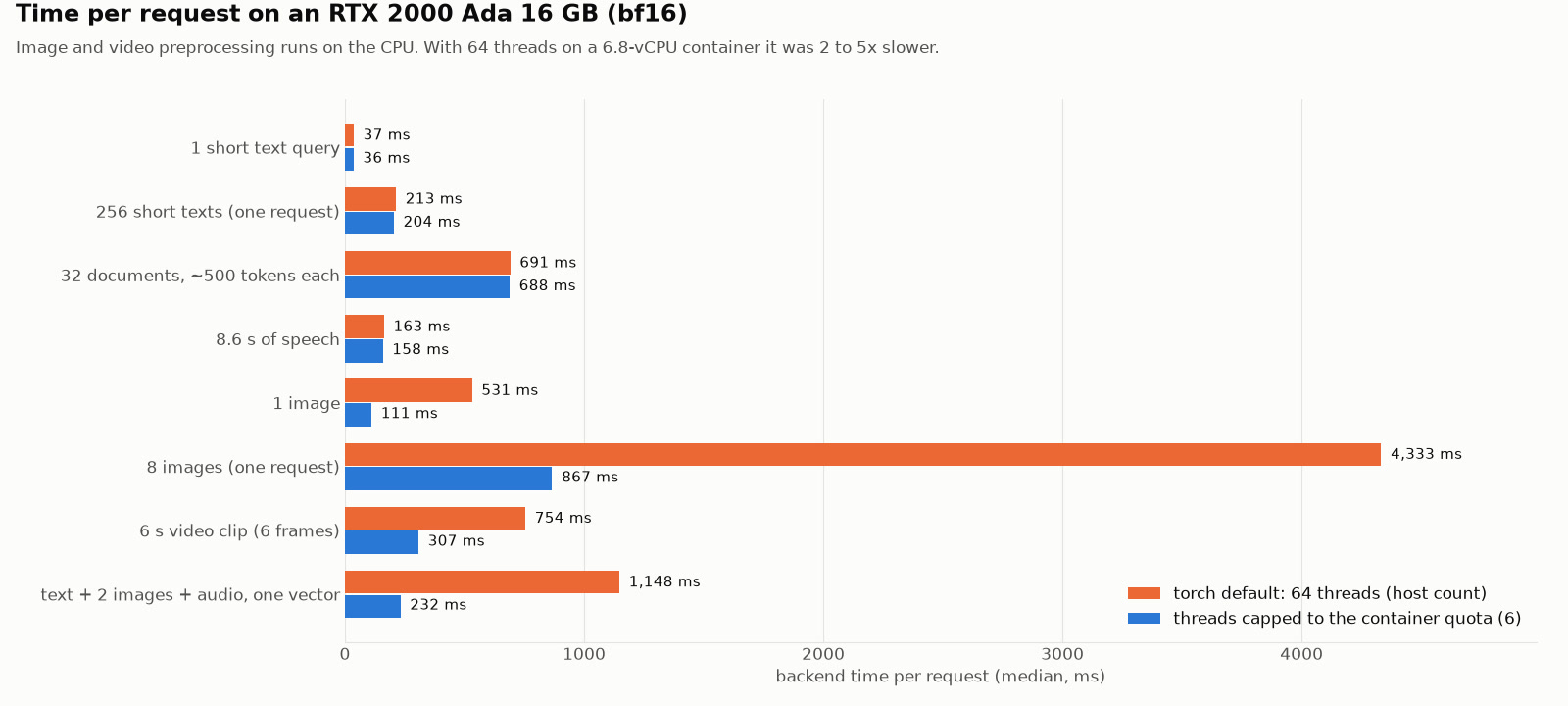
Blue is the final backend. Orange is the first version, before the CPU fix described under "What went wrong". Text and speech did not care. Photos and video were two to five times slower.
Memory. The full model took 1.4 GB of GPU memory once loaded. A short query barely moved that. On our GPU, the model plus one input at a time never needed more than 2.6 GB. Big batches of long documents are the exception: eight documents of 6,000 tokens in one request needed about 10 GB. In detail, memory peaked at 1.5 GB for one photo, 2.0 GB for eight photos, 2.6 GB for one 8,000-token document and 3.3 GB for 32 documents of 500 tokens. On a 16 GB GPU that still fits, but it is the number to plan for if you index long PDFs in bulk. The GPU never drew more than 68 watts.
The search test
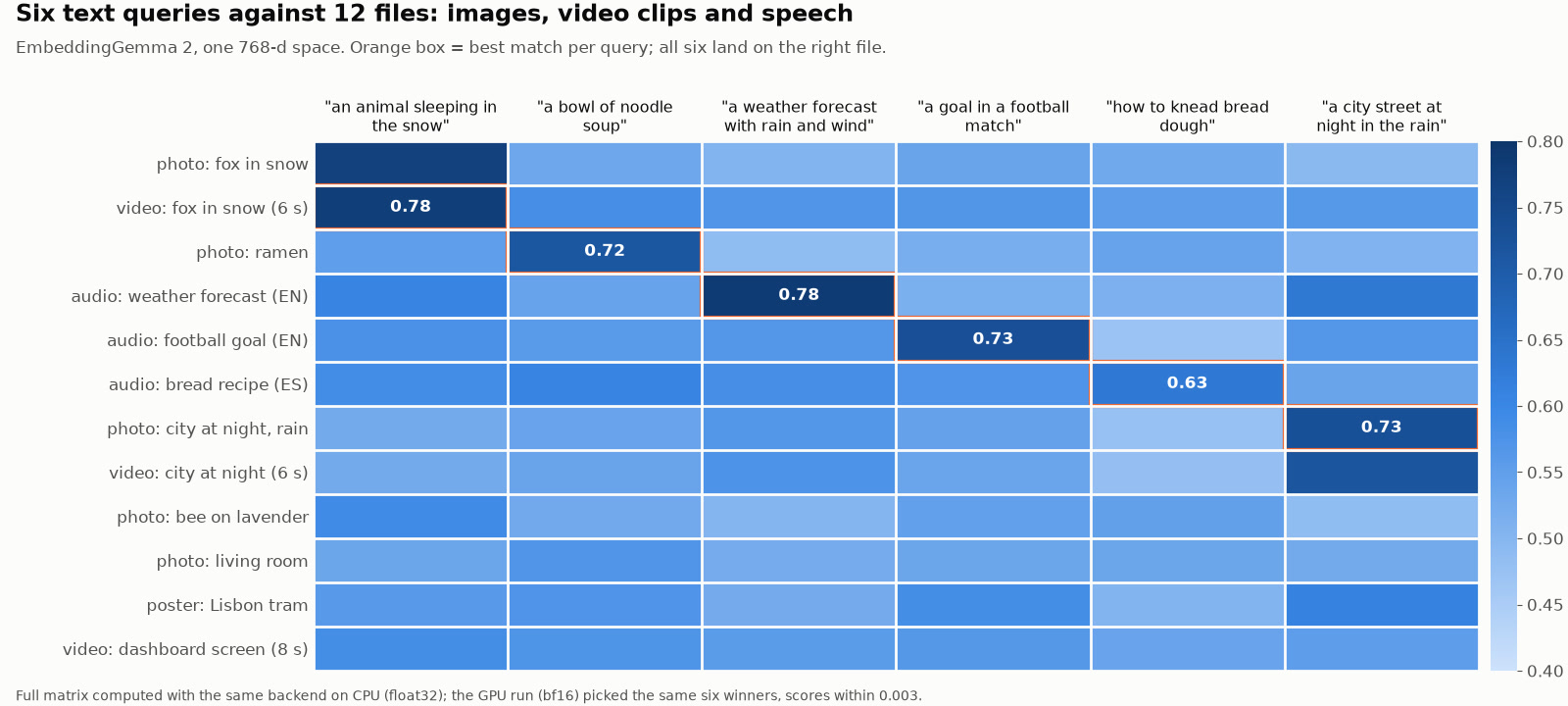
Each column is a question, each row a file. Darker means closer on the map. The boxed cell is the top answer.
All six questions found the right file. "A weather forecast with rain and wind" found the spoken forecast. "A goal in a football match" found the football commentary. "How to knead bread dough" found the Spanish recipe. For "an animal sleeping in the snow", the top two answers were the video of the fox and the photo of the same fox, and for "a city street at night in the rain", the photo and the video of the same street. One caveat: each of those videos is a slow camera pan over the very picture it sits next to, so its frames are crops of that photo. The near-tie shows that the video path and the photo path agree with each other, not that the model recognised the same scene filmed separately. The scores were identical when we ran it again 22 minutes later.
This proves less than it looks. The twelve files are ours and synthetic: six pictures we made with Iris-3B, an image-generating model, in an earlier test, three recordings made with Pocket TTS, a text-to-speech model, and three clips (two 6-second camera pans over the pictures and 8 seconds of our earlier Iris panel demo, the "dashboard screen"). It shows that the mechanism works through InferenceKey. It says nothing about how the model ranks against others, which is what Google's benchmark table is for. The score measures how close a file sits to the question on the map, and higher is closer. All of them fell in a narrow band, between about 0.45 and 0.80, so what matters is the gap between the first and second answer, not the number itself. The lowest winner was the bread recipe, at 0.63.
The demo
The 57-second recording below is the InferenceKey panel during the test: both EmbeddingGemma 2 workloads (full and text only) running on the GPU machine, named gpu-search-01, the panel's built-in test box answering a search query with a list of 768 numbers in 163 ms, and the live view while a script sends photos, recordings and clips.
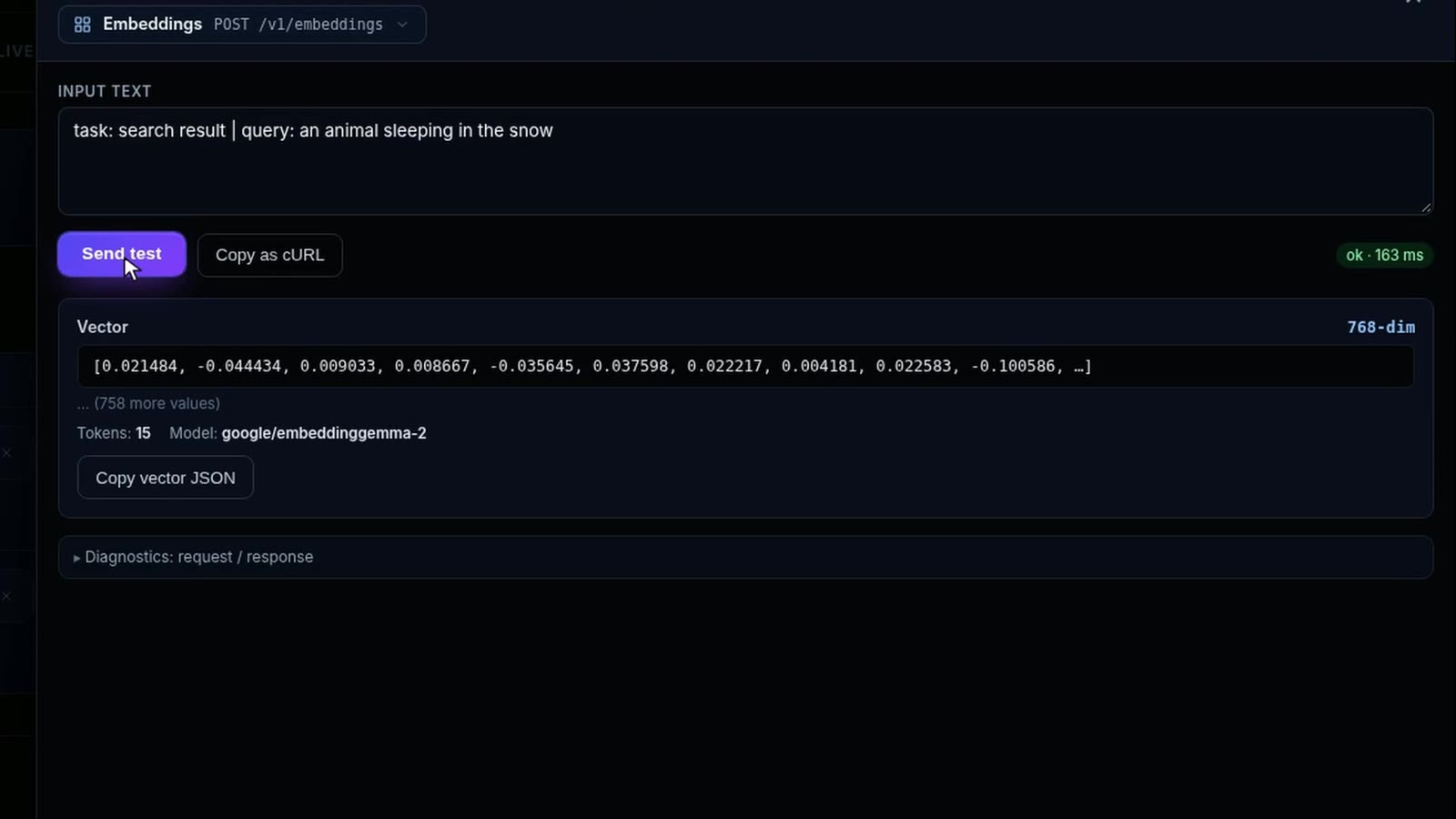
Click the image to play the MP4 (56.6 s, 4.8 MB).
Two panel details show on screen and are ours to fix: the Access column says "No access" although the project's API key worked, and the Workers table says it only gets part of the GPU's health readings ("GPU telemetry partial").
What went wrong
The model ran end to end, and the panel's tester and live view worked with our backend unchanged. On the way we hit five problems. Problems 1 to 3 were in our backend, and problems 1, 4 and 5 show gaps on the InferenceKey side:
- The first install failed in 3 seconds, and the reason was not in the log. The worker only said the Python install had failed. Running it by hand on the machine showed why: the installer picked up outdated copies of a few common libraries from a secondary download source, and the minimum versions we had asked for could not be met. We removed them. The real gap is on our side: the worker should show the installer's error, and today it does not.
- Photos and video were two to five times slower than they should be. The GPU spent about 72 ms on each photo, but the CPU spent 0.33 to 0.44 seconds preparing it. Our rented machine was a slice of a bigger server. It was allowed about 7 processor cores, but the software saw all 64 and tried to use them all, so the work kept getting in its own way. Telling it to use only its real share took one photo from 531 to 111 ms and eight photos from 4.3 to 0.87 seconds. The fix is in the example: it reads how many cores the rented machine is allowed, and on a machine that does not say, you set the number yourself.
- The GPU kept memory it no longer needed. After the batch of eight long documents, the server held on to 11.6 GB until it was restarted, because the AI library underneath keeps memory for next time. The backend now hands that memory back after any very large request, and after the same batch it sat at 1.6 GB.
- "Wait until ready" hung once. Asking the SDK to deploy a model that was already serving, and then waiting for it to be ready, sat at "checking readiness" for over 10 minutes in one run (we stopped it) and for 90 seconds when we tried it again on purpose. Our test copy ran with one InferenceKey component, the policy executor, switched off. That may be related, but we do not know yet, and we have not confirmed it happens in production. Deleting and deploying again took 12 seconds.
- The panel's tester takes text only. Photos, sound and video have to go through the API for now.
Who did what
EmbeddingGemma 2 is Google DeepMind's work: the model, the three readers, the benchmark table and the model card that warns about float16. They trained it with the nesting-doll technique (Matryoshka Representation Learning, from earlier research by Kusupati and colleagues in 2022). The launch post is by Sahil Dua and Henrique Schechter Vera, research engineers at Google DeepMind. The model is built on Gemma 4, shares parts with it (its word splitter and its sound reader), and comes from the same technology as the Gemini Embedding models, per the post. Hugging Face's transformers library, the standard code for running open models, added support in version 5.19.0. Its companion sentence-transformers is what the model card uses to run it. PyAV, a video and audio reader, decoded our clips and recordings. The test pictures came from Sperid Labs' Iris-3B, the three speech recordings from the Pocket TTS text-to-speech model, and the ffmpeg video tool cut the pans.
Our part: checking which tools could run it, writing the custom backend and the SDK example, running it on InferenceKey, measuring speed and memory, fixing the three backend problems, and recording the demo.
What to take away
If you want search across documents, photos, recordings and video on your own GPU, under a license that lets you build a product on it, EmbeddingGemma 2 is worth a test. It ran on a small 16 GB GPU with most of the memory to spare, and the model took 36 ms on a search query and about a tenth of a second on a photo. Our opinion: the case for running this on your own GPU is control and privacy, not cost (we did not compare prices). Call recordings, product photos and screen captures are exactly the files you would rather not upload to someone else's API to make them searchable. Here the model and the data stay on a machine you choose, your own server or a GPU you rent, not one shared with an API provider. Our own test used a rented pod. Plan for three things. Run it in bfloat16 or the full-size format (float32), never float16. If you prepare photos or video on a rented machine, tell the software how many processor cores it really has. And keep about 10 GB of GPU memory free if you send long documents in big batches.
The check we did not run is the one the model card warns about. This test was scoped to serving the model the safe way, so a float16 run is our next test, not part of this one: load the model in float16 on the same GPU, embed the same twelve files, and compare the map with the one above. If the model card is right, nothing will crash, and the lists of numbers may come back empty of meaning (NaN, "not a number") or quietly off. We will see whether any box moves.
For engineers
Model (model card, launch post, Google docs). HF repo google/embeddinggemma-2, created 2026-09-14, last modified 2026-10-06, sha 914f7f89142e33e77833254d9c9b90c3cef7303b, license:apache-2.0, not gated, 124,930 downloads and 2,122 likes when we fetched it on 2026-10-14. model.safetensors 1,488,915,288 bytes (bf16).
Text backbone: 24 layers, model dim 512, hidden dim 2048, 4 heads, KV heads local/global 2/1 (GQA/MQA), local:global 5:1, sliding window 1024, vocab 262,144, gated FFN with GELU, mean pooling, projection 512 -> 768. Context 8,192 tokens. Output 768, MRL truncation to 512/256/128 (re-normalize after truncating, and queries and documents must use the same dimension).
Selective encoder loading (sentence-transformers config_kwargs):
| Load | config_kwargs | Parameters |
|---|---|---|
| text only | {"vision_config": None, "audio_config": None} | 270M (we counted 271,002,624) |
| text + image | {"audio_config": None} | 440M |
| text + audio | {"vision_config": None} | 570M |
| full | {} | 740M |
Token costs in the shared 8,192-token window: text 1 per subword, image 280 by default (about 29 images), video 140 per frame (about 58 frames, 1 fps default), audio 25 per second (about 327 s, mono 16 kHz). The vision budget is configurable from 70 to 1120 soft tokens, up to about 114 images or frames at the low end. Interleaving uses <|image|>, <|video|>, <|audio|> placeholders and returns one embedding. Text inputs take task prefixes (task: search result | query: {query}, documents title: {title} | text: {content}, task: code retrieval | query: {query}), media takes none. 100+ languages, training data in 140+ languages, cutoff January 2025.
Benchmarks from the model card (full-precision checkpoint):
| 768d | 512d | 256d | 128d | EmbeddingGemma 1 (768d) | |
|---|---|---|---|---|---|
| MTEB multilingual v2 | 61.36 | 61.17 | 60.41 | 57.89 | 61.15 |
| MTEB code v1 | 78.68 | 77.24 | 76.18 | 71.41 | 68.76 |
| MMEB v2 overall | 59.01 | 58.38 | 56.24 | 45.65 | |
| MSEB retrieval (MRR@10) | 69.54 | 69.18 | 66.76 | 56.71 |
Also at 768d: MIEB lite 64.64, MMEB v2 Image 57.28 (Hit@1), VisDoc 67.84 (NDCG@5), Video 50.67 (Hit@1), MAEB 49.39. The model card describes the code gain as about 14%, the blog as +9.92 points, which is the same change (9.92 / 68.76).
Precision, verbatim from the model card: "Run inference in bfloat16 or float32. Do not use float16." and "In float16 the model returns NaN or silently degraded embeddings rather than raising an error, so the failure is easy to miss." bfloat16 where natively supported, float32 elsewhere including most CPUs. Suggested selection: dtype = torch.bfloat16 if torch.cuda.is_bf16_supported() else torch.float32. We did not run a float16 comparison. Google's on-device figures (quantized, Pixel 11 Pro) are about 191 MB of RAM text only and about 567 MB full. None of Google's pages gives a GPU VRAM figure.
Our setup. RunPod NVIDIA RTX 2000 Ada Generation, SECURE cloud, EUR-IS-1, driver 570.195.03 (CUDA 12.8), 16,380 MiB, 70 W limit, compute capability 8.9, 8 vCPU listed, cgroup quota 6.8 CPUs with 64 visible, 0.24 USD/h. RTX A4000 COMMUNITY and SECURE and RTX 2000 Ada COMMUNITY answered 409 for stock. Pod bootstrap 66 s after the create call. Local InferenceKey manager (never production) reached through HTTP and TCP tunnels, 71 ms RTT to the pod. Backend: Python 3.12.3, torch 2.14.1+cu126 (the CUDA 13 wheel on PyPI needs driver 580+), transformers 5.19.0 (first release with embedding_gemma2), sentence-transformers 6.1.0, av 19.0.1. Multimodal venv 6.7 GB on disk, text-only venv 89 MB, HF cache 1.5 GB. Custom backend slugs embeddinggemma2-multimodal and embeddinggemma2-text, task_type embedding, policy fixed. Published versions 0.1.0 (install failed), 0.1.1, 0.1.2 (thread cap), 0.1.3 (cache release). SDK example commit f18474c on inferencekey-sdk main. Requests travel as one message with an 8 MB limit, so send large files one per request or pass URLs.
Why a custom backend, and what it does. vLLM 0.31.0 (2026-10-05) registers Gemma3TextModel (EmbeddingGemma 1) but no EmbeddingGemma2Model, so it cannot serve this model even for text. InferenceKey's built-in embedding backends (SGLang, Ollama, llama.cpp) take text only. Google's launch post lists vLLM, SGLang, Ollama, llama.cpp (GGUF) and others as supported tooling; we did not check later vLLM builds or the non-text paths of the others. The backend loads SentenceTransformer("google/embeddinggemma-2") in bf16 when torch.cuda.is_bf16_supported(), else float32, never float16. Images are decoded with Pillow, audio and video with PyAV (video 1 fps, max 32 frames; audio 16 kHz mono). /v1/embeddings takes the OpenAI JSON shape for text; items may also be objects with text, image, audio or video (data URI, base64 or URL), which is our extension, so a stock OpenAI client can send text only. Other fields: dimensions (768/512/256/128), prompt_name, encoding_format. Responses include usage and timings. Bad input returns 400 (checked with dimensions: 300 and an undecodable image).
Start times. Cold: ensure() to ready 78.3 s (venv + deps 49 s, download + load 28.6 s). Text-only variant as a second workload on the same pod: 19.7 s (load 5.3 s). Re-publish 0.1.1 -> 0.1.2 hot-recycled the running workload in 13 s. Fresh ensure() with cached weights: 11.9 s.
Model time per request (backend timings.encode_s, bf16, medians. Before = 64 threads, after = capped to the cgroup quota):
| Input | before ms | after ms | round trip after s |
|---|---|---|---|
| 1 short text query | 37 | 36 | 0.28 |
| 256 short texts (4,242 tokens) | 213 | 204 | 1.02 |
| 32 docs of ~500 tokens (16,256 tokens) | 691 | 688 | 1.15 |
| 8 docs of ~6,000 tokens (48,064 tokens) | 4,411 | 4,416 | 5.73 |
| 8.6 s of speech | 163 | 158 | 0.50 |
| 1 image (768 px JPEG) | 531 | 111 | 0.38 |
| 8 images | 4,333 | 867 | 1.32 |
| 6 s video, 6 frames | 754 | 307 | 0.68 |
| 8 s screen recording, 8 frames | 910 | 422 | 0.85 |
| text + 2 images + audio, one vector | 1,148 | 232 | 0.58 |
| 1 text at 512 / 256 / 128 dims | 35 / 34 / 35 | 0.28 / 0.28 / 0.29 |
Throughput: about 23,600 tokens/s on 500-token docs and about 10,900 tokens/s on 6,000-token docs. Texts/s and images/s in the narrative are our division of these medians, not separate measurements. dimensions changes payload size (5,550 / 2,883 / 1,559 bytes at 512 / 256 / 128), not speed. Platform overhead about 0.25 s per request on our tunnelled path. The panel tester showed 163 ms for a 15-token query.
VRAM (torch.cuda.max_memory_allocated in a separate process, plus nvidia-smi every 0.5 s). Loaded: 1,432 MiB allocated (multimodal), 517 MiB (text only), 1,530 MiB on the GPU right after load. Peaks: 1 short text 1,441 MiB, 1 image 1,515 MiB, 8 images 2,031 MiB, 32 docs x 500 tokens 3,344 MiB, one 2,000-token doc 1,678 MiB, one 6,000-token doc 2,152 MiB, one 8,000-token doc 2,640 MiB. 8 docs x 6,000 tokens: the serving process grew to 11,610 MiB and kept it (allocator cache). The same batch in a third process OOMed with 0.9 GB free ("Tried to allocate 1.10 GiB"), so it needs about 10 GB. With torch.cuda.empty_cache() above 16,384 tokens, the two serving processes sat at 1,598 MiB and 678 MiB after the same batch. Peak power 68.1 W.
Retrieval test (12 files embedded one per request, six English queries with prompt_name: SearchQuery, GPU bf16):
| Query | Top-1 (score) | Runner-up (score) |
|---|---|---|
| an animal sleeping in the snow | video-fox.mp4 (0.7756) | img-fox.jpg (0.7662) |
| a bowl of noodle soup | img-ramen.jpg (0.7161) | bread-es.wav (0.6059) |
| a weather forecast with rain and wind | weather-en.wav (0.7847) | bread-es.wav (0.5824) |
| a goal in a football match | football-en.wav (0.7322) | img-poster.jpg (0.5849) |
| how to knead bread dough | bread-es.wav (0.6336) | video-fox.mp4 (0.5546) |
| a city street at night in the rain | img-city.jpg (0.7260) | video-city.mp4 (0.7183) |
Identical scores in two runs (05:28 and 05:50 UTC). Text-only check through the typed SDK embed(): the aurora query scored 0.8229 against the right passage and 0.5754 / 0.5147 / 0.4981 against the others. The heatmap's full 6 x 12 matrix was recomputed afterwards with the same backend on CPU in float32: same six winners, scores within 0.003 of the GPU run.
Problems, exact. (1) The pod's driver 570 is too old for PyPI's CUDA 13 torch (needs 580+), so requirements.txt adds PyTorch's cu126 extra index. SDK error [server_up]: bootstrap step failed, worker WARN worker::bootstrap: custom backend: uv pip install -r requirements.txt failed with no uv output. By hand: No solution found ... only requests==2.28.1 is available and you require requests>=2.31 ... uv will only consider versions that are published on the first index that contains a given package. The cu126 extra index also hosts old requests, pillow and numpy. Fix: no version floors. Gap: the worker does not surface uv's stderr. (2) Profiler: 72 ms CUDA per image against 0.33 to 0.44 s of CPU preprocessing with 64 threads on a 6.8-CPU quota. _cpu_quota() caps torch threads (override EG2_TORCH_THREADS): one image 0.50 -> 0.10 s, 8 images 4.7 -> 0.86 s in the profiler. Tested on this one RunPod container only; it reads the cgroup quota, so containers without a quota need EG2_TORCH_THREADS. (3) 11.6 GB held after a long batch, fixed with empty_cache() above 16,384 tokens. (4) wait_until_ready() after ensure() on an already-serving workload stayed at "worker assigned; checking readiness" (over 10 min once, 90 s in a repro): the worker logs custom backend: driven by ProjectConfigSnapshot; skipping legacy LoadModel, and the readiness check reads worker_leases, which had 0 rows. The local manager ran with POLICY_EXECUTOR_ENABLED=false, so this is a local observation, not a confirmed production bug. (5) Panel embeddings tester is text only. Also: an unauthenticated Hugging Face Hub warning (no HF_TOKEN), and 3 of 4 GPU choices answered 409.
Limits.
- One GPU model, one machine, bfloat16 only on the GPU. No float16 run, no float32 GPU run, no GPU without native bfloat16.
- The retrieval set is 12 synthetic files of our own. It shows the mechanism, not quality against other models.
- Times are per request from a benchmark script. We did not load-test many concurrent callers.
- Round trips include a tunnel from our development machine to Iceland and are not representative of a co-located deployment.
- We checked vLLM 0.31.0 only. We did not check later vLLM builds, or whether SGLang, Ollama or llama.cpp (GGUF) serve the image, video and audio paths of this model.
- The
wait_until_ready()hang was seen only on a local stack with the policy executor off.
Sources: model card, Google launch post, Google AI for Developers docs, SDK example.