Kandinsky 6.0: open video with sound, priced in minutes per clip
Kandinsky 6.0 makes 5-second clips with synced audio under MIT. Minutes per clip on seven GPUs, and why every published run uses offload.
On 6 October, Kandinsky Lab open-sourced Kandinsky 6.0: two models that turn a sentence (or a sentence plus a picture) into a 5-second video clip with its own soundtrack. The sound is generated together with the picture, at 44 kHz (about the quality of a music CD), and the project's notes say it includes lip-sync: a character who talks moves its mouth with the words. There is a small model, Lite, and a big one, Pro, about ten times its size (3B against 29B parameters, the numbers that measure a model's size). A separate add-on enlarges the result to Full HD.
The code and the weights are under the MIT license, which allows building on the model, selling what you make with it and redistributing it. One catch: the full (non-distilled) Pro download sits behind a Hugging Face gate that approves you automatically, and we could not read its terms without logging in. We have not surveyed every other open video model, so we will not claim this is the first or the only one to make picture and sound together under terms that loose. The release is less than a week old and the weights are a download away.
The question we started from was what one clip costs in GPU time. The repo answers it with a table of seconds per 5-second clip on seven GPUs. The H100 and A100 are data-centre cards and the RTX PRO 6000 is a professional workstation card; the RTX 5090, 5080, 4090 and 5060 Ti are gaming cards you can buy for a desktop.
The table lists three settings, SD, HD and Full HD. The repo does not say what they mean (for Pro, HD is even faster than SD on most cards), so we only quote the numbers. Here is the middle one, HD, on all seven cards:
| GPU (memory) | Lite: one 5 s clip | Pro: one 5 s clip | Pro clips per hour |
|---|---|---|---|
| H100 (80 GB) | 203 s, about 3.4 min | 292 s, about 4.9 min | about 12 |
| RTX PRO 6000 (96 GB) | 274 s | 561 s, about 9.4 min | about 6.4 |
| RTX 5090 (32 GB) | 296 s | 638 s, about 10.6 min | about 5.6 |
| A100 (80 GB) | 472 s | 791 s, about 13 min | about 4.6 |
| RTX 5080 (16 GB) | 579 s | 1,189 s, about 20 min | about 3 |
| RTX 4090 (24 GB) | 422 s | 1,194 s, about 20 min | about 3 |
| RTX 5060 Ti (16 GB) | 1,328 s, about 22 min | 2,716 s, about 45 min | about 1.3 |
Kandinsky Lab's numbers for the standard models (not the faster "distilled" versions explained further down), after a warm-up run, with loading the model and writing the video file left out. The repo does not say whether the time spent reading the prompt is included.
We have not run it ourselves yet, and we have not watched or judged the clips. Every number in this post comes from Kandinsky Lab's repos and model cards, or from simple arithmetic on them, and we link each source.
At best, a minute of GPU per second of video
Start with the best case. On an H100, the fastest card in the table, Pro makes an HD clip in 292 seconds. That is close to one minute of GPU work for every second of finished video.
Now picture a short ad, 30 seconds long, built from six separate clips. On the H100 that is about 29 minutes of generation. On an RTX 4090, a high-end gaming card, the same six clips take about two hours. On the 16 GB RTX 5060 Ti, one Pro clip takes about 45 minutes at HD (2,716 s) and about an hour at Full HD (3,530 s).
Lite is the cheaper option in GPU time. On the RTX 5090 it makes a clip in about 5 minutes, and on the 4090 in about 7. Pro costs more, and the gap grows on the gaming cards. On an H100 it adds about a minute and a half per clip over Lite (292 s against 203 s). On a 4090 it takes almost three times as long: about 20 minutes against 7.
What that extra time buys you, we cannot tell you. The repos and model cards we read do not say how Pro's clips differ from Lite's, and we have not compared them. Kandinsky Lab's quality claims are in its technical report, which this post does not evaluate. So before you pay 1.4 to 2.8 times the GPU time for Pro, make the same few clips with both and look.
Either way, none of this is an interactive tool. You queue the work and come back. The repo's instructions for running it as a shared service agree: you send a request for a video, get a ticket number back, check on it until it is done, then download the file.
Why every published run uses offload
Look at the table again: the 96 GB RTX PRO 6000 takes 561 seconds for a Pro HD clip, and the 80 GB H100 takes 292. The card with more memory takes almost twice as long. To read that, you need to know how the model gets onto the card.
A GPU has its own fast memory, and normally a model is loaded into it whole before it starts working. Kandinsky 6.0 Pro does not fit that picture well. Its files add up to about 90 GB, and the part that does the drawing alone is about 70 GB. An H100 has 80 GB.
So the repo uses offload: the full model stays in the computer's normal memory (RAM), and pieces are carried to the GPU when they are needed. That means the computer itself needs enough RAM to hold what is not on the card; the repo does not publish a minimum.
The repo ships two ways of doing that. On the three big-memory cards (H100, A100, RTX PRO 6000) it carries one whole section of the model at a time: the part that reads your prompt, then the part that draws, then the parts that turn the result into frames and sound. On the gaming cards it carries the drawing part in small slices, two on the GPU while the next one is already on its way.
Every GPU setting the repo ships uses one of the two, the 96 GB card included. None of them switches offload off, and the repo's instructions for running Pro as a shared service say offload "is required" on an 80 GB GPU. So the RTX PRO 6000 does not use its extra memory to keep the whole model on the card.
The H100 is fastest; the table cannot say exactly why
The short answer: the H100 is the fastest card in the table, and the table cannot tell you how much of that is the chip and how much is memory. So do not buy a bigger-memory card on the strength of it: the 96 GB card loses to the 80 GB H100 (561 s against 292 s), and no run in the table keeps the whole model on the card.
Our best reading is that the H100's chip is simply faster, and the extra memory on the 96 GB card does not make up for that. That is an inference, not a measurement. Every run in the table uses offload, so nothing shows the model sitting whole on the GPU, and nothing measures how much time the carrying costs.
The cards also differ in more than memory. They are different chips, and the repo carries the model in differently on the big cards and on the gaming cards. The H100 also uses different attention software from the other cards (FlashAttention 3 instead of SageAttention) in every pass of the drawing, so the comparison is not on equal terms.
Some pairs point the other way, toward memory mattering: the 96 GB RTX PRO 6000 beats the 32 GB RTX 5090 (561 s against 638 s), and the 80 GB A100 beats the 24 GB RTX 4090 (791 s against 1,194 s). Those pairs also differ in chip and in how the model is carried in, so they do not settle it either way.
What the distilled models change
The repo's own default is a model it has not timed. Every ready-made GPU setting, and the public online demo, starts from a distilled Pro: a version trained to finish a clip in 10 cleanup passes instead of 50. The timing table covers only the standard 50-pass models.
The idea behind the passes: these models start from noise and clean it up step by step. Lite has a distilled version too. Five times fewer passes sounds like five times faster, but we would not promise that, because the repo publishes no timings at all for the distilled models. The distilled Pro is also a bit smaller on disk, about 81 GB in total instead of 90.
The Full HD add-on
Making the clip sharp is cheap next to making it. The super-resolution add-on is a separate model that enlarges the video and redraws its detail. On an H100, its faster version (the one Kandinsky Lab timed) doubles the size of a 5-second clip in 41 seconds and quadruples it in 118, against about 3 to 7 minutes to generate a clip on the same card (203 to 402 seconds, depending on model and setting). (The timed clip was a little smaller than what the base models produce, so treat that as a rough guide.)
The base models produce 864 by 480 pixels; the add-on takes that to Full HD. It does not just stretch the pixels: it redraws the detail in each small patch of the frame.
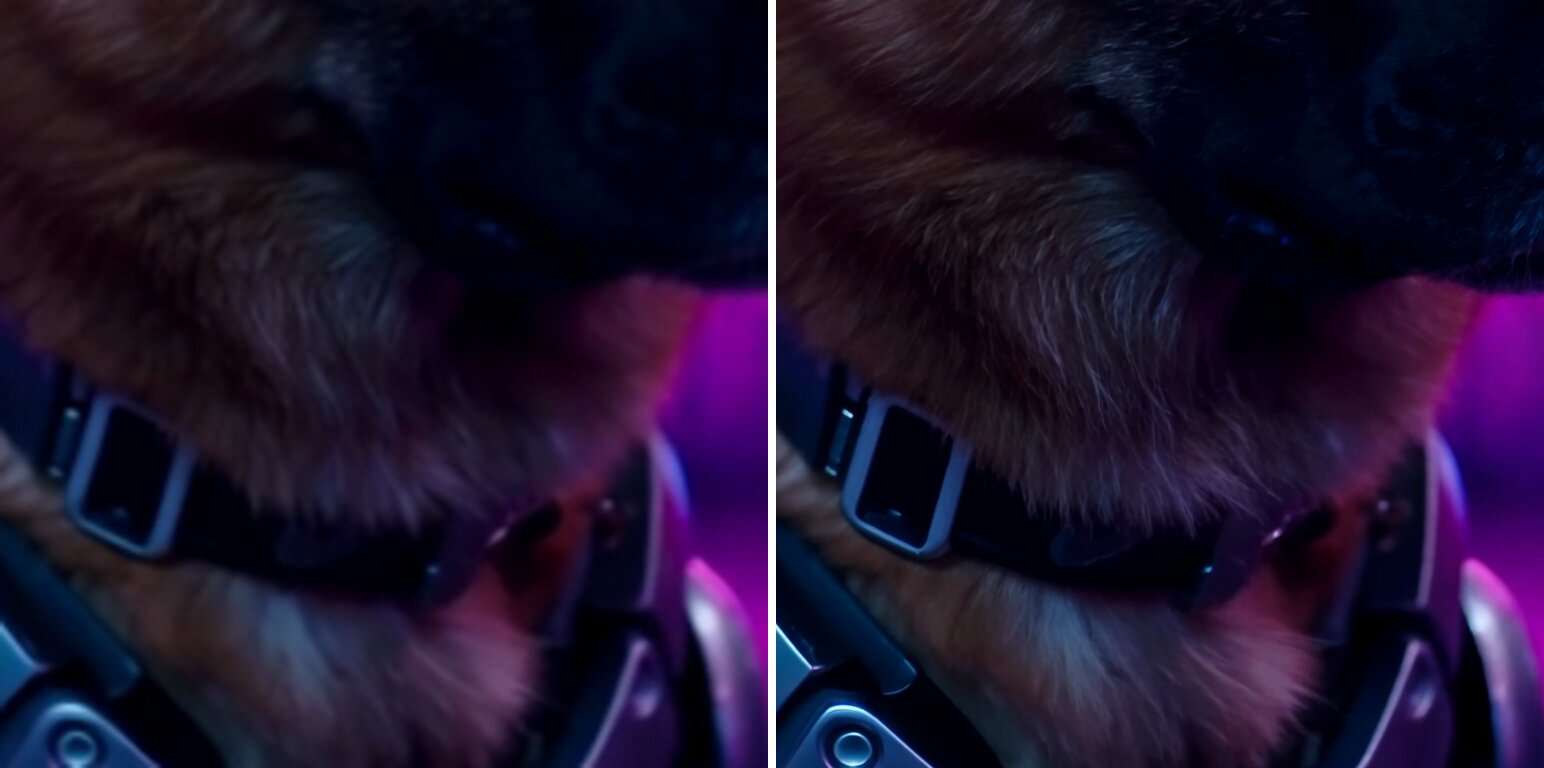
Left: ordinary 4x enlargement. Right: 4x with the 2-step super-resolution model. Crops from the kandinsky-6-sr repo, on clips generated by Kandinsky 6.0.
There are no published timings for gaming cards or for the slower version. One practical detail: the add-on only works on the picture. The sound has to be put back onto the enlarged video from the original generation.
Who did what
All of this is Kandinsky Lab's work: the two video models, the super-resolution model, the GPU settings and the timing table, with a technical report behind it. Their models also build on other teams' open work: a language model from Alibaba's Qwen team reads the prompt, a component in the style of Tencent's HunyuanVideo turns the result into frames, and parts from the MMAudio and BigVGAN projects turn it into sound.
On release day the models also worked in five open tools, from point-and-click ComfyUI to software that runs a model as a shared service, such as vLLM-Omni and SGLang. Two days later the community account realrebelai published compressed versions of Pro, between about 17 and 24 GB, aimed at smaller cards in ComfyUI. Its own page labels them experimental and not fully tested, and warns that Pro "is still a very large model even after quantization" (the compression it applied).
Our part in this post is narrower: reading the repos, checking file sizes and configs, and doing the arithmetic.
What to take away, and what is still open
If you want to make short clips with sound on your own hardware, under a license that lets you build on and redistribute the model, Kandinsky 6.0 is worth a test. We read timings, files and configs. We did not watch the clips or judge their quality, so that part is yours to check. Lite downloads without signing anything and is about 28 GB, most of it the prompt-reading model. Pro asks you to accept its terms on Hugging Face first, approved automatically; we could not read those terms without logging in.
Plan for it like a render farm, not like a chatbot. Pick the card by how many clips per hour you need: about 12 Pro clips an hour on an H100, about 3 on an RTX 4090. Those are the standard models on a warmed-up machine, with loading and file writing left out, so your real rate will be lower by an amount the repo does not publish, and the distilled default may change it.
The honest gap is the distilled models: they are what the repo defaults to, and Kandinsky Lab has not published how long they take. Finding out takes an RTX 5090, the repo's setup step (just setup) and an 81 GB download (just download pro-distill). Then:
cp kandinsky/configs/devices/rtx-5090.yaml my-5090.yaml
printf 'profile:\n  mode: time_mem_module\n' >> my-5090.yaml
just generate "a cat on a mat" --config my-5090.yaml --warmup --out clip.mp4
The command makes the clip once to warm up, then times a second run, close to the way the table was measured. How that timing differs from the table's is in the engineers' section below.
For engineers
Models and files (Hugging Face API sizes, queried 2026-10-12, all model cards declare license: mit):
| Repo | Total | Transformer | Notes |
|---|---|---|---|
| Kandinsky-6.0-Pro-5s-Diffusers | 90.04 GB | 69.7 GB | gated, auto approval |
| Kandinsky-6.0-Pro-distill-5s-Diffusers | 80.65 GB | 60.3 GB | ~30.14B params in the safetensors header (30.107B BF16 + 0.033B F32) |
| Kandinsky-6.0-Pro-pretrain-5s-Diffusers | 90.04 GB | 69.7 GB | |
| Kandinsky-6.0-Lite-5s-Diffusers | 27.78 GB | 7.48 GB | ~3.18B params (2.615B BF16 + 0.561B F32), not gated |
| Kandinsky-6.0-Lite-distill-5s-Diffusers | 26.68 GB | 6.38 GB | not gated |
| Kandinsky-6.0-VSR-5s-Diffusers | 17.46 GB | 4 steps per tile | |
| Kandinsky-6.0-VSR-distilled2steps-5s-Diffusers | 17.46 GB | π-Flow distilled, 2 evaluations per tile |
Shared Pro components: Qwen2.5-VL text encoder ~16.58 GB (5 shards, also used for prompt expansion), audio VAE 1.71 GB, video VAE 0.99 GB, CLIP 0.49 GB, vocoder 0.49 GB. Why Pro's transformer is 69.7 GB while Pro-distill's is 60.3 GB at nominally similar parameter counts is not explained in the sources (the gated Pro header could not be read).
Licenses. kandinsky-6 code: MIT. kandinsky-6-sr: MIT, with its Diffusers export templates keeping Apache-2.0 notices (LICENSE-APACHE). Weights: MIT on every model card. Pro (non-distilled) sits behind an auto-approved Hugging Face gate.
Architecture. Lite: model_dim 1792, 32 visual blocks, 2 text blocks, ff_dim 7168. Pro: model_dim 4096, 60 visual blocks, 4 text blocks, ff_dim 16384. Pipeline Kandinsky6TI2VAPipeline: Kandinsky6Transformer3DModel, AutoencoderKLHunyuanVideo, Qwen2_5_VLForConditionalGeneration, CLIPTextModel (pooled), MMAudioVAE, MMAudioVocoder (BigVGAN-style), FlowMatchEulerDiscreteScheduler (shift 5.0). Upstream credit: Qwen2.5-VL (Alibaba Qwen team), CLIP (OpenAI), HunyuanVideo VAE design (Tencent), MMAudio, BigVGAN (NVIDIA), the π-Flow distillation method behind the distilled checkpoints, FlashAttention 3 (Tri Dao and co-authors) and SageAttention (Tsinghua's thu-ml group).
Generation settings (kandinsky/configs/checkpoints/*.yaml): pro, lite and pretrain: 864x480, 121 frames, 50 steps, guidance 5.0. pro-distill and lite-distill: 10 steps, guidance 1.0, PiflowScheduler (n_grid 10, 128 policy substeps). Audio VAE scaling 0.5302 (pro/lite) or 0.417 (distill, pretrain). The vLLM-Omni section says Pro defaults to 125 frames at 24 fps, the native configs and the Diffusers example use 121.
Full timing table (README, Performance). Seconds per 5 s clip, non-distilled, after warmup, weight loading and MP4 encoding excluded. Module offload on RTX PRO 6000, A100, H100. Block offload on the consumer cards. SageAttention2++ for visual self-attention everywhere except H100 (FlashAttention 3).
| RTX 4090 | RTX 5060 Ti | RTX 5080 | RTX 5090 | RTX PRO 6000 | A100 80 GB | H100 | |
|---|---|---|---|---|---|---|---|
| Lite SD | 437 | 1310 | 577 | 309 | 242 | 532 | 239 |
| Lite HD | 422 | 1328 | 579 | 296 | 274 | 472 | 203 |
| Lite Full HD | 578 | 1774 | 770 | 406 | 387 | 664 | 284 |
| Pro SD | 936 | 3080 | 1336 | 754 | 621 | 972 | 356 |
| Pro HD | 1194 | 2716 | 1189 | 638 | 561 | 791 | 292 |
| Pro Full HD | 1247 | 3530 | 1546 | 854 | 765 | 1106 | 402 |
Oddities worth knowing: Pro HD on the 4090 (1194 s) is slower than on the 5080 (1189 s). For Pro, SD is slower than HD on every card except the 4090 (H100: 356 vs 292), and Lite HD beats Lite SD on the 4090, 5090, A100 and H100. The README does not define how the SD, HD and Full HD rows are produced, so I do not interpret them. The table varies chip, attention kernel and offload mode together and has no no-offload baseline, so it cannot isolate the cost of offload from compute speed.
Offload in code (kandinsky/runtime/offload/). module: registered modules stay on CPU, one resident group at a time on CUDA, async H2D/D2H. block: per-DiT-block (Pro has 60 visual blocks, and whether the 4 text blocks are staged the same way is not stated), two resident, next one prefetched on a transfer stream, requires pinned memory, rejects quantized parameter subclasses and AOTI dit_export. OffloadConfig defaults to none and the CLI accepts --offload none|module|block, but every shipped preset sets module (rtx-pro-6000, a100-80gb, h100) or block (rtx-4090, rtx-5090, rtx-5080, rtx-5060-ti). The 5060 Ti and 5080 presets also load the Qwen text encoder in NF4 via bitsandbytes. Peak VRAM per GPU is not published.
Running it. Native: Python 3.13 or 3.14, NVIDIA GPU, just setup (PyTorch for CUDA 13.0, FlashAttention 3 on Hopper, SageAttention 2.2.0 compiled with nvcc on Ampere, Ada and consumer Blackwell, so nvcc must be on PATH, CUDA_HOME defaulting to /usr/local/cuda), just download pro-distill (about 81 GB into $KANDINSKY_HOME/weights, default ~/.cache/kandinsky), just generate "..." [--config ...] [--out ...]. Default config is h100.yaml. --warmup runs once without saving, then runs again and saves; that second run is the one profiled when profiling is on. Profiling is off by default (ProfileConfig.mode = "none", no shipped preset sets it): add profile: {mode: time_mem_module} to a copy of the preset, as in the snippet above. The JSON lands in $KANDINSKY_HOME/profile/time_mem_module/ with --out, or in <run>/profiles/ without it. The profile wraps the whole pipeline call, which also writes the MP4 and muxes the audio when a destination is given, and includes the default qwen25 prompt expansion. So its total_time counts encoding that the README table excludes: compare the per-module times (DiT, VAE, audio VAE, vocoder) for a closer match. Other flags: --sr, --no-audio, --image, --steps, --guidance, --magcache/--navicache.
vLLM-Omni needs vLLM 0.31.0 plus vLLM-Omni built from source, on Python 3.12, in a separate environment. The example below pulls the gated Pro repo, so accept its terms on Hugging Face and authenticate with an HF token first:
vllm serve kandinskylab/Kandinsky-6.0-Pro-5s-Diffusers --omni \
  --host 127.0.0.1 --port 8091 --num-gpus 1 --enable-cpu-offload
# POST /v1/videos (prompt, size=864x480, num_frames=125, num_inference_steps=50, seed)
# GET /v1/videos/$VID until done, then GET /v1/videos/$VID/content
Diffusers: Kandinsky6TI2VAPipeline.from_pretrained(..., torch_dtype=torch.bfloat16) plus pipe.enable_model_cpu_offload(). sample_audio=False gives video only, expand_prompts=True lets Qwen2.5-VL rewrite the prompt (adds latency). Release-day integrations listed in the README: Diffusers, ComfyUI, vLLM-Omni, SGLang and FastVideo.
Super-resolution (kandinsky-6-sr). Kandinsky6SRPipeline, x2, x2.25 (default: x1.125 bilinear then the x2 path) or x4, tiled diffusion in K-VAE latent space with Hann-window blending, overlap 0.20, tiles_batch_size 1 by default. A 480x864 source at x2.25 yields 1088x1952. To resize that, set target_resolution (tiers hd, fullhd, 2k; each tier holds a 16:9 landscape, a square and a 9:16 portrait size, and the one closest in aspect ratio is picked, e.g. fullhd landscape 1080x1920). The resize never crops. With the default target_resize_mode: fit, both sides are scaled by one factor, min(1080/1088, 1920/1952), so fullhd gives 1070x1920 (1920 wide, 1070 tall). Exactly 1080x1920 needs target_resize_mode: exact as well, which allows a slight anisotropic squeeze. Components: SR DiT 1.41B, SR VAE 1.74B, latent upscaler bank 3.65B. Needs torch._inductor.config.max_autotune = True and the flex attention backend. Contract: 24 fps, at most 121 frames. Frames only, mux the audio back yourself. H100 timing, 2-step model, 768x512 input, torch 2.10.0+cu128, warmup and IO excluded: x2 (9 tiles) 41 s, x4 (25 tiles) 118 s.
Community quants (realrebelai/Kandinsky-6.0-Pro-5s_GGUFs, MIT, created 2026-10-08, "Experimental / Not Fully Tested"): Pro Q3_K_S 20.35 GB, Pro Q4_K_S 23.73 GB, Pro W4A8 17.13 GB, Pro-distill W4A8 17.13 GB, Qwen2.5-VL-7B W4A8 encoder 5.58 GB. GGUF needs two RebelAI ComfyUI forks, W4A8 uses official nodes. The card suggests 240x240 and 21 frames for first tests and warns that a run can finish diffusion and then fail at audio decoding if the MMAudio and BigVGAN 44 kHz files are missing.
Limits.
- We have not run Kandinsky 6.0 and have not looked at or judged its output. Every timing is Kandinsky Lab's, under their setup.
- The table is for the non-distilled models while every preset defaults to
pro-distill. The exact config behind the table (checkpoint override, steps, frames) is not published. - Whether the table includes prompt expansion and text encoding, or only denoising and decoding, is not stated.
- No timings exist for the distilled checkpoints, for the 4-step VSR, or for VSR on consumer cards.
- Every published run uses offload, so neither the cost of offload nor the speed without it is measured. Any claim about memory versus compute from this table is an inference.
- "Offload is required on 80 GB" is stated for vLLM-Omni. For the native pipeline the presets use offload on every card, but the repo does not say running without it is impossible.
- Quality claims (lip-sync accuracy, benchmark scores) live in the technical report, which this post does not evaluate.
Sources: kandinsky-6, kandinsky-6-sr, Pro, Lite and VSR model cards, community GGUFs.