A private ChatGPT for fifty teams, and one bill you can split
How one private AI assistant serves fifty teams through one address, and how its fixed hourly cost becomes a bill per team. A demo, with its limits.
When a company decides to run its own AI assistant, the first worry is usually the model: will an open model be good enough? The harder questions tend to arrive once the assistant works: how to let more teams in when the machines fill up, and how to tell finance which team spent what.
This demo answers both: how a private assistant can grow from one team to fifty without being rebuilt, and how its cost stays fixed, predictable and split by team along the way.

The video (2:47, with voice-over) follows Nexora, a mid-size company we made up. Nexora does not want to send its contracts, support tickets and financial forecasts to a public AI service, so in the story it runs its own assistant on ten rented machines in Frankfurt, each with one Nvidia H100 (a high-end AI chip), and serves it with InferenceKey. Every department calls the same model with its own keys.
The voice-over plays the scenario straight, so it is worth saying up front: the machines in this video are simulated. The panel, the keys, the queue and the accounting are the real product. The ten "H100 servers" are test-mode programs that behave like GPU servers but answer with filler text instead of running a model. The section on limits says what that means for each number.
Here is what the panel showed:
| What | In the demo |
|---|---|
| Keys, one per team or use case | 50 |
| What each key can reach | 1 address, the company chat |
| Machines serving the model | 10, all online, 0 warnings |
| Steady load from the test script | about 4,200 requests a minute |
| Cost of ten machines left on all month | about $17,500, whatever the traffic |
| Cost recorded while the demo fleet existed | $326.97 for 134.53 machine hours, split by key |
The idea that makes the rest easy
A rented GPU machine is billed by the hour, like a rehearsal room. You pay for the room whether the band plays one song or forty. A public AI API is the opposite: it bills by the word, so every extra question costs more. Per-seat subscriptions hide that until someone hits a usage limit.
That changes what "controlling costs" means. With your own machines, the bill for the month is known in advance. In this demo it is ten machines at $1,750 a month each, about $17,500 a month, or $24.31 an hour, however much the teams type. Two things are left to manage: keeping the machines busy, because an idle hour costs the same as a full one, and knowing who used them, so each team sees its share. The rest of the demo is those two things on screen.
One key per team
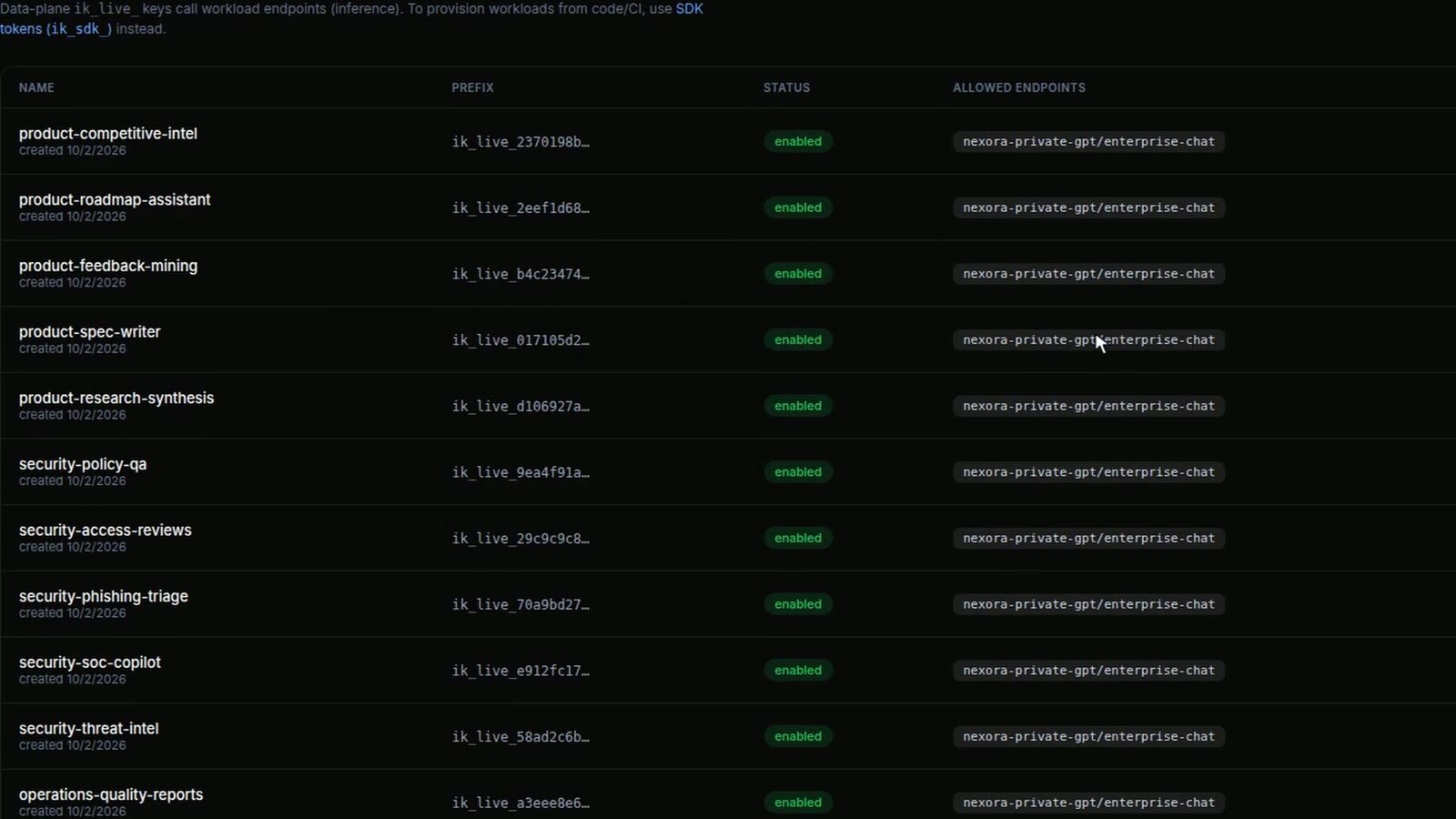
A key is a password that a program uses to call the assistant. Every team gets its own, and often each use case inside a team gets one too: product has keys for competitive intelligence, the roadmap and specs, security has its own set, and so on through operations, finance, support and people. Fifty in total. Each key opens a single door, the address of the company chat, so a key that leaks cannot reach anything else Nexora runs on the platform.
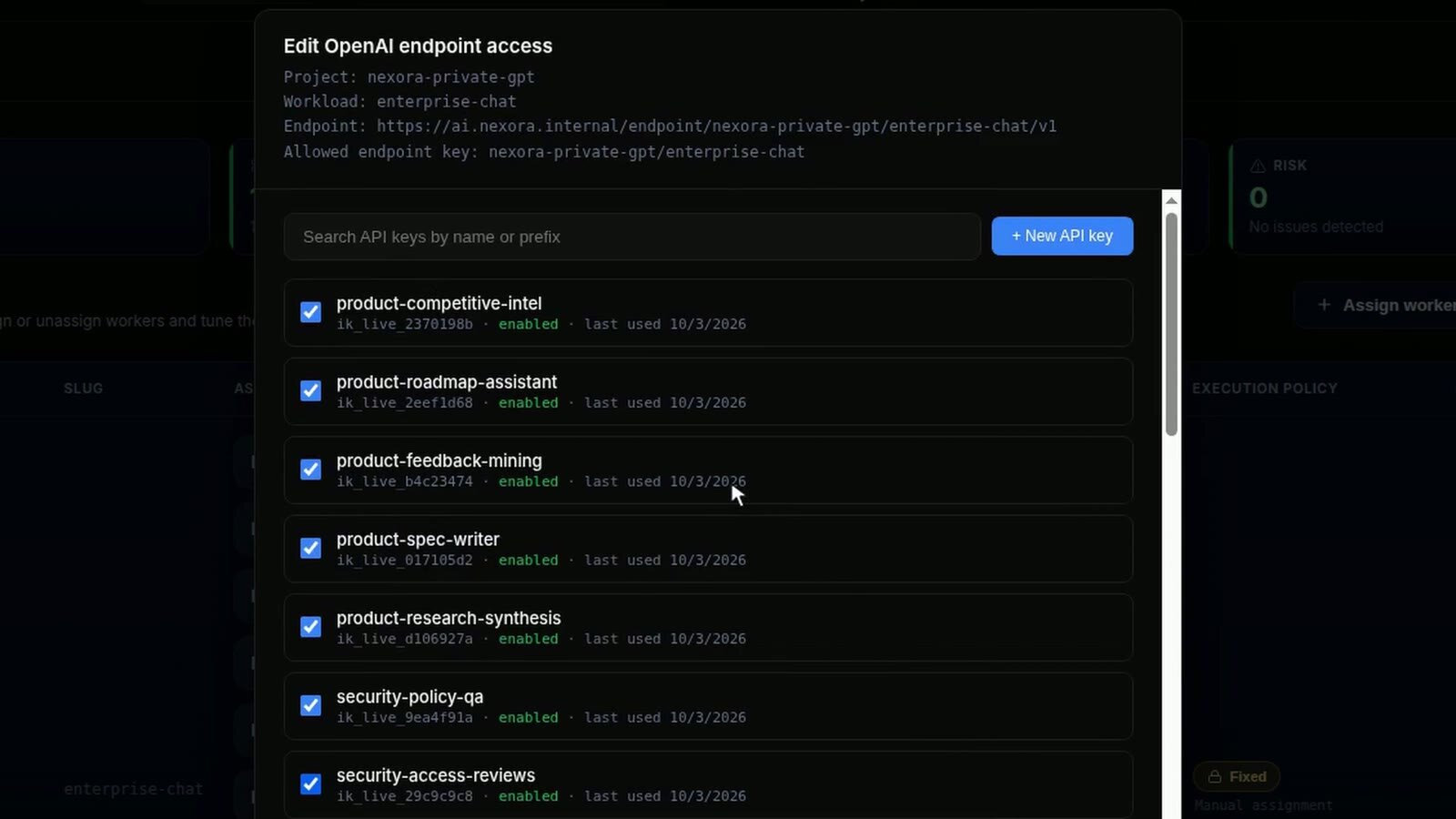
Access is a list of checkboxes on that address. There is no chat window in this demo: the address speaks the same format as the OpenAI API, so any chat app or internal tool that already works with OpenAI can use it by changing an address and a key. Adding a team means creating a key and ticking it. Removing a team means unticking it or disabling its key.
One model, ten machines
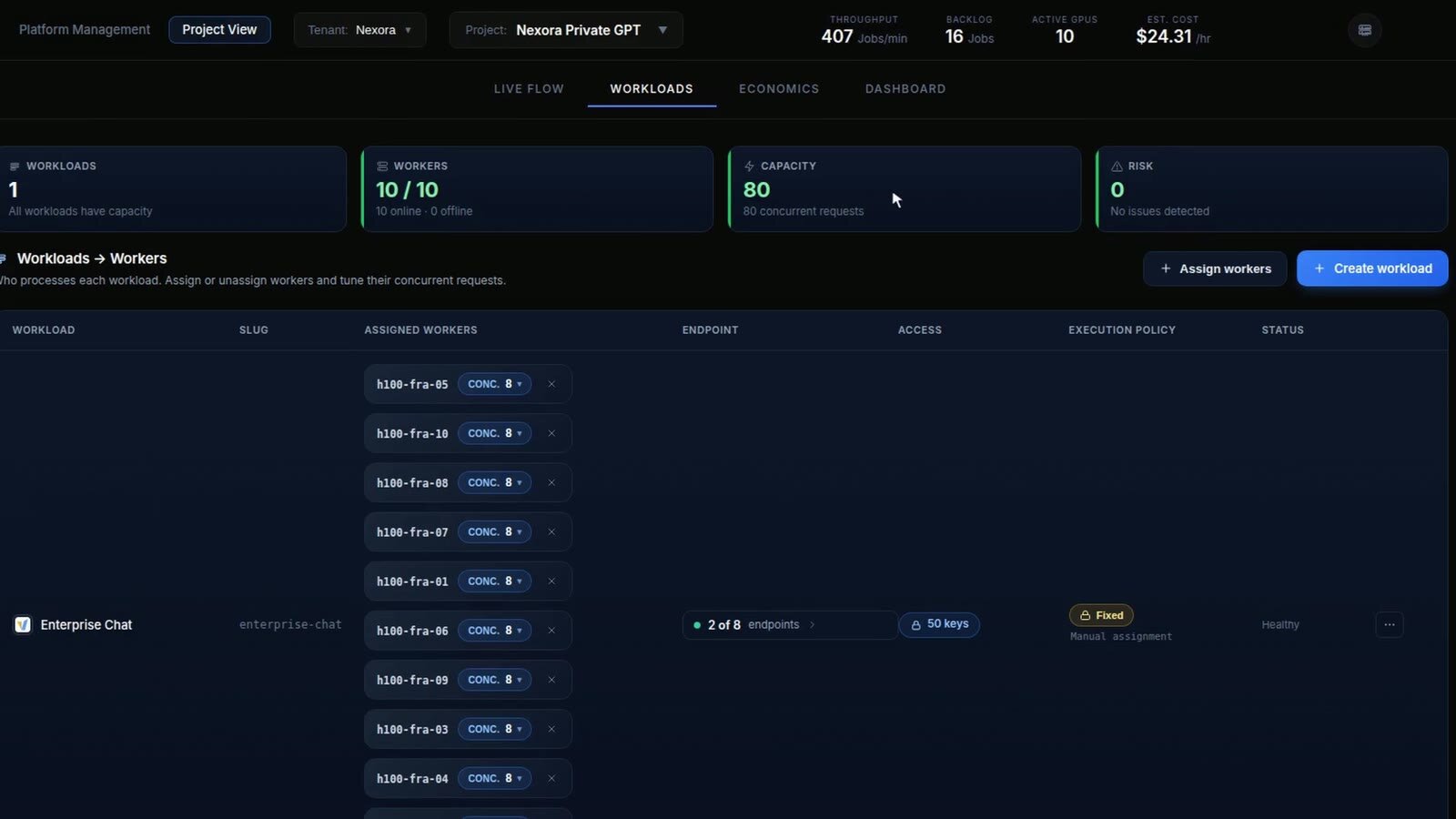
Behind that address runs one model, the company chat. Ten machines serve it (in the story, each with its own copy of the model), and the panel calls each machine a worker. Each worker takes eight requests at a time, so the fleet can work on 80 requests at once.
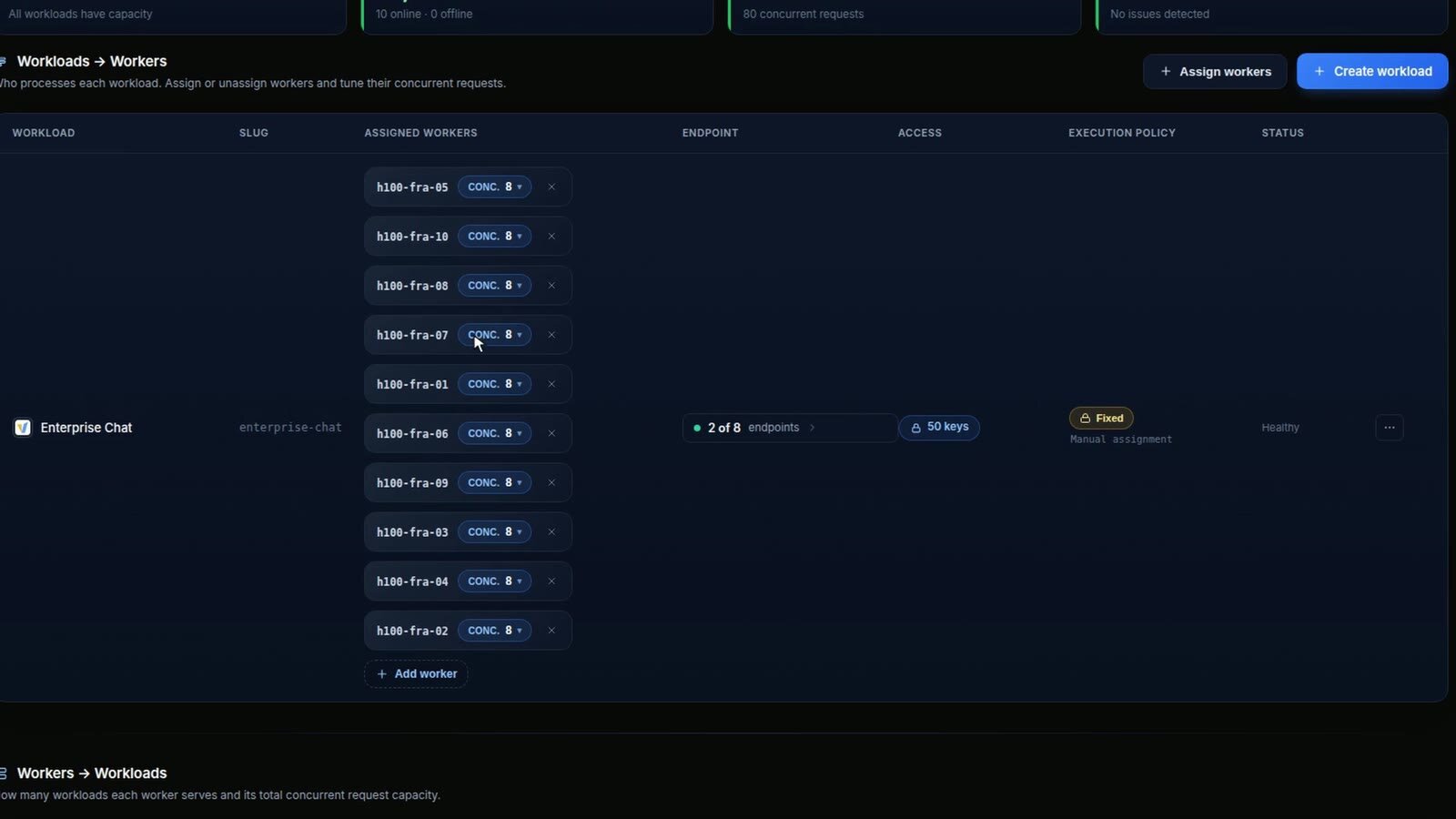
This row is where you grow. On day one it could be one team, one key and one or two machines. Each new team adds a key and a tick. When the queue starts to grow, the "Add worker" button under the list puts one more machine on the model: you pick a registered machine, or deploy a new cloud GPU, and set how many requests it takes at once. Another machine like these ten adds eight more requests at a time for another $1,750 a month. The teams keep their key and their address. So the bill grows in steps you choose, one machine at a time, and only when the queue asks for it. We did not press that button in this take. Adding a machine under live traffic is a video we still have to record.
The load spreads by itself
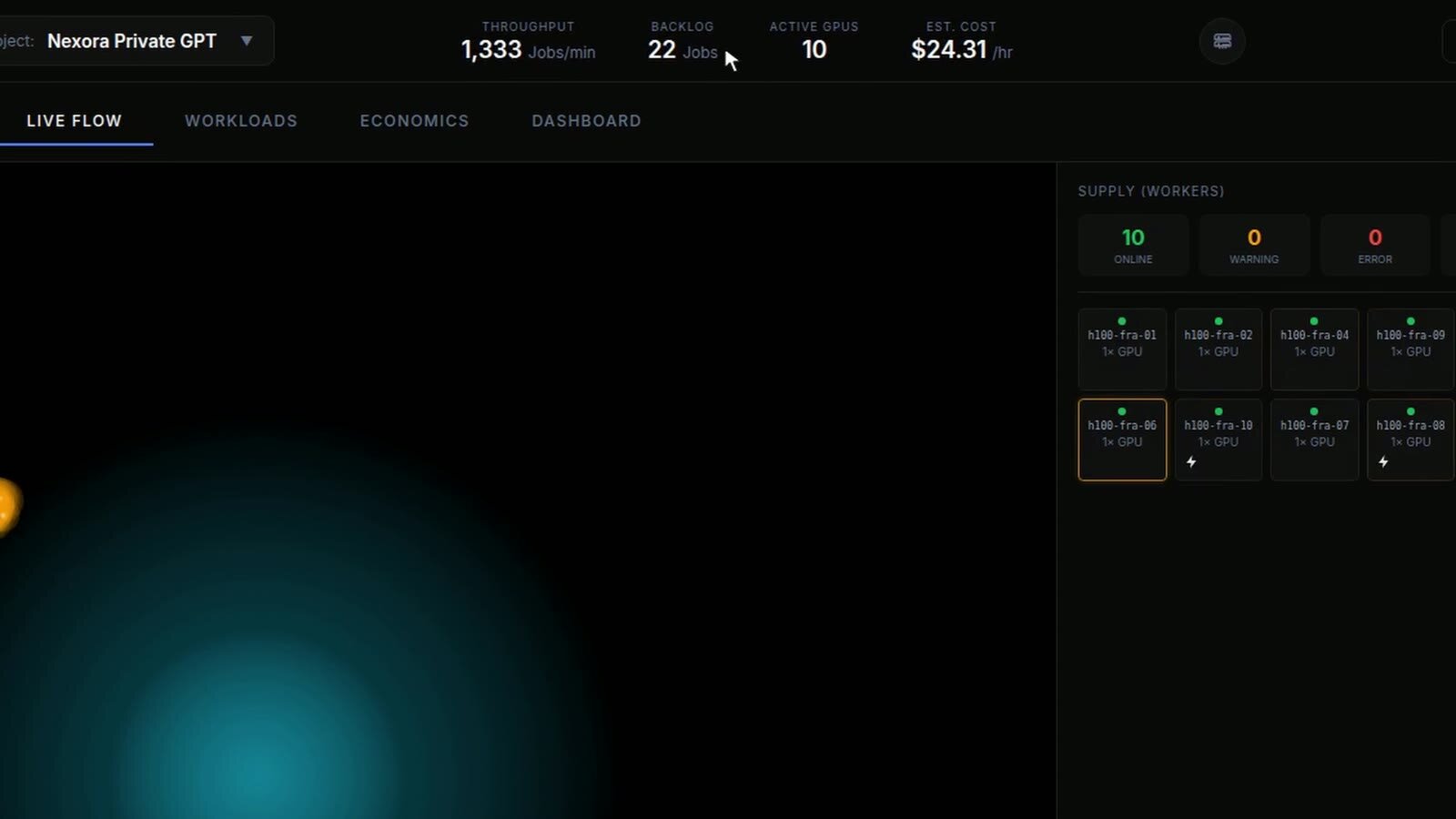
The test script kept a steady load of about 70 requests a second, roughly 4,200 a minute, spread over the fifty keys with a few teams much busier than the rest. The counter in the top bar reads lower in this screenshot because it starts from zero every time a page opens. Next to it: between 8 and 28 requests waiting their turn, ten machines active, and $24.31 an hour.
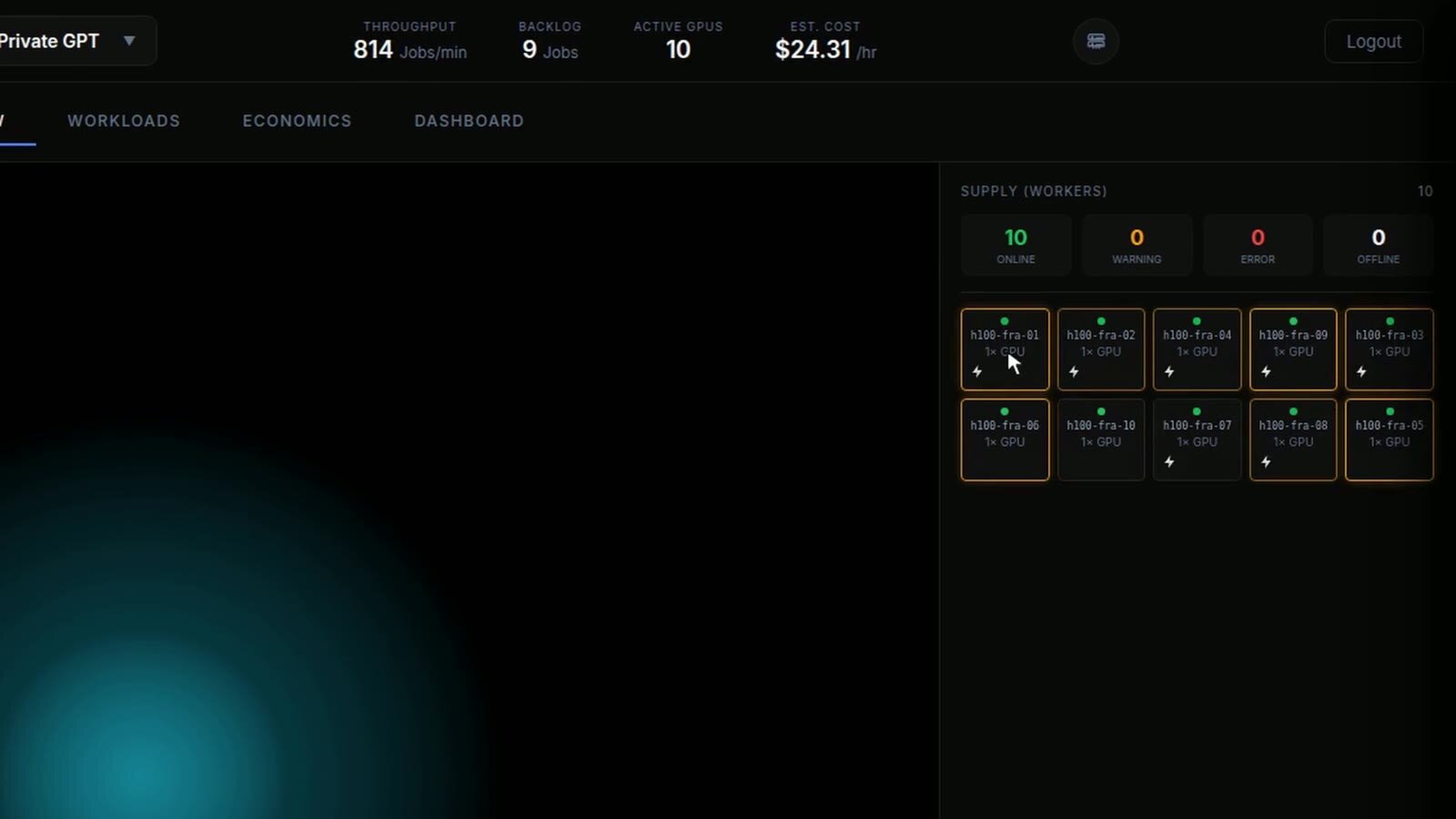
The supply panel shows the ten machines. The highlighted ones are working on a request at that moment, and the highlight jumps from one to another as requests land. You choose which machines serve the model, but not which machine takes each request: the requests from fifty teams go into one queue, and whichever machine has a free slot takes the next one.
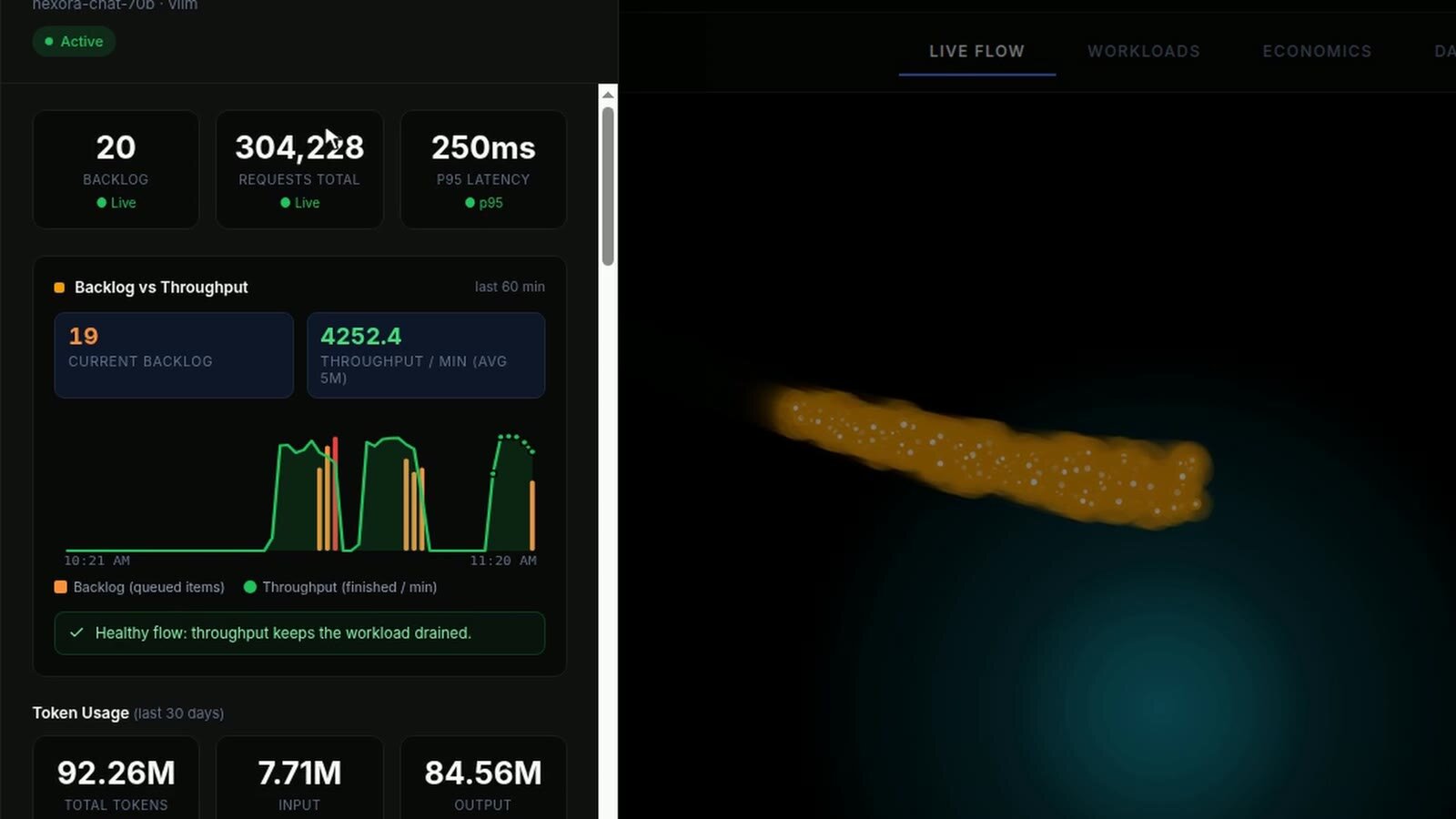
Open the model and the panel answers the question an operator asks first: is the queue under control? The chart shows two things: how many requests are waiting (bars) and how many get finished each minute (line), 4,252 on average over the last five minutes. Under the chart, a label reads "Healthy flow" as long as the queue has not grown over the last few minutes. If it starts growing, the label changes to "At risk" or "Critical", the sign that the model needs another machine.
The bill, per team
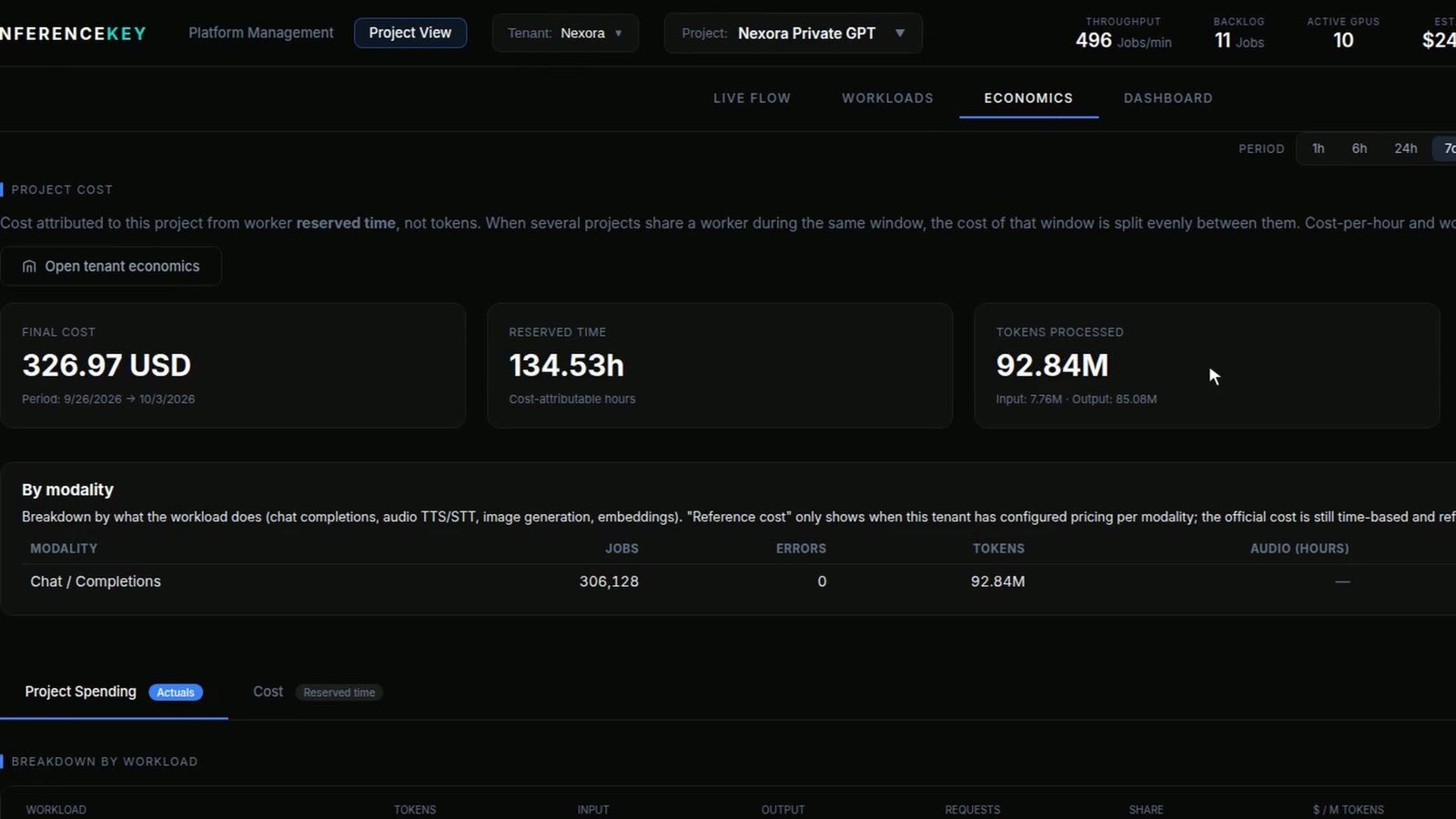
Economics is the screen finance cares about. The panel takes the hours each machine was reserved for this project and multiplies them by that machine's price. Nothing is estimated from word counts.
The period selector says seven days, but the demo fleet only existed for part of one: 134.53 machine hours, about 13 and a half per machine. Those hours cost $326.97. In them, the test traffic produced 306,128 requests and 92.84 million tokens (a token is roughly three quarters of a word). Divided by its steady rate, the traffic comes to a bit over an hour of those 13 and a half, so most of the paid hours were idle. That is why the $3.51 per million tokens on the panel mostly measures idle time, and it is not a price to compare with a public API. Keep the same machines busy and the same hours are spread over many more words: that is the lever you manage.
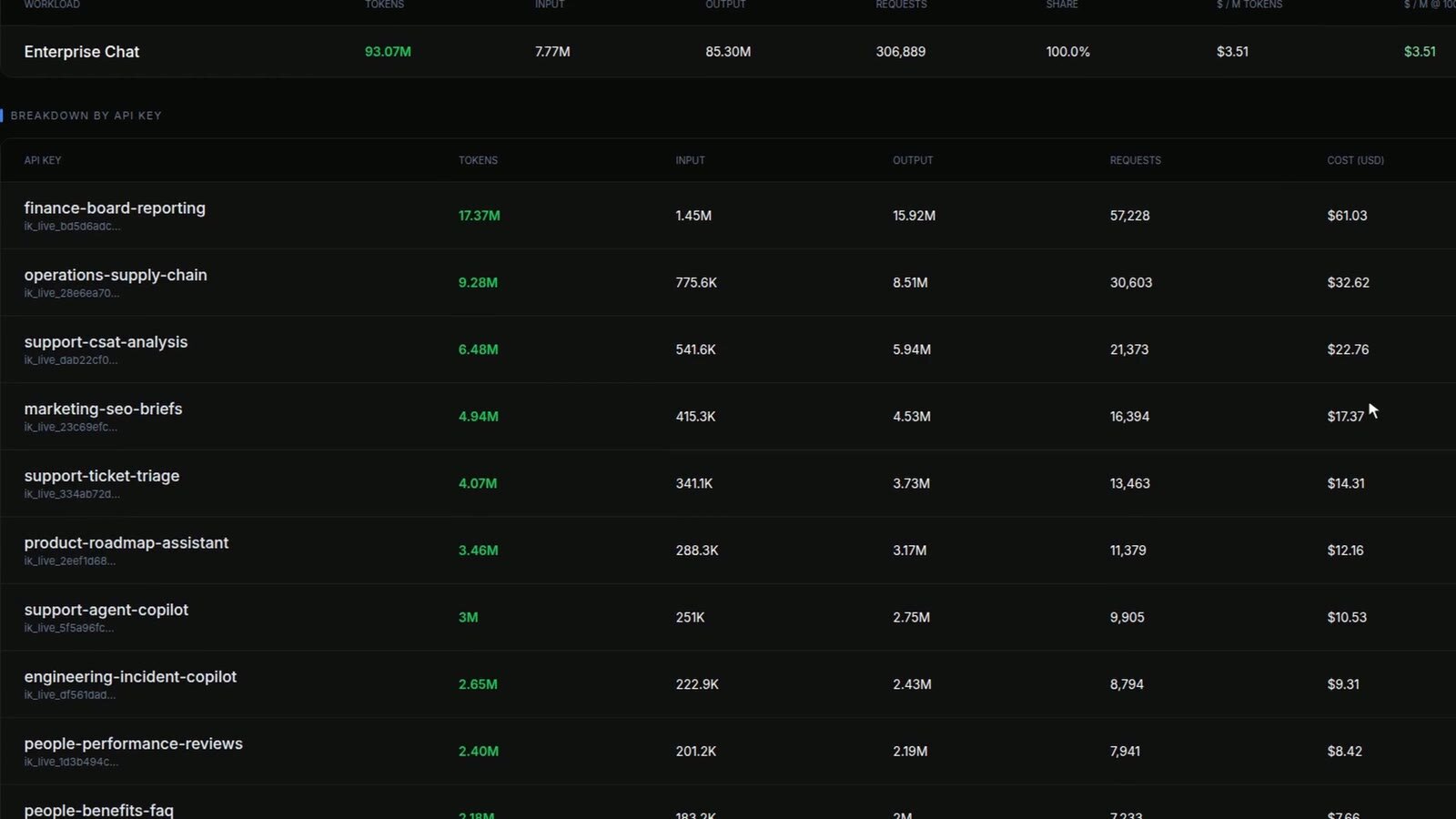
Then the cost is split by key, in proportion to the tokens each key used. Finance board reporting used 18.7% of the tokens, so it carries 18.7% of the cost: $61.03 at that moment. Supply chain, $32.62. Customer satisfaction analysis, $22.76. Marketing, $17.37. There are fifty lines, one per key, and they update while the traffic runs. If the fleet ran all month with the same mix, finance board reporting would carry about $3,300 of the $17,500.
It works like the mixing desk at a gig: fifty channels go into one master, and you can still see which microphone is too loud. Finance does not need to understand GPUs to read it. It is a list of teams with a number next to each one.
What this proves, and what it does not
It proves the parts that do not depend on the GPU. Each of the fifty keys could only reach the company chat. Ten workers shared the load from one queue without anyone routing requests by hand. The panel kept its numbers live at about 4,200 requests a minute, and the bill came out of machine hours and was split per key without anyone exporting a spreadsheet.
It does not prove how fast a real model answers or how many people ten real H100s can serve. The ten "H100s" were ten test-mode processes on one ordinary machine. The 250 ms response time on screen comes from that test mode, and so do the speed of each answer and the 0 errors: these workers cannot fail the way a real GPU can. The tokens are counted on filler text, so each team's share follows the script's traffic mix, not real answer lengths. The script never sent more than 32 requests at once, so the fleet never reached its 80. Nexora is invented, and $1,750 a month per machine is a rental price we configured, not a quote.
How many people one real machine can take depends on the model, the length of the answers and how people use it. That needs a measurement on real GPUs, and this demo is not it.
For engineers
- Setup. One project, one workload (
enterprise-chat, labelled as a vLLM workloadnexora-chat-70bin the panel, though no vLLM runs in test mode), assigned to ten workers (h100-fra-01toh100-fra-10) with a fixed manual assignment and a concurrency of 8 each, so 80 slots. Fifty data-plane keys (ik_live_), each scoped to the endpointnexora-private-gpt/enterprise-chat. The endpoint is OpenAI compatible (.../enterprise-chat/v1). - Traffic. A script sends chat requests from the fifty keys with Zipf weights (a few keys dominate, long tail), 32 streams with a 0.2 s gap, about 70 requests a second. The workload drawer read 4,252 finished per minute (5-minute average). The header counter counts
finishedevents received by the open tab in the last 60 s and restarts on every page load, so its values in the take (0 to about 3,700) are ramps, not the load. Backlog in the header: 8 to 28. - Workers. Test-mode workers on one host (driver reported as
0.0.mock): real registration, real job claiming from the shared queue, real telemetry path, generated output. Latency (p95 250 ms), speed (142 tokens per second per request), token counts and the 0 errors are properties of the test mode. - Healthy flow. The drawer classifies the workload as healthy while the backlog has not grown by more than max(2, 25%) over the last complete minutes (up to 5) and throughput is above zero. A shrinking backlog with rising throughput reads "Recovering", a growing backlog reads "At risk", or "Critical" if throughput also drops.
- Cost model. Project cost = reserved worker hours × each worker's configured hourly price. Reserved time is calendar time while the worker is assigned to the project, and windows shared by several projects are split evenly. Here: 134.53 h × $2.4306/h ($1,750 / 720 h) = $326.97. Ten workers cost $24.31/h, about $17,500 a month if they never stop. Reserved hours keep accruing while the workers stay assigned, about a cent every 1.5 seconds at $24.31/h, so screens taken seconds apart differ by a few cents.
- Per key. Each key's cost is its share of the project's tokens times the project cost: finance-board-reporting had 17.37M of 93.07M tokens in the 09 frame, 18.7% of the project cost at that moment, $61.03.
- Unit cost. $3.51 per million tokens in the workload table, over a window where the traffic, at its steady rate, adds up to roughly 72 minutes of 13.5 hours per worker. Under per-hour pricing that figure falls as utilization rises. With real models, the token rate per machine is what decides it.
- Not shown in the video. Adding an eleventh worker under traffic, a worker failing mid-load, and disabling a key and watching its cost line stop growing.
The keys, scopes and environment variables are documented in Tokens & API keys.