Sage-A1.5 runs a research agent on one 24 GB card; leave its check mode off for lookups
Sage-A1.5 on one RTX 4090: 136 tokens/s, a research question right in 3 of 3 runs, and a check mode that takes 2.2 times the time.
Can an open research agent, one that splits a question, sends helpers to search and writes the answer, live on a single gaming card? With Sage-A1.5, yes. We served Shanghai AI Laboratory's new 35B model on one RTX 4090 on our cloud, using the authors' own compressed file and stock llama.cpp. It wrote about 136 tokens per second and got our three-part research question right in all three test runs. Every tool call came out in the exact format our code needed. If you deploy models, that means an agent with a free commercial license, on a 24 GB card you control, with the tools running in your own code. One switch needs care: its new Verification Mode gave the same right answers on easy questions, but took 2.2 times the time and twice the tokens. Leave it off for lookups and test it on your hard cases.
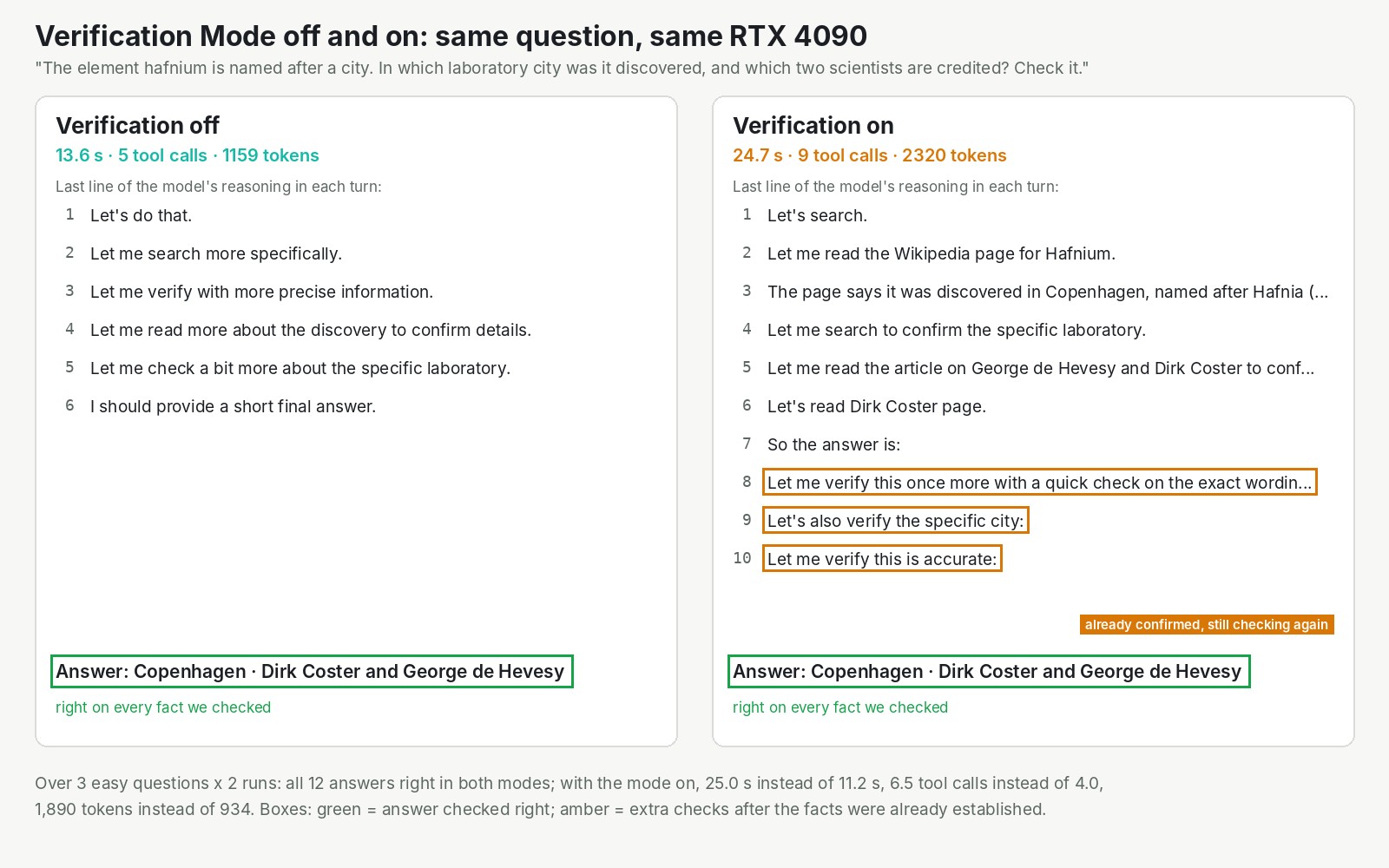
One question, asked twice on the same card. Both answers were right. With the mode on, the model kept checking facts it had already read.
A big model that works like a small one
Sage-A1.5 is a mixture-of-experts model: picture 256 specialists and one generalist who is always in the room. For each word it writes, it consults 8 specialists while the rest wait. So of 35 billion parameters, only about 3 billion do work at each step, according to the project page. The speed follows the 3 billion, and the memory bill follows the 35. That is how it fits one 24 GB card.
It was built by Shanghai AI Laboratory from two earlier models: the Qwen team's open 35B model and Agents-A1, the lab's own agent released in June. The paper, by Wenjie Lou and 98 co-authors, went up on 20 October. The full model and the compressed file, about 22 GB, are both Apache-2.0, free for commercial use, with no form to fill in. The credit for the model is theirs. Our part was the deployment, the questions and tools, and the measurements.
Two modes, which you switch on yourself, make it an agent. Agentic Orchestration gives it one tool to hand out tasks, so it can send three assistants to the library at once. Verification Mode is one line in its instructions that tells it to check its own work before answering.
What our test found
The research question was ours: how many years passed between the discoveries of hafnium, rhenium and technetium. In each run the model handed out three tasks at once, one per element. Three sub-agents searched live Wikipedia pages through two tools we wrote and reported back. The lead model then wrote the answer: 1923, 1925 and 1937, 14 years from first to last. Right in 3 of 3 test runs.
A run took 72 seconds with our platform's default of one request at a time, because the sub-agents waited in line. With two at once, it took 50 and 56 seconds. That default is still one.
Verification Mode is where the surprise was. On three easy questions, asked twice each, all 12 answers were right with the mode off and with it on:
| Off | On | |
|---|---|---|
| Answers right | 6 of 6 | 6 of 6 |
| Average time | 11.2 s | 25.0 s |
| Average tokens written | 934 | 1,890 |
The extra work was mostly repetition: "Let me verify" turns after the facts were already confirmed. That does not contradict the authors. They report the mode raising their score on BrowseComp, a test of hard-to-find facts on the web, from 72.5% to 82.9%. Hard questions are where a second look pays.
Who should care
- Teams that want an agent to search, read and report on their own hardware. It ran on one RTX 4090 at full speed, using 21.3 of the card's 23.5 GiB with our settings.
- Anyone who cares about accuracy on hard questions. Try Verification Mode on your own hard cases, not on lookups.
- Teams that need quick chat replies. Look elsewhere. A two-sentence definition took 14.4 seconds, because it reasoned through 1,905 tokens first.
- Teams on 16 GB cards or smaller. Expect a fraction of the speed. When we simulated a 16 GB card on the same 4090, it ran about 5.6 times slower, and it needs plenty of main memory.
On InferenceKey it was serving 104 seconds after the deploy call, on the llama.cpp our platform already ships. One snag sits in the model card: its command uses a reasoning setting, deepthink, that llama.cpp does not have, and the server quits on start. Write deepseek instead. Status: fixed in our example, still in the authors' card.
The honest limit: we asked a handful of easy, Wikipedia-backed questions, one agent at a time, so this checks the machinery, not the breadth of its research.
Read the full test
The Research post has the long-prompt and vision checks, the GPU memory ladder, the authors' benchmarks, every rough edge with its status and the SDK example that runs the same question on your own card. Read the full Sage-A1.5 test in the Research post.