Sage-A1.5 on one 24 GB card: 136 tokens/s, and a check mode that doubles the work on easy questions
Shanghai AI Lab's 35B research agent on one RTX 4090: 136 tokens/s, one research question right in 3 of 3 runs, check mode twice as slow on easy lookups.
Thirty-five billion parameters on disk, about three billion at work for each word. That gap is why Sage-A1.5, an open research agent from Shanghai AI Laboratory, fits on one gaming card. We ran the authors' own compressed file on one RTX 4090, a 24 GB gaming card, on our cloud (InferenceKey Cloud), with standard open-source software. Its agent machinery worked there: it handed out tasks, asked our code to search, and answered. It wrote about 136 tokens per second, a long reply in 11 seconds, and got our one three-part research question right in all three test runs. Its new Verification Mode, which makes it check its own work, gave the same right answers on easy questions, but took 2.2 times the time and twice the tokens. The model runs on a GPU worker you control, and the tools run in your own code. Leave the check mode off for lookups, and test it on your hard cases.
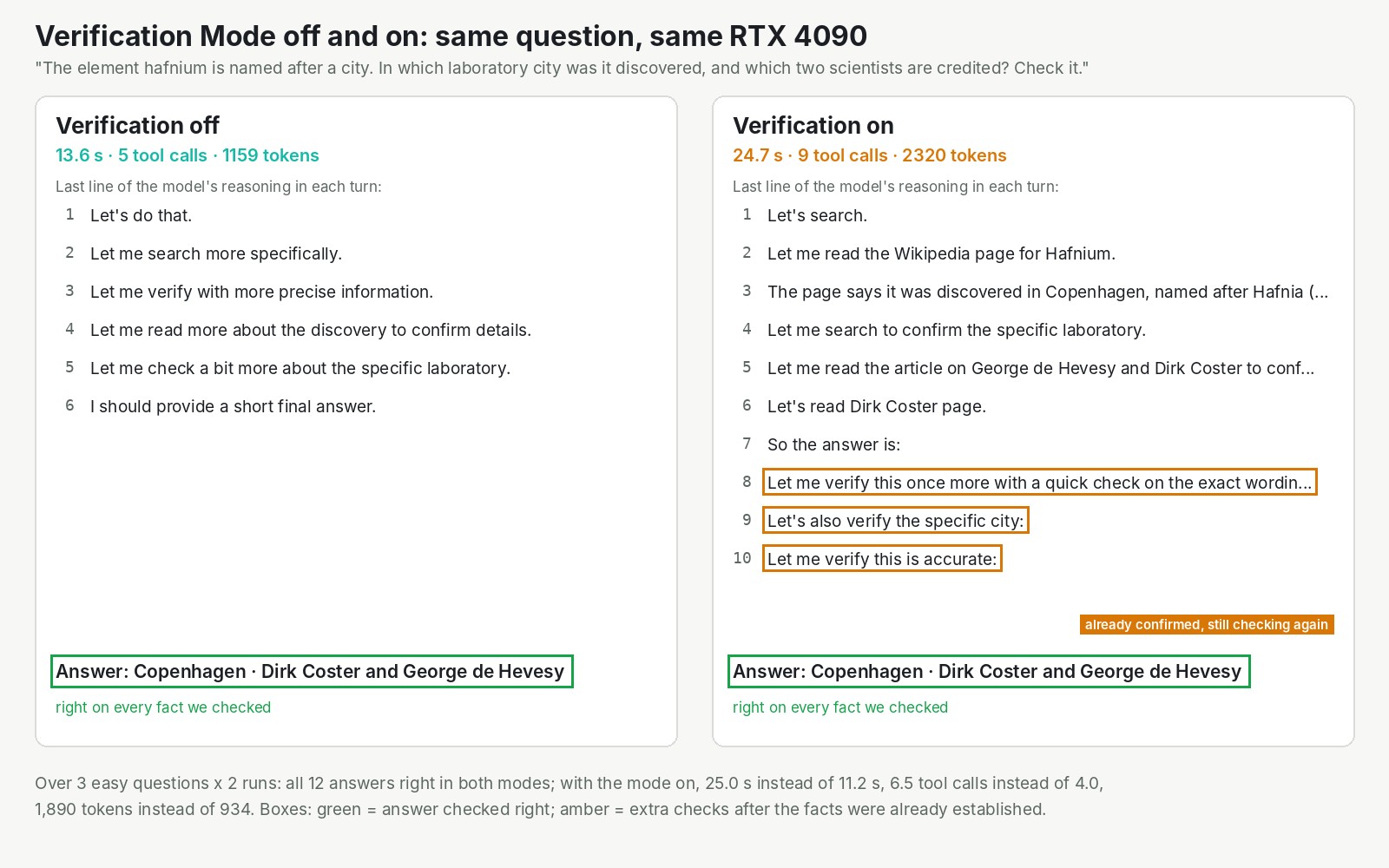
The image shows one question asked twice on the same card: in which city was hafnium discovered, and by whom. Both runs got it right, and the one with the mode on kept checking facts it had already read.
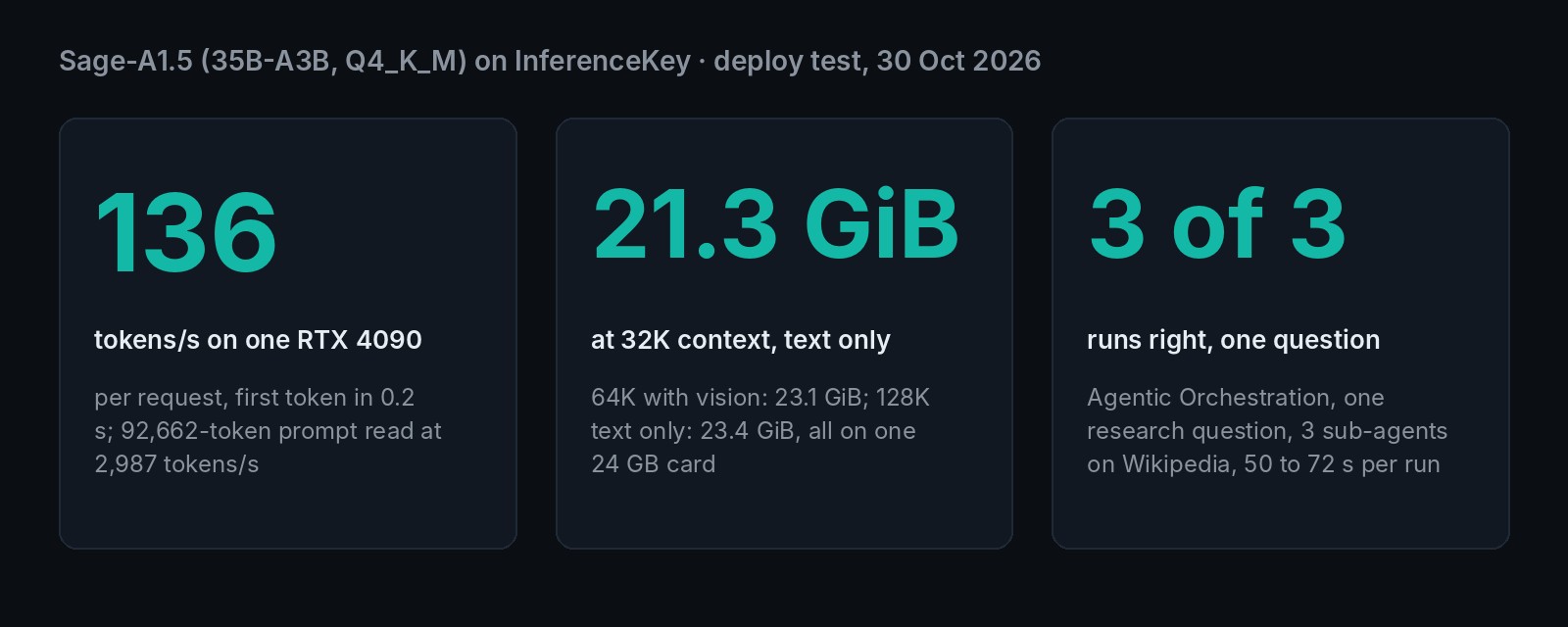
| What you want to know | What we measured |
|---|---|
| Smallest card that ran it at full speed | one RTX 4090, 24 GB |
| Verification Mode on easy questions | same answers, 2.2 times the time, twice the tokens |
35 billion parameters, 3 billion awake for each word
Sage-A1.5 is big on disk and small in motion, and that is why one gaming card can serve it. It is a mixture-of-experts model. Picture a team of 256 specialists, plus one generalist who is always in the room. For every word it writes, the model consults 8 specialists. The rest wait. So of 35 billion parameters, only about 3 billion do work at each step, according to the project page. The speed follows the 3 billion, and the memory bill follows the 35.
The model is retrained from two others: the Qwen team's open 35B model and Agents-A1, the lab's own earlier agent, released in June. The paper, by Wenjie Lou and 98 co-authors, went up on 20 October. The full model and the compressed file, about 22 GB, are both Apache-2.0: free for commercial use, and open to download without a form. A small extra file lets the model read images, and two modes you switch on yourself turn it into an agent:
- Agentic Orchestration. You give the model one tool that hands out tasks. The model then splits a question into tasks and hands each one to a sub-agent, which searches and reads on its own and reports back. It is a lead researcher sending three assistants to the library at once.
- Verification Mode. One line added to the model's instructions tells it to check its own work before it answers. The authors say it needs nothing else installed.
The authors' scores come from the uncompressed model and were not reproduced here
On BrowseComp, which asks for hard-to-find facts on the web, the authors report 81.7 out of 100, against 91.2 for Kimi-K3, the best model on their table. In a separate on/off test over all 1,266 BrowseComp questions, Verification Mode raised the score from 72.5% to 82.9%. We cannot tell whether the 81.7 already includes that gain. Their other scores are in the appendix.
Our test: one RTX 4090, the authors' own file, our own questions
The limit first: a handful of easy, Wikipedia-backed questions on one card, one agent at a time. That checks the machinery (tool calls, handing out tasks, answers coming back), not the breadth of its research.
We served the authors' compressed file with llama.cpp, the open software that runs models on a single machine, on one RTX 4090 on our cloud. We used the authors' recommended settings. All requests went through our platform, the way an application would call it, and we checked speed against llama.cpp directly as well.
The questions were ours. Each needed a few facts from Wikipedia: who discovered rhenium and where, which city hafnium is named after, when technetium was found. The model searched and read live pages through two tools we wrote. For orchestration, we asked one question, run three times: how many years passed between the discoveries of three elements, so each sub-agent took one.
About 136 tokens per second, and one research question right in all three runs
On one RTX 4090 the model wrote about 136 tokens per second for one request, and the first token arrived in about a quarter of a second. Going through our platform added no measurable delay: llama.cpp alone gave the same speed. A 1,489-token reply took about 11 seconds.
It reads long prompts fast too. We hid a made-up tag, 7342-ORCHID, inside a 92,662-token prompt, about the length of a novel. The model read the whole thing in 31 seconds and found the tag.
The research question came back right every time we asked it. In each of three test runs, the model handed out three tasks at once, one per element. The three sub-agents searched Wikipedia and sent back their findings. The lead model then wrote the answer: hafnium in 1923, rhenium in 1925, technetium in 1937, 14 years from first to last. Every tool call came out in the exact format our code needed to run it. A simpler test with one search call came back clean 3 times out of 3, in under a second each.
Time depends on whether the sub-agents run side by side, and our platform's default makes them queue. After a deploy, it sends the model one request at a time, so the three sub-agents waited in line and the run took 72.0 seconds. One API call raised the limit to two, and runs then took 50 and 56 seconds. Status: the default is still one, and the call is in the appendix.
The vision part works as well. We showed it the authors' own benchmark chart and asked for a value. It read 80.0 off the right bar, and 50.0 as the best of the larger models, both correct.
The catch is how long it thinks. This model reasons at length before it answers. A two-sentence definition took 14.4 seconds, because it reasoned through 1,905 tokens first. Even 17 x 23 took 336 tokens of reasoning. At 136 tokens per second that is fine for a research task, and slow for a chat box.
Verification Mode doubled the work on easy questions and changed no answer
On our easy questions, Verification Mode bought nothing we could measure. All 12 answers were right with the mode off and with it on.
| Off | On | |
|---|---|---|
| Answers right | 6 of 6 | 6 of 6 |
| Average time | 11.2 s | 25.0 s |
| Average tool calls | 4.0 | 6.5 |
| Average tokens written | 934 | 1,890 |
The extra work was mostly repetition. With the mode on, the reasoning filled up with "Let me verify" turns after the facts were already confirmed. The gap varied: in the other hafnium run, the mode on made one tool call fewer than the mode off. One run took 52.7 seconds because a Wikipedia search timed out and the model tried again.
That does not contradict the authors. Their gain came on BrowseComp, where facts are hard to find and a wrong first lead is common.
Which GPU: a real 24 GB card at full speed, about a fifth of the speed or less below it
The smallest card that ran Sage-A1.5 at full speed was a real 24 GB RTX 4090. With our example's settings, room for 32,768 tokens of conversation and two requests at once, it used 21.3 of the card's 23.5 GiB. The model card's own setup, 64K tokens with vision, peaked at 23.1 GiB. 128K tokens, text only, peaked at 23.4 GiB, leaving the card almost full. Every one of those fit, with no loss of speed.
Below 24 GB, the model only runs if part of it moves to the computer's main memory. Llama.cpp can park some specialists there and let the processor run them, which is much slower. We simulated smaller cards on the same 4090, by moving specialists out until the card's memory stayed under each limit.
- Simulated 16 GB: 14.4 GiB on the card, about 5.6 times slower, and the research question still came back right in 98 seconds.
- Simulated 12 GB: 10.8 GiB on the card, and the question came back right in 93 seconds.
- Simulated 8 GB: 3.0 GiB with every specialist in main memory. One of two research runs used up its 12-step limit after 270 seconds without an answer. The retry was right.
- Not tried: real 16 and 12 GB cards, the RTX 3090, 32 GB cards, the uncompressed model.
The simulated speeds depend on the computer's processor and memory, so treat them as a direction, not a promise. The smaller settings also need free main memory for the parked specialists, up to about 17 GB when all of them move there.
On InferenceKey: ready in 104 seconds, after one fix to the model card's command
A 35B agent model should not need a custom engine, and this one did not. From the deploy call to serving took 104.1 seconds, on the llama.cpp version our platform already ships: download the 21.7 GB file, load it, answer. Our platform runs a model on a worker, a GPU machine you own or rent and connect to it, and its default llama.cpp loaded Sage-A1.5 without changes. The first time on a fresh machine, llama.cpp also has to be built for the card, which took 10 and a half minutes. After that, a restart takes 4 to 7 seconds.
The one problem you will hit is in the model card itself. Its llama.cpp command uses a reasoning setting called deepthink, which llama.cpp does not have. The server quits on start with "Unknown reasoning format: deepthink". We checked a much newer llama.cpp release too, and it still does not exist there. The fix is to write deepseek instead. Status: fixed in our example, still in the authors' card.
A second gap is ours. The authors switch Verification Mode on with a setting our platform does not pass to the model yet. Our example adds the same switch line to the model's instructions instead. We checked that the model sees exactly the same prompt both ways. Status: open on our side, worked around in the example.
Should you try it? Yes on one 24 GB card: the agent machinery worked
- If you want an agent that searches, reads and reports on your own hardware, try it.
- If you care about accuracy on hard questions, test Verification Mode on your own hard cases.
- If you need quick chat replies, look elsewhere. It thinks through hundreds or thousands of tokens before short answers.
- If your card has 16 GB or less, expect a fraction of the speed, and only with plenty of main memory.
To ask Sage-A1.5 the same research question on your own card, with sub-agents and with Verification Mode off and on, run python main.py from the Sage-A1.5 SDK example. It needs an InferenceKey project with an SDK token and an API key, and a private NVIDIA worker with 24 GB or more. It deletes the deployment when it finishes.
For engineers
Credits
- Sage-A1.5: Shanghai AI Laboratory (the InternScience organisation on Hugging Face, released as Alpha-Innovator on the project page), paper by Wenjie Lou and 98 co-authors, arXiv 2610.28578. They trained the model, built both modes, published the BF16 weights, the official Q4_K_M GGUF and the vision projector under Apache-2.0, and recorded a Mac llama.cpp demo on the project page.
- Base models: Qwen3.6-35B-A3B from the Qwen team, and Agents-A1, the authors' earlier agent (open-sourced 2026-06-26, 35B-A3B, Apache-2.0).
- Serving: the llama.cpp project.
- Data for our questions: Wikipedia, through its public API.
- Where we spotted it: AI Search's news video of 2026-10-25 (Sage-A1.5 segment at 36:10).
- Our part: the deployment through the platform, the questions and tools, the measurements, the VRAM ladder, the SDK example and the demo video.
Model and files
InternScience/Sage-A1.5-Q4_K_M-GGUF, sha10b179b52f2c841030db327627e707d076b4c8cf, created 2026-10-21, last modified 2026-10-22, Apache-2.0, not gated.Sage-A1.5-Q4_K_M.gguf: 21,713,463,520 B ("MoE weights + built-in MTP layer"), GGUF archqwen35moe. About 5 bits per parameter on average for about 35B parameters, roughly a third of the BF16 repo's size.Sage-A1.5-mmproj.gguf: 899,282,880 B. Together about 22.6 GB.
InternScience/Sage-A1.5(BF16), sha0e3205cf, created 2026-10-15, last modified 2026-10-22: 14 safetensors shards of about 5.37 GB plusmodel-mtp.safetensors1.69 GB, about 72 GB.Qwen3_5MoeForConditionalGeneration: 40 layers (30 linear-attention, 10 full-attention), 256 experts, 8 per token plus a shared expert, hidden 2048, 1 MTP layer, 27-layer vision tower,max_position_embeddings262,144. 35B total, about 3B active per token (project page).- Card memory note: "~20.2 GiB for the Q4_K_M weights plus ~0.84 GiB for the projector, plus the KV cache... A single 24 GB GPU comfortably serves the model at moderate context lengths".
- Recommended sampling: temperature 1.0, top_p 0.95, top_k 20, min_p 0.0, presence_penalty 1.5, repetition_penalty 1.0.
Authors' benchmarks (BF16, not reproduced)
| Benchmark | Sage-A1.5 | Others on the authors' table |
|---|---|---|
| GAIA | 95.1 | Agents-A1 96.0, Kimi-K3 92.2, GLM-5.3 92.2, GPT-5.6-sol 88.3 |
| BrowseComp | 81.7 (82.8 with orchestration) | Kimi-K3 91.2, GPT-5.6-sol 90.4, GLM-5.3 76.2, Agents-A1 75.5, Qwen3.6-35B-A3B 67.9 |
| SWE-bench Pro | 61.2 | GPT-5.6-sol 64.6, GLM-5.3 64.6, Kimi-K3 63.3, Ornith-1.5 59.6, Qwen3.6-35B-A3B 49.5, Agents-A1 43.6 |
| HLE with tools | 55.1 | GPT-5.6-sol 64.5 |
| IFBench | 81.6 | |
| FrontierScience-Research | 48.3 | |
| CMT | 80.0 | best larger model 50.0 |
The card says the Q4_K_M quantization "trades a small amount of accuracy". SWE-bench Pro used the mini-SWE-agent harness, temperature 1.0, top-p 0.95, 200K context, offline. On GAIA, the predecessor Agents-A1 (96.0) scores higher than Sage-A1.5 (95.1) on the authors' own table. Current flagships (Claude Opus 5.5, GPT-6.1 Sol) are not on the table.
Setup
- One RTX 4090 24 GB (24,080 MiB) on our cloud (InferenceKey Cloud), 203 W power limit (stock 450 W), AMD EPYC 7402, driver 580.142, a CUDA 13 container image.
- Stock
llamacppbackend, llama.cpp tagb9748(the worker's default pin, no override). It already containsLLM_ARCH_QWEN35MOE. - A local InferenceKey manager (from
origin/main9e53fe57) bootstrapped the worker. Production was not involved. - Streaming requests through the OpenAI-compatible endpoint unless noted. Speed cross-checked against llama-server directly.
Step by step with the SDK example
- Clone inferencekey-sdk and open
examples/sage-a1-5-research-agent-llamacpp-private-nvidia/(commit3c5cc178). - Build the Python binding locally with maturin and install
requests>=2.31(requirements.txt). - Copy
.env.exampleto.envand setINFERENCEKEY_SDK_TOKEN,INFERENCEKEY_API_KEY,INFERENCEKEY_PROJECTandIK_WORKER_ID(a private NVIDIA worker with 24 GB or more). Optional:IK_KEEP_ALIVE=1keeps the deployment,SAGE_CONTEXTchanges the context (32768 by default; 65536 and 131072 fit 24 GB text only). - Run
python main.py. The flow:ensure()a fixedllamacppworkload on your worker,wait_until_ready(3600), one plain question withgenerate_text()(max_tokens16,384), Agentic Orchestration, Verification Mode off and on, answers tooutputs/answers.json, thendelete()unlessIK_KEEP_ALIVE=1. - The script runs the tools (
wiki_search,read_page) on your side against the public Wikipedia API, up to 5 sub-agents in parallel threads. The machine running it needs internet access.
The command the example deploys:
llama-server -hf InternScience/Sage-A1.5-Q4_K_M-GGUF --hf-file Sage-A1.5-Q4_K_M.gguf \
  --no-mmproj --alias sage-a1.5 -ngl 99 -fa on -c 32768 -np 2 --kv-unified \
  --jinja --reasoning-format deepseek \
  --temp 1.0 --top-p 0.95 --top-k 20 --min-p 0 --presence-penalty 1.5
For parallel sub-agents, raise the assignment's max_in_flight from 1 to 2 with PATCH /api/projects/<pid>/assignments/<workload>/<worker>.
Verification Mode through our endpoint (the template's exact trigger, lowercase "protocol"):
system = "You are a careful research assistant." + "\n\nVerification protocol: enabled"
Directly against llama-server, the documented switch works: chat_template_kwargs={"verification": true}, with a non-empty system message and a JSON boolean (otherwise HTTP 400 from the template).
Timings
- llama.cpp
b9748CUDA build (arch 89, 46 jobs): 10 min 33 s. ensure()to ready, llama.cpp already built: 104.1 s (21.7 GB download and load).- Warm llama-server restarts: 4 to 7 s.
Speed (streaming, one request, authors' sampling)
| Path | Prompt | Tokens | First token | Decode |
|---|---|---|---|---|
| Endpoint | 300-word essay | 1,489 / 1,827 | 0.22 / 0.26 s | 137.5 / 135.0 tok/s |
| Endpoint | "capital of Australia, one word" | 118 / 125 | 0.32 / 0.24 s | 129.4 / 130.7 tok/s |
| llama-server direct | essay | 1,525 / 3,297 | 0.27 / 0.36 s | 134.0 / 135.3 tok/s |
| Direct, 128K config | 92,662-token needle prompt | 110 | prefill 2,987 tok/s (31.0 s), decode 99.6 tok/s, found "7342-ORCHID" | |
| Direct, 64K + mmproj | authors' chart + question (2,124 prompt tokens) | 1,628 | prefill 1.66 s, 131.7 tok/s, answer right |
During decode: about 66% GPU utilisation and about 175 W of the 203 W cap, so the card stayed under its cap. An uncapped 4090 was not measured.
Tool calls and modes
- Single tool call: 3 of 3 one
wiki_searchcall with valid JSON arguments, 0.87 to 0.98 s. Not tested: many tools at once or nested argument schemas. - Orchestration (lead has only
spawn_subagent, sub-agents havewiki_searchandread_page, return{answer, status, evidence, unresolved_issues}), one three-part question (years between the discoveries of hafnium, rhenium and technetium): 3 of 3 test runs right, plus the recorded take for the video, also right, so 4 of 4 in all. The summary image counts the 3 test runs. Onespawn_subagentwith 3 tasks per run. 72.0 s withmax_in_flight1 (sub-agent turns 9/7/3), 49.7 s (4/4/7) and 55.7 s (3/6/11) with 2, recorded take 48.3 s. One sub-agent took 9 tool calls for hafnium because sources disagree on 1922 or 1923. - Verification, 3 questions (rhenium, hafnium, technetium) x 2 runs x off/on:
| Mode | Runs | Mean s | Mean tool calls | Mean completion tokens | Mean reasoning chars | Right |
|---|---|---|---|---|---|---|
| off | 6 | 11.2 | 4.0 | 934 | 2,778 | 6/6 |
| on | 6 | 25.0 | 6.5 | 1,890 | 5,662 | 6/6 |
Mean turns: 5.0 off, 7.5 on. The spread is wide: the hafnium run in the key image went from 5 to 9 tool calls (13.6 s to 24.7 s), while the other hafnium run made 6 tool calls on against 7 off (15.9 s against 15.5 s).
We did not see the structured "what is established, what failed" review of the authors' demo text. The extra turns were plain re-checks.
VRAM ladder
Peak VRAM by nvidia-smi every 1 s. The narrative gives these in GiB (21,760 MiB is about 21.3 GiB; 24,080 MiB on the card, 23.5 GiB, minus 23,920 MiB at 128K leaves 160 MiB). Caps emulated on the same 4090 by moving experts of N layers to system RAM (--n-cpu-moe, 24 CPU threads). Agent check: the rhenium question, verification off, 12-turn budget.
| GPU or cap | Config | Peak VRAM | Speed | Output OK | Real or emulated |
|---|---|---|---|---|---|
| RTX 4090 24 GB | -c 32768 -np 2 --kv-unified, text only, through the platform | 21,760 MiB | 135 to 137 tok/s; orchestration 48 to 56 s | yes | real |
| RTX 4090 24 GB | -c 65536 --mmproj, -fit off | 23,684 MiB | 138 tok/s; agent 22.3 s | yes, chart read right | real |
| RTX 4090 24 GB | -c 131072 text only, -fit off | 23,920 MiB | 137 to 139 tok/s; agent 25.6 s | yes, 92.7K needle found | real |
| 16 GB cap | -c 32768 -np 2 --n-cpu-moe 16 | 14,708 MiB | 23.9 to 25.0 tok/s; agent 98.0 s | yes (about 5.6x slower) | emulated |
| 12 GB cap | --n-cpu-moe 24 | 11,052 MiB | 12.9 to 18.1 tok/s; agent 92.8 s | yes | emulated |
| 8 GB cap | --cpu-moe | 3,048 MiB | 14.1 to 14.9 tok/s; agent 270.2 s, no answer, retry right in 104.1 s | partial, 1 of 2 | emulated |
| RTX 4090 24 GB | --spec-type draft-mtp -md <same GGUF> | no: failed to allocate CUDA0 buffer of size 21416407552 | real |
--cpu-moe needs about 17 GB of weights in system RAM. Not tried: real 16 and 12 GB cards (none in stock on our cloud: 4080, 4080 SUPER, 5080, A4000, 2000 Ada, 4070 Ti, 3080 Ti), RTX 3090 (the only machine we got had no direct SSH and was terminated), 32 GB cards, BF16 weights with vLLM, other quants.
Problems and status
--reasoning-format deepthinkin the model card: llama-server exits with "Unknown reasoning format: deepthink". Valid values inb9748arenone|deepseek|deepseek-legacy|auto, andb12000(2026-10-30) still has nodeepthink. Fixed in the example withdeepseek.- The endpoint drops
chat_template_kwargs,top_kandmin_p.ChatCompletionRequestdoes not carry them. Through the endpoint,{"verification": "maybe"}and{"verification": true}without a system message both return 200, so the kwargs never reach the template. Workaround: the trigger line in the system message, byte-identical on/apply-templatewith and without tools. Open. - The non-stream endpoint drops
reasoning_contentwhencontentis set. Withmax_tokens4,096, the first plain question returned 4,096 tokens of "Thinking Process:" in 30.7 s. The example asks for 16,384 (then 14.4 s, 1,905 tokens) and streams the agent loops. - Worker llama.cpp build: "No CMAKE_CUDA_COMPILER could be found", because
nvcc(13.0.88,/usr/local/cuda/bin) is not onPATHin the worker's container image. Worked around withCUDACXX,PATHandCMAKE_BUILD_PARALLEL_LEVELin the worker env. Status: open in the product, not yet tracked. wait_until_ready()hangs on an already-serving fixed workload:worker_leasesis empty for the private fixed assignment, and the readiness check only reads live Ready leases. Status: open product bug, not yet tracked.max_in_flightis 1 afterensure(), so sub-agents queue. Raised to 2 with the PATCH above. Status: open, the default is still 1.- Local NATS URL defaulted to
tls://while the local nats-proxy had TLS disabled. Fixed with anats://setting and a worker reinstall. Local test setup only. - MTP (the built-in layer that guesses several tokens at once) from the same GGUF:
--spec-type draft-mtp -md <same GGUF>loads the file a second time and runs out of memory on 24 GB withb9748. - An RTX 3090 machine came up without direct SSH for 180 s and the manager terminated it.
- Card and page inconsistencies: the project page's serving snippets name
Alpha-Innovator/Agents-A1.5(the repo isInternScience/Sage-A1.5), and it writes the trigger as "Verification Protocol" while the template uses "protocol". We used the template's string. The authors' Mac demo trace has no hardware, quantization or throughput log, as they say themselves.
Demo video
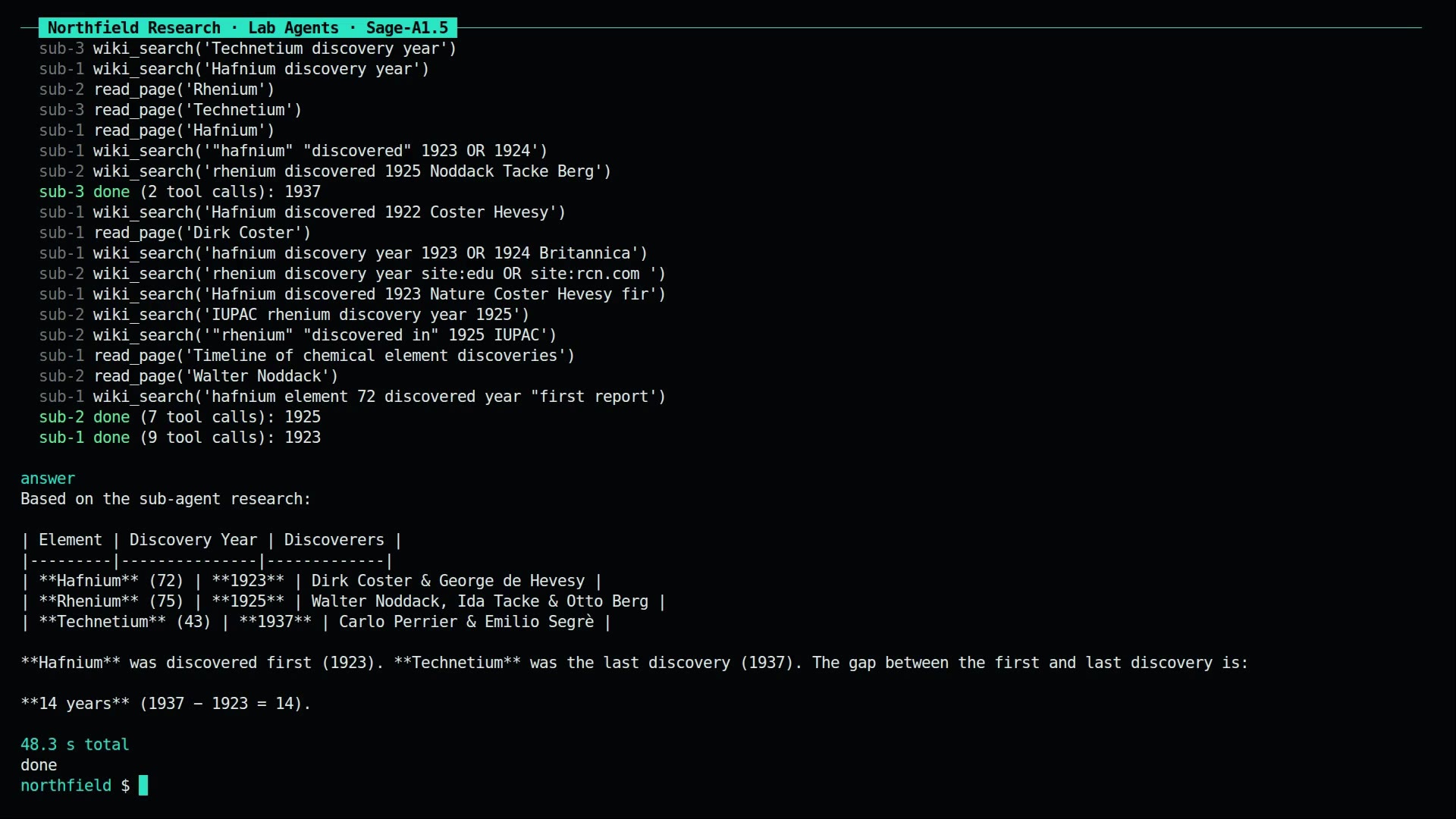
160.6 s, 1920x1080. It includes a cut of the authors' Mac llama.cpp demo, credited to the Sage-A1.5 team, and their benchmark table, attributed and marked as not reproduced by us.
Sources
- Model card, BF16: https://huggingface.co/InternScience/Sage-A1.5
- Model card, Q4_K_M GGUF: https://huggingface.co/InternScience/Sage-A1.5-Q4_K_M-GGUF
- Paper: https://arxiv.org/abs/2610.28578
- Project page: https://alpha-innovator.github.io/Sage-A1.5/
- Predecessor: https://github.com/InternScience/Agents-A1
- SDK example: https://github.com/inferencekey/inferencekey-sdk/tree/main/examples/sage-a1-5-research-agent-llamacpp-private-nvidia
- Where we spotted it: https://www.youtube.com/watch?v=EfyQOAJjx1A