Unlimited OCR 2 reads a 59-page PDF in one request on a 16 GB card, once its page tiles are off
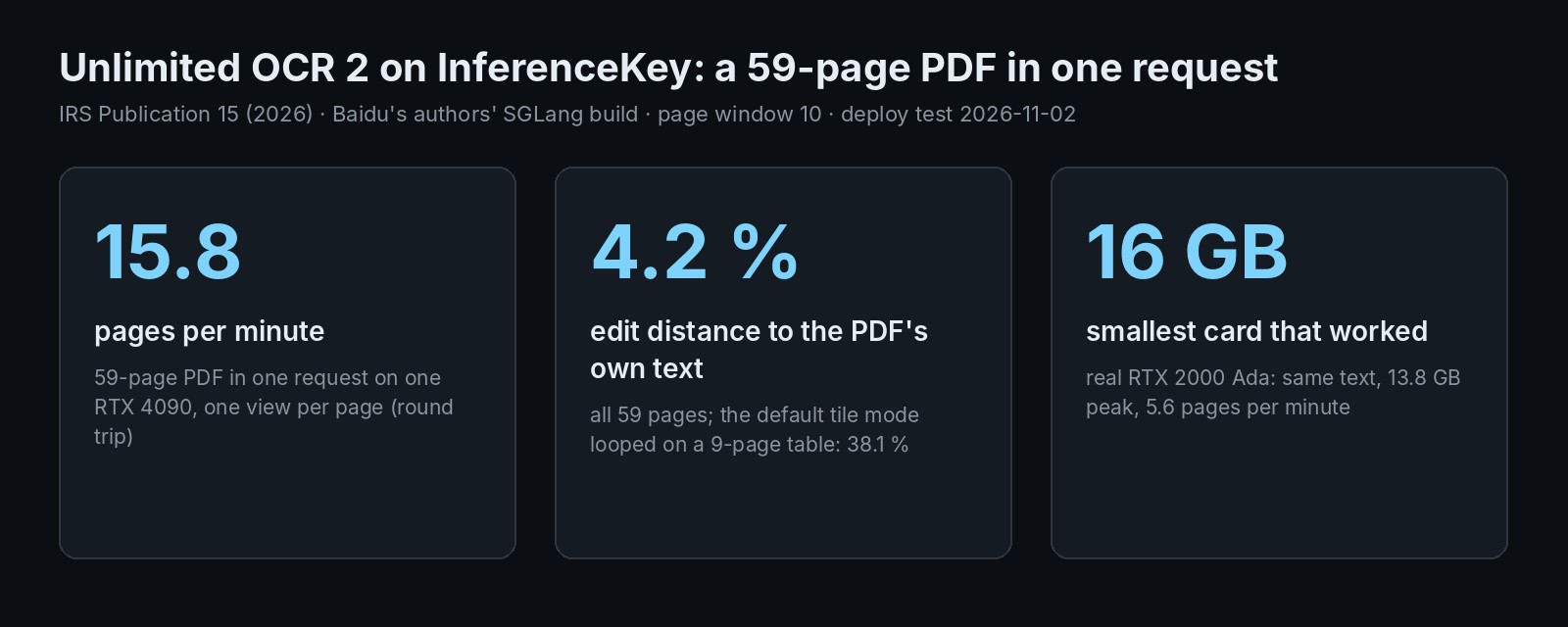
Baidu's MIT document parser on a 59-page guide in one request: 15.8 pages/min, 4.2% off the PDF's text, same quality on a 16 GB card.
Page 46 of the IRS employer's tax guide starts a table that runs to page 52. A pipeline that reads one page at a time hands it back in seven unlinked pieces. Unlimited OCR 2, an MIT-licensed document parser from Baidu, takes the whole PDF in one request. We ran all 59 pages of the guide on one RTX 4090. With one image setting changed, it read the whole guide in 3 min 44 s, 4.2% off the PDF's own text. It also split the table, but labelled most joins. A real 16 GB card gave the same quality. The code we used is at the end.
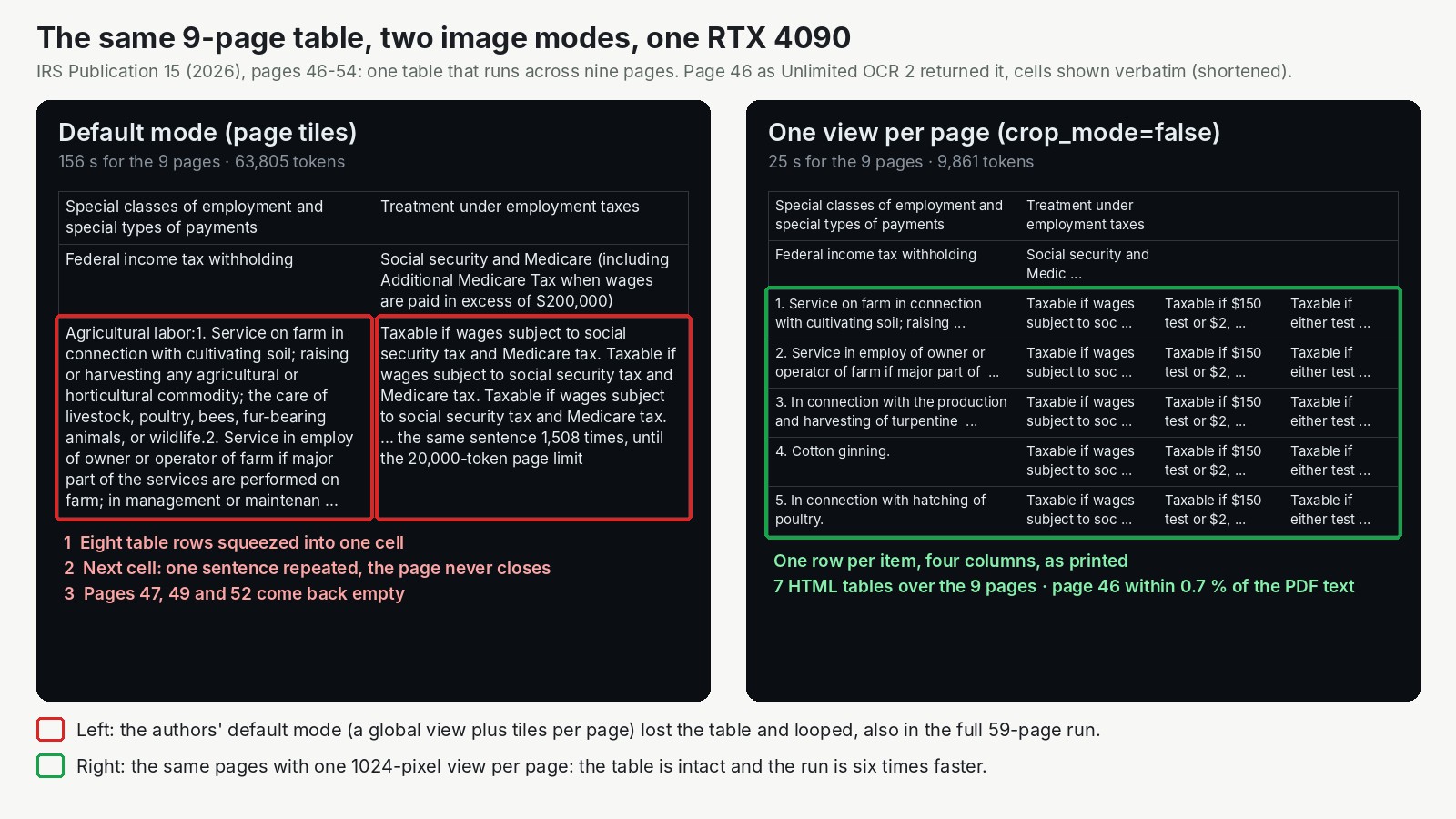
Pages 46 to 54 sent alone, same card, two ways of showing the model each page. On the left, the authors' default. On the right, one setting changed: six times faster, and no repeated sentence.
The difference between the two sides is how each page is shown to the model. The authors' default cuts every page into tiles, zoomed-in pieces, on top of one overview picture, which gives the model more detail for small print. The other mode, switched on with crop_mode=false, shows only the overview picture. Almost every result below turns on that choice.
What Baidu built: a reader that keeps only a few pages in view
As the authors put it, Unlimited OCR 2 reads a long document the way a person copies a book by hand. It looks at the page it is writing out, not at every page that came before. That is what lets it take a long document in one go without its memory growing page after page.
This matters because of how a page-by-page pipeline handles a PDF. It splits the file into pages, reads each one alone and glues the text back together. Anything that crosses a page break gets cut. A table that spans two pages becomes two tables, and the second one has no header. The AI Search channel, where we spotted the model in its 1 November news video, put it plainly: per-page systems "lose context when the content continues onto the next page".
Reading several pages together is not new. Baidu's first version, Unlimited OCR, already did it, up to 40 pages. Version 2 aims at hundreds. Showing the model every page at once gets expensive fast. Each page is a picture, and pictures turn into a lot of input. Without a trick, every new word the model writes has to look back over all of it. The model card gives Baidu's trick. The model keeps only a fixed number of image pieces in view, however many pages there are (the card's example is 512). So, by the authors' account, each new word costs about the same time and memory on page 3 as on page 300.
On top of that, pages go in windows. A page window is the group of pages the model holds in view while it writes, and memory for pages outside it is freed. The serving recipe uses 10. Smaller windows use less memory, and the authors' notes say they can hurt the merging of content across pages. The model itself is small: 6.7 GB on disk.
The credit belongs to Baidu's team. Shu Wei, Jingjing Wu and Qunyi Xie lead the paper as core contributors, with eleven more contributors. They built on their first Unlimited OCR and on DeepSeek-OCR, whose parts the model reuses. So part of the credit goes to the DeepSeek-OCR team. Baidu released the weights and code under MIT, which allows commercial use. They also shipped a patched build of SGLang, the open serving framework, with a full recipe, inside the model repository. Credit for the server itself goes to the SGLang project. Our part was the rest: packaging that server behind an API, running it on a real document, checking the output and checking that a 16 GB card does the job.
The test: a 59-page tax guide with a table that runs across seven pages
We wanted a document that punishes page-by-page reading. IRS Publication 15 (2026), the US "Employer's Tax Guide", fits. It is 59 pages, public domain, and has paragraphs that cross page breaks on most pages. Section 15 holds one table that runs from page 46 to page 52.
We ran the authors' SGLang build, unchanged, on one RTX 4090, a 24 GB gaming card. Each run sent the whole PDF in one request and streamed the answer back.
To score the output we needed a reference nobody typed by hand. The PDF carries its own text layer, so we compared the model's text with it, character by character. The score is the share of characters you would have to change to turn one into the other: 0% is identical. It is strict about reading order, so a sidebar read before its paragraph costs points even when every word is right. Why not just dump that text layer? It gives a free, exact reference for scoring, but no reading order, block positions, HTML tables or cross-page tags. The model adds those.
This was one document, in English, read once per setting, one request at a time. It had clean digital pages only, so scans, where the text layer is missing, are untested. Our largest document was 59 pages, not the hundreds the authors target, so anything we say about a 300-page book is their claim, not our measurement. Other untested cases are listed in the appendix.
Results: 59 pages in under 4 minutes, 4.2% off the PDF's text, tiles off
One view per page won on both speed and accuracy.
| 59-page PDF, one request, RTX 4090 | Page tiles (authors' default, memory share 0.7) | One view per page (memory share 0.5) |
|---|---|---|
| Whole document | 6 min 45 s, 8.7 pages/min | 3 min 44 s, 15.8 pages/min |
| Distance to the PDF's own text | 38.1% (2.4% without pages 46 to 54) | 4.2% (2.45% without pages 46 to 54) |
| Table pages 46 to 52 | loops on pages 46 and 51, pages 47, 50 and 52 empty | HTML tables, five pages 20% to 46% off |
The one-view run also used a smaller share of the card's memory. The share made no speed difference in tile mode, but we did not check that in this mode. Speed held steady from the first page to the last.
On running text both modes were good. Leave the table pages out and both were about 2.4% off the PDF's text, two or three characters in every hundred. The faster mode's 4.2% comes mostly from the table pages: five of its seven pages over 20% off are table pages. The other two are the cover, full of links, and a page read out of order.
The model tags each paragraph cut by a page break as continuing on the next page, 31 to 34 per run here. The table came back in seven pieces, one per page, like a page-by-page parser would give. The difference is the tags: five of the six joins carry one. The join on page 49 has none. Those tags are what a program needs to stitch the table back into one.
Where it breaks: tiles on a long table, and one window for the whole document
The default mode failed on the one table that mattered. On page 46, it squeezed eight table rows into a single cell. In the next cell it wrote one sentence, "Taxable if wages subject to social security tax and Medicare tax", 1,508 times. It was a looper pedal nobody switched off, cut only by the cap of 20,000 tokens per page (tokens are the word pieces a model reads and writes). Pages 47, 50 and 52 came back empty. On page 51 it looped again, writing "Exempt." 3,088 times. On page 53, just past the table, it wrote 6,658 empty table cells. It recovered on page 55. The authors' own guard against repetition was on. We sent pages 46 to 54 again on their own and got the same loop on page 46. So this is how the model behaves on this table in this mode, not a memory accident.
In tile mode, one window for the whole document did not fit. The serving recipe has a switch that drops the windows and gives the model all 59 pages at once. With tiles, the page images alone took about 89,000 of the 131,072 tokens the model can handle at once. That left too little room for the answer, and it stopped in the middle of page 27. The server does not raise an error here. With the recipe's settings it shortens the answer silently, so you only notice if you count the pages. On the 26 pages it did write, quality matched the windowed run, 3.67% off in both.
The authors name one more limit in their paper. Because the model looks only at a few pages at a time, it does not hold the whole document in mind. That limits how well it understands document-wide structure, such as which heading sits under which.
Which GPU: a real 16 GB card read the whole guide in about 10 and a half minutes
A real 16 GB card worked: an RTX 2000 Ada, a small 70-watt workstation card, with one view per page. Its quality matched the 4090's.
The server books a fixed share of whatever card it finds, 70% by default, and fills it with working memory. So the 19.4 GB on the 4090 is not what the model needs. On a bigger card it simply books more. To emulate a 16 GB card, we told the server on the 4090 to book half of it. The share did not change speed: tiles ran at 8.7 pages a minute at both 70% and 50%.
| Card | How it ran | Peak memory | Speed | Output |
|---|---|---|---|---|
| RTX 4090 24 GB, real | tiles, 70% of the card | 19.4 GB | 8.7 pages/min | loops on the table, like every tile run that covered it |
| 16 GB limit on the 4090, emulated | tiles, 50% of the card | 14.7 GB | 8.7 pages/min | same loop, near-identical text |
| 16 GB limit on the 4090, emulated | one view per page, 50% of the card | 15.2 GB | 15.8 pages/min | 4.18% off |
| RTX 2000 Ada 16 GB, real | one view per page, defaults (70%) | 13.8 GB | 5.6 pages/min | 4.23% off |
| RTX 2000 Ada 16 GB, real | tiles, pages 1 to 10 only | 13.8 GB | 5.0 pages/min round trip | identical to the 4090 on those pages |
The emulated rows show the memory fits, not how fast a small card is.
On InferenceKey: the authors' SGLang build behind an API, ready in 61 to 143 seconds with the files cached
On your own GPU you can run the exact server the authors use, unchanged, behind an API your app already knows how to call. InferenceKey has no ready-made support for this model, because it needs Baidu's patched SGLang build rather than the standard one. So we wrote a custom backend: a short Python file that InferenceKey installs and runs on your GPU machine. It downloads the weights at a fixed version and installs the authors' server from the model repository. Your app calls it the way it calls OpenAI's chat API, with a link to the PDF in the message, and gets the Markdown back as it is written.
A prep step had already downloaded the weights and installed the server. From there, the first start took 143 seconds, most of it the server preparing itself for the card. Restarts took 61 to 63 seconds, and the 16 GB card was ready in 96. On a machine with nothing cached, add about 70 seconds for the download and the install. The settings that move memory, the page window and the share of the card, are plain variables in the example. Options for a single document, such as a page range or crop_mode=false, go in the text of the message.
Two rough edges you will hit too:
- The published InferenceKey Python package predates this kind of backend. Installed the usual way, the backend fails to start. The workaround is to install our library straight from GitHub on the GPU machine, as the example explains. Status: open, waiting for the next package release.
- A PDF sent inside the request never reaches the GPU machine. The job is queued but never arrives, and the client gives up after 180 seconds. Send a link to the PDF instead, and the backend downloads it. Status: open, cause not found yet.
Should you use it? Yes for PDFs like this one, on a 16 GB card with tiles off
- If you parse long reports, manuals or contracts with tables and paragraphs that cross pages, it is worth running. One request per document gives you text, positions and tags across page breaks, under a license that allows commercial use.
- If your documents have long tables, set
crop_mode=falseand check the numbers on the table pages. - If you keep tiles on, keep the default 10-page windows and count the pages that come back.
- If your card is small, a 16 GB card is enough for a document like ours.
- If you need hundreds of pages, the authors' 100 to 300-page benchmark scores it 77, the next model 34 (their test, not ours). We tested 59 pages, so check a long one yourself.
To parse the IRS guide on your own NVIDIA GPU, publish the backend with python publish.py and run python main.py from the SDK example. You get the whole document as Markdown with page markers, HTML tables and timings. You need an InferenceKey project and an NVIDIA card with 16 GB or more. The example README lists the keys.
For engineers
Model and files
Model card, GitHub (baidu/Unlimited-OCR), paper (PDF in the model repo), MarathonDocBench.
- Repo
baidu/Unlimited-OCR-2, license MIT, not gated, shac14071b549f4fcab10909f3c4acc6a2edb366947, lastModified 2026-10-29T09:18:46Z. HF createdAt 2026-10-26T03:57:46Z; the card's release note says 2026/10/27. - Safetensors metadata: 3,343,978,240 BF16 parameters. Paper: MoE decoder, 3B total and 500M activated per token (a figure labels it "3B-MOE-A570M", Table 3 "3B-A0.5B").
- Two shards, 4,998,430,312 + 1,689,875,264 bytes (about 6.7 GB). The repo also ships the authors' SGLang wheel
wheel/sglang-0.5.20.dev13+g75b9b06b02-py3-none-any.whl(15.3 MB) and a 156 MBHarryPotter.gifreplay of a full-length book parsed in one request. Total repo storage 7.12 GB. We did not verify any FP8 or GGUF build. - Wheel requirements: torch 2.13.0 (cu130), flashinfer 0.6.18 cu13, sglang-kernel 0.4.7, transformers 5.12.1, so a CUDA 13 driver. Attention backend
unlimited_ocr_v2(Triton, PDL only on sm90+, so Ada works). - Card inference paths: Transformers (
infer_multi, tested with Python 3.10, torch 2.13.0, transformers 4.52.1 on an A800-80GB) and SGLang (recommended for serving) in a uv-built Python 3.10 venv withpymupdf==1.27.2.2andfastokens==0.3.2. - The GitHub
infer.pydefaults to gundam (tile) mode and falls back to base mode for multi-page documents whose token budget is short. It usesmax_model_len131072 for MPDocBench and 786432 for MarathonDocBench.
Mechanism (paper, sections 3.3 and 3.4)
Model card: SR-SWA "compresses text-visual attention interactions from ultra-long sequences down to a fixed-size set of working references (e.g., 512 tokens)", keeping per-step decoding latency and memory nearly constant regardless of document length.
SR-SWA (Sparse Reference Sliding Window Attention) = Page Gate (restricts visual attention to blocks of target pages, with a bounded alternating 0-1 page coordinate plus an intra-page coordinate) + Token Sieve (alpha-entmax router keeping the top-k blocks, trained end to end, no distillation loss), plus a fixed local window. The Unlimited-Horizon Decoding Paradigm splits the document into overlapping page chunks that share a boundary page whose KV is reused, and releases visual KV outside the active chunk. Training: 25 x 8 H800 nodes, global batch 1,600, max sequence 64K, initialized from Unlimited OCR v1, DeepEncoder frozen, MS-Swift. Section 3.2: the model inherits the backbone of Unlimited OCR (v1, which pushed multi-page parsing to tens of pages with a 40-page input limit) and uses DeepSeek-OCR as its foundation (DeepEncoder plus an MoE decoder).
Author list (paper section 8): core contributors Shu Wei, Jingjing Wu, Qunyi Xie; contributors Lingshu Zhang, Xiangcheng Du, Yannian Fu, Mengjie Wang, Zuyi Wang, Zhichao Liu, Yangliu Xu, Youyang Yin, Huanhuan Liu, YY, Yi Yang (Baidu ERNIE Team).
Authors' claims (not reproduced by us)
- 7.0x and 5.6x per-step speedups over Full Attention and R-SWA at hundred-page scale (latency figure in Gundam mode, batch 3, 1,024 tokens per page).
- Table 4 (MarathonDocBench): peak KV memory at B=1 47.00 GB (standard) vs 1.77 GB (unlimited-horizon); throughput at B=16 360 vs 1,315 TPS.
- MarathonDocBench, the authors' own benchmark released with the model, overall (100 documents of 100 to 300 pages, about 18k pages, mixed Chinese and English): Unlimited OCR 2 77.06, Kimi-K3 33.74, Gemini-3.8-Flash 28.61, Qwen-3.8-Flash-Next 27.8, Gemini-3.1-Pro Preview 26.97, Qwen-3.8-Max 22.93, Minimax-M3 17.97, DeepSeek-4.1-Flash 12.34, GLM-5.3-Flash 7.51. Annotations Apache-2.0, images research-only.
- MPDocBench (up to 30 pages) overall: Unlimited-OCR 2 84.59, Qwen3.8-Max 78.30, Qwen-3.8-Flash-Next 77.36, Gemini-3.8-Flash 76.25, Gemini-3.1-Pro Preview 71.79, Unlimited-OCR v1 61.89. v1 is not on MarathonDocBench because of its 40-page input limit.
- Limitation (paper section 6): sparse attention does not preserve global document information, which limits document-level structure such as heading hierarchies. Training data diversity is limited.
Setup
- One RTX 4090 24 GB on our cloud (driver 595.91.07, CUDA 13.2, 450 W, 100 GB container disk) for the main runs, and one RTX 2000 Ada Generation 16 GB (70 W, sm 8.9, same driver) for the ladder. Both registered as workers with a local InferenceKey manager. Production was never touched.
- Custom backend
unlimited-ocr-2(final version 0.1.2):setup()downloads the pinned revision, builds a Python 3.10 env with uv and the authors' wheel (about 60 s; the Transformers fallback was not needed), extracts the authors'DeepseekOCRNoRepeatNGramLogitProcessor, and startssglang.launch_serverwith the card's flags and env.chat_stream()takes a PDF link in the text (or an OpenAIfilepart, or images), renders pages with PyMuPDF at 300 dpi, builds"<PAGE><image>" * n + "Multi page parsing."and streams one request. - Request parameters (from the card): temperature 0,
max_tokens = 8000 x pages, n-gram guardngram_size 35,window_size 1024(multi-page),page_token_id 128827,eos_token_id 1,max_page_tokens 20000. - Server flags:
--mem-fraction-static 0.7,--max-running-requests 8(card: 64),--max-prefill-tokens 2048,--enable-custom-logit-processor,--allow-auto-truncate,--disable-radix-cache, CUDA graph prefill buckets sized tomax_prefill_tokens. Env:SGLANG_UOCR_EANABLE_DOC_LIMIT=1(the authors' spelling; 0 = one window for the whole document),SGLANG_UOCR_DOC_GUNDAM_PAGE_WINDOW=10,SGLANG_UOCR_DOC_BASE_PAGE_WINDOW=10,SGLANG_UOCR_MAX_PAGE_TOKENS=20000,SGLANG_OPT_UOCR_SAM_REL_POS_BIAS_MB=64(the default 512 "allows a single ~462 MiB allocation and can OOM"),SGLANG_UOCR_SHM_WRAP_MODEL_DATA=1,PYTORCH_CUDA_ALLOC_CONF=expandable_segments:True. - Card memory notes: 0.75 leaves too little headroom at 32+ concurrent requests, 0.7 is stable;
--max-prefill-tokensdrives a temporary tensor of about[tokens, context/32], so 4096 to 2048 halves that peak; the largest prefill CUDA graph bucket must equalmax-prefill-tokens. - Ground truth: the PDF text layer (PyMuPDF). NED = Levenshtein / max length, after lowercasing and removing markup, layout tags and whitespace.
Time to ready
| Phase | Time |
|---|---|
| First platform start, RTX 4090 (weights and env cached by a prep step) | 143 s, of which SGLang start 105.1 s incl. CUDA graph capture (prefill graphs 23.5 s) |
| Weights download / uv env with the wheel | 10 s / 60 s (8 s / 51 s on the RTX 2000 Ada) |
| Restarts after redeploys, RTX 4090 | 61 to 63 s |
| RTX 2000 Ada | 96 s (scheduler 48.4 s, CUDA graphs prefill 18.8 s + decode 16.6 s) |
| KV pool | 160,640 tokens at share 0.7 and 83,840 at 0.5 on the 4090; 72,096 on the RTX 2000 Ada |
| Render of 59 pages at 300 dpi | 16.5 to 17.0 s on the GPU machine's CPU |
Runs on the RTX 4090
Backend = the backend's own done: line. Client = round trip through the platform. First-token times are backend-side; through the platform they were 27.6 s (tiles), 21.2 s (one view) and 71.2 s (one window).
| Run | Mode | Pages | Backend s | First text s | Pages/min backend / client | Prompt / output tokens | Peak MiB | Result |
|---|---|---|---|---|---|---|---|---|
| w10-full | tiles, window 10, share 0.7 | 59 | 387.87 | 10.53 | 9.1 / 8.7 (404.91 s) | 97,621 / 160,254 | 19,386 | loop on 46, again on 51 ('Exempt.' x3,088) and 53 (6,658 empty cells); 47, 50, 52, 54 empty, 48 a 412-char fragment; NED 38.06%, 2.38% without 46-54 |
| base-w10-full | one view, window 10, share 0.5 | 59 | 206.01 | 3.34 | 17.2 / 15.8 (223.83 s) | 18,277 / 89,477 | 15,212 | NED 4.18%, 2.45% without 46-54; pages over 20%: 1 (30.0%), 8 (77.6%), 46 (45.2%), 47 (23.0%), 48 (26.9%), 49 (45.5%), 51 (20.4%); 16 tables, 34 cross_text, 5 append_table |
| whole-full | tiles, one window | 59 asked, 27 written | 147.46 | 50.28 | (168.37 s client) | 89,331 / 41,739 | 18,058 | truncated mid page 27 |
| cap16-w10 | tiles, window 10, share 0.5 | 59 | 386.56 | 9.86 | 9.2 / 8.7 (407.62 s) | 97,621 / 160,242 | 14,670 | same as w10-full |
| table-gundam | tiles | 46-54 | 156.14 | 8.27 | 3.5 / 3.4 | 13,631 / 63,805 | 14,670 | same loop on 46, 47/49/52 empty |
| table-base | one view | 46-54 | 25.04 | 2.84 | 21.6 / 18.7 | 2,471 / 9,861 | 15,150 | 7 tables, doc NED 11.0%, page 46 0.68%, pages 48/49/51 26-37%; 5 append_table |
- Decode about 430 to 435 tok/s in tile mode and about 445 tok/s in base mode at batch 1, flat across the document. Window release is visible in the SGLang log (
#token29,248 to 19,936 between windows). - Whole document vs windows on pages 1-26 (tile mode): NED 3.67% for both. 4 of 26 pages byte-identical, the rest differ in quotes and small wording.
- One window, exact server message:
Requested token count (89331 input + 472000 new) exceeds the model's context length (131072 tokens). Truncating max_new_tokens.The answer stops without an error because of--allow-auto-truncate. - The
append_tabletags were counted, not followed: the table comes back as 7 pieces on pages 46-52, and only 5 of the 6 joins are tagged (pages 47, 48, 50, 51, 52; the table on page 49 has none, in both base runs). We did not stitch the table pieces into one table or check that they join correctly. - Output format:
<PAGE>per page,<BLOCK>type[x1, y1, x2, y2]<FORK>textper block on a 1000 x 1000 grid, tables as HTML. Cross-page links:cross_text/append_text(31 to 34 in 59 pages),append_tableon table continuations.
Page 46, one view per page (first lines):
<BLOCK>title<LEVEL1>[66, 41, 895, 66]<FORK>15. Special Rules for Various Types of Services and Payments
<BLOCK>table[64, 104, 936, 884]<FORK><table><tr><td rowspan="2">Special classes of employment and special types of payments</td><td colspan="3">Treatment under employment taxes</td></tr>...<tr><td>1. Service on farm in connection with cultivating soil; ...</td><td>Taxable if wages subject to social security tax and Medicare tax.</td><td>Taxable if $150 test or $2,500 test in section 9 is met.</td><td>Taxable if either test in section 14 is met.</td></tr>
The same page in tile mode:
<td>Agricultural labor:1. Service on farm ... 8. Handling or processing commodities ...</td><td>Taxable if wages subject to social security tax and Medicare tax.Taxable if wages subject to social security tax and Medicare tax. ... (x1,508)
VRAM ladder
| GPU or cap | Config | Peak VRAM | Time for the 59-page PDF | Output OK | Real or emulated |
|---|---|---|---|---|---|
| RTX 4090 24 GB | tiles, share 0.7, window 10 | 19,386 MiB | 387.9 s backend, 8.7 pages/min | yes (table loop is model behaviour, same on every tile run that covered pages 46-54) | real |
| RTX 4090 24 GB | tiles, one window | 18,058 MiB | 147.5 s, stopped at page 27 | no (context limit) | real |
| 16 GB cap on the 4090 | tiles, share 0.5, window 10 | 14,670 MiB | 386.6 s, 8.7 pages/min | yes, same loop; 13 pages byte-identical, rest tiny diffs | emulated |
| 16 GB cap on the 4090 | one view, share 0.5, window 10 | 15,212 MiB | 206.0 s, 15.8 pages/min | yes, 4.18% | emulated |
| RTX 2000 Ada 16 GB (70 W) | one view, defaults (share 0.7, window 10) | 13,819 MiB | 614.7 s backend, 634.1 s round trip, 5.6 pages/min | yes, 4.23% | real |
| RTX 2000 Ada 16 GB | tiles, defaults, pages 1-10 | 13,819 MiB | 116.7 s backend (5.1 pages/min), 120.5 s client (5.0) | yes, identical to the 4090 | real |
About 147 tok/s on the RTX 2000 Ada against about 440 on the 4090. Not tried: 12 GB or smaller, tiles over all 59 pages on a real 16 GB card, concurrency above 1, a page-by-page parser on the same guide, stitching the table pieces back together, heading levels, the Transformers path, FP8 or GGUF builds, a 100-page document, one window for the whole document with crop_mode=false (its 59-page prompt was 18,277 tokens against 89,331 with tiles, so it may fit the 131,072 context).
Step by step with the SDK example
Example on GitHub, commit 944a21f on inferencekey-sdk main. Files: backend.py, publish.py (api="openai-chat"), main.py, requirements.txt, .env.example, README.md.
cp .env.example .env    # INFERENCEKEY_SDK_TOKEN, INFERENCEKEY_API_KEY, INFERENCEKEY_PROJECT, IK_WORKER_ID,
                        # plus INFERENCEKEY_TENANT_ID and INFERENCEKEY_USER_TOKEN (dashboard session token) for the upload
pip install -r requirements.txt
python publish.py       # once: builds dist/*.tar.gz and uploads it (only if TENANT_ID and USER_TOKEN are set)
IK_PDF=https://www.irs.gov/pub/irs-pdf/p15.pdf python main.py
-
Without
INFERENCEKEY_TENANT_IDandINFERENCEKEY_USER_TOKEN,publish.pyonly buildsdist/*.tar.gz. Upload it by hand from Dashboard -> Custom backends. -
On the worker, set
INFERENCEKEY_SDK_PYTHON_DIRto a checkout ofbindings/python/pythonfrom inferencekey-sdkmainbefore deploying. The PyPI package (0.260725.739) makes the backend fail at import (see Problems, 1). -
IK_WORKER_IDmust be an NVIDIA worker with 16 GB or more and a CUDA 13 driver. Placement is private with aFIXEDexecution policy. We used a 100 GB container disk. -
main.pyensures the workload, waits until ready, parsesIK_PDF, savesoutputs/<name>.mdandoutputs/<name>.json(pages, seconds, pages per minute, time to first text) and deletes the workload unlessIK_KEEP_ALIVE=1. -
main.pydefaults toIK_CROP_MODE=falseafter this test. The backend itself keeps the authors' default (crop_mode=true). OptionalIK_PAGES=1-20. -
Backend knobs:
UOCR_PAGE_WINDOW(10; 0 = one window),UOCR_MEM_FRACTION_STATIC(0.7),UOCR_MAX_RUNNING_REQUESTS(8),max_prefill_tokens2048,max_page_tokens20000, dpi 300. -
Endpoint:
{base}/endpoint/{project}/{workload}/v1/chat/completions,"stream": true. Options in the message text:"Parse this document: https://example.org/report.pdf pages 10-30 crop_mode=false dpi=200".
Problems
- PyPI SDK too old for chat custom backends. Installed with
pip install inferencekey, the backend fails at import.inferencekey0.260725.739 on PyPI has nochat()/chat_stream()for custom backends:cannot import name 'chat_completion' from 'inferencekey.backend'. Workaround: the SDK from GitHub on the worker's path (INFERENCEKEY_SDK_PYTHON_DIR). Open, needs a PyPI release. - Inline PDF did not reach the worker. A 1.7 MB PDF inline (2.2 MB of JSON) reached the job queue but never the worker, and the client ended at the 180 s first-token timeout. The route accepts 8 MiB. Workaround: send a link, the backend downloads it. Open, not bisected.
- Custom top-level chat fields dropped. The worker forwards only standard chat fields to a custom backend (
build_vllm_chat_stream_bodyinworker/src/jobs.rs). Workaround: options in the message text. Open. - Manifest without
api="openai-chat". The firstpublish.pyleft it out and streamed requests were refused. Fixed in the example (0.1.1). - SSE decoded as Latin-1 by
requests(no charset ontext/event-stream). Fixed inmain.pywithresp.encoding = "utf-8". - Tile mode loops on the 7-page table (pages 46-52) with the authors' n-gram guard on. Model behaviour, reported as is.
- One window for the whole document truncates silently at this length (see above).
- The panel's Access pill showed "No access" for the workload while calls worked. Cosmetic.
Demo video
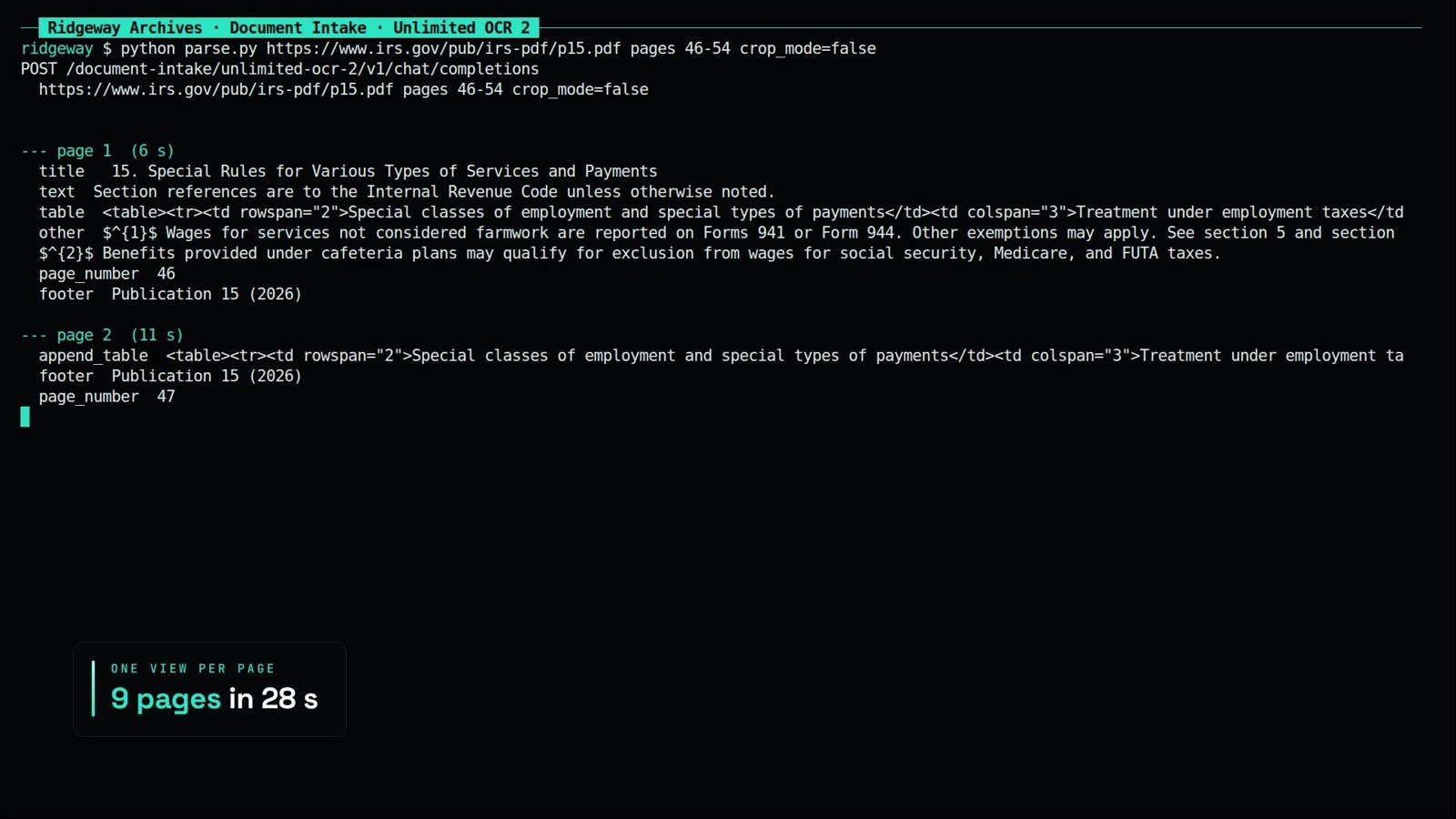
3 minutes 10 seconds. The panel tester parses pages 7 and 8 (first token 3,268 ms, total 10.02 s), then the terminal parses pages 46 to 54 with one view per page (9 pages in 28 s, 19.3 pages/min). It also shows the authors' replay of a whole book parsed in one request and their benchmark figures, labelled as theirs.
Sources
- Model card: https://huggingface.co/baidu/Unlimited-OCR-2
- Code: https://github.com/baidu/Unlimited-OCR
- Paper: https://huggingface.co/baidu/Unlimited-OCR-2/blob/main/Unlimited-OCR-2.pdf
- MarathonDocBench: https://huggingface.co/datasets/baidu/MarathonDocBench
- Test document: https://www.irs.gov/pub/irs-pdf/p15.pdf
- Where we spotted it: AI Search, 1 November 2026, chapter "Unlimited OCR 2" at 05:48, https://www.youtube.com/watch?v=IGICYFyP_EI
- Our SDK example: https://github.com/inferencekey/inferencekey-sdk/tree/main/examples/unlimited-ocr-2-pdf-parsing-custom-backend-private-nvidia