RelayVSR upscales a 3-second 480p clip 4x in 10 seconds of GPU time on one 24 GB card
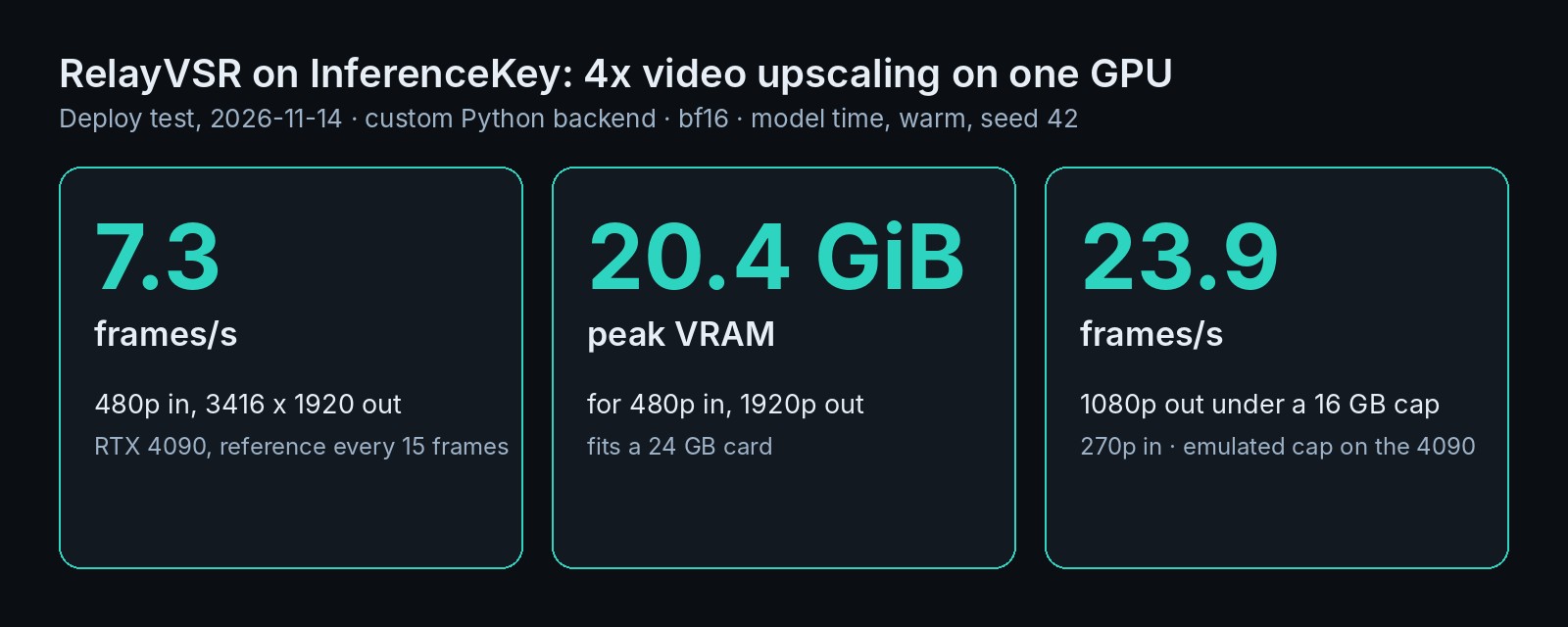
RelayVSR upscaled a 480p clip 4x at 7.3 frames/s of GPU time on one RTX 4090, peaking at 20.4 GiB. An emulated 16 GB cap fit only 1080p output.
RelayVSR upscales video 4x. A large generative model draws only a few detailed keyframes, and a small network carries that detail to the frames in between. We ran it on one RTX 4090 on our cloud (InferenceKey Cloud). A 3-second 480p film clip came back at 3416 x 1920 after about 10 seconds of GPU work, using 20.4 GiB (about 22 GB) of the card's 24 GB memory. End to end the request took 26 to 41 seconds, mostly CPU video encoding (see below). A real RTX 3090 did the same job at about half the speed. If you run your own GPUs, that puts 4x video upscaling on a 24 GB gaming card instead of a datacenter one. Our SDK example deploys it on your own card.
Clip: Tears of Steel (CC) Blender Foundation, mango.blender.org, CC BY 3.0.
| One RTX 4090, 3-second clip | Frames per second of GPU time | Peak GPU memory |
|---|---|---|
| 480p in, 3416 x 1920 out, keyframe every 15 frames | 7.33 | 20.4 GiB |
| Same, keyframe every 31 frames | 9.10 | 20.4 GiB |
| 270p in, 1920 x 1080 out, keyframe every 15 frames | 23.9 | 13.1 GiB (about 14 GB), fits a 16 GB cap (emulated) |
Six expensive frames out of 72: how RelayVSR splits the work
RelayVSR is fast because most frames never touch the big model. Think of how hand-drawn animation was made. A lead animator draws the key poses, and in-betweeners draw the frames that connect them.
RelayVSR does the same with two models. The lead is a reference generator adapted from Wan2.2, an open video model from Wan-AI. It draws a detailed version of one frame every 15, the keyframes. The in-betweener is a small network of the authors' own design, 32 million parameters against the big model's 5 billion. It upscales every single frame, looking at the low-resolution video and at the detailed keyframes on both sides. In our 72-frame clip the big model drew 6 keyframes, and the small network upscaled all 72.
That split is what makes one card enough. The authors compared it at 1080p on an A100, a datacenter card. RelayVSR reports 29.29 frames per second using 13.82 GB of GPU memory. The fastest rival in their table reports 23.48 using 31.36 GB, and two heavier AI upscalers manage under one frame per second in 41 to 74 GB. In their user study, people rated RelayVSR's overall quality above that rival, well above the heavy two, and about level with FlashVSR, which is nearly four times slower in their table. One of the heavy two still stayed truer to the source and flickered less. Those are their numbers, not ours.
The work belongs to Xijun Wang, Xin Li, Zirui Lang, Suhang Yao, Haoran Li and Zhibo Chen, at the University of Science and Technology of China. They published the paper on 29 September 2026, the code on GitHub and the weights on Hugging Face, last updated on 13 November. Wan2.2 and both RelayVSR weight files are Apache-2.0, an open license that allows commercial use. The download is about 10.2 GB. We spotted it in the AI Search news video of 8 November. Our part: the backend that serves it as an API, the speed tests and the smallest-card test.
Near-4K in 10 seconds of GPU time for a 3-second clip, and 1080p about as fast as it plays
On one RTX 4090, RelayVSR turned 3 seconds of 480p film into 3416 x 1920 (we call that 1920p below) in about 10 seconds of GPU time. That is roughly three times slower than the film plays. From a 270p clip to 1080p, the same 3 seconds took about 3 seconds of GPU time (23.9 frames per second).
The clip was 72 frames of Tears of Steel, the Blender Foundation's open short film, scaled down to 854 x 480. It shows a bearded man in a plaid jacket turning his head. We also ran the authors' own 360p demo clip for 1440p output. Every number here is the two models' GPU time, as the authors measure it, after one warm-up clip, with one request at a time on an otherwise idle card. We did not test concurrent clips.
| RTX 4090, keyframe every 15 frames | Output | Frames per second | Peak memory |
|---|---|---|---|
| 480p in | 3416 x 1920 | 7.33 | 20.4 GiB |
| 360p in (authors' clip) | 2496 x 1440 | 12.27 | 15.5 GiB |
| 270p in | 1920 x 1080 | 23.85 | 13.1 GiB |
At 1080p the 4090 reached about 80% of the authors' A100 figure, at the same interval and output size on a shorter clip.
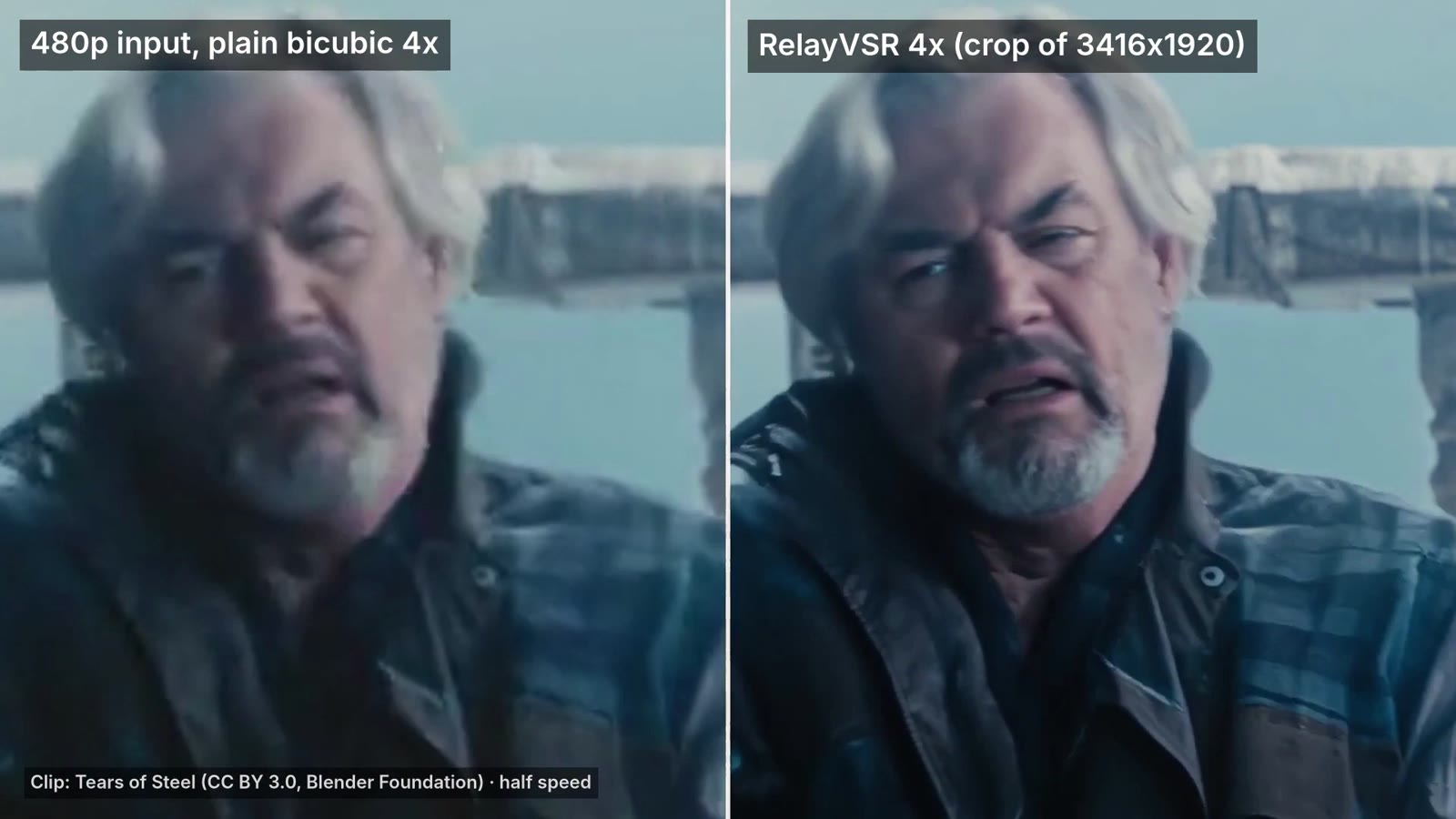
The output is clearly sharper than plain bicubic 4x upscaling, the standard resize filter. Faces, hair, beard and the fabric of the jacket gain convincing detail. The split-screen sample shows it at half speed.
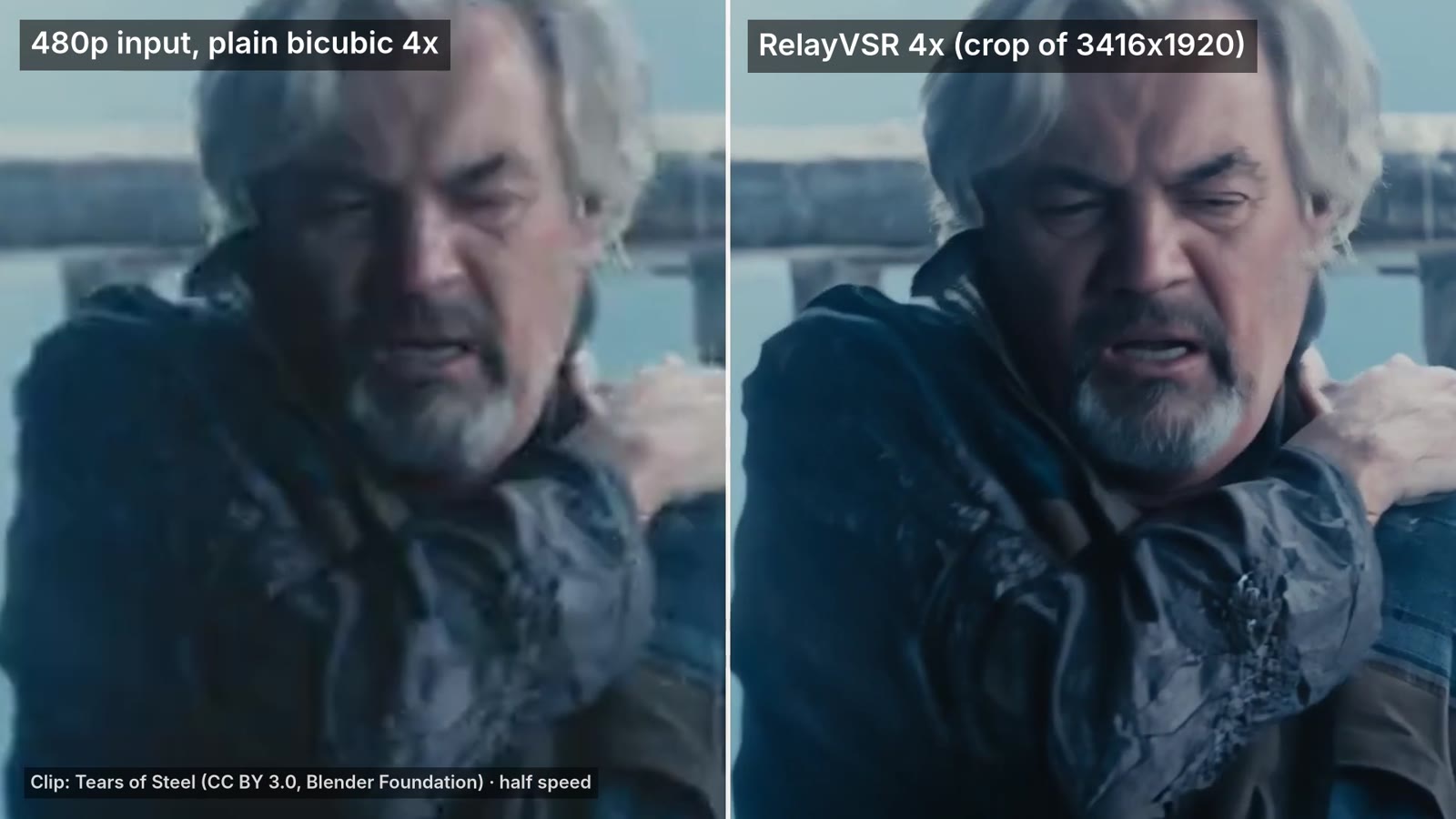
This is a visual check on one clip, not a quality benchmark: we looked at still frames and compared only against bicubic. The extra detail is generated, plausible rather than recovered, so check it before you use it where fidelity matters. The input was a clean HD film scaled down, so real old or damaged footage is untested.
A keyframe every 31 frames is a quarter faster, and softer on fast motion
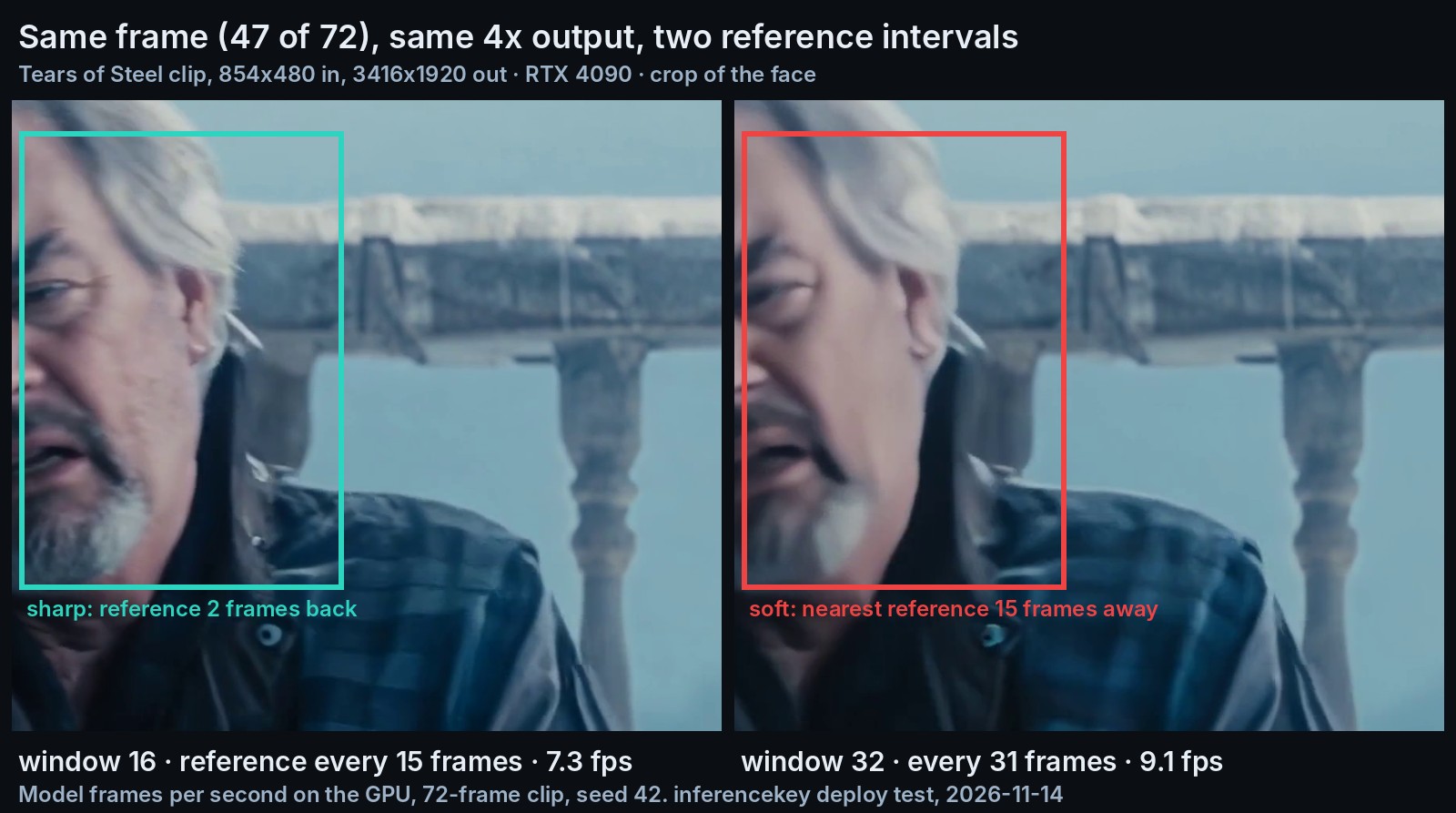
Spacing the keyframes twice as far apart cut the 3-second clip from about 10 to about 8 seconds of GPU time (7.33 to 9.10 frames per second). The cost shows up on motion. It is one setting per request: a keyframe every 15 frames by default, or every 31.
Look at frame 47 in the image at the top. With the default, the last keyframe was 2 frames earlier, and the face is sharp. With a keyframe every 31 frames, the nearest one is 15 frames away, in the middle of a head turn, and the face goes soft. The in-betweener carried the detail as far as it could, and on a moving face 15 frames was too far. At frame 38, 7 frames from a keyframe in both modes, the two outputs look alike.
From this one clip, our guess is that slower scenes can take the longer interval, while fast motion and faces should keep the default.
Which GPU: 24 GB for 480p input, a 16 GB budget only for 1080p output
The smallest real card that worked was a 24 GB one. Both the RTX 4090 and the RTX 3090 upscaled 480p to 3416 x 1920. The 3090 is the older, cheaper card and ran at about half the speed: 3.76 frames per second, 19 seconds of GPU time for the 3-second clip. At 1080p output it took about 7 seconds for the clip (10.69 frames/s).
Smaller budgets we could only emulate. We tried to get a real 16 GB card on our cloud, and every 16 GB option we tried was out of stock. So we capped how much of the 4090's memory the model could use. A 15.2 GiB cap stands in for a 16 GB card, and 11.2 GiB for a 12 GB one (a GiB is a slightly larger gigabyte, about 1.07 GB). The authors' code has no switch to move parts of the model off the GPU, so the only lever was the size of the input.
| Card or memory budget (budgets are caps on the 4090) | Input to output | Result |
|---|---|---|
| RTX 3090 24 GB, real card | 480p to 1920p | 3.76 frames/s |
| 16 GB budget | 480p to 1920p | out of memory |
| 16 GB budget | 360p to 1440p | out of memory |
| 16 GB budget | 270p to 1080p | fits, same output as uncapped |
| 12 GB budget | 270p to 1080p | out of memory |
Nothing fit the 12 GB cap: the big model alone takes 9.6 GiB, leaving too little for the frames.
What we did not try: smaller number formats that save memory, and clips longer than 72 frames. 1440p peaked at 15.5 GiB, over our cap but under a 16 GB card's total, so whether it fits a real one is open.
On InferenceKey: ready in 71 seconds, and the GPU is not the slow part
The card is yours by the hour, and the model was serving 71.2 seconds after we asked for it. Those seconds cover building the Python environment, loading 10.2 GB of weights onto the GPU and one short warm-up clip, with the weights already staged on the machine's local disk. On the 3090 the same path took 165.8 seconds, slowed by that machine's downloads. This was a local copy of our stack, not the hosted service.
Nothing built in serves a video upscaler, so we wrote a custom backend. It is a small Python file that tells the platform how to load the model and answer requests. It runs a fixed version of the authors' own code, with their settings. You send the clip inside a standard API request, and the answer carries the 4x video and its timings.
The problem you will hit is time on the CPU, not the GPU. A 72-frame clip at 1920p took 26 to 41 seconds from request to answer, for 8 to 10 seconds of GPU work. The rest is compressing 72 large frames into an MP4 on the processor. The answer also has to fit in one 8 MB message, so a 1920p clip gets compressed twice. At 1080p it fits on the first try, and the whole round trip took 6.4 to 7.2 seconds. Status: open. It comes from returning the video inside the answer. The example's README says to send long videos in chunks of 2 to 3 seconds, and returning a download link instead would remove the second pass.
Should you use it? A 24 GB card, the default interval, short clips
- Upscaling 480p to 1920p: a 24 GB card, a 4090 or, at half the speed, a 3090.
- 1080p output from low-resolution clips: a 16 GB budget fit (emulated).
- Fast motion and faces: keep a keyframe every 15 frames.
- Slow scenes, where speed matters most: every 31 frames buys about a quarter more speed.
- A 12 GB budget: nothing fit our emulated cap.
- Audio: it is not copied, so put it back yourself.
To upscale your own clip on your own GPU, run python main.py my-clip.mp4 from the RelayVSR SDK example. It needs a 24 GB NVIDIA card and about 25 GB of disk, and writes both keyframe intervals to outputs/.
For engineers
Credits
- Xijun Wang, Xin Li, Zirui Lang, Suhang Yao, Haoran Li and Zhibo Chen (University of Science and Technology of China): RelayVSR, the paper "RelayVSR: Large-Small Model Collaboration for Efficient Real-World Video Super-Resolution" (arXiv 2609.37850, submitted 29 Sep 2026), the weights (Apache-2.0), the code with
inference.pyandrefvsr_inference, and the project page. - Wan-AI: Wan2.2-TI2V-5B (Apache-2.0), the base of the reference generator.
- FlashVSR (OpenImagingLab, Zhuang et al., 2026): a baseline in the paper and acknowledged in the authors' README. The paper names the small network a Dual-Memory Video Transformer of the authors' design; in code its class is
FlashVSRConditionNet, described as "FlashDecoder-style streaming VSR with configurable persistent conditions" (checkpointflash.safetensors). - Hugging Face Diffusers: diffusers (pinned at 0.37.1), acknowledged by the authors.
- Blender Foundation: Tears of Steel (CC) Blender Foundation | mango.blender.org, CC BY 3.0, our test clip.
- AI Search: where we spotted it (AI NEWS, 2026-11-08, chapter at 02:32).
- Our part: the custom backend, the deployment through the platform, the timings, the memory ladder, the visual checks, the SDK example and the demo video.
Model and method
kopper/RelayVSR: sha751954dc8adf34aa1d636a39fc548b9089703c85, lastModified 2026-11-13T05:04:59Z, not gated, apache-2.0, base modelWan-AI/Wan2.2-TI2V-5B. Files:wan.safetensors10,066,399,024 B (reference generator adapted from Wan2.2-TI2V-5B, prompt embeddings included) andflash.safetensors127,759,784 B (the lightweight VSR network; the authors' default is "S, step 60000, EMA").- Mechanism, "Sparse Generative Relay": the large model produces reference latents only for sparse keyframes; a lightweight "Dual-Memory Video Transformer" super-resolves every frame from those references and the low-resolution video.
- In code,
CollaborativeFrameStream(refvsr_inference/runtime/streaming.py) runs the Wan generator once per endpoint (one step at timestep 1000, guidance 1.0) on the first and last frame of each window, with overlapping endpoints. The small network decodes each frame of the window conditioned on both endpoint latents (dual-endpoint), with a two-frame video attention window (current frame and one predecessor). A 72-frame clip gets 6 references with window 16 and 4 with window 32. - Paper Table 5 (the "32 million parameters" of the narrative are trainable parameters): Wan2.2-TI2V-5B with a rank-512 LoRA (1.32B trainable parameters, LoRA plus LR projection). Small network: 10 transformer blocks of width 512, video attention window of 2 frames (24 x 24 spatially), 31.9M trainable parameters.
- Training of the large model ends with Video-Aware Reference Optimization (VARO), a reinforcement-learning step with two rewards: a system-level reward on the video produced by the fixed small network, and a reference-level reward on decoded keyframe quality.
- Wan2.2-TI2V-5B card: 16 x 16 x 4 compression VAE, 720p at 24 fps, single consumer GPU such as a 4090 (at least 24 GB with offload flags).
- Authors' flags:
--window-sizedefault 16 ("Reference interval + 1"; it counts both ends, so keyframes fall every 15 frames, and window 32 gives one every 31; the README says to raise it "to let the small model process more intermediate frames"),--dtype bf16|fp16|fp32(default bf16),--max-frames,--fps,--seed 42,--start-frame,--cpu-threads 8. Output is exactly 4x the input, FPS preserved, audio not copied. Pins: torch 2.10.0 (cu128 extra), diffusers 0.37.1, accelerate 1.15.0, triton 3.6, av. Python 3.11 to 3.13, Linux, NVIDIA GPU. No offload or low-VRAM switch.
Authors' numbers (paper Table 8, 201 frames, 4x, one A100 80 GB, interval 15; not reproduced by us except where noted):
| Output | Dual-endpoint fps / GB | First-keyframe fps |
|---|---|---|
| 720p | 58.32 / 11.92 | 68.59 |
| 1080p | 29.29 / 13.82 (first frame 0.327 s) | 35.89 |
| 1440p | 17.59 / 16.47 | 21.44 |
| 2160p | 8.23 / 24.25 | 10.05 |
Baselines at 1080p in the same table (fps / GB): SwiftVR 23.48 / 31.36, FlashVSR 7.80 / 24.45, Stream-DiffVSR 0.85 / 25.92, SeedVR2-3B 0.79 / 73.89, DOVE 0.56 / 41.08, SparkVSR 0.56 / 41.30, RealBasicVSR 18.50 / 24.81, RealViformer 14.87 / 12.36.
Table 9 (A100, dual-endpoint) by keyframe interval 5 / 10 / 15 / 20 / 25: 1080p 18.10 / 25.60 / 29.29 / 32.20 / 34.13 fps; 2160p 4.91 / 7.12 / 8.23 / 9.17 / 9.69 fps.
The two heavier upscalers named in the narrative are SeedVR2-3B and DOVE.
Table 11 (good-same-bad user study, positive favors RelayVSR), overall quality: +26.7 vs SwiftVR, -3.3 vs FlashVSR (near-neutral), +46.8 vs SeedVR2, +53.6 vs DOVE. Against DOVE, content fidelity -8.9 and temporal stability -8.7: DOVE is the one rated better on those two.
Setup and why
- GPUs: one RTX 4090 24 GB on our cloud (InferenceKey Cloud) for the main run and the memory ladder (24,564 MiB, 450 W). Then a real RTX 3090 24 GB on our cloud (24,576 MiB, 350 W) as a second consumer card. Both are the standard 24 GB variants. A 16 GB card was the goal for a third rung, but every 16 GB option we tried returned "no stock" (RTX 4080 SUPER, RTX 4080, RTX 5080, RTX 2000 Ada, RTX A4000, V100 16 GB), and the 20 GB RTX 4000 Ada and RTX A4500 returned the same.
- Backend: a new custom Python backend,
relayvsr-video-upscale0.1.0 (RelayVSRBackend), CPython 3.12.setup()fetches the authors' source tarball at commite856773350f53036d825404c9ea9228e6dffadca(onlyrefvsr_inference/, the demo clip and LICENSE), downloads both checkpoints at the pinned revision, buildsload_checkpoints+WanVSRPipelineexactly asinference.py, and runs a 17-frame 128 x 224 warm-up.process()decodes the clip, streams it throughCollaborativeFrameStream, sums the authors'DeviceSpantimings per stage, encodes H.264 at CRF 18 and raises the CRF (18, 22, 26, 30, 34) until the base64 fits 7.5 MB. Why custom: no built-in backend serves a video-in, video-out model. Why the authors' code: their numbers are measured on it, and it is the only path that runs the two models together. - Transport: the SDK has no video task type for custom backends, so the package and workload are tagged
text2imageand the video travels as base64 JSON on the chat route (/v1/chat/completions). - Stack: a local InferenceKey manager, nats-proxy and worker built from main. Production was never touched.
- Weights on the worker: pre-downloaded to the worker's local disk (8.6 s on the 4090 machine, 83.5 s on the 3090 machine) while the worker built the venv.
Step by step with the SDK example
The example is commit c06208ce on inferencekey-sdk main: backend.py, publish.py, main.py, requirements.txt, README.md, .env.example.
You need an SDK token (ik_sdk_), an API key (ik_live_), the project slug, the id of a private NVIDIA worker assigned to the project (IK_WORKER_ID), and your tenant id plus a dashboard session token for publish.py and to turn on the chat route (or do both in the dashboard). The worker needs about 25 GB of disk (venv about 7 GB, weights 10.2 GB) and gcc (Triton and FlexAttention compile kernels on first use).
The SDK is not on PyPI yet, so the client uses the local build in the repo (examples/CONTRIBUTING.md, section 4). In .env.example, INFERENCEKEY_TENANT_ID and INFERENCEKEY_USER_TOKEN are commented out: uncomment and fill them for publish.py and the chat route, or do both steps in the dashboard.
git clone https://github.com/inferencekey/inferencekey-sdk.git
cd inferencekey-sdk/examples/relayvsr-video-upscale-custom-backend-private-nvidia
python -m venv .venv && . .venv/bin/activate
pip install maturin requests
( cd ../../bindings/python && maturin develop --release )   # local SDK build into this venv
cp .env.example .env         # INFERENCEKEY_SDK_TOKEN, INFERENCEKEY_API_KEY,
                             # INFERENCEKEY_PROJECT, IK_WORKER_ID, and uncomment
                             # INFERENCEKEY_TENANT_ID, INFERENCEKEY_USER_TOKEN
python publish.py            # once: packages backend.py and uploads it to your tenant
python main.py my-clip.mp4   # or no argument: the authors' 360p demo clip
main.py calls ensure() for a fixed workload on IK_WORKER_ID (ready_timeout_secs 2400, request_timeout_secs 900), turns on the chat endpoint, waits with wait_until_ready(2400), upscales the clip with window 16 and window 32 and writes outputs/x4-w16.mp4 and outputs/x4-w32.mp4. It deletes the workload on exit unless IK_KEEP_ALIVE=1. RVSR_CLIP_FRAMES (default 72) sets the frames per call.
A request is JSON in the last user message:
{"video_b64": "<base64 MP4, up to 5 MB>", "window_size": 16, "max_frames": 72, "seed": 42}
video_url (https) or "demo": true work instead of video_b64. window_size must be 2 to 64. Input frames up to 960 x 544 (RVSR_MAX_PIXELS), up to 241 frames (RVSR_MAX_FRAMES). The answer's message content is JSON: video_b64 (H.264, no audio), width, height, frames, fps, keyframes, crf and timings (model_fps, wan_ms, flash_ms, first_frame_ms, wall_s, peak_vram_mib). The endpoint is POST /endpoint/<project>/relayvsr/v1/chat/completions.
Backend settings, passed through the workload env: RVSR_VRAM_LIMIT_GIB (caps the backend's GPU memory with torch.cuda.set_per_process_memory_fraction), RVSR_DTYPE, RVSR_MAX_FRAMES, RVSR_MAX_PIXELS, RVSR_OUTPUT_DIR (keeps a CRF 18 copy on the worker) and RVSR_WARMUP.
Full measurements
Time to ready:
- RTX 4090: "ready after 71.2 s" from the SDK. Backend log:
download 20.1s, load 8.4s, warmup 4.2s, weights in VRAM 9.62 GiB. - RTX 3090: "ready after 165.8 s" (venv about 2 min on that host).
Through the endpoint, warm calls, seed 42. Model fps = frames / model time (GPU time of both models, the authors' measure). Round trip from the HTTP client to the local manager.
| Card | Input to output | Window | Frames | Refs | Model s | Model fps | Wan ms | Small net ms | First frame ms | Peak MiB | Round trip s |
|---|---|---|---|---|---|---|---|---|---|---|---|
| 4090 | 854x480 to 3416x1920 | 16 | 72 | 6 | 9.82 / 9.84 | 7.33 / 7.31 | 4,842 | 4,747 | 1,565 | 20,880 | 41.2 / 40.3 |
| 4090 | 854x480 to 3416x1920 | 32 | 72 | 4 | 7.91 | 9.10 | 3,104 | 4,630 | 1,571 | 20,880 | 25.7 |
| 4090 | 480x270 to 1920x1080 | 16 | 72 | 6 | 3.02 (8.11 first) | 23.85 | 1,404 | 1,528 | 472 | 13,364 | 7.2 |
| 4090 | 480x270 to 1920x1080 | 32 | 72 | 4 | 2.47 | 29.1 | 902 | 1,502 | 477 | 13,364 | 6.4 |
| 4090 | 624x360 to 2496x1440 | 16 | 48 | 5 | 3.91 (9.28 first) | 12.27 | 2,108 | 1,693 | 822 | 15,887 | 10.0 |
| 4090 | 624x360 to 2496x1440 | 32 | 48 | 3 | 2.94 | 16.31 | 1,242 | 1,630 | 888 | 15,801 | 9.4 |
| 3090 | 854x480 to 3416x1920 | 16 | 72 | 6 | 19.16 | 3.76 | 8,674 | 10,001 | 2,862 | 20,880 | 41.6 |
| 3090 | 854x480 to 3416x1920 | 32 | 72 | 4 | 15.74 | 4.58 | 5,575 | 9,810 | 2,832 | 20,880 | 38.0 |
| 3090 | 480x270 to 1920x1080 | 16 | 72 | 6 | 6.74 (14.81 first) | 10.69 | 2,996 | 3,528 | 998 | 13,364 | 13.5 |
| 3090 | 624x360 to 2496x1440 | 16 | 48 | 5 | 8.15 (16.77 first) | 5.89 | 4,134 | 3,781 | 1,719 | 15,887 | 18.5 |
- Peak reserved memory: 21,408 MiB (1920p), 16,112 MiB (1440p), 13,520 MiB (1080p). Card peak in nvidia-smi (1 s sampling): 21,900 MiB on the 4090, 21,750 MiB on the 3090.
- First call at a new frame size (Triton and FlexAttention compile for the geometry), 4090: 4.71 vs 7.33 fps at 1920p, 8.88 vs 23.85 fps at 1080p. 3090: 2.59 fps at 1920p on the first call.
- Where the 1920p round trip goes (4090, window 16): decode 2.1 s, streaming loop with CPU H.264 CRF 18 encode 15.0 s (model 9.8 s of it), CRF 22 re-encode 22.0 s because the CRF 18 file was above the 7.5 MB base64 limit; backend wall 40.1 s. The 1920p clips came back at CRF 22, about 4.9 MB.
- 1080p against the authors: 23.85 fps (window 16) on the 4090 against their 29.29 fps on an A100 80 GB; window 32 gives 29.1 on the 4090. Their 1080p peak is 13.82 GB, ours 13,364 MiB (14.0 GB).
VRAM ladder. Emulated rungs ran on the 4090 after deleting the workload, in the backend venv, one process per rung, RVSR_VRAM_LIMIT_GIB mapped to torch.cuda.set_per_process_memory_fraction, same clips, seed 42.
| GPU or cap | Configuration | Peak VRAM | Speed | Output | Real or emulated |
|---|---|---|---|---|---|
| RTX 4090 24 GB | bf16, 480p in, 3416x1920 out, window 16, through the platform | 20,880 MiB (card 21,900) | 7.33 fps (9.82 s per 72 frames) | ok, reference | real |
| RTX 3090 24 GB | same, through the platform | 20,880 MiB (card 21,750) | 3.76 fps (19.16 s per 72 frames) | ok | real |
| 15.2 GiB cap (16 GB card) | 480p in, 1920p out, window 16 | OutOfMemoryError: CUDA out of memory. Tried to allocate 38.00 MiB ... 15.20 GiB allowed | emulated | ||
| 15.2 GiB cap | 360p in (authors' clip), 1440p out, window 16 | Tried to allocate 96.00 MiB ... 15.20 GiB allowed | emulated | ||
| 15.2 GiB cap | 270p in, 1080p out, window 16 / 32 | 13,355 MiB (reserved 15,518) | 23.91 / 29.58 fps | ok, byte-identical to the uncapped run (ffmpeg PSNR inf) | emulated |
| 11.2 GiB cap (12 GB card) | 270p in, 1080p out, window 16 / 32 | Tried to allocate 56.00 MiB ... 11.20 GiB allowed (generator weights alone 9.62 GiB) | emulated |
Not tried: a real 16 GB or 12 GB card (no stock), 12 GB with any offload (the code has none), fp8 or int8, the first-keyframe mode, clips longer than 72 frames. A real 16 GB card adds driver and context overhead that the cap does not model, so the 16 GB rung is a budget, not a card.
Test clips and quality notes (visual inspection, one seed, not a benchmark)
- Every narrative number is a warm call (after one warm-up clip at that frame size) with seed 42.
- Clips: (a) 3 s of Tears of Steel from 00:02:09, cropped to 950 x 534, scaled to 854 x 480, x264 CRF 28, 72 frames at 24 fps; (b) the same clip at 480 x 270; (c) the authors' demo
assets/demo/input.mp4(624 x 360, 16 fps), first 48 frames. - 480p to 1920p, window 16: face, beard, hair strands and the plaid jacket clearly sharper than bicubic 4x; the stone balustrade gains texture. No obvious artifacts in the frames we checked (36, 38, 47).
- Window 32 vs 16 at frame 47 (window 16 reference at 45, window 32 references at 31 and 62): window 32 visibly soft on the face during the head turn. Frame 38, 7 frames from a reference in both: alike.
- No quantitative quality metric of our own, no audio. We checked still frames, not flicker across keyframe boundaries in motion, and bicubic was the only baseline (no Real-ESRGAN or RealBasicVSR on the same card).
- Units: memory figures are MiB or GiB (1 GiB is about 1.07 GB); the 20.4 GiB peak is 20,880 MiB, about 21.9 GB.
Full RelayVSR output, 3416 x 1920, window 16, 72 frames, CRF 22 as returned by the endpoint:

Demo video
A narrated 3-minute walk-through (188.5 s): what RelayVSR is, with the authors' examples and figures credited; the panel serving it on the RTX 4090; our speed numbers, the key comparison and the memory ladder.
Remaining problems
- Round trip dominated by CPU encoding: 26 to 41 s for a 72-frame 1920p clip against 8 to 10 s of GPU time, including a second encode at CRF 22 to fit the 8 MB message. Status: open, a design limit of returning video inline; an object-store output URL would avoid the re-encode. Send 2 to 3 second chunks for long videos.
- No video task type for custom backends: the backend is tagged
text2imageand the video rides the chat route as base64 JSON. Status: open in the SDK, documented in the example. - Shared local object store full: publishing the backend to our dev VM's shared MinIO returned
put custom backend to S3 ... (XMinioStorageFull)because the VM's root disk was at 100 %. Status: worked around for the test with a private MinIO on/dev/shm; the dev VM disk still needs attention. It does not affect the hosted service. - Demo recorder: the panel recorder's
Page.gototo/logintimed out three times (Timeout 30000ms exceeded). Status: fixed with a storyboardstart_urlofabout:blank. - Minor: the worker logged
NATS connection establishedtwice at start, harmless.
Sources
- Model card
- Code (commit
e856773350f53036d825404c9ea9228e6dffadca) - Paper, arXiv 2609.37850
- Project page
- Base model, Wan2.2-TI2V-5B
- FlashVSR, a baseline in the paper, acknowledged by the authors
- Where we spotted it, AI Search
- SDK example