NitroFusion2 on one card: a 1024px image in 0.78 s, a correct sign in two steps
One-step images in 0.78 s of GPU time on an RTX 4090, two steps in 1.32 s, and 4 s on a real 16 GB card. One step misspells more.
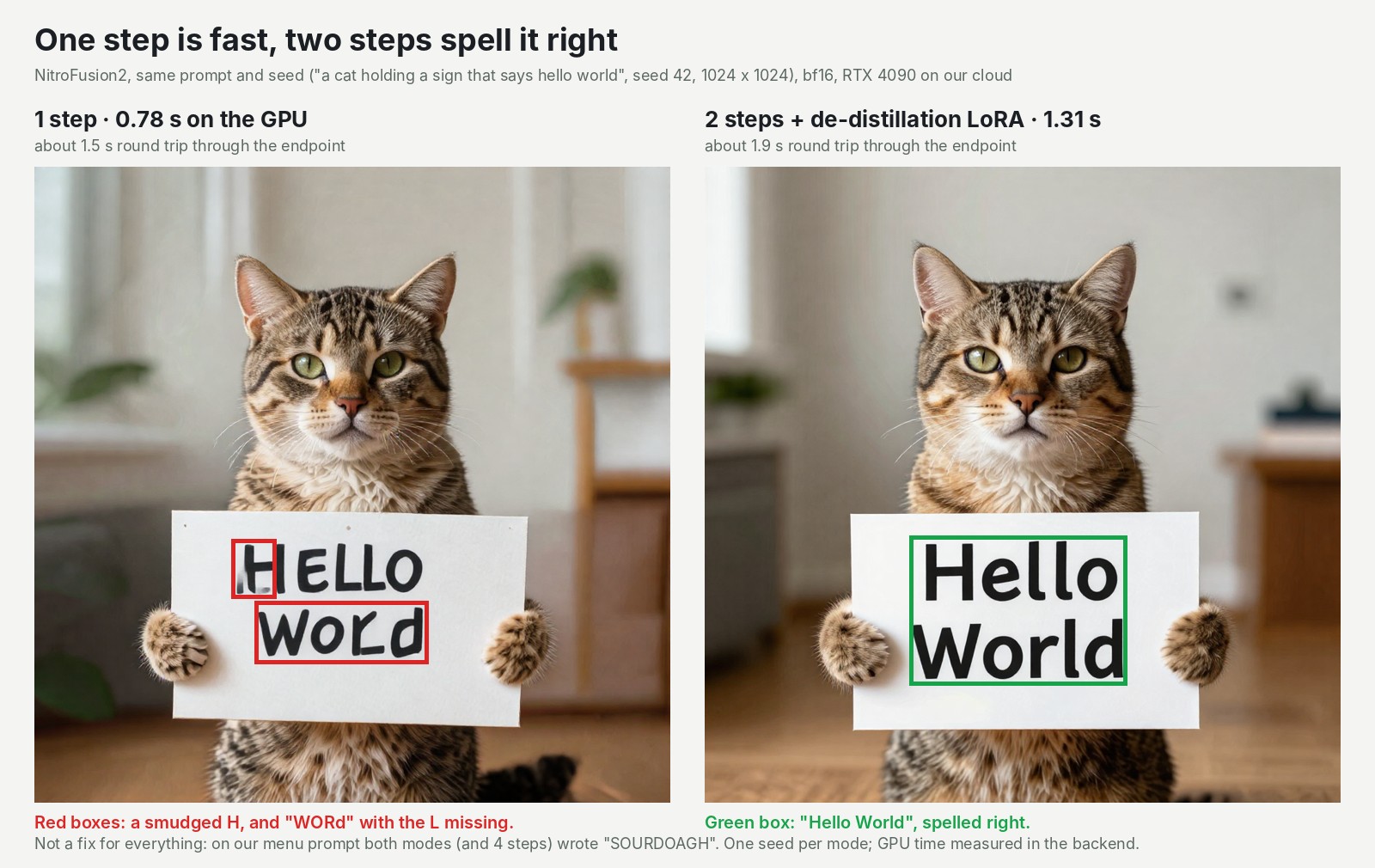
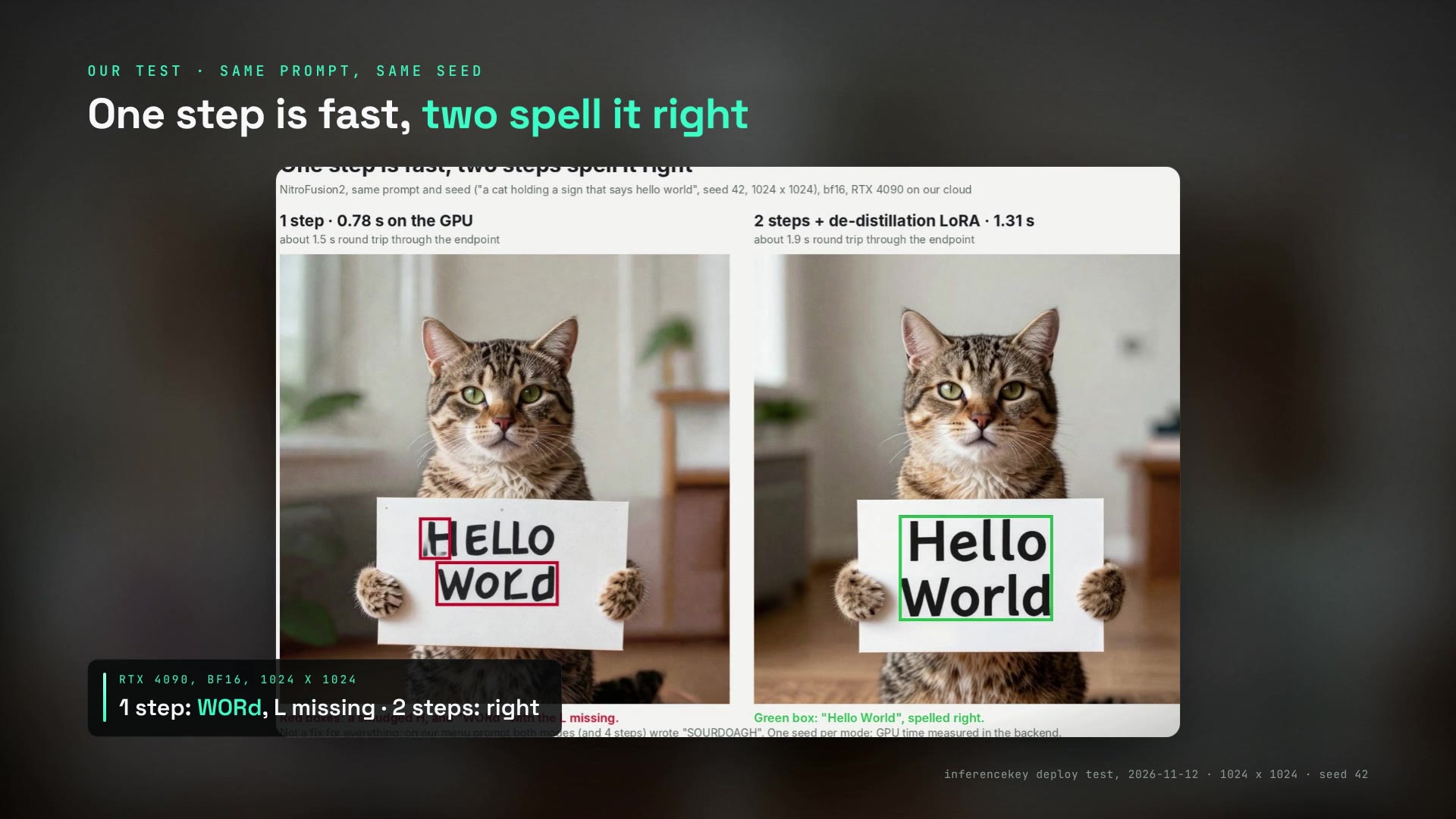
A cat holds a cardboard sign that reads "HELLO WORd". NitroFusion2 drew it in one step, in 0.78 seconds of GPU time, on an RTX 4090 on our cloud. With two steps, the same prompt and random starting point (the seed) took 1.31 seconds, and the sign read "Hello World". That pair is the trade-off in miniature.
NitroFusion2 is a faster copy of the open Z-Image-Turbo: one or two passes per image instead of eight. We timed NitroFusion2 against itself, not against the eight-step original. Served one request at a time, one card returns about 40 large images a minute through the API at one step. With the authors' compressed 5 GB copy it also runs on a real 16 GB card, at about 4 seconds an image. On your own GPU the speed is settled, and what you have to decide is which images can live with a typo. Our SDK example deploys it as an API on your own card.
| 1024 x 1024, one image at a time | One step | Two steps (authors' recipe) |
|---|---|---|
| GPU time, RTX 4090, full 12.3 GB file | 0.78 to 0.82 s | 1.32 to 1.33 s |
| The sign, seed 42 | "HELLO WORd" | "Hello World" |
| Real 16 GB card, 5 GB copy | about 4.0 s | about 7.3 s |
Two passes instead of eight: a student trained to skip the work
NitroFusion2 is fast because it was trained to finish the picture early. An image model like this one starts from random noise and cleans it up in passes. Each pass, a "step", runs the whole 6.2-billion-parameter network over the picture once. Z-Image-Turbo, released by the Tongyi-MAI lab under Apache-2.0, makes eight of them.
Dar-Yen Chen and Yi-Zhe Song, of the SketchX group at the University of Surrey, trained a student version that does it in one or two. A fast student learns to land where the slow teacher lands. Think of a session player who learns to play the producer's final part, built up over eight overdubs, straight through in one pass.
Their paper, published on 3 November, focuses the training on the prompt's words.
The authors' own numbers predict what we saw. On a test of long text written inside images, one step scores 43 out of 100. Z-Image-Turbo at eight steps scores 92, and NitroFusion2 at two steps scores 76. On how closely the picture follows the prompt, one step matches or beats eight. The paper says it plainly: there is "a substantial gap" left on text rendering. These are their benchmarks. We did not rerun them.
For two steps the authors recommend a small 0.38 GB add-on. It makes the first step half Z-Image-Turbo to remove some flaws, then the student finishes alone. Everything is Apache-2.0: the weights and the code. The model card also ships compressed copies, from 2.0 GB to 7.2 GB, next to the 12.3 GB full version. We spotted it in AI Search's 8 November news video.
One step costs 0.78 seconds of GPU time, two cost 1.32
Each extra step adds a bit over half a second. The paper reports only step counts, so we timed it. We served NitroFusion2 as an API on one RTX 4090 on our cloud and asked for 1024 x 1024 images, one at a time, all with seed 42. The card we got was the 48 GB version of the 4090, so we capped the model's memory to behave like the common 24 GB card. We did not test Z-Image-Turbo at eight steps or several users at once: this is NitroFusion2 against itself.
| Steps | GPU time | Round trip through the API |
|---|---|---|
| 1 | 0.78 to 0.82 s | 1.45 to 1.50 s |
| 2 | 1.32 to 1.33 s | 1.95 to 2.00 s |
| 4 | 2.42 s | 3.08 s |
The round trip includes sending the request, encoding the PNG and getting it back over the network. It adds about two thirds of a second, so at one step the plumbing costs almost as much as the drawing.
Through the API, one step gives you about 40 images a minute, two steps about 30. For one person, that is a fresh preview about every second and a half. Two steps feel like a short pause. Four steps, the most the model accepts, take about three times as long as one, and on the menu prompt four steps still wrote "SOURDOAGH".
Big headlines survive one step, small print survives neither
The result depends on the size of the text. Big words came out right in one step. Small print stayed weak at every step count we tried.
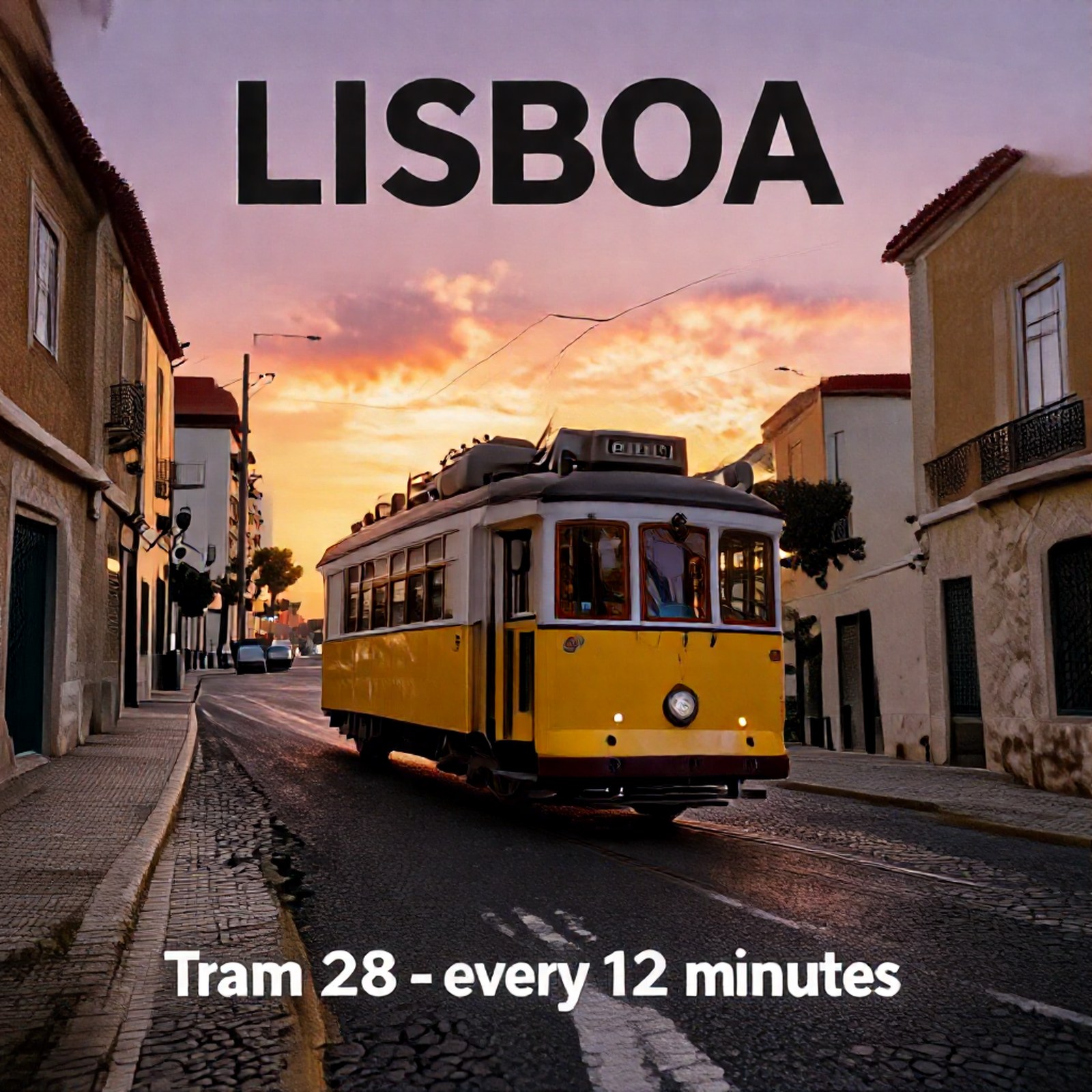
The tram poster got "LISBOA" and "Tram 28 - every 12 minutes" right in one step, in two steps, and on the 16 GB card. The authors' portrait prompt came out clean at one and two steps.
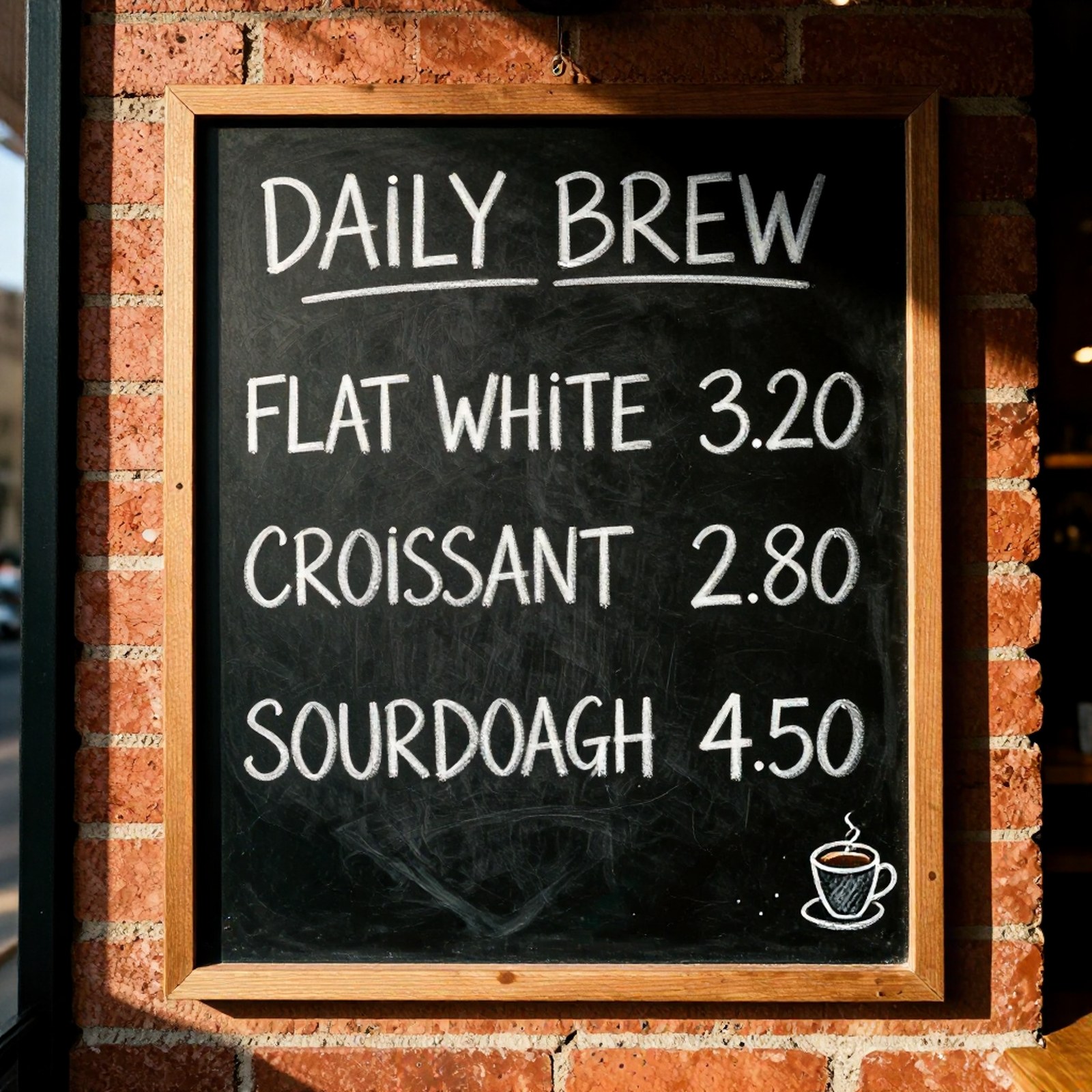
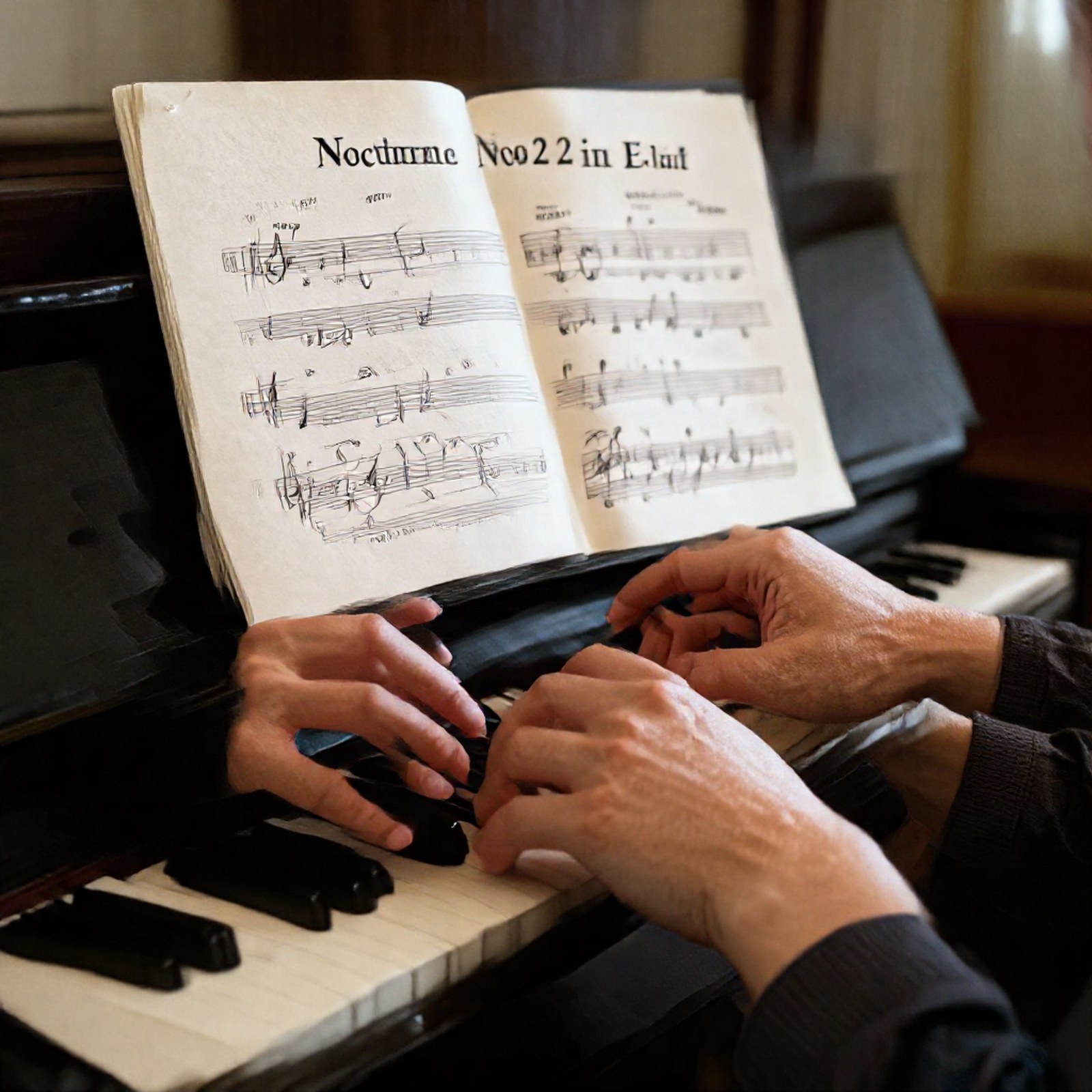
The cafe menu shows the limit. It asked for "FLAT WHITE 3.20 / CROISSANT 2.80 / SOURDOUGH 4.50". On the 4090, every mode we tried wrote "SOURDOAGH": one step, two steps, four steps, and two steps without the add-on. Prices and the other words were right there. On the 16 GB card, one step also wrote "CROSSANT". On the sheet music, the small title "Nocturne No. 2 in E-flat" was garbled at one step and still imperfect at two.
One caution about seeds. The same seed gives different pixels on a different GPU. On the 16 GB card, the one-step sign came out right, "HELLO WORLD". One seed per prompt is a behaviour check, not a benchmark. Read the pattern: short, large text is usually fine in one step, a second step fixes some errors, and small or long text needs checking every time.
Which GPU: a real 16 GB card works with the 5 GB copy, at 4 seconds an image
The smallest real card that worked was a 16 GB RTX 2000 Ada, a small 70-watt workstation card. It ran the 5 GB copy with everything kept on the card, roughly five times slower than the 4090. It left less than half a gigabyte of its memory free. On the capped 4090 the 5 GB copy took about 1 second, so most of the 4 seconds on the small card come from the slower chip.
Why not just the 12.3 GB file on a 16 GB card? The 12.3 GB file is only part of the load. Z-Image-Turbo's text reader (the part that reads the prompt) adds about 8 GB, so the setup with the full 12.3 GB file peaked at about 23 GB. That needs a 24 GB card to stay on the GPU. Moving parts to system memory between uses lets the full file run under a 16 GB cap, but at 14 to 19 seconds an image. The authors' larger 7.2 GB copy did not fit either: under a 16 GB cap it ran out of memory on the first image. With the text reader on the card, the 5 GB copy is the one that leaves room.
| Card or memory budget | Setup | Time per image (1 step, 2 steps) | Real card? |
|---|---|---|---|
| RTX 2000 Ada 16 GB | 5 GB copy, all on the card | 4.0 s, 7.3 s | yes |
| 16 GB budget | full 12.3 GB file, parts moved to system memory between uses | 14 to 19 s | no, a cap on the 4090 |
| 12 GB budget | 5 GB copy, parts moved to system memory between uses | 7.5 to 10.5 s | no, a cap on the 4090 |
An 8 GB budget fails: the text reader alone is about 8 GB, so nothing is left for the rest. We had no real 12 GB card, and did not try the smaller 2 GB to 4 GB copies or a smaller text reader for 8 GB cards.
On InferenceKey: ready in 67 seconds, and two settings to change
A fresh GPU machine on the platform was ready to serve 67 seconds after we asked for it. Those 67 seconds cover the Python setup (28 s), the download of about 20 GB of weights (33.8 s) and the load (4.4 s). It downloads only what NitroFusion2 uses and skips the 24.6 GB of Z-Image-Turbo it replaces. On the 16 GB card the same path took 76 seconds.
Nothing built in serves this model, so we wrote a small Python file that tells the platform how to load it and answer requests. It follows the authors' own settings, including the add-on at half strength on the first step. The platform itself needed no change. This was a local copy of our stack, not the hosted service.
The problem you will hit: the dashboard's image tester starts at 20 steps and a guidance (how hard it pushes toward the prompt) of 4.5, wrong for this model. NitroFusion2 rejects 20 steps with an error: it accepts only 1 to 4. Set the steps to 1 or 2 and the guidance to 0, and the tester answered the one-step poster in about 1.1 seconds. Status: documented in the example's README, the tester defaults are unchanged.
Should you use it? One step for previews, two for anything with words
- Previews, thumbnails, live drafts: one step, under a second of GPU time.
- Images with short, large text that ship to customers: two steps, and check them.
- Menus, labels, prices, small print: neither. Render the text yourself on top, or try the eight-step Z-Image-Turbo.
- A 16 GB card: the 5 GB copy, and tell the example to keep everything on the card, or it falls back to a much slower path.
- An 8 GB card: not with this setup.
To make the sign and menu images on your own card, run the NitroFusion2 SDK example. It needs a 24 GB NVIDIA card, or 16 GB with the 5 GB copy, and about 27 GB of disk (32 GB with the 5 GB copy).
For engineers
Credits
- Dar-Yen Chen and Yi-Zhe Song (SketchX, CVSSP, University of Surrey; Turing Elite Research Labs): NitroFusion2, the paper "NitroFusion2: Bringing Adversarial Loss to the Text Stream of Multimodal Diffusion Transformers" (arXiv 2611.05648, CC BY 4.0), the weights (Apache-2.0), the de-distillation LoRA (the 0.38 GB add-on), the GGUF files, the code and
inference.py(Apache-2.0), four ComfyUI workflows and the project page. It builds on NitroFusion (Dar-Yen Chen, Hmrishav Bandyopadhyay, Kai Zou and Yi-Zhe Song, CVPR 2025). - Tongyi-MAI: Z-Image-Turbo (Apache-2.0), whose text encoder, tokenizer, VAE and scheduler the pipeline reuses.
- The diffusers maintainers:
ZImagePipeline, the Z-Image LoRA loader and single-file GGUF loading in diffusers 0.42.1. - PedroMarinhoDev: community int8, W6A8 and W4A8 ComfyUI builds (not tested by us).
- AI Search: where we spotted it (2026-11-08 AI NEWS, chapter at 03:50).
- Our part: the custom backend, the deployment through the platform, the timings, the memory ladder, the quality checks, the SDK example and the demo video.
Model and files
ChenDY/NitroFusion2: sha62d1a7000af9c46a0c4348d936bd7670ff33c1b9, created 2026-10-27, last modified 2026-11-08, not gated, apache-2.0, library diffusers, pipeline text-to-image, base modelTongyi-MAI/Z-Image-Turbo. Release on the card: 2026-11-03.- Transformer: diffusers
ZImageTransformer2DModel, 6,154,908,736 parameters (the paper's Table 1 says 6B, same as Z-Image-Turbo). Bf16 in 3 shards: 4,986,858,288 + 4,986,868,776 + 2,336,146,728 B (12.31 GB). Single filenf2-bf16.safetensors12,309,866,400 B.nf2-BF16.ggufandnf2-F16.gguf12,311,939,136 B each. - GGUF tiers (GB): Q2_K_4XS 2.04, Q2_K_3XS 2.30, Q2_K_2XS 2.70, Q2_K_XS 3.00, Q2_K_S 3.30, Q2_K_M 3.60, Q2_K_L 4.01, Q3_K_S 4.36, Q3_K_M 4.56, Q3_K_L 4.60, Q4_0 4.59, Q4_K_S 4.79, Q4_1 4.85, Q4_K_M 5.07, Q5_0 5.26, Q5_K_S 5.29, Q5_1 5.53, Q5_K_M 5.58, Q6_K 6.10, Q8_0 7.22.
nf2-dedistill-lora.safetensors: 381,553,336 B.- Z-Image-Turbo sha
f332072a: Qwen3 text encoder in 3 shards (about 8.05 GB), VAE 167,666,902 B, its own transformer about 24.6 GB (F32), which our backend does not download. Its card claims sub-second latency on an H800 and a fit on 16 GB consumer devices. Its card's diffusers example usesnum_inference_steps=9("This actually results in 8 DiT forwards") andguidance_scale=0.0. - Authors' recipe (
inference.py, identical on GitHub main): steps 1 to 4 only, scheduler shift {1: 3.0, 2: 6.0, 3: 8.0, 4: 9.0}, sigmas1 - i/steps, guidance 0.0, LoRA scales {1: (0.0,), 2: (0.5, 0.0), 3: (0.5, 0.6, 0.0), 4: (0.5, 0.6, 0.7, 0.0)}, default 1024 x 1024 and 2 steps,pipe.enable_model_cpu_offload()in__main__. - Method: Text-Stream Adversarial Distillation (discriminator heads on intermediate text-token states of the frozen MMDiT) and Aspect-Cued Discrimination (the discriminator is conditioned on typography, object, style, background, action and layout cues).
- Training per the paper: 100k synthetic references from Z-Image-Turbo at 12 steps (EN/CN), captions by Qwen3.5-35B-A3B, Adam lr 5e-5, batch 256, eight H100, 20,000 steps (5,000 off-policy, 15,000 on-policy). No training code in the repo.
- Paper limitations: complex scenes still hard, mostly at one step; lower sample diversity (OneIG diversity below both baselines at 1 and 2 steps); a seesaw effect across ACD cues.
Paper Table 1 (authors' numbers, not reproduced by us; the text calls it Table 2):
| Model | NFE | LongText-EN | LongText-CN | GenEval | DPG-Bench | OneIG |
|---|---|---|---|---|---|---|
| NitroFusion2 | 1 | 43.34 | 47.78 | 75.86 | 86.48 | 47.63 |
| Z-Image-Turbo | 1 | 11.72 | 12.70 | 57.08 | 77.23 | 32.43 |
| TwinFlow | 1 | 29.18 | 36.85 | 66.34 | 85.17 | 42.20 |
| NitroFusion2 | 2 | 76.03 | 81.95 | 74.46 | 86.21 | 51.45 |
| Z-Image-Turbo | 2 | 72.89 | 78.48 | 76.53 | 85.78 | 50.94 |
| Z-Image-Turbo++ (6B+6B) | 2 | 89.88 | 91.62 | 75.70 | 85.86 | 52.50 |
| Z-Image-Turbo | 8 | 91.74 | 92.56 | 75.01 | 84.86 | 52.84 |
Setup and why
- GPU: one RTX 4090 on InferenceKey Cloud. The card reported
NVIDIA GeForce RTX 4090, 49140 MiB(the 48 GB variant), so the main workload ran withNF2_VRAM_LIMIT_GIB=23.4to stand in for a 24 GB card. No standard 24 GB card was used. The bf16 pipeline needs about 22 GiB resident, which is why the reference is a 24 GB budget. Then a real RTX 2000 Ada 16 GB (16,380 MiB, 70 W) for the small-card check. - Backend: a new custom Python backend,
NitroFusion2Backend0.1.0 (package 5,600 B), on diffusers 0.42.1ZImagePipeline, with the NitroFusion2 transformer and the LoRA as adapterdedistill. Pins: torch 2.14.1, transformers 5.21.0, accelerate 1.15.0, peft 0.21.2, gguf 0.19.0. Why custom: no built-in backend serves the Z-Image pipeline. Why diffusers: it is the authors' own path, and 0.42.1 has the pipeline, the LoRA loader and single-file GGUF for this transformer. - Memory modes (
NF2_MEMORY_MODE):gpu(all resident),model(enable_model_cpu_offload, the authors' script default),sequential. The defaultautopicksgpuonly with at least 23 GiB free, otherwisemodel. On a 16 GB card, setNF2_TRANSFORMER=nf2-Q4_K_M.ggufandNF2_MEMORY_MODE=gpuexplicitly, orautofalls back to offload and you lose the 4 s path. - Stack: a local InferenceKey manager, nats-proxy and worker built from main
97aec23e. Production was never touched. - Request fields (OpenAI images style):
prompt(required),size("1024x1024", sides 256 to 2048, multiples of 16),seed,stepsornum_inference_steps(1 to 4, default 2),dedistill(default true),output_format(png,jpeg,webp). Guidance is always 0. The response addsseconds,encode_seconds,vae_seconds,vram_peak_gibandmemory_mode. Endpoint:POST /endpoint/<project>/nitrofusion2/v1/images/generations.
Step by step with the SDK example
The example is commit 1ca451bd on inferencekey-sdk main: backend.py, publish.py, main.py, requirements.txt, README.md, .env.example.
cp .env.example .env    # INFERENCEKEY_SDK_TOKEN, INFERENCEKEY_API_KEY,
                        # INFERENCEKEY_PROJECT, IK_WORKER_ID (read by main.py)
# publish.py does not read .env: export these two in the shell
export INFERENCEKEY_TENANT_ID=<tenant-id>
export INFERENCEKEY_USER_TOKEN=<dashboard-session-token>
python publish.py       # packages backend.py into dist/ and uploads it to your tenant
IK_KEEP_ALIVE=1 python main.py
Without INFERENCEKEY_TENANT_ID and INFERENCEKEY_USER_TOKEN, publish.py only builds dist/*.tar.gz, prints "upload the package from Dashboard -> Custom backends instead" and exits 0. In that case upload the file from Dashboard -> Custom backends before running main.py, or ensure() has no backend to deploy.
For a 16 GB card, add to .env before main.py:
NF2_TRANSFORMER=nf2-Q4_K_M.gguf
NF2_MEMORY_MODE=gpu
main.py calls ensure() for a fixed workload on IK_WORKER_ID with ready_timeout_secs: 2400, request_timeout_secs: 600 and the NF2_* env, waits with wait_until_ready(2400), then makes three calls at 1024 x 1024 and seed 42: the sign at 1 step, the menu at 1 step and the menu at 2 steps. It deletes the workload on exit unless IK_KEEP_ALIVE=1. Disk: about 21 GB of weights (26 GB with the Q4_K_M file as well) plus a 5.5 GB venv.
A single request:
curl -s https://<api-host>/endpoint/<project>/nitrofusion2/v1/images/generations \
  -H "Authorization: Bearer $INFERENCEKEY_API_KEY" \
  -H "Content-Type: application/json" \
  -d '{"prompt": "a cat holding a sign that says hello world",
       "size": "1024x1024", "steps": 2, "seed": 42}'
Full measurements
Time to ready:
- RTX 4090: "ready after 67 s" from the SDK. Venv 28 s (CPython 3.12.3), then
download 33.8s, load 4.4s, transformer bf16, memory mode gpu (budget 23.4 GiB), weights in VRAM 19.5 GiB. HF cache about 20 GB. - RTX 2000 Ada: "ready after 76 s".
download 28.4s, load 23.0s, transformer nf2-Q4_K_M.gguf, memory mode gpu (budget 15.5 GiB), weights in VRAM 12.7 GiB.
Per request, 1024 x 1024, seed 42, one at a time. GPU time measured in the backend with cuda.synchronize, round trip from the HTTP client to the local manager.
| Card / config | Case | GPU s | Round trip s | Text encoder s | VAE s | Torch peak GiB |
|---|---|---|---|---|---|---|
| 4090 bf16 | sign, 1 step, first call | 1.72 | 3.43 | 0.638 | 0.379 | 21.86 |
| 4090 bf16 | menu, 1 step, x6 | 0.780 to 0.816 | 1.45 to 1.50 | 0.05 to 0.064 | 0.149 | 21.86 |
| 4090 bf16 | menu, 2 steps, x6 | 1.318 to 1.330 | 1.95 to 2.00 | about 0.055 | 0.149 | 21.86 |
| 4090 bf16 | sign/portrait/poster/hands, 2 steps | 1.312 to 1.326 | 1.90 to 1.99 | 0.149 | 21.86 | |
| 4090 bf16 | portrait/poster/hands, 1 step | 0.783 | 1.47 to 1.52 | 0.149 to 0.15 | 21.86 | |
| 4090 bf16 | menu, 2 steps, no LoRA | 1.341 | 2.01 | 21.86 | ||
| 4090 bf16 | menu, 4 steps | 2.419 | 3.08 | 21.86 | ||
| RTX 2000 Ada, Q4_K_M | 1 step (x5) | 3.98 to 4.33 (5.16 first) | 4.66 to 4.91 (7.06 first) | 0.21 to 0.25 | 0.57 to 0.60 | 15.11 |
| RTX 2000 Ada, Q4_K_M | 2 steps (x5) | 7.19 to 7.42 | 7.83 to 8.32 | about 0.21 | 0.57 to 0.74 | 15.11 |
Derived from these, single requests, no batching: about 1.2 to 1.3 images per second of GPU time at 1 step (0.67 to 0.69 by round trip) and about 0.75 at 2 steps (0.50 to 0.51 by round trip). The dashboard image tester showed "ok · 1098 ms" for the 1-step poster.
VRAM ladder. The emulated rungs ran in a separate process on the 48 GB 4090 with torch.cuda.set_per_process_memory_fraction, beside the live workload, so their timings may include some contention. Each rung ran the sign and the menu at 1 and 2 steps, twice, seed 42.
| GPU or cap | Configuration | Peak VRAM | Time per image | Output | Real or emulated |
|---|---|---|---|---|---|
| RTX 4090, 23.4 GiB cap | bf16, all on GPU, through the platform | 21.86 GiB torch | 0.78-0.82 s (1), 1.32-1.33 s (2) | ok, reference | real card under a cap |
| 15.2 GiB | bf16 + enable_model_cpu_offload | 12.30 GiB / 13,122 MiB | 14.2-19.4 s | ok, same images | emulated |
| 15.2 GiB | Q8_0 GGUF, all on GPU | CUDA out of memory. Tried to allocate 80.00 MiB ... 15.20 GiB allowed at the first request (setup 37.3 s) | emulated | ||
| 15.2 GiB | Q4_K_M GGUF, all on GPU | 15.11 GiB / 16,008 MiB | 0.95-1.03 s (1), 1.64-1.71 s (2) | ok, same text as bf16 | emulated |
| RTX 2000 Ada 16 GB | Q4_K_M GGUF, all on GPU, through the platform | 15.11 GiB / 15,948 MiB card | 3.98-4.33 s (1), 7.19-7.42 s (2) | ok | real |
| 11.2 GiB | Q4_K_M + model offload | 7.69 GiB / 8,366 MiB | 7.5-10.5 s | ok, same text | emulated |
| 7.2 GiB | Q4_K_M + model offload | Tried to allocate 48.00 MiB ... 7.20 GiB allowed (bf16 text encoder alone about 7.5 GiB) | emulated | ||
| 7.2 GiB | Q4_K_M + sequential offload | setup failed: KeyError: None | emulated |
Not tried: a quantized or CPU text encoder for 8 GB; resolutions other than 1024; the int8, W6A8 and W4A8 community ComfyUI builds; batch sizes above 1 and concurrency; real 12 GB and standard 24 GB cards (no 10 to 12 GB card was available); Q2, Q3, Q5 and Q6 GGUF tiers; Q8_0 with offload or on a 24 GB card; Z-Image-Turbo at 8 steps.
Quality notes (one seed per case, not a benchmark)
Prompts: the authors' cat sign and portrait, plus four of ours (a chalkboard cafe menu, a Lisbon tram poster, sheet music on a piano, a pair of hands).
- Sign (authors' prompt "a cat holding a sign that says hello world"): 4090 1 step "HELLO WORd" (L missing, lowercase d, smudged H), 2 steps "Hello World". Q4 rungs on the 4090 gave the same text as bf16. RTX 2000 Ada Q4: 1 step "HELLO WORLD", 2 steps right.
- Menu ("FLAT WHITE 3.20 / CROISSANT 2.80 / SOURDOUGH 4.50"): "SOURDOAGH" at 1, 2 and 4 steps and at 2 without LoRA on the 4090. RTX 2000 Ada 1 step: "CROSSANT" and a stray "0" under 4.50; 2 steps "SOURDOAGH".
- Poster: "LISBOA" and "Tram 28 - every 12 minutes" right at 1 and 2 steps and on the 16 GB card.
- Piano: title "Nocturne No. 2 in E-flat" garbled at 1 step, still imperfect at 2. Hands plausible.
- Portrait (authors' prompt): clean at 1 and 2 steps.

Demo video
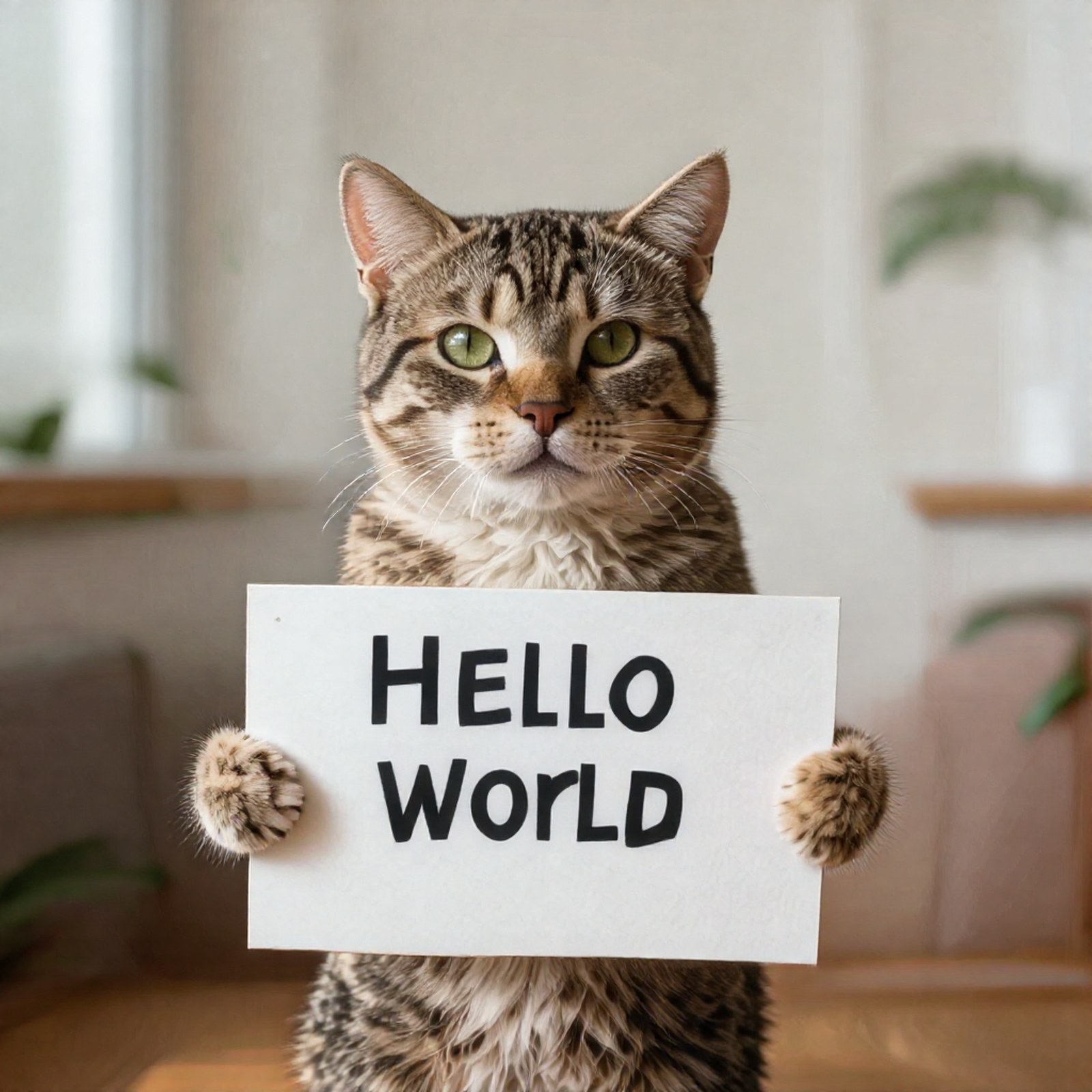
A 3-minute narrated walk-through: what NitroFusion2 is (with the authors' project page, figures and Table 1, credited), the panel generating at 1 and 2 steps, and the memory ladder.
Remaining problems
- The 4090 was a 48 GB variant. The 24 GB result is a cap (
NF2_VRAM_LIMIT_GIB=23.4), not a standard 24 GB card. Status: stated, not retested on a 24 GB card. - Image tester defaults (20 steps, guidance 4.5) return 400
NitroFusion2 is distilled for 1 to 4 steps. Status: documented in the README, platform defaults unchanged. - Q8_0 does not fit 16 GB with the bf16 text encoder resident. Status: use Q4_K_M.
- 8 GB fails: OOM with model offload,
KeyError: Nonewith sequential offload and a GGUF transformer. Status: open, untried with a smaller text encoder. - Text errors at one step, and one misspelling ("SOURDOAGH") at every step count. Status: model behaviour, matches the paper's stated gap on text rendering.
- Minor: our first seeding SQL for the local test tenant hit the seeded default tenant; corrected before the manager restart, no effect on the test. A harmless
RuntimeWarningaboutinferencekey.backend.serveinsys.modulesappears in the backend stderr.
Sources
- Model card: https://huggingface.co/ChenDY/NitroFusion2
- Code and
inference.py: https://github.com/ChenDarYen/NitroFusion2 - Paper: https://arxiv.org/abs/2611.05648
- Project page: https://chendaryen.github.io/NitroFusion2.github.io/
- Base model: https://huggingface.co/Tongyi-MAI/Z-Image-Turbo
- Where we spotted it: https://www.youtube.com/watch?v=9RIK3A24ZxA (AI Search, 2026-11-08, at 03:50)
- SDK example: https://github.com/inferencekey/inferencekey-sdk/tree/main/examples/nitrofusion2-text2image-custom-backend-private-nvidia