Ming-Image Design is a 6B model that peaked at 64 GiB, and transparency worked in one prompt variant of six
Ming-Image-0.1-Design on one 80 GB A100: 6 to 7 s per 1024 image, 36 s at 2048, 64.4 GiB peak, one transparent PNG from six prompt variants.
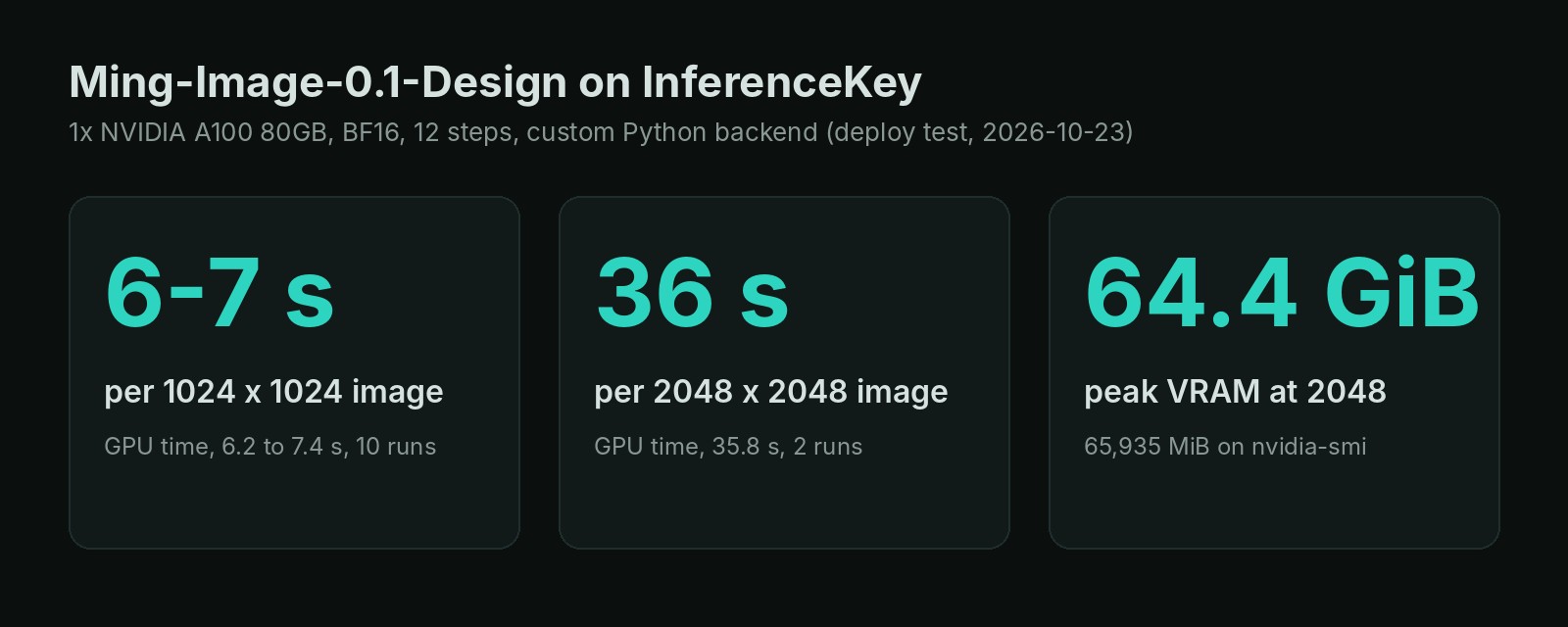
"A 6B text-to-image model for UI, infographics, posters, and other text-rich visual designs," says the model card of Ming-Image-0.1-Design. The repo is 53 GB. On one 80 GB NVIDIA A100 it filled 64.4 of the card's 80 GiB of memory. That is the first finding: with the whole model on the card, this is an 80 GB card job, not the 12 GB one the 6B figure suggests. On that card it made a 1024 x 1024 app screen in 6 to 7 seconds and a 2048 x 2048 poster in 36. The second finding is about its party trick, PNGs with a transparent background. Of six prompt variants we tried, one came back transparent, and only with the authors' trigger phrase alone on the first line. The model and its code are MIT licensed, so you can ship what it makes.
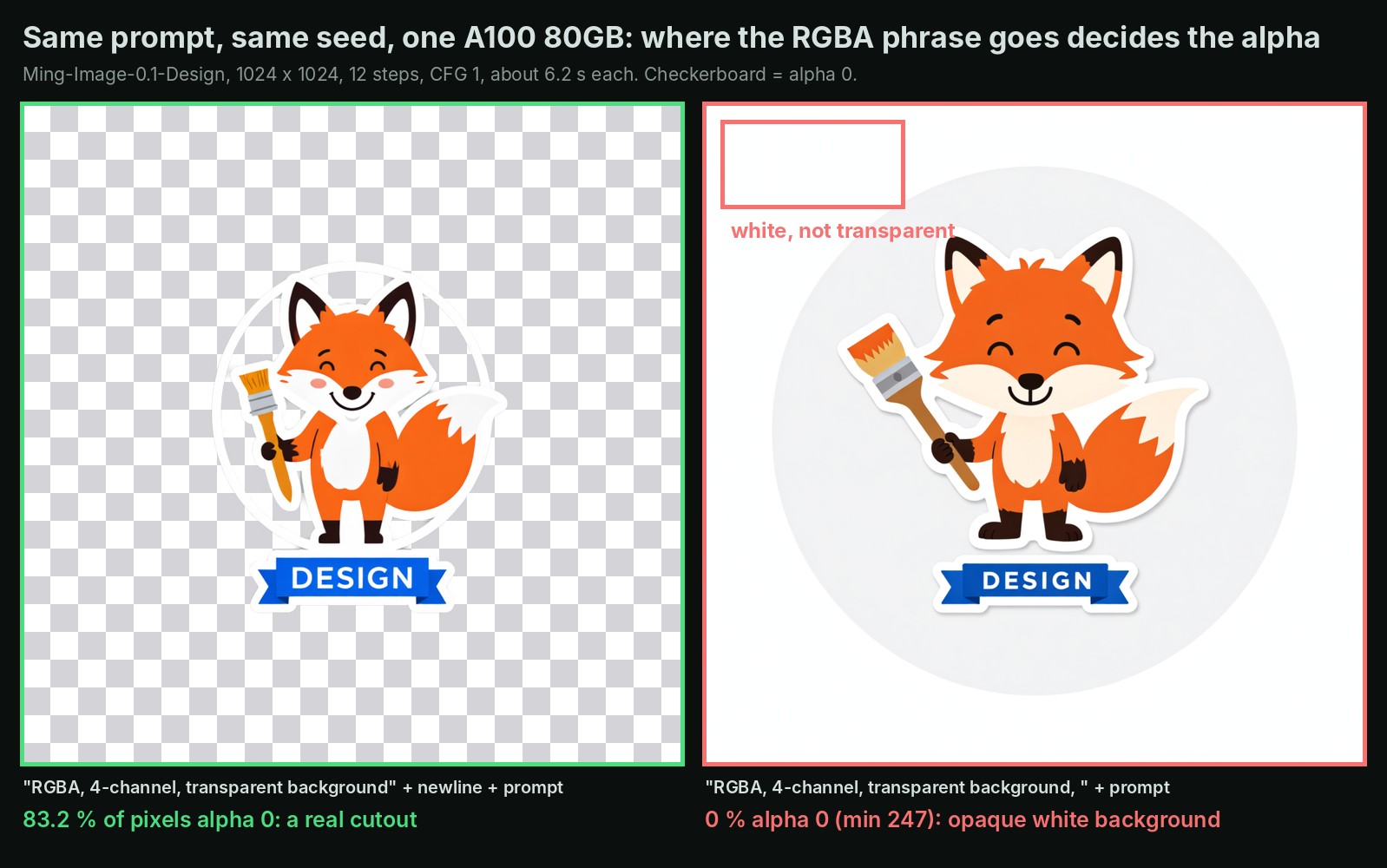
Same prompt, same random start: the line break is the only difference. The checkerboard marks fully transparent pixels.
The 6B is the singer, and the van carries 41 GB more
Ming-Image-0.1-Design is billed like a gig poster that names only the singer. The van still has to carry the drums, the amps and the bass player. The singer here is the part that draws: a 6-billion-parameter model that turns noise into a picture over a few passes, 12.3 GB on disk. Behind it sits a 34 GB language model that reads your prompt. A 6.2 GB connector hands what it understood to the drawing model. A small decoder, 0.25 GB, turns the result into pixels with a fourth layer for transparency. Altogether, 52.9 GB.
Their GitHub README puts it plainly: the minimum validated deployment is "one GPU with at least 80 GiB of memory." The parameter count is the part that got repeated.
We repeated it too. We spotted the model in the AI Search news video of 27 September. It describes the base model as "12 gigabytes in size" and says it "should be able to fit on most mid-to-high-end GPUs." Our own model catalog copied that 12 GB. It is the singer alone. We wanted the real number, so we ran it.
What makes the model worth the trouble is what it is built for. inclusionAI trained it for text-heavy design: app screens, dashboards, infographics, posters, slides. It is meant to put your words where a designer would. Every image comes back as a PNG with an alpha channel, the layer that says how see-through each pixel is. So a logo or a sticker can land on a slide without a white box around it. The model went up on Hugging Face on 17 September and was last updated on 14 October.
The test: one A100 with 80 GB, 15 pictures, one try each
This is a behavior check, not a quality benchmark: one try per prompt, our own prompts. We kept the authors' validated setup: one 80 GB NVIDIA A100 on our cloud, uncompressed model, 12 passes per picture. We served it through a test copy of InferenceKey built from its current main branch, with the authors' own Python code underneath. We did not call the hosted service, so treat it as untested there.
We made 15 pictures: seven layouts and eight transparency tries. Two more requests at 2048 failed for a reason we explain later.
The model works at two resolution levels, 1024 and 2048. Ask for another size and it draws at the nearer level and resizes. A 1920 x 1080 slide, for example, is drawn at 1024.
Results: 6 to 7 seconds and under half a cent per screen, 36 seconds and about 2 cents per poster
At 1024 x 1024 the card spent 6.2 to 7.4 seconds per picture over 10 runs. At 2048 x 2048 it spent 35.8 seconds, twice. Four times the pixels cost about five times the time. We measured the authors' plain script, untuned. vLLM-Omni reports about 2.2 s at 1024 on two H100s; we did not run it.
| Size | Card time per picture | Request to answer |
|---|---|---|
| 1024 x 1024 | 6.2 to 7.4 s | 7.0 to 8.9 s |
| 2048 x 2048 | 35.8 s | 41.5 to 44.0 s |
One request at a time. "Request to answer" includes the trip through InferenceKey. Full figures, memory per size included, in the appendix.
Busy nonstop, one card makes about 400 to 500 screens an hour at 1024, or 82 to 87 posters at 2048. That is an estimate from single pictures, not a sustained run. An 80 GB A100 rents for about 1.4 to 1.8 dollars an hour. Your bill comes to a quarter to half a cent per 1024 screen, and about 2 cents per 2048 poster.
Memory is the number that decides your card. Loaded on the card, the whole model took 46.3 GiB before any picture. A 1024 picture needed 50.45 GiB at its peak, and a 2048 one pushed the card to 64.4 GiB, which still leaves room on 80.
Quoted text came out right in 5 of 7 layouts, words you leave out come out as gibberish
Short text you write in quotes is usually text you get. Text you leave to the model is decoration that looks like words.
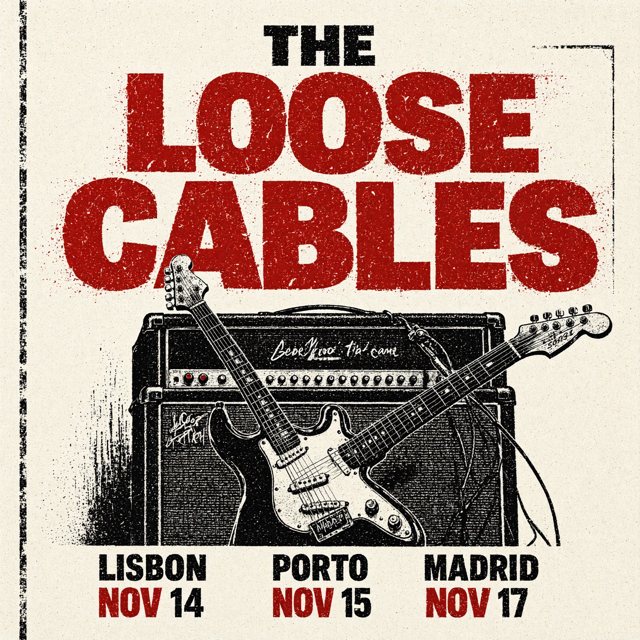
Every quoted word right. The scribbles on the amp were not in the prompt.
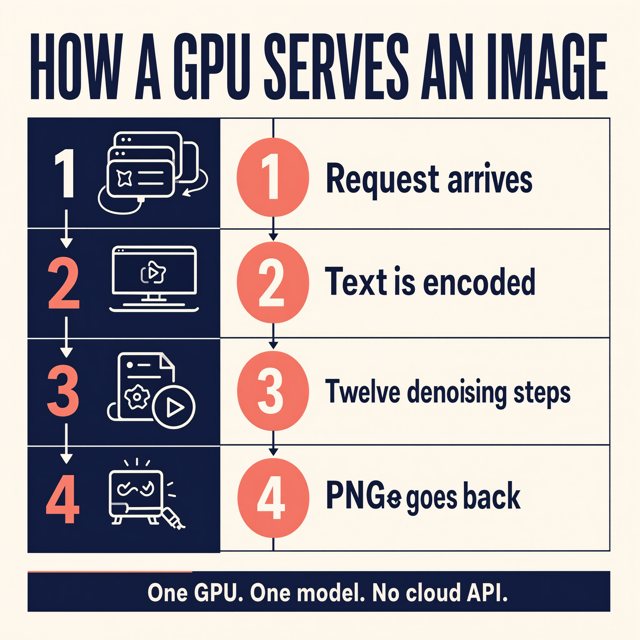
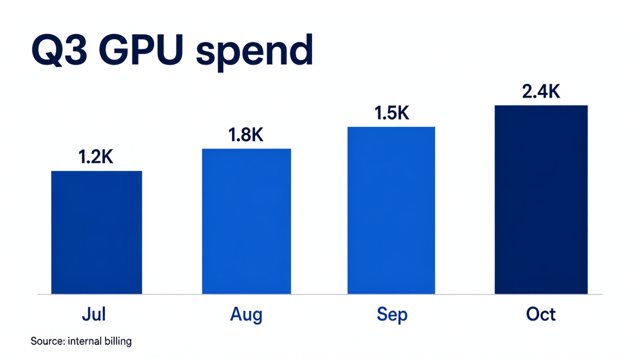
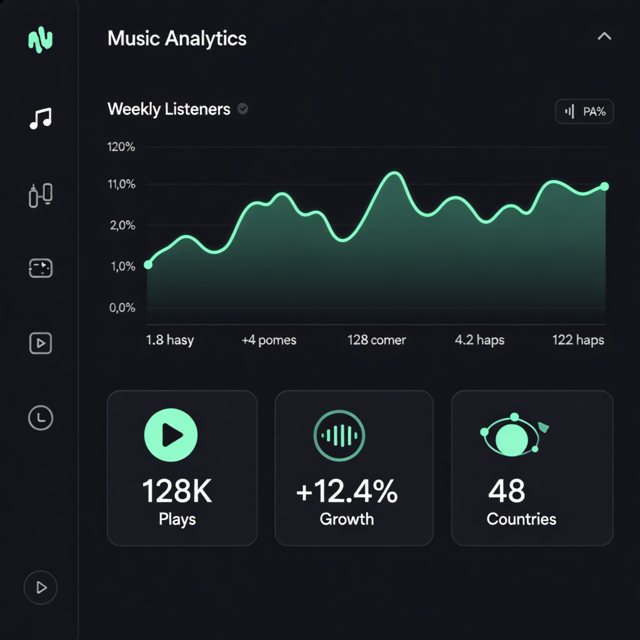
The concert poster got its band name and three city dates right. The slide, "Q3 GPU spend" with four bars, their values and the months, came out with every label right. On the dashboard, the three stat cards we spelled out ("128K Plays", "+12.4% Growth", "48 Countries") were perfect. The chart axes and legend, which we did not specify, read as convincing pseudo-text. The landing page did the same: headline, button and menu right, subheading and feature cards gibberish. An app onboarding screen spelled "Grow Together" right. The infographic was nearly clean, with one glyph glitch ("PNGe goes back") and step numbers drawn twice.
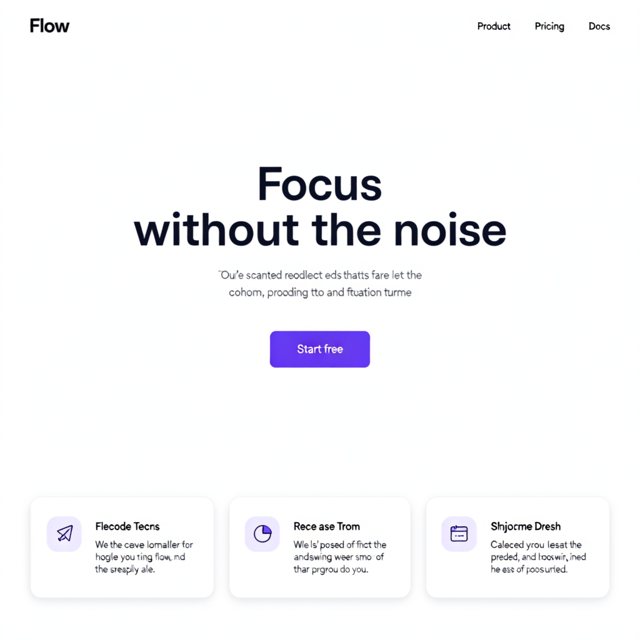
Quoted strings right, everything else placeholder text that looks real at a glance.
Long lists are where it slipped. We asked for a 12-line café menu with prices in two columns. It drew one column. It wrote "6.0l)" for 6.00 and "1110.0" for 11.00. It also added a coffee line we never asked for, "Bica 0.50".
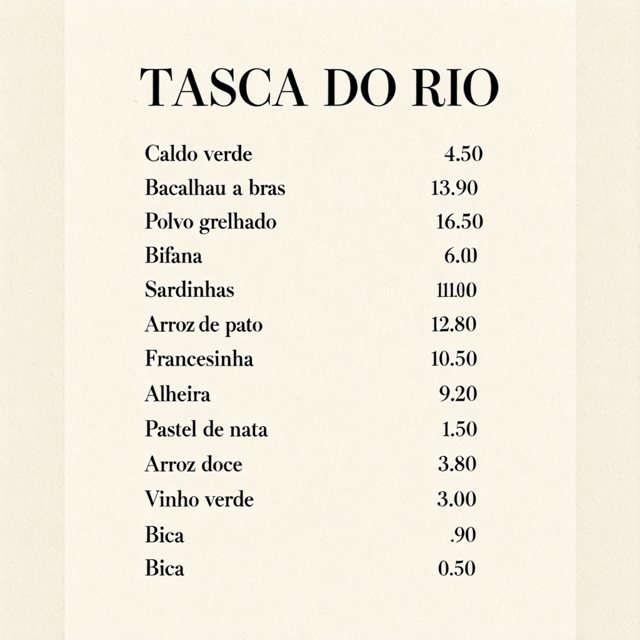
Two prices wrong and one invented line.
The authors recommend rewriting each prompt into a structured, Figma-style description with a separate language model before it reaches Ming. We sent plain prompts.
Transparency: one variant in six, and only with the phrase on its own line
One variant in six came back transparent. The line break mattered on one pair, but it was not enough on its own.
The authors publish ten fixed phrases and say to put exactly one at the start of the prompt. We used "RGBA, 4-channel, transparent background" on its own first line, then the sticker description. The fox came back with 83.2 % of its pixels fully transparent, a clean cutout. It did it twice: once with our own prompt, once through our server's transparency option.

With a comma after the phrase instead of a line break, the background came back solid white, as the image at the top shows. An app icon with the same phrase on its own line came back opaque. Three other phrase and subject combinations did too, all listed in the appendix. Normal prompts still return a four-layer PNG, mostly opaque, with some pixels partly see-through.
Our server code returns the share of transparent pixels with every image, so that check is one line.
Which GPU: one 80 GB card worked, and nothing smaller was tested
The only card that worked is the only one we tried, a real NVIDIA A100 with 80 GB, with everything on the card. So 80 GB is the requirement as the authors validated it.
We had planned a second step: cap the A100's memory at 24 GB to emulate a smaller card, with the 34 GB language model waiting in the computer's main memory. That makes sense on paper, because the language model only works once per prompt, at the start. Changing the setting did not restart the running model, which stayed fully on the card for seven minutes, so the step never ran. The restart bug is open.
On InferenceKey: your OpenAI image code can call this card
A program that already asks OpenAI for images can ask this card instead, with the address, key and settings changed. Ming ships as a Python script, not a server. So we wrapped it in a small backend, code that loads a model once and answers requests. Ours downloads the authors' code at one fixed version and loads the model once with their loader. Then it calls their generation function for each request.
The first start took 157 seconds: about 50 GB downloaded in 69, loaded onto the card in 23. That version broke at the first picture, and we did not time a clean start of the fixed one. A restart after an update took 29 seconds.
The authors' exact library versions do not install and run as listed on Python 3.11; slightly newer ones fix it, and the SDK example ships those. Status: fixed in the example, issue to the authors still to be filed.
One rough edge you may hit too:
- Big pictures can be too big to send back. Our test setup could send back at most 8 MB per answer. Two detailed 2048 pictures came out bigger, were dropped, and the caller waited the full 300 seconds for a timeout. Status: the backend in the SDK example now shrinks the file until it fits, tested on saved images only. The long wait is open.
Should you use it? Yes for quoted text on an 80 GB card, with a check on every cutout
- If you make app mockups, slides, dashboards or posters with text you can spell out, write every word you need in quotes.
- If you need long lists or exact numbers, like a menu, a price list or a table, read every line.
- If you need transparent assets, put the phrase on its own line and check the alpha layer in code.
- If your card is under 80 GB, plan on an 80 GB card for now.
- If you need a license for a product, MIT covers commercial use.
To make a screen, an infographic and a sticker on your NVIDIA machine, publish the backend with python publish.py and run IK_KEEP_ALIVE=1 python main.py from the SDK example. It needs an 80 GB card in an InferenceKey project and about 60 GB of disk.
For engineers
Model and files
Model card, GitHub (inclusionAI/Ming-Image), vLLM-Omni recipe, demo Space. Repo inclusionAI/Ming-Image-0.1-Design, created 2026-09-17T07:17:31Z, lastModified 2026-10-14T04:22:50Z, sha c57c49689d12ef7d4e24a170014f1dc43d3ce258, not gated, license tag mit, library_name: custom, 435 likes and 1,191 downloads on 2026-10-23. HF safetensors metadata counts 6,154,901,056 BF16 parameters, which matches the transformer alone.
| Component | What it is | Size |
|---|---|---|
mllm/ | BailingMM2: Ling bailing_moe_v2, 20 layers, 256 experts, 8 active, hidden 2048, plus a Qwen2.5 ViT; 7 shards | 34.018 GB |
transformer/ | DiffusionTransformer, dim 3840, 30 layers, 30 heads; 5 shards (the "6B") | 12.310 GB |
connector/ | Qwen2 1.5B in fp32 | 6.175 GB |
vae/ | AutoencoderKLQwenImage, 4 input channels | 0.254 GB |
mlp/ | 0.125 GB | |
assets/ | 0.002 GB | |
| Total | 52.883 GB |
Scheduler FlowMatchEuler, shift 6. The vLLM-Omni recipe describes the same thing as Stage 0 (Qwen2.5-VL vision tower plus the 20-layer BailingMoeV2 LM, 256 learned image-query tokens, query states plus VLM states from layers 5, 12 and 20) and Stage 1 (the connector plus a 30-layer Z-Image DiT with a Qwen-Image RGBA VAE).
There is no prompt-side RGBA logic in the authors' code: the VAE has 4 channels and infer.py saves with image.save as PNG, so every image is RGBA and alpha depends only on what the model generates (processing_bailingmm2.py:165, infer.py:246-257).
Settings
Model card: 2048 x 2048 recommended, 1024 x 1024 for faster generation, 12 sampling steps, CFG 1.0, BF16, "one CUDA GPU with 80 GiB VRAM (validated configuration)". infer.py text-to-image buckets are (1024, 2048), default 2048, aspect ratio within 1:4 to 4:1, nearest bucket by sqrt(width*height). Defaults: seed 42, bfloat16, attention eager, --num-gpus 1, --device-map balanced (multi-GPU sharding of the MLLM is supported, we did not try it).
The ten transparency phrases (README, "Transparent-background generation tip"): choose exactly one and put it at the beginning, do not combine. English: RGBA, 4-channel, transparent background, isolated subject, alpha matte, no background, cutout PNG, alpha=0 outside the object, transparent canvas, not white, not checkerboard, production RGBA layer for compositing, plus five Chinese phrases.
The authors recommend a structured Figma-style JSON prompt from a prompt enhancer (Ling-3.0-flash-VL or qwen3.8-27B) run outside infer.py. We used plain prompts.
The panel's image tester defaults (20 steps, guidance 4.5) are not this model's settings: set 12 and 1.
Our setup
One NVIDIA A100-SXM4-80GB on our cloud (81,920 MiB, driver 595.71.05, power limit 400 W, 32 vCPU, 125 GB RAM in the container). The PCIe variant had no stock. The worker was bootstrapped by a local InferenceKey manager over HTTP and TCP tunnels; production was never touched. Backend venv: Python 3.11, torch 2.5.1, torchvision 0.20.1, transformers 4.57.1, diffusers 0.36.0, numpy 1.26.4, provisioned by uv. Authors' code at commit 3515cd7b1e3049fc517eed7d35020251cd06519a (2026-09-28), still the HEAD of main on 2026-10-23.
Deploy step by step
The SDK example, commit 1e88edaa on main (files: README.md, backend.py, publish.py, main.py, requirements.txt, .env.example, .gitignore). You need an SDK token (INFERENCEKEY_SDK_TOKEN, control plane), an API key (INFERENCEKEY_API_KEY, data plane), INFERENCEKEY_PROJECT, IK_WORKER_ID of a private NVIDIA worker (80 GB keeps the whole model on the GPU), and for publish.py optionally INFERENCEKEY_TENANT_ID plus INFERENCEKEY_USER_TOKEN (or upload dist/*.tar.gz in the dashboard). About 53 GB of disk for weights plus a 6 GB venv. Client Python 3.9 or newer; the backend runs on Python 3.11 provisioned by uv.
cp .env.example .env              # tokens, project, worker id
python publish.py                 # packages backend.py, registers "ming-image-design-text2image" (v0.1.4)
IK_KEEP_ALIVE=1 python main.py    # ensure(), wait_until_ready(), 3 pictures into ./outputs
main.py deploys workload ming-image-design (task text2image, policy fixed, 1 replica, workload config ready_timeout_secs: 2400, request_timeout_secs: 900) and writes outputs/ui-1024.png, outputs/infographic-2048.png and outputs/sticker-rgba-1024.png. If the workload is already up, call the endpoint directly instead of re-running main.py (see problems).
A transparent sticker request (we called our local manager; the hosted service takes the same shape, though we did not call it):
curl https://cloud.inferencekey.com/endpoint/$INFERENCEKEY_PROJECT/ming-image-design/v1/images/generations \
  -H "Authorization: Bearer $INFERENCEKEY_API_KEY" -H "Content-Type: application/json" \
  -d '{"model": "default", "n": 1, "prompt": "A cartoon fox sticker holding a paintbrush above a ribbon that says \"DESIGN\"", "size": "1024x1024", "seed": 42, "steps": 12, "guidance_scale": 1.0, "background": "transparent", "output_format": "png"}'
background: "transparent" makes the backend put RGBA, 4-channel, transparent background on its own first line. The response is {data: [{b64_json}]} plus seconds (GPU time), vram_peak_gib, bucket and transparent_fraction.
Backend
backend.py. InferenceKey's ready-made backends don't run model scripts, hence this custom one. setup() downloads the Ming-Image code tarball at 3515cd7b into ~/.cache/ming-image-code/<sha>, runs snapshot_download of revision c57c4968 (skipping assets/), and loads BailingMM2NativeForConditionalGeneration.from_pretrained(..., torch_dtype=bf16, attn_implementation="eager", load_image_gen=True, device_map=<authors' 1-GPU plan>) plus the processor. process() reads prompt, size or width/height, steps/num_inference_steps (12), guidance_scale (1.0), seed, background, output_format (png or webp, both keep alpha) and calls the authors' run_generation. Memory modes auto, gpu, lowvram (MoE LLM layers on CPU through the device map), minimal (also the connector and part of the DiT under accelerate cpu_offload, VAE tiling) and the MING_VRAM_LIMIT_GIB cap (torch.cuda.set_per_process_memory_fraction) are written but never ran on a GPU. Versions during the test: 0.1.0 (authors' pins), 0.1.1 (numpy 1.26.4), 0.1.2 (torch 2.5.1), 0.1.3 (RGBA phrase on its own line, tested), 0.1.4 (WebP quality step-down for results over 8 MB, committed, tested offline only).
Time to ready
- Cold start with package 0.1.0: SDK
ready after 157 s(fresh venv about 60 s; backend logdownload 69.1s, load 23.4s, memory mode gpu (budget 78.3 GiB), weights in VRAM 46.3 GiB; about 50 GB downloaded, assets skipped, at about 0.7 GB/s). That package then failed at the first request (torch bug below). - Package 0.1.2, torch swapped inside the existing venv: 6 min 46 s of
uv pip install, thendownload 8.3s, load 21.6s. - Hot recycle after publishing 0.1.3: 29 s (
download 4.6s, load 20.9s). - A clean cold start with the final package was not timed.
Measurements
GPU time measured in the backend with cuda.synchronize(); round trip from the HTTP client to the local manager. 12 steps, CFG 1, one request at a time, eager attention, no flash-attn, no compilation, no step caching (an optimized stack should be faster; not measured).
| Case | Bucket | GPU s | Round trip s | torch peak alloc GiB | Output |
|---|---|---|---|---|---|
| ui-1024 (first call) | 1024 | 7.397 | 14.73 | 50.45 | png |
| infographic-2048 | 2048 | 35.849 | 41.49 | 62.84 | png, 2.1 MB |
| sticker, phrase + comma | 1024 | 6.257 | 7.45 | 50.45 | png, opaque |
| fox-zh-nl / fox-en-nl / mug-cutout-nl / logo-zh2 | 1024 | 6.237 / 6.236 / 6.199 / 6.178 | 7.34 / 7.47 / 7.85 / 7.10 | 50.45 | png |
| dashboard | 1024 | 7.135 | 8.39 | 50.45 | png |
| poster-2048 | 2048 | 35.807 | 44.03 | 62.84 | lossy WebP (PNG and lossless WebP over the cap) |
| logo, background transparent | 1024 | 6.232 | 7.11 | 50.45 | png, opaque |
| mug, background transparent | 2048 | ran | 504 after 300.02 | n/a | 10.6 MB result refused |
| slide 1920x1080 | 1024 | 5.774 | 7.03 | 49.95 | png |
| menu | 1024 | 6.381 | 8.87 | 50.45 | png |
| menu | 2048 | ran | 504 after 300.02 | n/a | 15.5 MB result refused |
| sticker, background transparent (phrase + newline) | 1024 | 6.224 | 7.47 | 50.45 | png, 83.2 % alpha 0 |
| panel tester, plant onboarding | 1024 | n/a | 8,397 ms in the panel | n/a | png |
| panel tester, fox with comma | 1024 | n/a | 7,292 ms in the panel | n/a | opaque |
About 2.2 to 2.4 it/s at 1024 and about 2.8 s/step at 2048. Platform overhead about 0.8 to 2.5 s at 1024 (7.3 s on the very first call) and 5.6 to 8.2 s at 2048 (larger payload). Card memory from nvidia-smi every second (2,736 samples): idle with the model loaded 47,843 MiB, peak 65,935 MiB at 06:11:33Z during the 2048 infographic; torch reserved up to 63.88 GiB; peak board power 450.55 W against a reported 400 W limit.
Transparency tests
Alpha checked with PIL on every PNG.
| Phrase and placement | Subject | Result |
|---|---|---|
RGBA, 4-channel, transparent background + newline | fox sticker | 83.17 % alpha 0 (twice: raw prompt, and the backend's background option) |
same phrase + , on the same line | fox sticker | opaque, alpha min 247 |
带透明通道,4通道RGBA图像 + newline | fox sticker | opaque |
透明背景,alpha通道,无底图 + space | app icon | opaque |
cutout PNG, alpha=0 outside the object + newline | mug | opaque |
RGBA, 4-channel, transparent background + newline (v0.1.3) | app icon | opaque, alpha 253 to 255 |
Normal prompts return RGBA with alpha 195 to 255. One seed per prompt; whether this generalizes is unknown.
VRAM ladder
| Target | Config | Peak | Time per output | Output OK | Real or emulated |
|---|---|---|---|---|---|
| A100-SXM4-80GB (main run) | gpu, BF16, all resident, 12 steps, CFG 1 | 65,935 MiB card (64.4 GiB) / 62.84 GiB torch at 2048; 50.45 GiB at 1024 | 35.8 s (2048), 6.2 to 7.4 s (1024) | yes | real |
| 24 GB cap on the A100 | lowvram (MoE LLM layers on CPU), MING_VRAM_LIMIT_GIB=23 | n/a | n/a | not run | emulated (planned) |
The 24 GB rung was not run: ensure() with only config.env changed did not recycle the running backend (still memory mode gpu 7 minutes after 06:30:46Z), and the rung was stopped there. Not tried: 48, 24 and 16 GB caps, any real consumer card, any quantization. The lowvram estimate (about 18 GiB of weights plus 4 to 16 GiB of activations) is a lead, not a result.
Quality, extra detail
Our own prompts, one sample each, every image read by hand. Beyond the narrative: the infographic's title, three other step labels and footer were right, and its step numbers appear both plain and circled; the slide's footnote "Source: internal billing" was right.
Demo video

Click to play the MP4 (104 s, narrated). The Workloads view shows Ming-Image-0.1-Design on gpu-design-01 (1x NVIDIA A100-SXM4-80GB, Fixed, Healthy). The image tester, at 12 steps and guidance 1, makes the plant onboarding screen in 8,397 ms, then the fox sticker with the phrase followed by a comma in 7,292 ms, which comes back opaque. The company in the panel, Lumen Design Co, is a made-up demo account.
Remaining problems and status
- The authors' pins do not run as pinned.
numpy==1.23.1has no CPython 3.11 wheel (uvstarted compiling it from source); fixed with numpy 1.26.4.torch==2.4.0withdiffusers==0.36.0fails at the first request withTypeError: scaled_dot_product_attention() got an unexpected keyword argument 'enable_gqa'(diffusersattention_dispatch.pyline 1814, called from Ming'sdiffusion/transformer.pyline 133); fixed with torch 2.5.1 and torchvision 0.20.1. Status: fixed in the SDK example; issue on inclusionAI/Ming-Image to be filed. - Swapping torch inside an existing backend venv took 6 min 46 s, because the worker reused the venv path and ran
uv pip installover it. Status: open. - Results over 8 MB are dropped (messages of 10,610,209 and 15,530,594 bytes exceeded JetStream
max_payload, 8 MB on the NATS container of our test stack; the hosted limit was not checked) and the client waits 300.02 s for a504 inference_timeout. Status: backend 0.1.4 steps WebP quality down (90, 82, 74, 66, 58, 50), tested offline only; the platform still waits the full timeout, open. - Re-running
ensure()+wait_until_ready()against an already-ready workload waited 10 minutes with no event (worker:custom backend: driven by ProjectConfigSnapshot; skipping legacy LoadModel). Status: open; call the endpoint directly if the workload is up. - Changing only
config.envwithensure()did not recycle the running custom backend. See the VRAM ladder above. Status: open. - Harmless log noise: unexpected config attributes on
AutoencoderKLQwenImage(scaling_factor,shift_factor) and onDiffusionTransformer(siglip_feat_dim), and a runpyRuntimeWarning.
Alternatives we did not test
- vLLM-Omni.
vllm serve inclusionAI/Ming-Image-0.1-Design --omni --deploy-config vllm_omni/deploy/ming_image.yaml --port 8091, OpenAI-compatible/v1/chat/completionswithmodalities: ["image"]. Environment: CUDA 13.0, vLLM 0.29.0, vLLM-Omni commit6daf5b30f, "2x H100 80GB (1xH100 to be validated)". Benchmark on 2x H100 (1024, 12 steps, CFG 1, concurrency 1): 2.219 s end to end without cache, 2.068 s with TeaCache 0.30, 1.698 s with Cache-DiT 0.16 (SSIM 0.853). The table lists vLLM 0.30.0 while the environment says 0.29.0. Notes: one request at a time, first request per shape pays compilation and CUDA graph capture, sizes divisible by 16, non-emptynegative_promptrejected, outputs keep four RGBA channels. Not comparable to our eager single-A100 numbers. - The hugging-apps demo Space. Gradio on ZeroGPU (the API reports
zero-a10g, the code requests sizexlarge, so the real GPU is unverified), 1024 and 2048 buckets, steps 4 to 24 (default 12). It re-implements the pipeline from vLLM-Omni PR #8021 rather than callinginfer.py, and runs CFG wheneverguidance_scale > 0, which doubles the DiT batch at 1.0. Its notes saying the GitHub repo 404s and the RGBA phrases are unpublished are stale. Useful to try prompts before renting a card: it shows the pictures, not the speed. - Ming-Image-0.1-Design-Layer, prompt enhancement, concurrency, other aspect ratios, multi-GPU sharding.
Limits
15 images (13 by API, 2 from the panel) plus 2 failed requests, one sample per prompt, our own prompts, one seed. One card type, one request at a time. The leaderboard rank shown in the model card and quoted in the AI Search video was not checked by us.
Credits
inclusionAI built and released Ming-Image-0.1-Design under MIT, with the inference code and the transparency phrases. The model reuses parts from the Ling MoE family, Qwen2.5's vision encoder, a Qwen2 connector, the Z-Image diffusion transformer design (per the vLLM-Omni recipe) and the Qwen-Image VAE. The vLLM-Omni team wrote the serving recipe and its benchmark. hugging-apps published the demo Space. AI Search is where we spotted the model. Our part: the custom backend, the deployment on InferenceKey, the dependency fixes and the measurements.