Hy-SimulMT interprets Chinese and English as the speaker talks, on one 48 GB card
Tencent's open live interpreter on one RTX 6000 Ada: first words in 2 to 5.5 s, each sentence of the first Chinese clip done within 2 s of the speaker.
Five and a half seconds into a Chinese clip, the first English words came back: "The United Nations also". The speaker was still talking. That is Hy-SimulMT, Tencent Hunyuan's open model for live Chinese and English interpreting. We ran it on one 48 GB RTX 6000 Ada on our cloud. First words came 2.3 to 5.5 seconds into each clip. In the first Chinese clip, the only one we timed per sentence, every sentence was finished within about 2 seconds of the speaker. If you run your own GPUs, the meeting audio and its translation never leave a card you own or rent. It used 38 GB of the card, and a voice clone of the speaker filled the rest. Two limits: one of our two English clips lost two of its six sentences, and our API takes recorded files played at speaking speed, not a live microphone yet.
| What you want to know | What we measured |
|---|---|
| How far behind the speaker | first words after 2.3 to 5.5 s, and in the first Chinese clip each sentence done 0 to 2 s after the speaker |
| Memory on the card | 38 GB of 48 while serving, nearly all 48 with the voice clone |
| Smallest GPU that served it | a real 48 GB card (32 GB worked only under a simulated limit) |
| Accuracy | Chinese to English solid, English to Chinese uneven (one clip lost 2 of 6 sentences) |
| Speech output | worked Chinese to English, stalled English to Chinese (open) |
An interpreter in one model, not a transcriber and a translator in a row
Hy-SimulMT listens and translates in the same model, so it can start the translation before the sentence ends. The usual way to translate speech is a relay. One program writes down what was said, then a second one translates the finished text. It is like a court stenographer passing pages to a translator in the next room. The translator cannot begin until a page is done, so the delay grows with every long sentence.
Hy-SimulMT works like the person in the booth at a conference instead. It hears a slice of speech, decides whether it has enough to say something, and says it. A small service from the same authors, SimulInfer, feeds it audio in 1.6-second slices and stitches the pieces together.
Tencent Hunyuan released it on 26 October under Apache-2.0, which allows commercial use, and anyone can download it without asking. It is a 30B model where only about 3B parameters work on each word. Think of a large team of specialists where each word consults a handful and the rest wait. That keeps it fast, but the card still has to hold the whole team.
We tested a compressed 32 GB version that also writes down the original speech next to the translation. The other builds are in the appendix.
Two limits up front. It only does Chinese to English and English to Chinese. Its download page lists 40 languages, but its text and the official software support only those two directions. SimulInfer refuses any other direction with an error. And it does not speak by itself: spoken output needs a second model, Qwen3-TTS, running as a separate service next to it.
The authors claim interpreter-level lag and quality, and we did not re-run their tests
The authors' main claim is about lag. On long recorded talks from a public test, it trailed the speaker by about 3 seconds by their measure. That was the lowest of every system in their comparison, which includes commercial live translation services. On FLEURS, a public set of short read clips, its translation-quality score sits between Google's and Alibaba's live translators: 90.3, against 92.4 and 88.4. On three other short-clip tests it ranks first on one and behind Google's or Alibaba's on the other two.
They also put it against six professional interpreters on 18 Chinese and English recordings of about six minutes each. Their model page says the quality was on par with the experts, often with lower lag, and only for those samples. We spotted the model in AI Search's news video of 1 November. The video says it beats human interpreters, which is stronger than what the authors claim. We go with the authors.
Our test: one card, four read clips, played at speaking speed
Three questions: does it run on one 48 GB card, how far behind does it run, and what does the voice cost? We used one RTX 6000 Ada on our cloud.
The audio came from FLEURS, a public set of Wikipedia-style sentences read aloud, with human translations. We built four clips of 50 to 56 seconds, two in Chinese and two in English, each five or six sentences long. We streamed each clip into the service in tenth-of-a-second pieces at normal speaking speed, as a microphone would. Then we logged when every piece of translation came back.
The limits: four read clips, one run each plus a few repeats, one session at a time. Long talks, spontaneous speech, accents and noisy rooms were not tested. It tells you whether the model keeps up and roughly how well it translates. It is not a benchmark, and nobody talked over anyone.
It kept pace: first words in 2 to 5.5 seconds
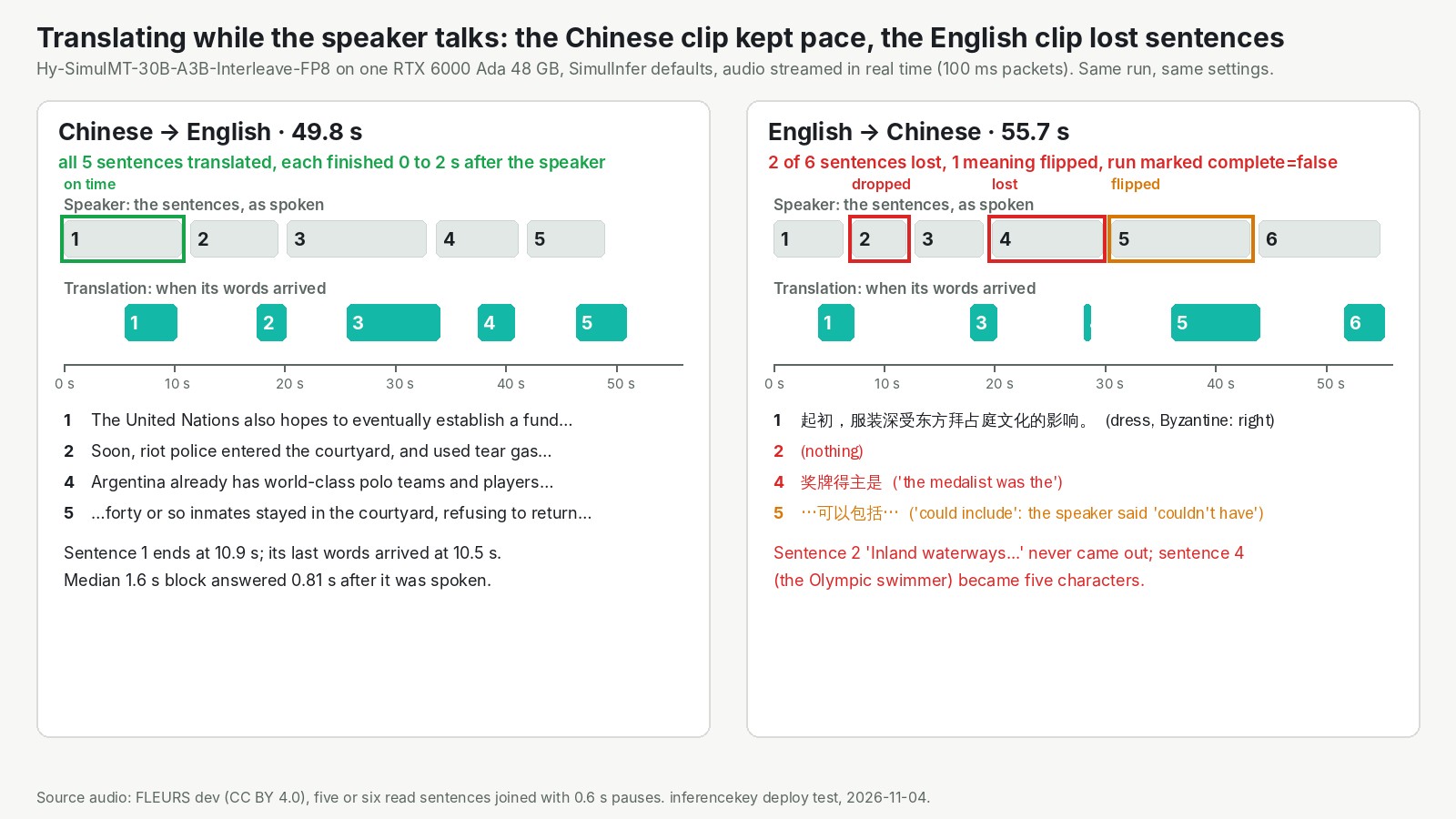
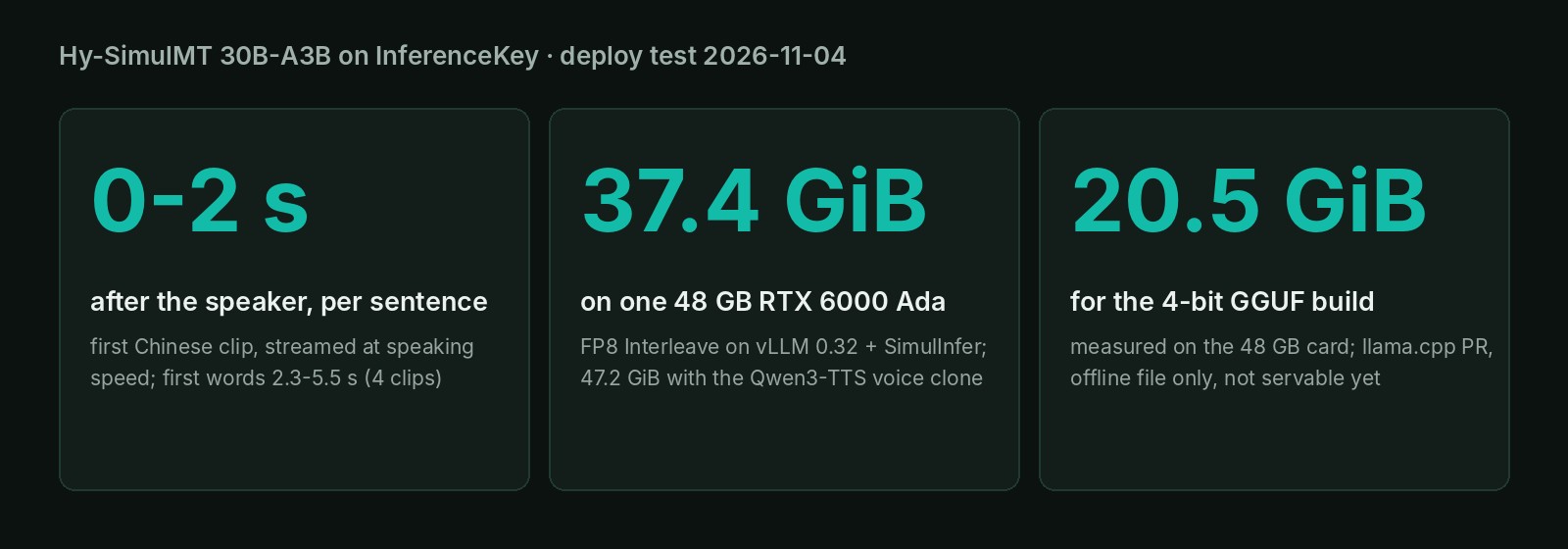
Each sentence of the first Chinese clip was finished 0 to 2 seconds after the speaker finished it. Its opening sentence ended at 10.9 seconds, and its translation was already complete at 10.5. Under the hood, the service hands the model a new 1.6-second slice of audio. A typical slice was answered 0.4 to 0.8 seconds after it ended, in all four clips. One slice in ten took 1.5 seconds or more, the slowest 2.9.
| Clip | Typical wait after a slice ends | First words | Finished? |
|---|---|---|---|
| Chinese 1 (49.8 s) | 0.81 s | 5.5 s | yes |
| Chinese 2 (52.7 s) | 0.74 s | 2.3 s | yes |
| English 1 (53.6 s) | 0.73 s | 4.4 s | yes |
| English 2 (55.7 s) | 0.43 s | 4.0 s | no |
The first words take a few seconds because the model waits until it has something worth saying.
If you do not need it live, there is a faster mode. Uploaded as a whole file, 50 to 56 seconds of speech came back translated in about 26 seconds, roughly twice as fast as it plays.
Chinese to English held up, English to Chinese dropped sentences
Speed was even across both directions, accuracy was not. We scored how closely each output's wording matched human translations, from 0 to 100. For an anchor, a smaller version we test below got every sentence of the first Chinese clip right and scored 66. The Chinese clips scored 60.6 and 51.7 into English, and the English clips 42.2 and 23.4 into Chinese.
The 23.4 clip lost two of its six sentences. One sentence, about inland waterways as a travel theme, never came out at all. We ran that clip again separately and it was dropped again. Another sentence, about an Olympic swimmer, shrank to five Chinese characters that mean "the medalist was". A third sentence flipped its meaning: the speaker said "couldn't have included" and the translation says "could include". The service marked that run as incomplete. In the other English clip, the main run dropped one sentence about iron rails in 1767.
That flipped negation is the kind of error a listener cannot catch. A dropped sentence leaves a gap you might notice. A wrong "could" sounds perfectly fluent.
We do not know why. Uploaded as a whole file, the same clip came back marked incomplete too, so the live setup is not the only cause. Treat English to Chinese as something to test on your own audio first.
The voice clone fills the card, and it only worked Chinese to English
The voice clone worked in one direction and stalled in the other. It copies the speaker's voice from the first few seconds of their own speech and reads the translation aloud with it. No reference recording is needed. It runs as a second, small model, Qwen3-TTS-0.6B from Alibaba's Qwen team, on the same card.
On the first Chinese clip, the first English speech came out 8.7 seconds into the clip. In total it produced 33.7 seconds of English audio for 49.8 seconds of Chinese. The text translation kept its pace, so the voice did not slow the translator. It did take the memory: the card went from 38 GB to 48 GB in use, nearly the whole card.
English to Chinese with the voice on never answered. The audio ended, and then nothing came back for over four minutes. Status: open, not investigated. Nobody listened to the cloned voice in this unattended run either, so we make no claim about how close it sounds.
Which GPU: a real 48 GB card is the proven size, 32 GB is unproven
The smallest card that served it is a real 48 GB card. We tried two cheaper options on the same 48 GB card.
- A 32 GB budget, simulated. We told the server to use only 32 GB of the 48. It started, with room for a much shorter conversation and one listener at a time. It translated both test clips at the same live pace. But startup briefly takes the whole card, in every run, before it settles. A memory limit does not stop that, so a real 32 GB card such as an RTX 5090 may fail at startup.
- The 4-bit build, about 21 GB. The authors' 4-bit file, a translation-only build, ran in 21 GB on the 48 GB card. It translated every sentence of both clips it got, under a minute of speech in about 3 seconds, not counting model load. The catch: it needs a preview version of a separate tool and only translates a finished file. No server can load it yet.
We did not try the full 61 GB build, a real 32 GB or 24 GB card, or several listeners at once.
On InferenceKey: three services on one card you control, up in about 6 minutes, 73 seconds on restart
One 48 GB card held the translator, its streaming service and the voice. On our platform a worker is a GPU machine you own or rent and connect to it. This model needs more than a plain model server, so we wrote Python code that installs it with SimulInfer and starts them in order.
From the first deploy on a fresh machine, the model server was up in about 6 minutes. A restart on the same machine was ready in 73 seconds.
The problem you will hit first, if you deploy the compressed build yourself: SimulInfer does not recognise it. It only knows the full builds by name, and stops with an error in Chinese saying it cannot identify the model's output format. Our code writes the small file SimulInfer is looking for. Status: fixed in our example, not yet fixed by the authors when we tested.
One limit is ours. Our API takes an uploaded file of up to about one minute and plays it to the model at speaking speed. The timeline of arrivals comes back at the end. A live microphone cannot go through our API yet. Status: open. The other problems and the full timings are in the appendix.
For a few calls a week, a hosted live translation service is the shorter path. This setup is for teams that want the model on a card they control.
Should you use it? Yes for Chinese to English on your own card, test the other way first
- If you need live Chinese to English, this is a strong open option. For a live microphone today, connect to SimulInfer on the card directly.
- If you need English to Chinese, test it on your own audio before anyone relies on it.
- If you want the speaker's voice too, plan for a full 48 GB card and the Chinese to English direction only, for now.
- If you have a 24 GB or 32 GB card, the 4-bit build used 20.5 GB on a 48 GB card, for recorded files only. We have not tried it on a real 24 GB card, and it needs an unmerged llama.cpp build.
- If you need any other language, this is not your model.
Run python publish.py and then python main.py from the Hy-SimulMT SDK example. It deploys the same setup on your GPU and replays your clips at speaking speed, with per-slice arrival times. It needs an InferenceKey project with an SDK token and an API key. Bring a private NVIDIA worker with 48 GB and about 70 GB of disk. The setup steps are in the appendix.
For engineers
Credits
- Hy-SimulMT: Tencent Hunyuan. They trained the model, published the BF16, FP8, GGUF, Interleave, Interleave-FP8 and Interleave-GGUF builds, the
simulstvLLM plugin, the SimulInfer service and launcher, the TTS integration, the llama.cpp support for the GGUF builds (PR #31198, still open), the benchmarks and the interpreter comparison. Repos: base, Interleave-FP8, GGUF, GitHub. - Voice: Qwen3-TTS-12Hz-0.6B-Base from the Qwen team, served with vLLM-Omni.
- Serving: the vLLM project (0.32.0 for translation, 0.31.0 for the TTS side), the llama.cpp project, which the GGUF support was submitted to, and the SGLang-Omni team for their cookbook.
- Test audio: FLEURS dev (Google, CC BY 4.0).
- Where we spotted it: AI Search, "AI finally sleeps, Gemini 4 Carbon, ...", 2026-11-01, Hy-SimulMT at 10:02. We used its stored transcript, not a full viewing.
- Our part: the custom backend, the deployment through the platform, the streaming harness, the measurements, the VRAM ladder, the SDK example and the demo video.
Model and files
HYV3SpeechForCausalLM: audio tower plus a Hunyuan v3 MoE, 48 layers, 128 experts with top-8 per token plus 1 shared, 4 KV heads, head_dim 128. About 30B total, about 3B active.- Interleave-FP8 (the build we tested; Interleave also writes out the source transcript): fp8 e4m3, dynamic activations,
weight_block_size[128,128] on the experts. lm_head, router gates and attention projections stay BF16. 32.16 GB (17 shards plus a 0.66 GB audio tower file), sha7f37cb76. - Sizes from the HF API: BF16 60.86 GB, GGUF Q4_K_M 19.75 GB, Q8_0 33.31 GB (translation only, single file with the audio projector inside).
- License:
apache-2.0on the base and Interleave-FP8 cards,LICENSE-Hy-SimulMT.txtin the repo (Apache-2.0 except listed third-party parts). The GGUF card has no license field. None of the repos is gated. - Language tags: the card lists 40, but the card text, SimulInfer and the SGLang-Omni recipe support only zh<->en.
- Directions: SimulInfer raises a
ValueErrorunless direction iszh-enoren-zh(simulinfer/translation.py:36), the client offers only those two (client.py:90). - Authors' short-form table (not reproduced): Hy-SimulMT FLEURS 90.3, CoVoST2 75.5, ACL6060 81.2, RealSI-Sentence 84.7. Gemini3.5-LiveTranslate 92.4 / 74.4 / 82.6 / 82.2, Qwen3.8-LiveTranslate 88.4 / 82.1 / 80.5 / 84.4. Long-form RealSI StreamLAAL about 3 s, the lowest in their chart; GEMBA above the open models and four of five commercial APIs. StreamLAAL is not time to first speech.
- SGLang-Omni (not tested by us): BF16 translation-only checkpoint, text only, about 57 GiB of weights, a single H200.
sgl-omni serve --model-path tencent/Hy-SimulMT-30B-A3B --mem-fraction-static 0.75 --enable-realtime --port 8000. Offline input up to 30 s per request, realtime at/v1/realtime?intent=transcription(16 kHz PCM16, hypotheses every 1.6 s), context restarts after 30 s, without SimulInfer's VAD and recovery heuristics.
GPU choice and backend
- Planned GPU: an L40S 48 GB. It was unavailable on our cloud at test time. A first L40 machine came up without direct SSH and the manager discarded it after about 3 minutes. We used an RTX 6000 Ada Generation 48 GB (49,140 MiB, sm_89, driver 595.91.07, CUDA 13.2), same Ada generation and memory as the L40S.
- FP8 on Ada: vLLM 0.32.0 runs these block-FP8 experts with the weight-only Marlin kernel ("Your GPU does not have native support for FP8 computation ... Weight-only FP8 compression will be used"). An L40S would do the same. File mode was still about 2x real time.
- Why a custom backend: the stock
vllmbackend cannot add thesimulstplugin, and the simultaneous logic lives in SimulInfer, a separate service in front of vLLM. - Backend
hy-simulmt0.1.2:setup()fetches Hy-SimulMT at7efcb18c, builds a Python 3.12 env with uv (vllm==0.32.0,simulst[audio]==0.1.0,SimulInfer[vad]), downloads the pinned revision to the container disk, runssimulinfer-prepare-model, writesexport_manifest.jsonwhen missing, takes the vLLM command fromsimulinfer.launch --dry-run, then starts SimulInfer on the authors' default config pointed at loopback. Optional TTS env (vllm==0.31.0,vllm-omni==0.31.0rc1) withsimulinfer-tts-omniat util 0.15. - vLLM flags as run:
--enforce-eager, prefix caching, chunked prefill,--limit-mm-per-prompt '{"audio":1024}', the authors' chat template,--gpu-memory-utilization 0.78 --max-model-len 8192 --max-num-seqs 4 --max-num-batched-tokens 4096. process(): multipart or JSON,direction(orlanguage),transportrealtime(WebSocket, 100 ms PCM16 packets paced at real time) orfile(/translate/streamSSE),tts. Returns text, source text, every event witht_ms, delays, first text and the TTS wav.- Child processes get
PR_SET_PDEATHSIG, and a restarted backend stops servers left inservers.pid.
Step by step with the SDK example
Example: hy-simulmt-speech-translation-custom-backend-private-nvidia, commits 61f823f (example) and 769745e (README note on the startup memory spike).
git clone https://github.com/inferencekey/inferencekey-sdk
cd inferencekey-sdk/examples/hy-simulmt-speech-translation-custom-backend-private-nvidia
cp .env.example .env        # SDK token, API key, IK_WORKER_ID, IK_CLIPS
pip install -r requirements.txt
python publish.py           # uploads the custom backend
python main.py              # ensure -> wait -> each clip in realtime -> outputs -> delete
- Needs an NVIDIA GPU with 48 GB, proven with and without the voice sidecar (the example README says 40 GB+, which we did not test; the startup spike fills 47.4 GiB), a driver with CUDA 13 support and about 70 GB of disk.
- Env vars:
IK_WORKER_ID,IK_KEEP_ALIVE=1(keep the deployment),HYSIMULMT_TTS=1(voice clone),HYSIMULMT_GPU_MEMORY_UTILIZATION,HYSIMULMT_MAX_MODEL_LEN,HYSIMULMT_MAX_NUM_SEQS. - Endpoint:
/v1/audio/transcriptionswithfile,direction(zh-enoren-zh),transport(realtimeorfile) andtts. 2 MiB request limit, about one minute of 16 kHz WAV.
Outside our platform, the authors' one-command path is:
git clone https://github.com/Tencent-Hunyuan/Hy-SimulMT && cd Hy-SimulMT/SimulInfer
git checkout 7efcb18c   # the commit we tested
bash deploy.sh --install-server --model tencent/Hy-SimulMT-30B-A3B-Interleave
# Ready: http://127.0.0.1:8080/   (model server on :8800)
curl -N http://127.0.0.1:8080/translate/stream -F direction=en-zh -F file=@audio.wav
That command loads the BF16 Interleave build (the BF16 base alone is 60.86 GB), which does not fit the 48 GB card tested here. At 7efcb18c SimulInfer also does not recognise the FP8 repo names without the export_manifest.json fix (problem 1).
SimulInfer endpoints: GET /health, GET /config, GET /, POST /translate/submit, GET /translate/task/{task_id}, POST /translate/stream, WebSocket /translate/ws. Defaults: 1600 ms blocks (standard), VAD on, max_sessions 4, timeout 900 s, ws_audio_mode noise_resistant. For the voice: simulinfer-tts-omni --model Qwen/Qwen3-TTS-12Hz-0.6B-Base --host 0.0.0.0 --port 8091 and [tts] tts_backend = "vllm_omni", tts_url = "http://127.0.0.1:8091/v1".
Full measurements
Time to ready:
- Cold (backend 0.1.0): about 6.2 min from
ensure()to the vLLM API. Env 47.2 s, 32 GB download 26.0 s, vLLM import about 2 min (the machine's CPU was also building llama.cpp), weight load 27.5 s, engine init 71.2 s. - Warm (0.1.1): 73 s (vLLM 57.2 s, SimulInfer 6.0 s).
- With the TTS env build (0.1.2): 376 s.
Translation, RTX 6000 Ada, FP8 Interleave, SimulInfer defaults:
| Clip | Mode | Audio s | Wall s | First text | Block delay median / p90 / max (ms) | LAAL-style lag (ours) | chrF | BLEU | complete |
|---|---|---|---|---|---|---|---|---|---|
| zh1 zh->en | realtime | 49.8 | 51.07 | 5.51 s | 809 / 1546 / 2058 | 7.34 s | 60.6 | 28.8 | true |
| zh2 zh->en | realtime | 52.66 | 53.55 | 2.34 s | 738 / 1847 / 2907 | 3.98 s | 51.7 | 15.8 | true |
| en1 en->zh | realtime | 53.64 | 54.08 | 4.44 s | 733 / 1633 / 1876 | 1.58 s | 42.2 | 48.5 | true |
| en2 en->zh | realtime | 55.68 | 55.82 | 3.97 s | 434 / 1774 / 2729 | 15.18 s (inflated by drops) | 23.4 | 25.1 | false |
| zh1 | file | 49.8 | 26.29 | non-CA 5.50 s | 62.8 | 32.0 | true | ||
| zh2 | file | 52.66 | 27.52 | non-CA 3.02 s | 51.8 | 16.4 | true | ||
| en1 | file | 53.64 | 25.34 | non-CA 4.22 s | 29.5 | 33.2 | true | ||
| en2 | file | 55.68 | 25.05 | non-CA 6.50 s | 39.2 | 47.1 | false |
- Block delay = arrival wall time minus the audio end position of the block that produced it. Blocks are 1.6 s, so a word from the start of a block waits longer than the block delay.
- Quality score: sacrebleu chrF, which counts shared character sequences between output and reference, 0 to 100.
- LAAL-style lag is our approximation over the whole clip (uniform alignment against the reference length, computation-aware), not the authors' StreamLAAL, and not comparable to their 3 s.
- chrF and BLEU with sacrebleu 2.6.0 (BLEU
zhtokenizer for Chinese output). One clip each: not a benchmark. - Through
main.pyon the platform: zh1 first words 6.14 s, median 825 ms; en1 4.44 s, median 713 ms. - Panel tester: a 20 s Chinese clip returned
ok · 20943 mswith "The UN also hopes to eventually establish a fund to help relevant countries address the impacts of global warming. Soon, police equipped with riot gear entered the courtyard, and used tear gas to corner the prisoners."
GPU memory:
- vLLM: model loading 30.05 GiB, KV cache 5.09 GiB = 55,552 tokens, maximum concurrency 6.78x at 8,192 tokens.
- nvidia-smi every second: 38,256 MiB serving, 48,302 MiB with Qwen3-TTS, 48,510 MiB (the whole card) during startup encoder profiling in every run.
Voice clone (zh1 with tts=true): first audio 8,721 ms, 33.67 s of 24 kHz mono English for 49.8 s of input, first text 5.52 s, block delay median 820 ms, p90 1,538 ms, round trip 56.2 s.
VRAM ladder
| GPU or cap | Config | Peak VRAM | Time per output | Output OK? | Real or emulated |
|---|---|---|---|---|---|
| RTX 6000 Ada 48 GB | FP8 Interleave, vLLM 0.32 + SimulInfer, util 0.78, len 8192, 4 seqs, batched 4096 | 37.4 GiB (47.4 GiB at startup) | about 26 s per 50 to 56 s file | yes (en2 loses sentences) | real |
| same + Qwen3-TTS 0.6B | + vLLM-Omni 0.31.0rc1, util 0.15 | 47.2 GiB | first audio 8.7 s | zh->en yes, en->zh stalled | real |
| 32 GB cap on the 48 GB card | util 0.66 (31.27 GiB), len 4096, 1 seq, 7,136 KV tokens | 31.6 GiB (startup still 47.4 GiB) | 51.6 s wall zh1, 55.0 s en1 (realtime) | yes: zh1 chrF 62.8, en1 chrF 37.6 | emulated |
| GGUF Q4_K_M, 19.75 GB | llama.cpp PR #31198 (d38e66aa), llama-mtmd-cli -ngl 99 -c 16384, offline file | 20.5 GiB | 3.2 s of turns per clip, about 16x real time | yes: all sentences, zh1 chrF 66.1, en1 chrF 42.3 | measured on the 48 GB card, not servable |
The 32 GB cap sits at 32,394 MiB against an RTX 5090's 32,607 MiB, with no headroom, and the cap does not cover the startup spike. Not tried: a real 32 GB or 24 GB card, BF16, SGLang-Omni, Interleave-GGUF, the non-Interleave FP8, concurrency.
Problems and status
- SimulInfer does not recognise the FP8 checkpoints.
ValueError: 无法识别所选模型的输出格式...frommodel_discovery.py: noexport_manifest.jsonand the name is not inPROVIDED_CHECKPOINTS. Fixed in our backend (writes the manifest). Open upstream at7efcb18c. - Startup encoder profiling fills the card. With the authors' 16,384 batched tokens vLLM profiled 3,276 dummy audio items, logged thousands of allocator OOM warnings, then recovered. We use 4,096. The 47.4 GiB (48,510 MiB) spike stays, even under a 0.66 cap. A smaller card may fail here.
- vLLM-Omni version trap. 0.32.0 and 0.32.0rc1 fail with
ImportError: cannot import name 'Qwen3TTSSpeakerEncoder'. 0.31.0rc1 on vLLM 0.31.0 works. Fixed in backend 0.1.2. - English to Chinese with voice stalled after the audio ended, no answer after 4 minutes with the GPU idle. Open, not investigated.
- Dropped and garbled sentences in English to Chinese (en2 in realtime and file mode, same sentence dropped in a second run; en1 lost the 1767 sentence once). Model or streaming behaviour, reported as is.
- No live microphone through our API. 2 MiB request limit and no WebSocket passthrough. The backend paces uploaded audio and returns timed events at the end. Open.
- Orphaned vLLM after a watchdog retry held 47.4 GiB after a failed start. Fixed in 0.1.1 by a stale-server check.
- Weight-only Marlin FP8 on Ada (see above). Not a failure, a speed note.
Demo video
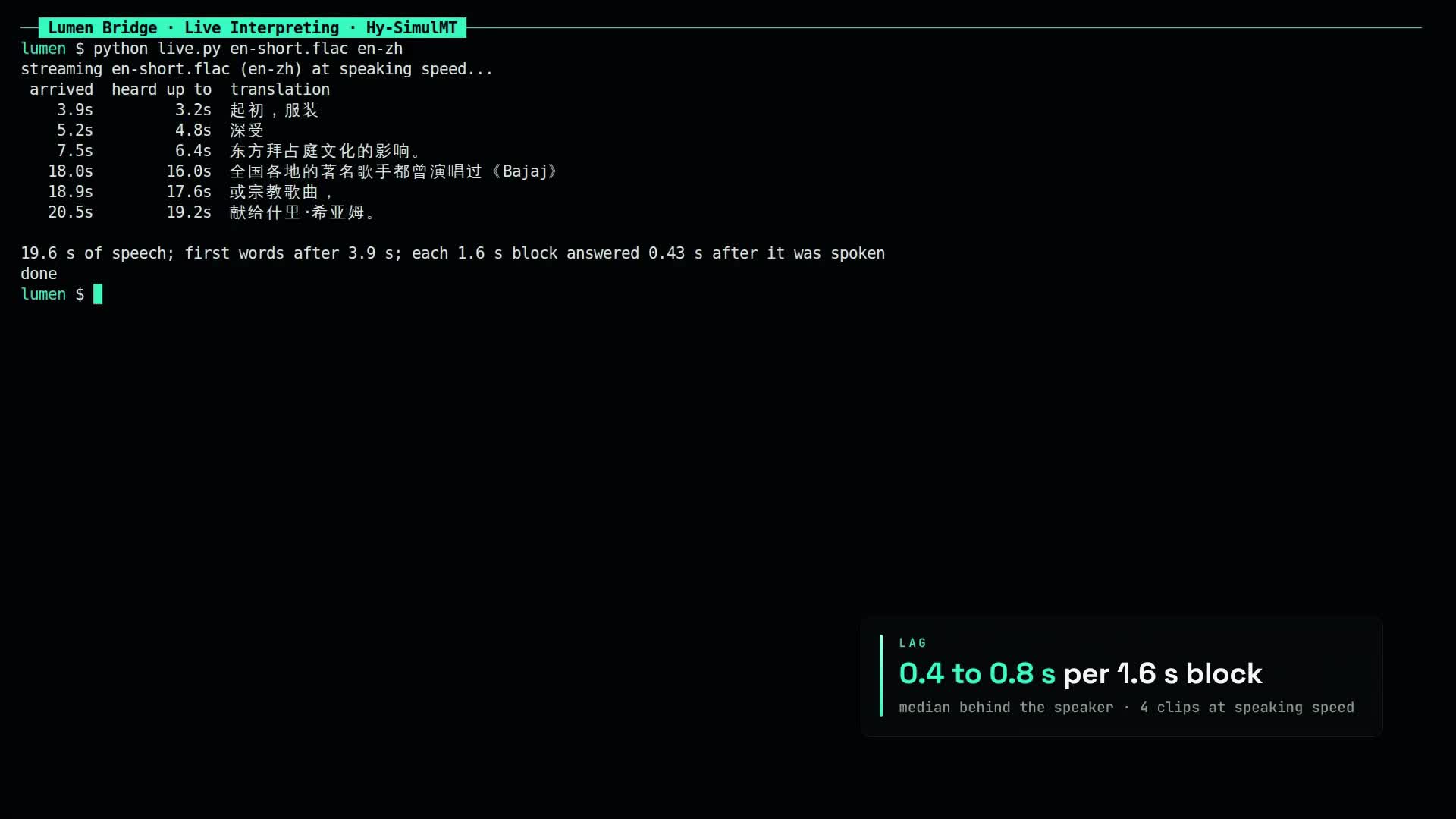
161 s, 1920x1080, narrated, with chapters and a 40-cue subtitle file. It shows the authors' demos with credit, the deployment in the panel, the tester, the terminal arrival times and the memory ladder.
Limits of this test
- Four read FLEURS clips, one run each plus repeats, one session at a time. chrF on single clips is not a benchmark.
- Our lag measure is not StreamLAAL. The authors' benchmarks and the interpreter comparison were not reproduced.
- No human listened to the cloned voice.
- Source facts come from the repo at commit
7efcb18c(2026-10-27). Later upstream changes, such as SimulInfer learning the FP8 names or the llama.cpp PR merging, were not checked.
Sources
- tencent/Hy-SimulMT-30B-A3B (model card, benchmarks, interpreter comparison)
- tencent/Hy-SimulMT-30B-A3B-Interleave-FP8
- tencent/Hy-SimulMT-30B-A3B-GGUF
- Tencent-Hunyuan/Hy-SimulMT and its TTS guide
- SGLang-Omni cookbook for Hy-SimulMT (BF16 only, text only, single H200)
- AI Search news video, 2026-11-01 (where we spotted it)
- Our earlier speech posts: Nemotron 3.5 Transcribe, Underdog Bark, Ming TTS