NorthCUA-Nano runs a web agent on a 16 GB card, if the screen is 1920x1080
Open computer-use model NorthCUA-Nano: 15 of 18 clicks on target at 1920x1080, 11 at 1280x800, about 4 s a step on a 16 GB RTX 5080.
The quickest way to underrate a computer-use model is to test it in a laptop-sized window. NorthCUA-Nano, a new open model from Beipo AI under Apache-2.0, looks at a screenshot and answers with the next click or keystroke. In our test it hit 15 of 18 targets with its first click on a 1920x1080 screen, and only 11 of 18 on 1280x800. Same pages, same settings, same card. For a team that deploys its own models, the good news is the size: it passed our checks on one 16 GB RTX 5080 gaming card on our cloud, at about four seconds per step. That is an agent that can drive internal web tools while every screenshot stays on hardware you control. What you can do with it: run the browser at 1920x1080, give the agent the values it needs, and check its first few clicks yourself.
A small model that uses the computer for you
"Computer use" means the model reads a request, the current screenshot and what it already did, then returns its reasoning plus actions: click here, type this, press Enter, scroll. The model never touches the machine. A program around it takes each screenshot, sends it, and carries out the action that comes back.
Beipo AI published NorthCUA-Nano on 1 November 2026, with a technical report. It is the smallest of three siblings, built on Alibaba's open Qwen3.5, and its files weigh 18.8 GB. The authors report 78.9% on OSWorld-Verified, a benchmark of real tasks on a full desktop. We asked a smaller question: does it click the right thing on screens a team actually uses, and what card does it need?
To keep it fair, we copied the instructions and the ten actions from the makers' own control program, the NorthCUA Harness. The pages were three small web apps we built (a mail inbox, an expense form and a settings dialog) running in a real browser. A script checked the page at the end of each task, so "passed" means the result really was there.
Right spot, wrong ruler
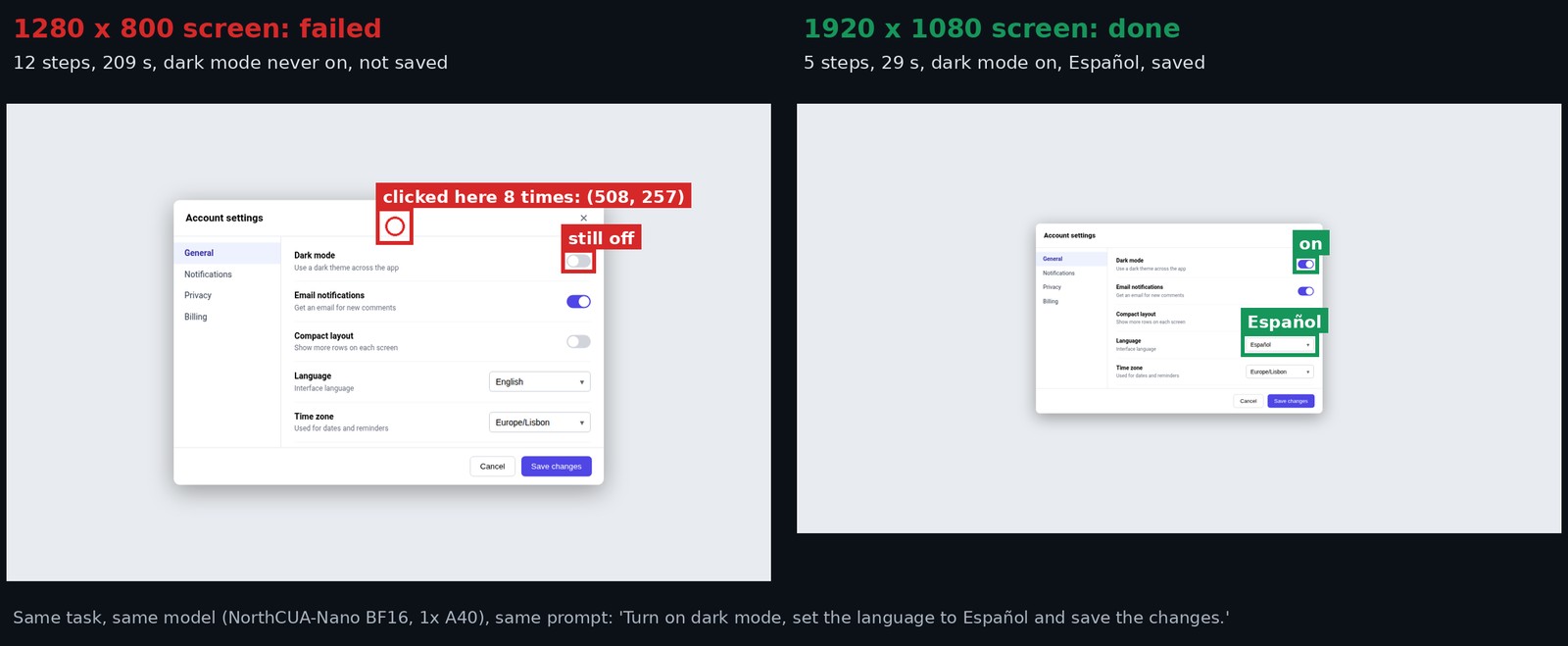
The model never answers in pixels. It answers on a grid from 0 to 1000 in each direction, whatever the size of the screen, and your code converts back. At 1280x800 that conversion went wrong.
On the settings task, the model's own reasoning placed the dark mode switch at pixel 976 across and 278 down, close to the truth. Then it sent 508, 257 on the grid. Those are the right numbers for a 1920x1080 screen, not for this one. On the real 1280x800 screen they land on the dialog's title bar. The model clicked that title bar eight times, and the task failed after 12 steps and 209 seconds. At 1920x1080 the same task took 5 steps and 29 seconds, with dark mode on, the language set to Español and the changes saved.
The model page does not mention this trap, so a team testing on a smaller window would think the model worse than it is.
| What we measured | Result |
|---|---|
| First clicks on target, 1920x1080 | 15 of 18 |
| Same targets, 1280x800 | 11 of 18 |
| Time per agent step | about 4 seconds |
| Smallest card that passed | RTX 5080 16 GB, model compressed to 8 bits, 15.2 GB used |
Who should care
If you want an agent that fills forms in internal web tools, and you would rather the screenshots never leave your hardware, this is worth a week of testing. It is licensed for commercial use. The compressed 8-bit version on the RTX 5080 aimed as well as the uncompressed model on the cards we compared, and if you want it uncompressed, a 24 GB RTX PRO 4000 Blackwell passed the same checks. A 16 GB card serves one agent at a time.
It needed no custom serving code. The standard open-source server that InferenceKey ships ran it with three settings, and a fresh card was ready in 8 to 12 minutes. To run it unattended on real desktops, the model page points to Beipo AI's Harness, which wraps each decision in the full loop and verifies the finished result.
Two habits matter more than the card. The model writes out its thinking before each click, and on our expense form that took 40 to 116 seconds. Part of that was our fault: two targets did not say what value to enter, so the model went looking for one. Give the agent the values, cap how long it may think, and set a step budget. One run saved its work at step 4 and kept clicking until our 12-step budget stopped it: it did not know it was done.
The honest limit: this was 18 targets on three synthetic web apps and eleven agent runs, one request at a time, with no real desktop applications and no benchmark reproduction.