NorthCUA-Nano clicks the right button on a 16 GB card, once you show it a 1920x1080 screen
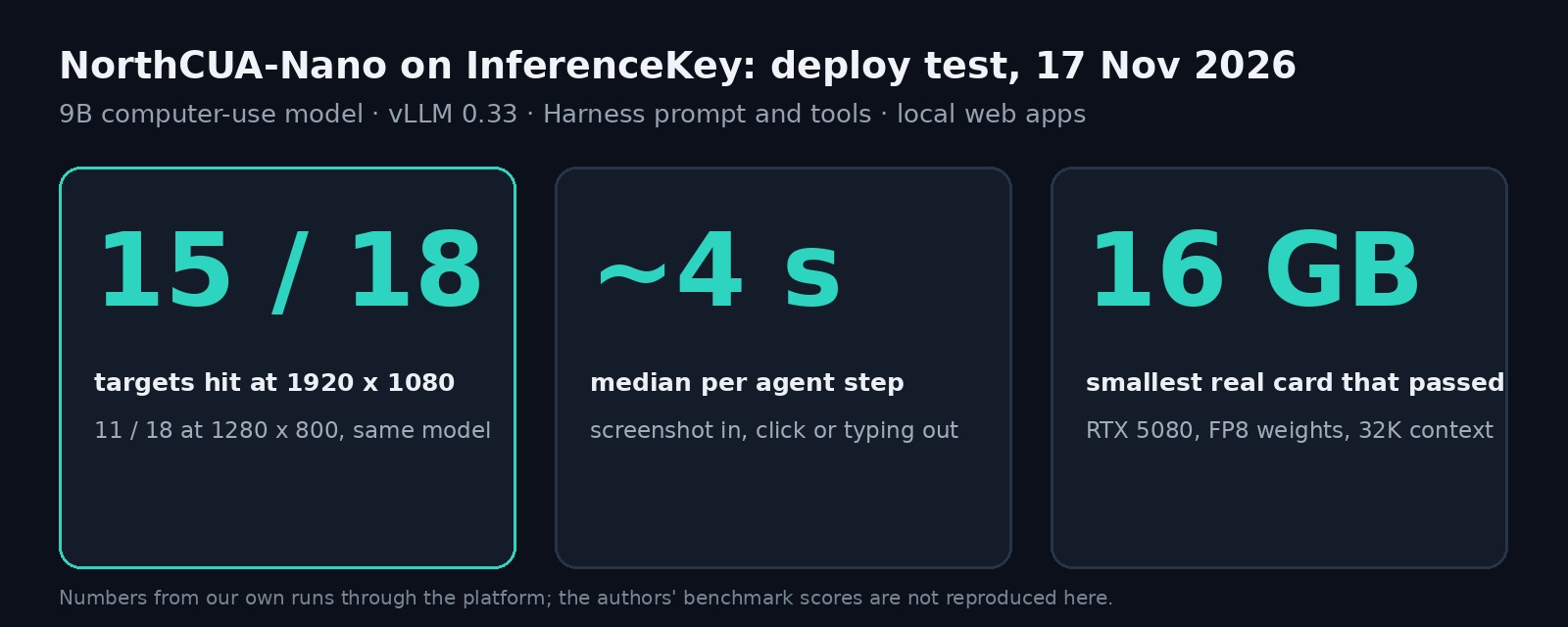
Open 9B computer-use model on one GPU: 15 of 18 clicks on target at 1920x1080, 11 at 1280x800, about 4 s a step on a 16 GB RTX 5080.
Our test screen was 1280 pixels wide. NorthCUA-Nano clicked as if it were 1920. NorthCUA-Nano is an open computer-use model from Beipo AI, under the Apache-2.0 license: you show it a screenshot and a request, and it answers with the next click or keystroke. On a settings dialog its own reasoning found the right switch, then it aimed with the wrong ruler and missed eight times. With 1920x1080 screenshots, the same model on the same card finished the same task in 5 steps and 29 seconds. The smallest card that passed our checks was one 16 GB RTX 5080 gaming card on our cloud, at about four seconds per step. For a team that runs its own GPUs, that is an agent that can drive web tools while every screenshot stays on hardware you control.
| What we measured | Result |
|---|---|
| First clicks on target, 1920x1080 screen | 15 of 18 |
| Same targets, 1280x800 screen | 11 of 18 |
| Time per agent step (screenshot in, action out) | about 4 seconds (median 3.5 to 5.4 s by card) |
| Smallest card that passed our checks | RTX 5080 16 GB, model compressed to 8 bits, 15.2 GB used |
| Smallest card, model uncompressed | RTX PRO 4000 Blackwell 24 GB, 22.1 GB used |
| Custom serving code needed | none: standard open-source server, three settings |
A model that uses the computer for you, small enough for one card
NorthCUA-Nano reads a request, the current screenshot and what it already did, and returns its reasoning plus actions: click here, type this, press Enter, scroll. That is what "computer use" means. The model does not touch the machine itself. A program around it takes each screenshot, sends it, and carries out the action that comes back.
Beipo AI published the model on 1 November 2026, with a technical report. Nano is the smallest of three. Beipo AI also ships two larger siblings, Mini and Pro. Nano is built on Alibaba's open Qwen3.5 model, and its files weigh 18.8 GB. That size is the reason we picked it: it fits one card you can rent by the hour, or buy.
The authors report 78.9% on OSWorld-Verified, a benchmark of real tasks on a full desktop. They also report 72.9% on a test of finding one button on busy professional screens. Their model page also says the scores were not measured on the exact files published. We wanted a smaller, more practical answer: does it click the right thing on screens a team actually uses, and what card does it need?
A fair setup: the authors' own prompt, checked on the page itself
We did not invent our own way of talking to the model. We copied the instructions and the ten actions from the makers' own control program, the NorthCUA Harness, so each request looked the way their model page asks. The pages were three small web apps we built: a mail inbox, an expense form and an account settings dialog. They ran locally in a real browser that a script controlled.
There were two kinds of test. The first was aim: 18 targets such as "open the mail settings" or "switch on dark mode", one try each. The first click had to land inside the right button. The second was whole tasks: archive an email, enter an expense and save it, change two settings and save them. A script checked the page at the end, so "passed" means the result really was on the page.
The model ran on three cards on our cloud. A 48 GB A40 took the main run. A 24 GB RTX PRO 4000 Blackwell and a 16 GB RTX 5080 showed how small a card can go. The limits, said once. 18 targets on three synthetic web apps, eleven agent runs, one request at a time, no card below 16 GB, no real desktop applications and no benchmark reproduction. The platform was a local InferenceKey manager and worker, the same worker and API code as the hosted service; we have not called the hosted endpoint. We used the Harness's prompt, not the Harness itself.
15 of 18 clicks on target, once the screen is full HD
At 1920x1080 the model hit 15 of the 18 targets with its first click. At 1280x800, with the same pages and the same settings, it hit 11. To see why, you need one idea about how the model points.
NorthCUA never answers in pixels. It answers on a grid that runs from 0 to 1000 across and 0 to 1000 down, whatever the size of the screen. The middle of the screen is always 500, 500. Your code converts back: on a 1280-pixel-wide screen, 500 across becomes pixel 640. The model page says so, and the official Harness does the conversion for you once you switch it on.
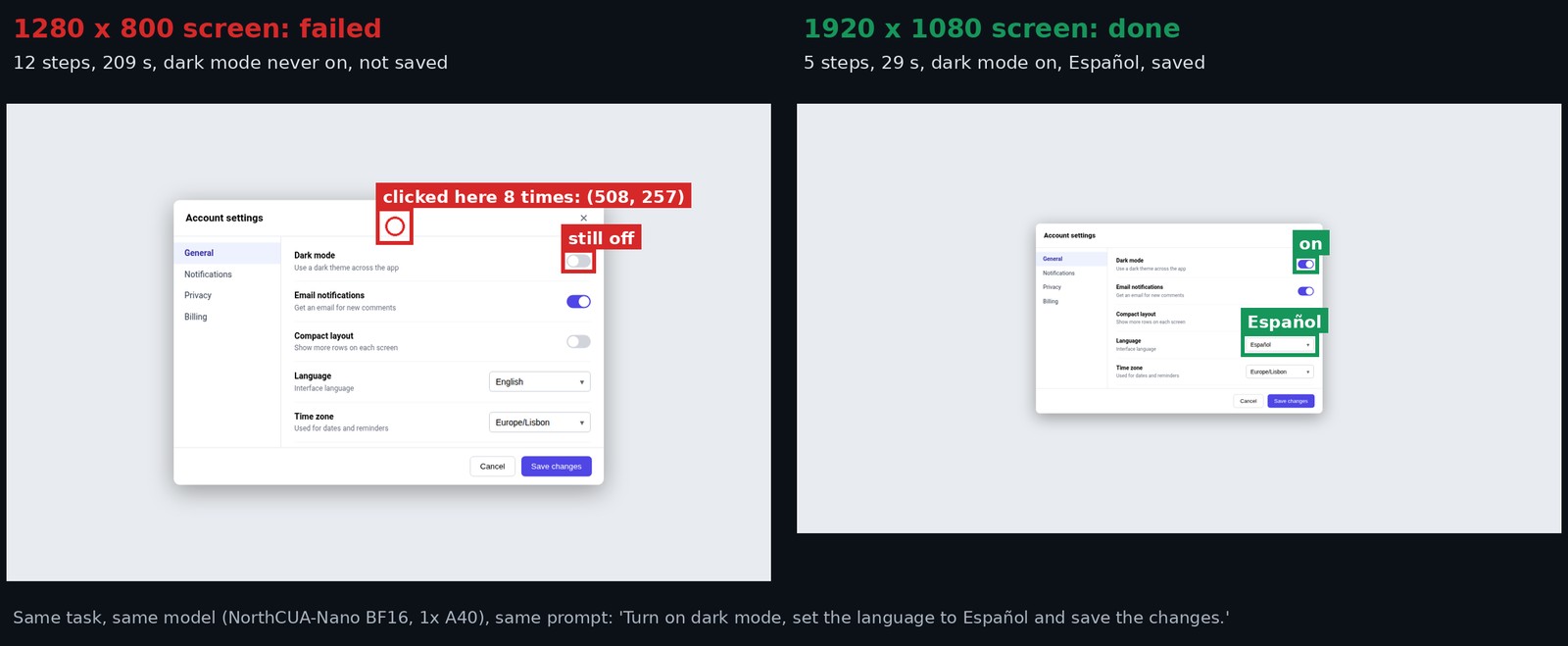
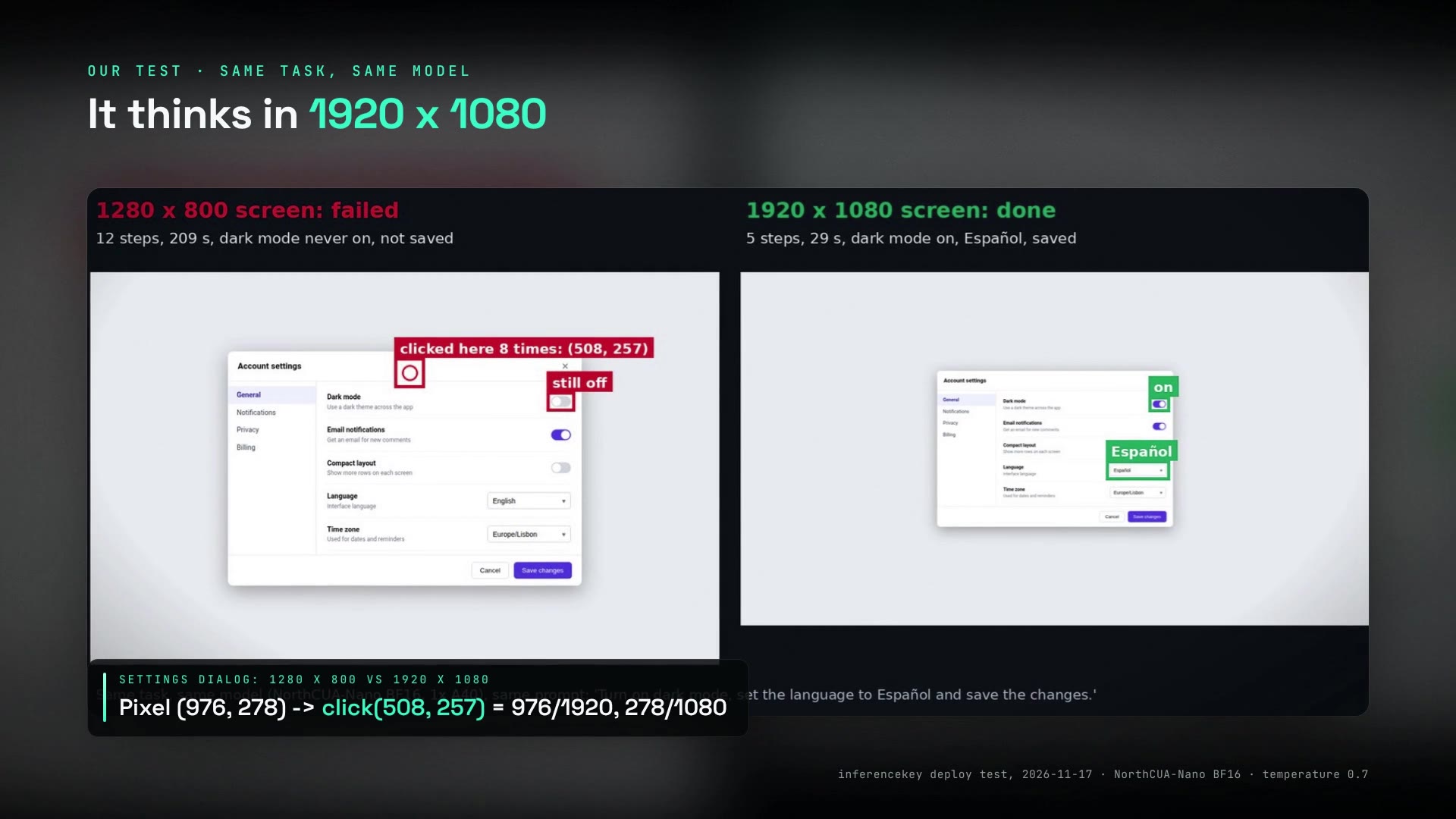
On the settings task at 1280x800, the model's reasoning said the dark mode switch was at pixel 976 across and 278 down. That was close to the truth, 958 and 263. Then it sent 508, 257 on the grid. Those grid numbers are 976 and 278 measured on a 1920x1080 screen, not on this one. It measured the right spot and converted it as if every screen were full HD. Back on the real 1280x800 screen, 508, 257 lands on the dialog's title bar, above the switch.
It is like reading a street address correctly and then looking it up on the map of another city. The model clicked that title bar eight times. The task failed after 12 steps and 209 seconds, with dark mode still off and nothing saved. At 1920x1080 the same task took 5 steps and 29 seconds, with dark mode on, the language set to Español and the changes saved.
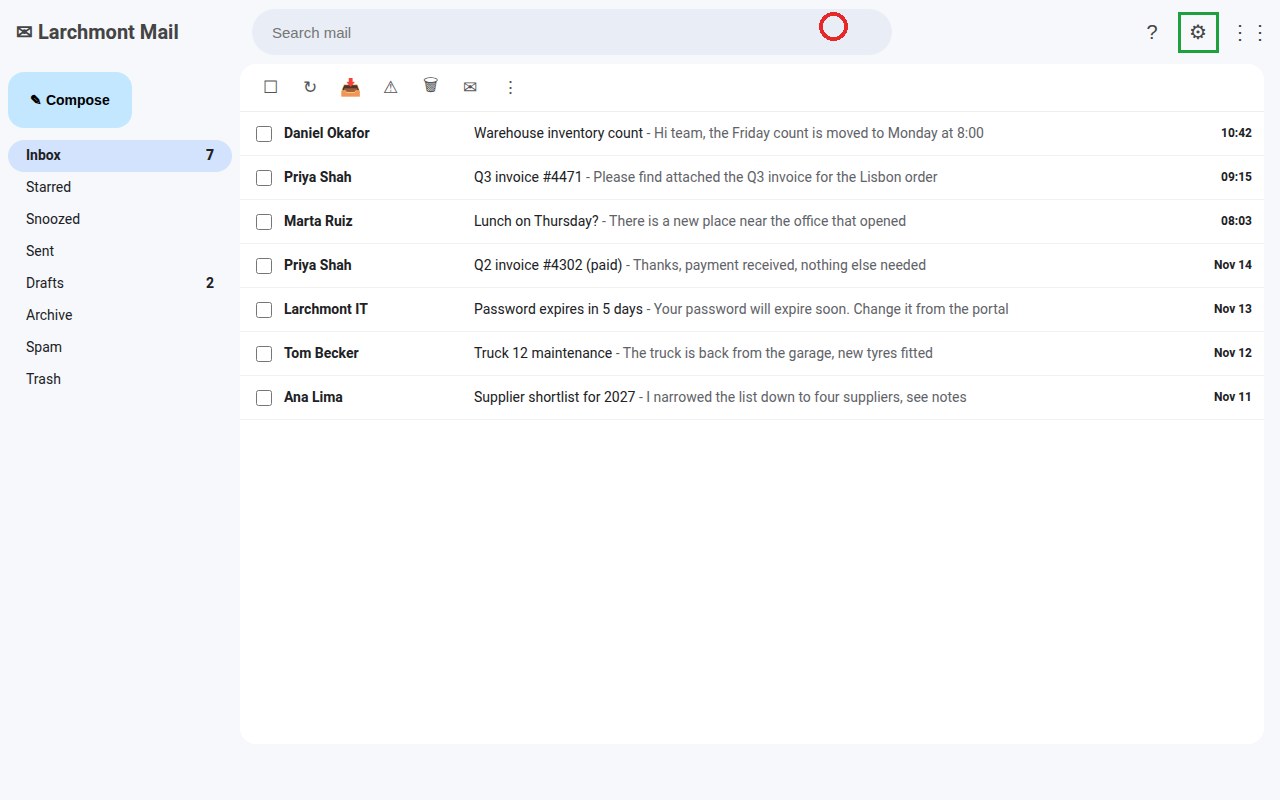
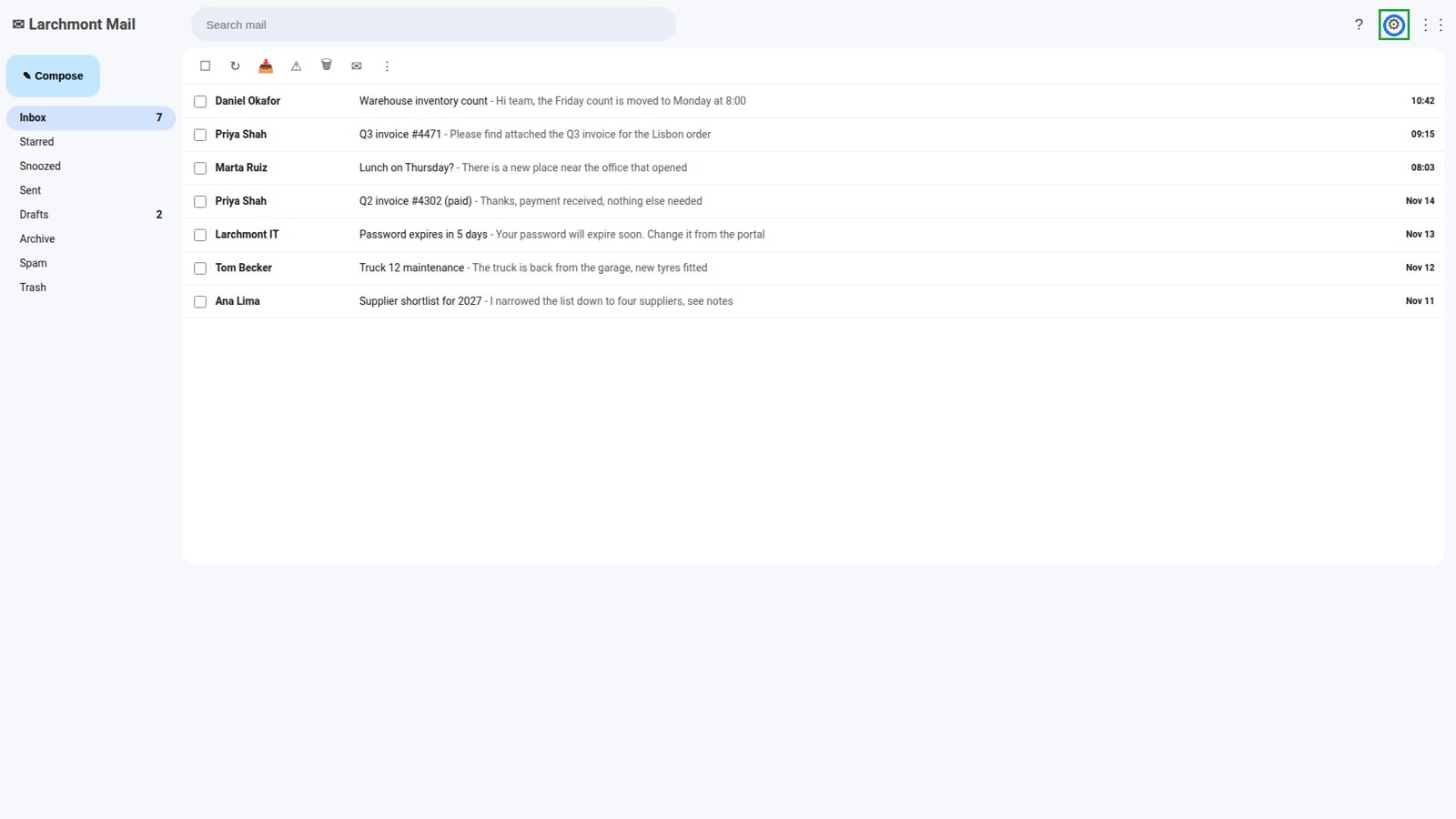
We do not know what resolution the model was trained on, and the model page does not say. What we saw is consistent: the conversion works when the picture is 1920x1080. The Harness's own test machines use that size too, which fits but proves nothing. The model page does not mention this screen-size trap, so a team testing on a laptop-sized window would think the model worse than it is.
Every whole-task run at 1920x1080 reached the right final state, but one saved its work at step 4 and then kept clicking until our 12-step budget stopped it: it did not know it was done. A typical settings or expense task took about five steps and half a minute. Even the mail task passed at 1280x800: the model missed the toolbar twice, found Archive on the fifth step, and opened the Archive folder to check its own work.
Where it broke: long thinking on vague forms
The model writes out its thinking before each click. On our expense form that took 40 to 116 seconds. In one case it decided to open the file manager to look for the expense amount.
Part of that was our fault. Two of our targets said "enter the amount" and "fill in the description" without giving a value, so the model went looking for one. Two of those thoughts ran past our platform's 120-second limit and counted as misses at full HD. The limit is adjustable. Counting only the 16 targets that were properly specified, the score was 15 of 16 at full HD and 11 of 16 at 1280x800. The lesson for a team is plain: give the agent the values it needs, cap how long it may think, and set a step budget.
The one remaining miss at full HD was "close this dialog without saving". The model clicked Cancel instead of the X. That is arguably the right call. A bug in our test page added one more lesson: its X button does nothing, and one RTX 5080 run kept clicking it after its task was saved. The dead button is ours, but the model never noticed that its clicks changed nothing.
Which GPU: a 16 GB RTX 5080 with the model compressed, or 24 GB uncompressed
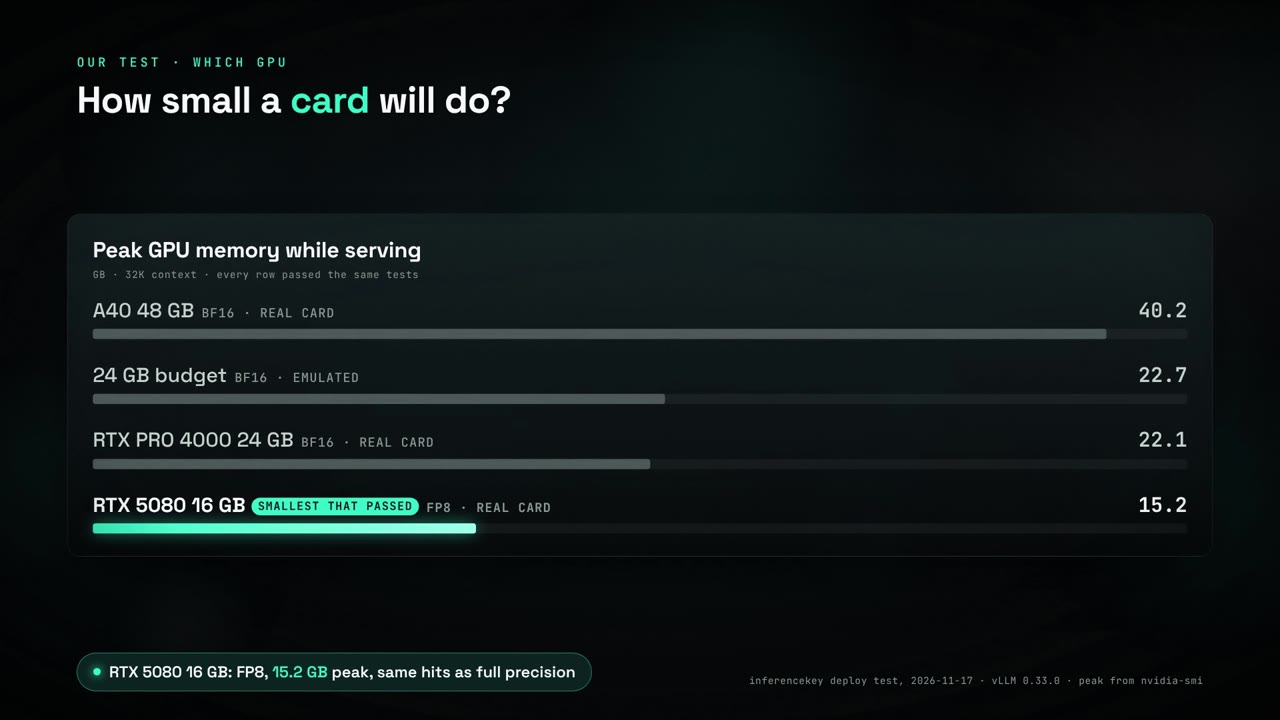
The smallest card that passed our checks was a real RTX 5080 with 16 GB. The serving software stored the model in a compressed 8-bit form, about 40% smaller. It peaked at 15.2 GB, loading included, and aimed as well as the uncompressed model: 12 of the 13 mail and settings targets we reran on every card. Both agent tasks we reran there, settings and expenses, passed. It was also the fastest card we tried, about 4 seconds per step. At 16 GB it serves one agent at a time.
If you want the model uncompressed, a real RTX PRO 4000 Blackwell with 24 GB passed the same checks. It peaked at 22.1 GB, hit 12 of 13 targets, and passed both agent tasks at about 5 seconds per step.
The 48 GB A40 was only the bench for the main run. It used 40.2 GB because the serving software reserves most of the card in advance as working memory, not because the model needs it.
On InferenceKey: no custom code, ready in 8 to 12 minutes on a fresh card
The card was ours by the hour, and the model needed no custom code. The standard open-source serving software that InferenceKey ships served it at an address any program built for OpenAI's API can call. A worker, in InferenceKey terms, is a GPU machine that runs your models and reports to the platform. On a fresh A40 worker the model was ready about 8 minutes (470 s) after we asked for it. About three of those minutes went to installing the serving software, and the 18.8 GB of weights downloaded in 27 seconds. The fresh RTX PRO 4000 took 635 seconds and the RTX 5080 took 726, mostly installing software on a slower host and compiling for the newer chip.
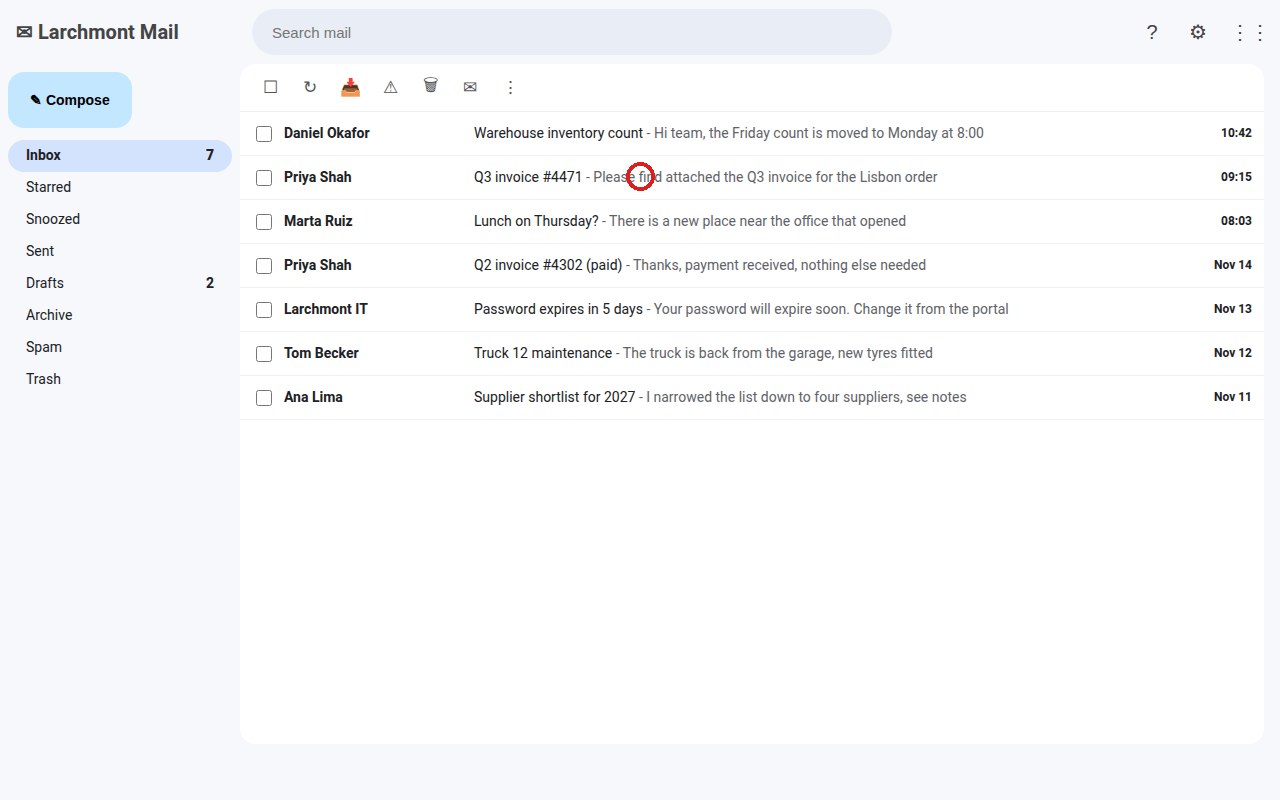
Three standard settings did the work: one separates the model's thinking from its answer, two put its actions in the format OpenAI's API uses. The responses that completed came back with a one-line summary and an action on the 0 to 1000 grid. The first call, a mail screenshot with "open the email from Priya Shah about the Q3 invoice", picked the right row on every card, in 8 to 15 seconds.
One problem you will hit: if you ask our endpoint for the whole answer at once, the model's thinking is dropped. The action and the summary arrive intact, but the reasoning text is missing. An answer sent piece by piece keeps it. The status is open on our side. Until it is fixed, ask for the answer piece by piece if you want to log why the agent clicked where it did.
The endpoint gives one decision per screenshot, the Harness gives the loop
Beipo AI's NorthCUA Harness wraps each decision in the whole loop, and the model page says to use it for real computer use.
The Harness controls real desktops and browsers. A separate checker inspects the finished result, so "done" is verified rather than claimed.
Our SDK example includes a small browser loop that stands in for the Harness, enough to watch the model work on a page. For anything with real data, use the Harness, run it in a sandbox, and keep credentials out of what the model can see.
Should you use it? Yes for web tools on your own card, at 1920x1080
If you want an agent that fills forms in internal web tools, with screenshots that stay on your hardware, NorthCUA-Nano is worth a week of testing. It is licensed for commercial use and runs on a 16 GB gaming card.
Run the browser or desktop at 1920x1080, and check the first few clicks yourself. We never tested resizing smaller, larger or differently shaped screens to 1920x1080.
To run it unattended on real desktops, pair it with Beipo AI's Harness.
Run python main.py from the NorthCUA-Nano SDK example to watch it click on your own GPU. It needs a 24 GB NVIDIA worker (16 GB with the 8-bit option) and deletes the deployment on exit.
For engineers
Credits
- Beipo AI: NorthCUA-Nano, Mini and Pro, the model card, the technical report (arXiv:2611.02102v1, "NorthCUA Technical Report: Turbocharging Computer-Use Agents through Experience at Scale"), the project blog and the NorthCUA Harness (Apache-2.0), whose Desktop prompt and ten desktop tool schemas we copied into the example with attribution.
- The Qwen team, Alibaba: Qwen3.5-9B, the architecture Nano is post-trained from. The NOTICE file says NorthCUA is "not an official Qwen release".
- The vLLM project: native
Qwen3_5ForConditionalGenerationsupport in 0.33, theqwen3_codertool-call parser, theqwen3reasoning parser and online FP8. - NexAU: the agent framework the Harness is built on.
- Microsoft Playwright and Chromium: the browser our test apps ran in.
- r/LocalLLaMA: a thread where we spotted the release. We could not fetch it, and nothing in it is used as a source.
- Our part: the three test apps, the Harness-shaped request builder, the grounding and agent runs on three cards, the memory ladder, the SDK example and the demo video.
The model, as published
beipo-ai/NorthCUA-Nanoon Hugging Face, 9B parameters, built on Qwen3.5-9B, sha317dd35f56527900d1c0fb4f344107f181598b07, createdAt 2026-11-01, lastModified 2026-11-03, not gated. 18,840,447,421 bytes: 4 safetensors shards (4.91 + 4.95 + 4.99 + 3.97 GB) plus a 20 MBtokenizer.json. Card: "Approximately 18.84 GB", "predominantly BF16". Release "r13 post-training checkpoint 975".- Config: 32 text layers with
full_attention_interval4 (three linear-attention layers per full-attention layer), hidden 4096, 16 attention heads and 4 KV heads,head_dim256, vocab 248,320, vision encoder depth 27,max_position_embeddings262,144,mtp_num_hidden_layers0 (no MTP weights), exported with Transformers 5.20.2. - Coordinate contract: every GUI action coordinate is
normalized_1000(0 to 1000 on both axes, relative to the screenshot, (500, 500) is the centre). Card: "Required for computer use: Run NorthCUA with our official NorthCUA Harness". - Family: Nano 9B dense; Mini 35B total / 3B active MoE (Qwen3.5-35B-A3B, about 70.23 GB of files, Apache-2.0); Pro 397B total / 17B active MoE.
- Authors' benchmarks, not reproduced by us:
| Benchmark | Nano | Mini | Pro |
|---|---|---|---|
| ScreenSpot-Pro (SFT; 1,581 examples, one prediction, no zoom or crop) | 72.87 | 92.41 | 93.30 |
| OSWorld-G (SFT, best of three complete runs) | 82.98 | 87.94 | 90.96 |
| OSWorld-Verified (RL; 361 tasks without the 8 Google Drive tasks, 100-step limit) | 78.90 | 85.30 | 88.64 |
| WebArena-Verified (RL) | 67.16 | 70.43 | 73.89 |
- The card states these results "have not been tied to an exact checkpoint975 export and are not new measurements of the files in this repository".
- The project blog lists WebTestBench F1 (Nano 48.0%, Mini 54.4%, Pro 60.3%), while the card marks the detailed WebTestBench results as pending and asserts no score.
- The blog compares Pro with other models on OSWorld-Verified (Pro 88.6, Qwen3.8-Max 86.1, Kimi-K3 84.8, GLM-5.3-Flash 84.7, DeepSeek-V4.1-Flash 71.7) and ScreenSpot-Pro (Pro 93.3, Qwen3.8-Max 84.5), noting that the reference models use different operation interfaces and aggregation.
- The Harness link on the card,
china-qijizhifeng/NorthCUA-Harness, is now an archived migration notice. The maintained repository is beipo-ai/NorthCUA (we used headb904a8fc, last push 2026-11-09).
Setup
| Item | Value |
|---|---|
| Backend | built-in vllm, vllm_version="0.33.0", stock, no custom code |
| Command | vllm serve beipo-ai/NorthCUA-Nano --revision 317dd35f... --max-model-len 32768 --gpu-memory-utilization 0.90 --max-num-seqs 8 --limit-mm-per-prompt '{"image": 4, "video": 0}' --reasoning-parser qwen3 --enable-auto-tool-choice --tool-call-parser qwen3_coder, plus --quantization fp8 for 16 GB |
| Prompt and tools | Harness Desktop system prompt rendered for normalized_1000, its task and observation messages, its 10 desktop tools (note, screenshot, click, double_click, drag, move, scroll, type, keypress, wait); tool-result screenshots sent as a separate user message, the Harness default for Chat Completions |
| Test apps | mail inbox, expense form, settings dialog, local, in Chromium via Playwright |
| Grounding | 18 targets, one try, temperature 0, the first coordinate must fall inside the element's box |
| Agent runs | browser_agent.py, temperature 0.7, seed 7, last two screenshots kept, step budget 12 to 15, DOM check of the final state |
| Cards | A40 48 GB (main run, emulated budgets), RTX PRO 4000 Blackwell 24 GB, RTX 5080 16 GB, each a fresh worker on our cloud |
| Platform | local InferenceKey manager and worker built from main, never production |
Step by step with the SDK example
The example (commit 7310ed3b on main) holds main.py (deploy, one Harness-style step on samples/mail.png, map to pixels, draw the click), browser_agent.py (agent loop on a real Chromium page, 1920x1080 by default), northcua_step.py (request builder and coordinate mapping), prompts/ (Harness templates and tool schemas), samples/ (the three apps and a screenshot), README.md, .env.example and requirements.txt.
git clone https://github.com/inferencekey/inferencekey-sdk.git && cd inferencekey-sdk
(cd bindings/python && maturin develop --release)   # local SDK build (Rust toolchain + maturin, in your venv)
cd examples/northcua-nano-computer-use-vllm-private-nvidia
pip install -r requirements.txt
cp .env.example .env   # INFERENCEKEY_SDK_TOKEN, INFERENCEKEY_API_KEY, INFERENCEKEY_PROJECT, IK_WORKER_ID
                       # optional: IK_KEEP_ALIVE, NORTHCUA_FP8, NORTHCUA_CONTEXT, NORTHCUA_GPU_UTIL, NORTHCUA_SLUG
python main.py                       # deploy + one step on a screenshot, then delete
IK_KEEP_ALIVE=1 python main.py       # keep the endpoint for the agent loop
python -m playwright install chromium
python browser_agent.py samples/settings.html \
  "Turn on dark mode, set the language to Español and save the changes."
The worker must be a private NVIDIA GPU with a CUDA 13 driver (580 or newer): 24 GB or more for BF16, 16 GB with NORTHCUA_FP8=1.
Coordinate mapping: the example's to_pixels clamps to [0, 1000] and maps with (width - 1) and (height - 1). The Harness maps x_px = x / 1000 * width, and only when desktop.coordinate_policy.input_space is set to normalized_1000 (the default is image_pixels, with optional clamp_to_bounds). Harness web point tools use CSS pixels and are not normalized.
Time to ready
| Card | Ready | Notes |
|---|---|---|
| A40, cold | 470.2 s | vLLM install about 3 min, weights 27 s, 4 shards loaded in 2.7 s, torch.compile 22.4 s, profiling and warm-up 70.6 s |
| A40, configuration change, warm | 86.9 s (BF16, 24 GB budget), 193.6 s (FP8, 16 GB budget) | |
| RTX PRO 4000 Blackwell, fresh | 635.0 s | install about 5 min, 17.57 GiB loaded in 13.0 s, torch.compile 26.2 s, CUDA graph capture 47 s per graph on sm_120 |
| RTX 5080, fresh | 726.3 s | slow pip on that host, FP8 load 10.73 GiB in 11.2 s, Blackwell compile |
Weights downloaded in 17 to 27 s with hf_xet.
First call (main.py)
Mail screenshot 1280x800, "Open the email from Priya Shah about the Q3 invoice", temperature 0. The target row spans y 155 to 199, and the Q2 invoice row from the same sender sits below it.
| Card | Seconds | Tokens (prompt / completion) | Tool call | Pixel | Right row |
|---|---|---|---|---|---|
| A40 BF16 | 15.22 | 6,150 / 413 | click(500, 220) | (640, 176) | yes |
| A40, 24 GB budget | 14.9 | 413 completion | click(500, 220) | (640, 176) | yes |
| A40, FP8 16 GB budget | 10.34 | 424 completion | click(500, 220) | (640, 176) | yes |
| RTX PRO 4000 BF16 | 13.71 | 412 completion | click(521, 222) | (667, 177) | yes |
| RTX 5080 FP8 | 7.89 | 423 completion | click(500, 222) | (640, 177) | yes |
Grounding, 18 targets
Targets: mail (Drafts, Compose, Priya Q3 row, gear icon, search, Tom Becker checkbox, trash icon), expenses (category, amount, description, Approvals link, Save), settings dialog (dark-mode switch, email switch, close X, time zone, Privacy tab, Español in an open dropdown).
| Run | Hits | Misses | Median s |
|---|---|---|---|
| A40 BF16, 1280x800 | 11/18 | gear to search bar; trash icon to between select and refresh; amount to keypress(super) (2,244 tokens, 69.6 s); description to top nav (3,203 tokens, 99.1 s); dark-mode switch to the dialog header; email switch to its label; X to Cancel | 6.1 |
| A40 BF16, 1920x1080 | 15/18 | amount and description: 503 after 120 s (long thinking); X to Cancel | 6.8 |
| A40, 24 GB budget, 1920 (13 mail and settings targets) | 12/13 | X to Cancel | 6.7 |
| A40, FP8 16 GB budget, 1920 | 12/13 | X to Cancel | 4.4 |
| RTX PRO 4000 BF16, 1920 | 12/13 | X to Cancel | 5.8 |
| RTX 5080 FP8, 1920 | 12/13 | X to Cancel | 3.6 |
16 of the 18 targets are well specified: 11/16 at 1280x800, 15/16 at 1920x1080. The save-expense target hit but took 3,093 tokens / 95.7 s at 1280 and 3,732 tokens / 115.9 s at 1920.
Agent tasks
| Card / screen | Task | Result | Steps | Seconds |
|---|---|---|---|---|
| A40 BF16, 1280x800 | expense "Train to Lyon", 42.50 EUR, Travel, save | pass | 9 | 50.6 |
| A40 BF16, 1280x800 | archive Priya Shah's Q3 invoice email | pass | 7 | 86.4 |
| A40 BF16, 1280x800 | dark mode on, Español, save | fail: click(508, 257) x8 on the header, Español set at step 11, never saved | 12 | 209.4 |
| A40 BF16, 1920x1080 | same settings task | pass | 5 | 28.7 |
| A40 BF16, 1920x1080, recorded take | same | pass | 5 | 31.3 |
| A40, 24 GB budget, 1920 | same | pass (toggled dark off and on again, then saved) | 8 | 101.4 |
| A40, FP8 16 GB budget, 1920 | same | pass | 5 | 28.4 |
| RTX PRO 4000 BF16, 1920 | settings / expenses | pass / pass | 5 / 5 | 32.6 / 36.6 |
| RTX 5080 FP8, 1920 | expenses | pass | 5 | 25.3 |
| RTX 5080 FP8, 1920 | settings | done and saved at step 4 (11.9 s), then clicked our inert X to the 12-step budget | 12 | 64.3 |
The table holds eleven runs (the RTX PRO 4000 row has two), the recorded take included. The A40 never ran the expense task at 1920x1080.
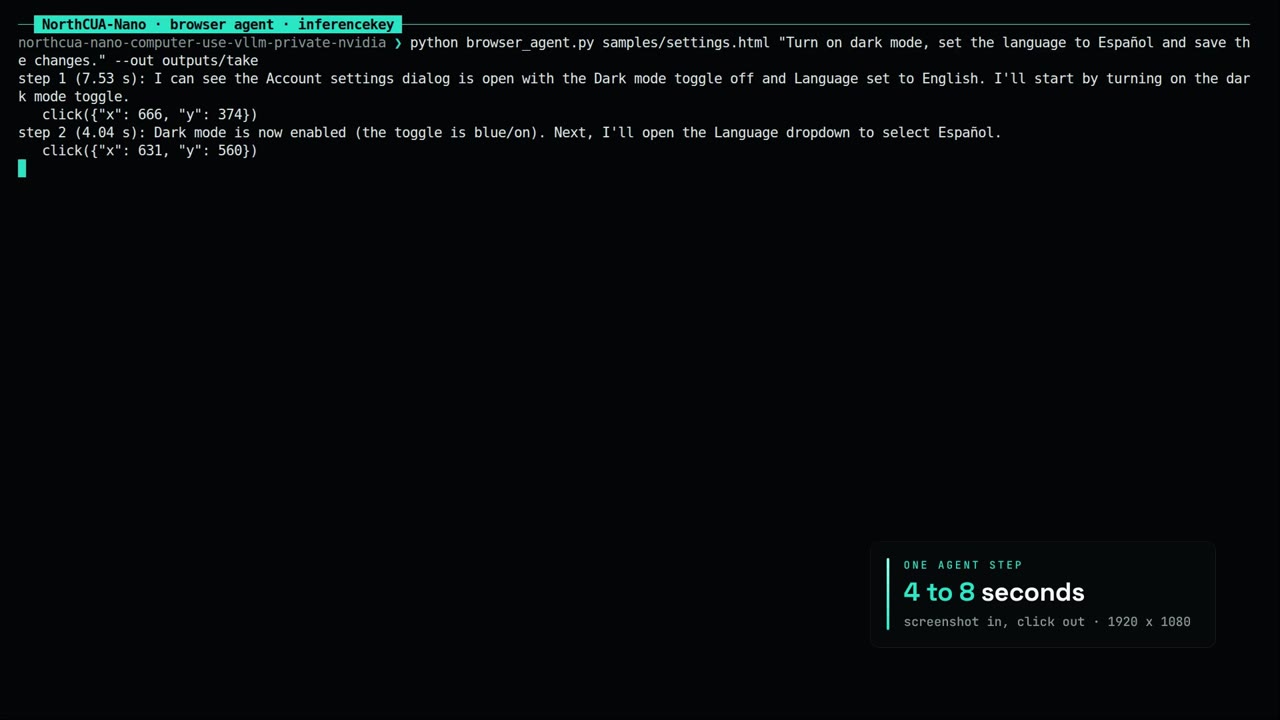
Per step at 1920x1080: median 4.2 s (A40), 5.1 to 5.4 s (RTX PRO 4000), 3.7 to 4.0 s (RTX 5080); first step of each task 7 to 14 s (reading the instructions and planning); max 14.3 s; the 24 GB-budget run had one 53.9 s step. Decode from long answers: about 32 tok/s BF16 on the A40, about 33 on the RTX PRO 4000, about 50 FP8 (Marlin) on the A40, about 70 FP8 on the RTX 5080. vLLM logged 20 to 28 tok/s generation and 160 to 720 tok/s prompt throughput during agent steps.
In the mail run at 1280x800, with the Harness prompt, the model explained each step, opened the Archive folder to check the final state, and stopped with a short report of what it had done.
GPU memory and the ladder
All at 32K context.
| GPU or budget | Config | Peak VRAM | Output OK | Real or emulated |
|---|---|---|---|---|
| A40 48 GB | BF16, util 0.90 | 40.2 GB (KV pool) | yes, 15/18 | real |
| 24 GB budget on A40 | BF16, util 0.52 | 22.7 GB | yes, 12/13 | emulated |
| RTX PRO 4000 Blackwell 24 GB | BF16, util 0.90 | 22.1 GB | yes, 12/13, both agent tasks | real |
| 16 GB budget on A40 | FP8 online (Marlin, weight-only), util 0.35 | 14.8 GB serving, 18.1 GB at load | yes, 12/13, settings pass | emulated, load exceeds 16 GB |
| RTX 5080 16 GB | FP8 online (native), util 0.90 | 15.2 GB including load | yes, 12/13, expenses pass, settings saved | real |
- A40 BF16: weights 17.57 GiB after load.
- 24 GB budget: KV 3.62 GiB, 106,377 tokens (3.25x of 32K).
- FP8 16 GB budget on Ampere: weights 10.73 GiB, KV 2.8 GiB, 82,157 tokens. vLLM online FP8 quantizes the BF16 weights at load on every card. On Ampere it uses weight-only Marlin, and that path peaked at 18.1 GB during load; the RTX 5080 used the native CutlassFP8 kernel and stayed at 15.2 GB. FP8 weights take 10.73 GiB against 17.57 GiB in BF16, about 39% less.
- RTX PRO 4000 BF16: KV 1.55 GiB, 43,690 tokens (1.33x of 32K).
- RTX 5080 FP8 (native, CutlassFP8ScaledMMLinearKernel): KV 1.2 GiB, 33,760 tokens (1.03x of 32K), so one request at a time.
gpu-memory-utilizationbudgets do not cap the load phase, which is why the 16 GB emulation exceeded 16 GB.
Problems and their status
- Screen-size coupling (model). At 1280x800 the model normalises its pixel estimate against 1920x1080. Workaround: send 1920x1080 screenshots (the example's default). Not documented on the card.
- Long thinking on simple forms (model). 1,337 to 3,732 completion tokens (42 to 116 s) on the expense form, partly because our prompts gave no value. Cap
max_tokensand keep a step budget. - Non-streaming responses drop the reasoning (platform). vLLM returns
message.reasoning. Through/endpoint/.../v1/chat/completionsthe field is absent (same 413 completion tokens). Streaming carriesdelta.reasoning_content. Open. - Gateway 503 after 120 s (platform). Two long-thinking requests got
503 backend did not respond within 120s ... raise INFERENCEKEY_BACKEND_REQUEST_TIMEOUT_SECS on the worker. Configurable on the worker. The Harness desktop recipe also uses a 120 s request timeout, and its long-context recipe 600 s. - FP8 on Ampere loads above budget. 18.1 GB transient on the A40. Native FP8 on the RTX 5080 stayed at 15.2 GB.
- Readiness events showed "provisioning a cloud GPU" and "worker assignment changed" while another worker was being created or deleted. Cosmetic, nothing moved. Not investigated.
- Ours. The first
browser_agent.pyrun crashed at step 6 with an HTTP 400 from a bug in our screenshot window (fixed, error bodies now surfaced). Our settings page's X button has no effect, which kept one RTX 5080 run clicking after the task was done.
Limits
- 18 targets on three synthetic web apps and eleven agent runs (one a recorded repeat). No real desktop applications, no OSWorld or ScreenSpot reproduction.
- One request at a time. No concurrency test.
- Not tried: 12 GB cards, Ampere 16 GB cards (RTX A4000, RTX 3080 16 GB, which may run out of memory during the FP8 load transient seen on the A40), the community quantizations listed on Hugging Face ("Quantizations: 2 models", publishers not checked), contexts beyond 32K, RTX 3090.
- The Harness itself was not run end to end. We used its prompt and tool schemas with our own loop.
- What the Harness adds, per its README and docs: native desktop tools (screenshot, mouse, keyboard) and browser tools (DOM refs, forms, tabs); a bounded screenshot window, task-preserving context compaction and durable working notes (note tool, SQLite store); an independent evaluator that inspects artifacts and the live workspace before cleanup; controller and device execution, isolated attempts, bounded retries, persistent batch state, resume and confirmed cleanup; response-recovery and no-tool-call retry policies. Python 3.12, uv, built on NexAU, with OpenAI Chat, Responses, Anthropic and Gemini APIs. Its desktop-settings recipe uses Chat Completions, temperature 0.7, reasoning effort max, 16,000 output tokens and three screenshot slots.
Demo video and images
A narrated 200.8 s video: the failed and successful settings runs, the authors' showcase clips with credit, the authors' benchmark scores next to self-reported rows from the Steel.dev OSWorld leaderboard (as of 2026-10-11; none reproduced or rechecked by us), the agent running in a terminal and the memory ladder. The synthetic narrator pronounces NorthCUA as "Northqua". Its lower third rounds the time per step to "4 to 8 seconds". The measured median is 3.5 to 5.4 s, as above.
Sources
- Model card: https://huggingface.co/beipo-ai/NorthCUA-Nano
- License (Apache-2.0): https://huggingface.co/beipo-ai/NorthCUA-Nano/blob/main/LICENSE
- NorthCUA-Mini: https://huggingface.co/beipo-ai/NorthCUA-Mini
- Project blog: https://beipo.top/blog/northcua/
- Harness, archived link on the card: https://github.com/china-qijizhifeng/NorthCUA-Harness
- Harness, maintained: https://github.com/beipo-ai/NorthCUA (its docs list OpenAI-compatible endpoints; we did not run it against ours)
- Technical report: https://arxiv.org/abs/2611.02102 (arXiv:2611.02102v1)
- Steel.dev OSWorld leaderboard, used in the video's benchmark insert: https://leaderboard.steel.dev
- SDK example: https://github.com/inferencekey/inferencekey-sdk/tree/main/examples/northcua-nano-computer-use-vllm-private-nvidia
- Where we spotted it: https://www.reddit.com/r/LocalLLaMA/comments/1xmlwjv/