MiniMax-H3-Image on one card: 16 megapixels in 45 seconds, and a license to read first
A 29 GB compressed copy of MiniMax's 135 GB image model drew 4096x4096 in 45 s on one A40, and in 49 s under an 8 GB memory cap. Read the license first.
MiniMax-H3-Image, MiniMax's open model that draws and edits images at 16 megapixels, weighs about 135 GB as published. We served a 29 GB compressed copy as an API on one 48 GB NVIDIA A40. A 4096 x 4096 image came back in about 45 seconds. Then we capped the model's GPU memory at 24, 16, 12 and 8 GB. The returned JPEG was identical, about 4 seconds later.
In our test GPU memory stopped being the limit, as long as the computer itself has memory (RAM) to spare. Time per image is one limit, and the license is the other. It does not cover the US, the EU, the UK or Korea without asking MiniMax. Elsewhere, serving people outside your company needs its written permission first. Our SDK example deploys the same setup on your own card.
| What we measured | Result |
|---|---|
| One 4096 x 4096 image, A40 | 44.4 to 45.2 s |
| GPU memory used, no cap | 30.9 GB |
| Same image under an 8 GB memory cap set on the A40 | 48.9 s, 7.7 GB |
| From asking for the model to ready | 135 s |
135 GB as published, 29 GB compressed
The original is 135 GB, too big to load whole on a 24 or 48 GB card. A 29 GB compressed copy is what ran on ours. MiniMax describes H3-Image as one model for two jobs: drawing from a text prompt, and editing with up to 16 reference pictures. It works directly at about 16 megapixels, from 4096 x 4096 to a wide 6272 x 2688, with no enlarging pass afterwards.
The price of that resolution is size: the part that draws weighs about 66 GB. The part that reads your prompt, taken unchanged from MiniMax's H3 model, weighs another 66.7 GB.
Two other projects did the work of running the original. MiniMax's model page points to recipes by SGLang and vLLM-Omni. On datacenter hardware they are fast: SGLang reports about 10 seconds for a 4736 x 3552 image on one H200. Both projects also document ways to run on smaller cards by keeping most of the model outside the GPU.
The route we tested comes from Comfy-Org, makers of ComfyUI, a desktop app for running image models. They opened their repository five days after MiniMax created its own, and it holds compressed copies in ComfyUI's format. In their smallest set, the part that draws drops to 12.5 GB and the part that reads to 15.7 GB. A third file of 1.2 GB turns the result into pixels. That is 29.4 GB to download. Their drawing file is also labelled "pruned", and their page does not say what was removed.
A third contributor, Abiray, converted Comfy-Org's files into even smaller ones, from 6.9 to 14.1 GB. We spotted the model in AI Search's tutorial video of 12 November.
One limit to state now: we never ran the 135 GB original. We cannot tell you what the compression costs in image quality, only how the compressed copy behaved.
16 megapixels take 45 seconds on an A40, 4 megapixels take 10
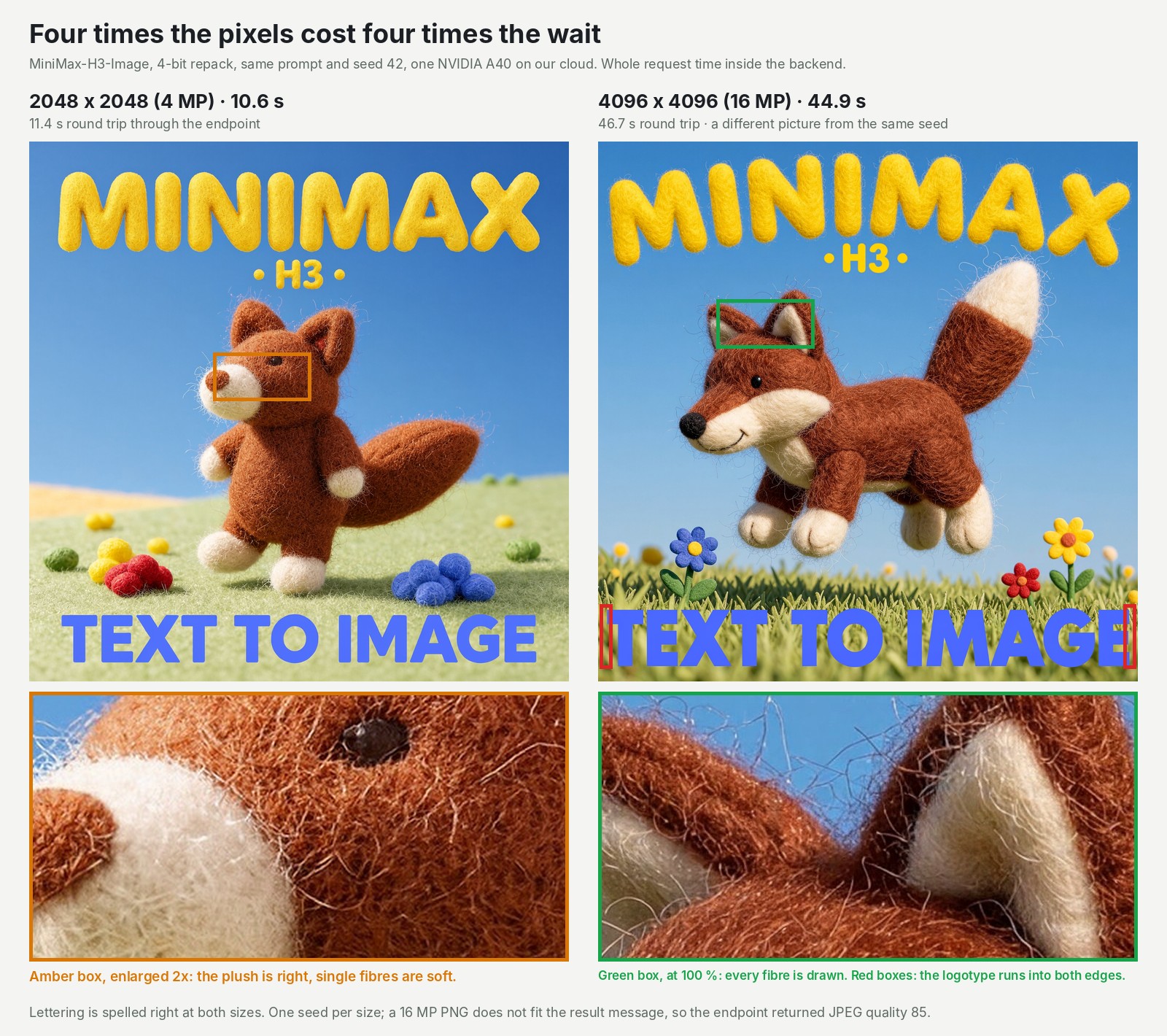
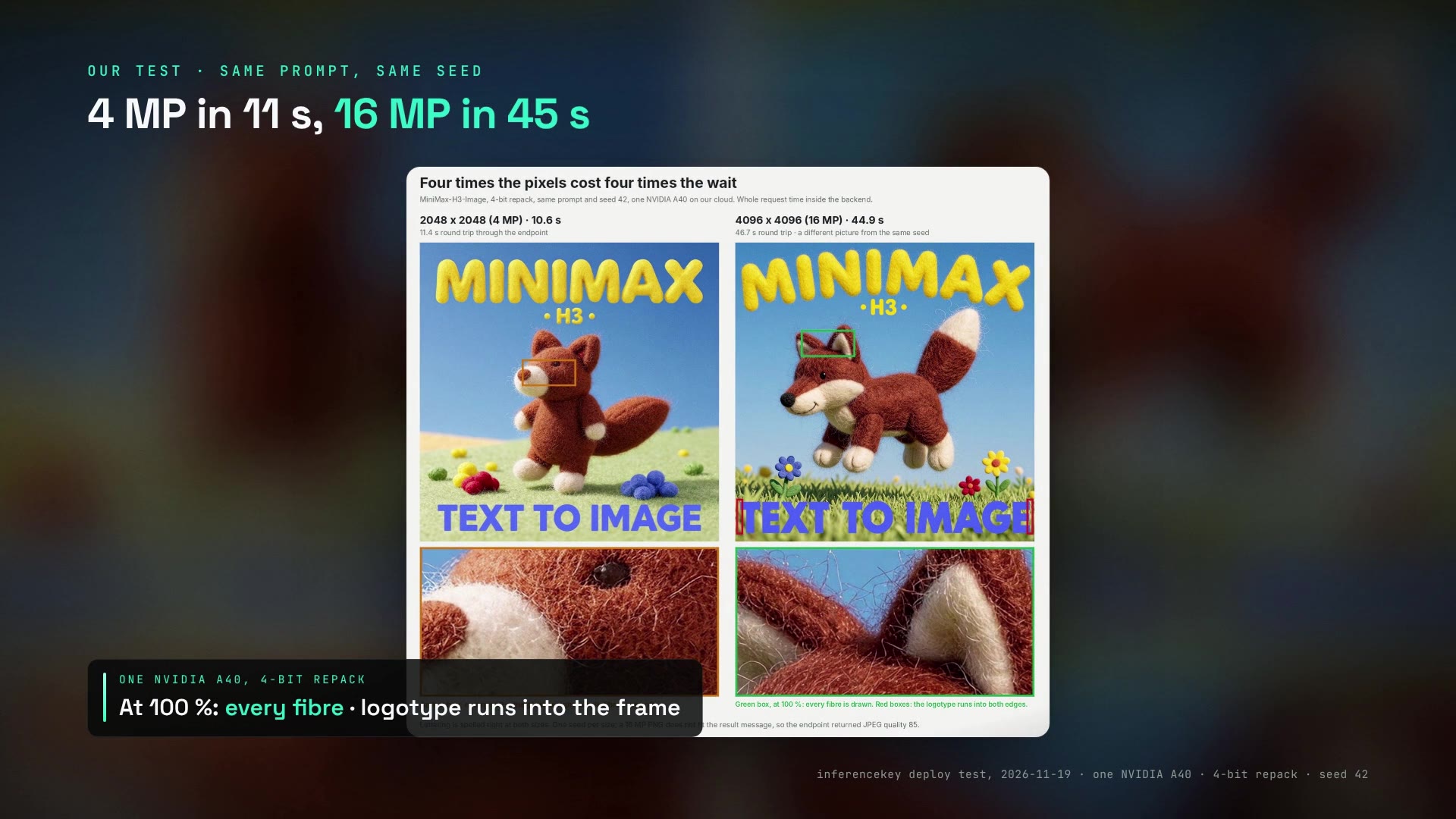
Four times the pixels cost a bit over four times the wait. Every request went through the API, one at a time, mostly with one random starting point (seed 42).
| Request | Time on the card | Round trip through the API |
|---|---|---|
| 1024 x 1024 | 4.4 s | 4.7 s |
| 2048 x 2048 | 9.3 to 10.8 s | 10.4 to 12.9 s |
| 4096 x 4096 | 44.4 to 45.2 s | 45.9 to 46.8 s |
| Edit with one reference picture, 2048 x 2048 | 18.8 to 20.2 s | 20.1 to 21.4 s |
| Edit with two reference pictures, 2048 x 2048 | 28.1 s | 29.9 s |
For one person, 2048 x 2048 is a working pace: a new draft every ten seconds. The full 16 megapixels is a final render, a bit more than one image a minute. The first reference picture added about nine seconds and the second about nine more (the second measured once).
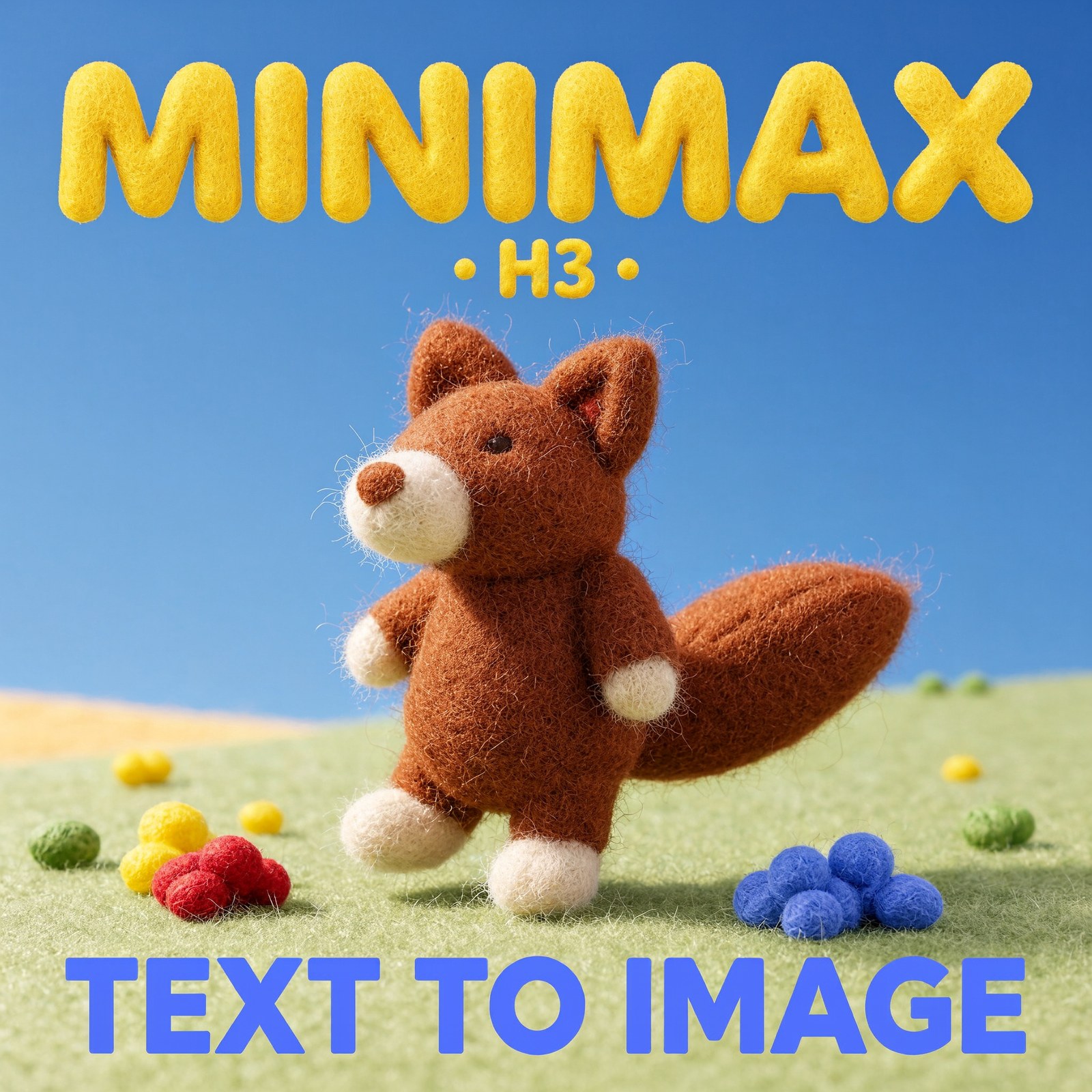
Size changes the picture as well as the wait. The same prompt and seed gave a standing fox at 2048 and a leaping fox at 4096, as the image above shows. A draft at the small size is therefore not a preview of the large one. MiniMax says the model gives its best results at around 16 megapixels, and the fine detail agrees: at 4096 it draws single wool fibres that the 2048 version only suggests.
The lettering was right every time, the two-picture edit was not
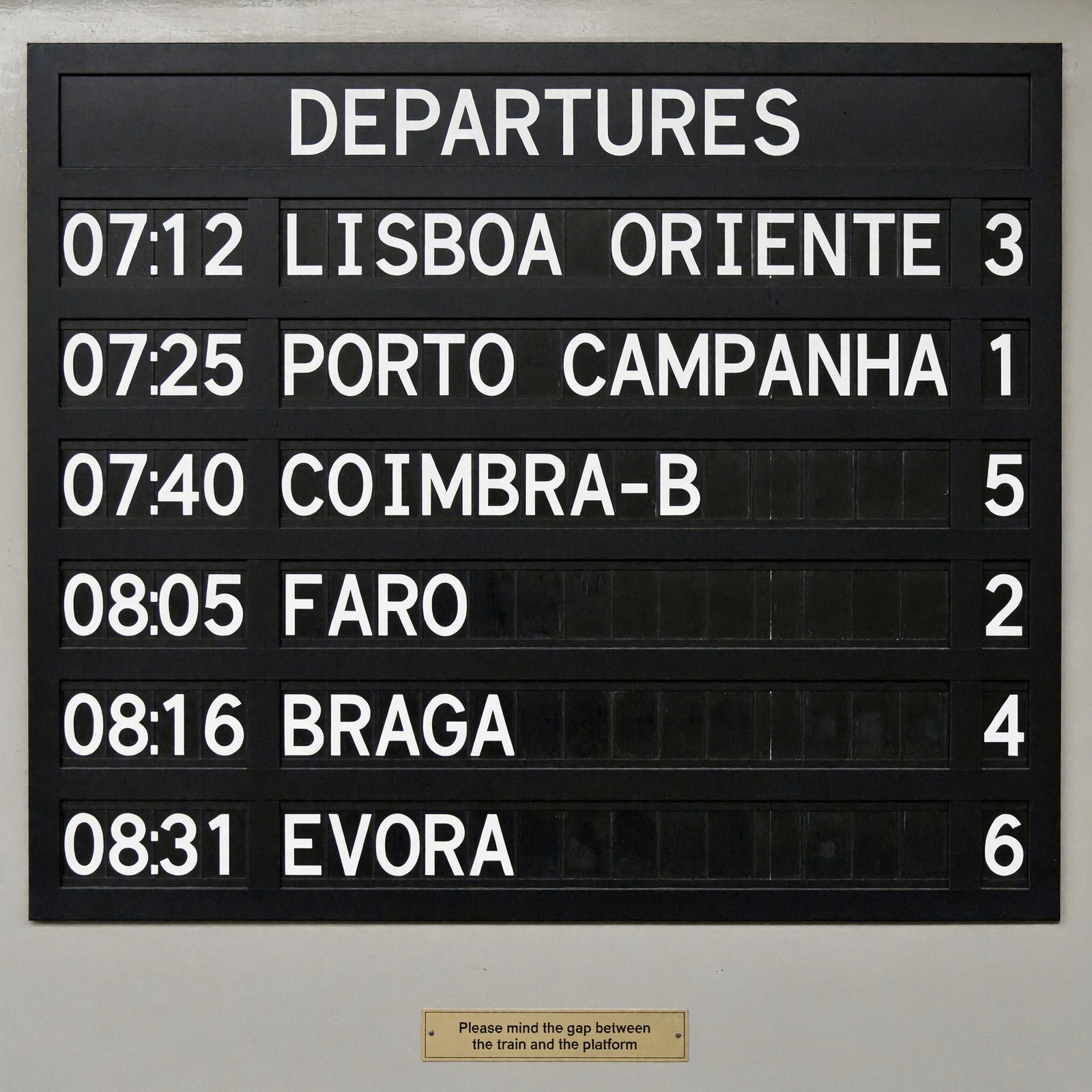
Text inside the image was spelled correctly in every sample we made. That covers the poster at three sizes (with three seeds at the middle one), a chalkboard cafe menu with prices, and a station departures board. The board has a header, six rows of times, destinations and platforms, and a small brass plaque with a full sentence. All of it was right at 4 and at 16 megapixels.
The 16-megapixel poster had one flaw, marked in red in the image at the top: the bottom logotype, spelled right, ran into both edges of the frame.
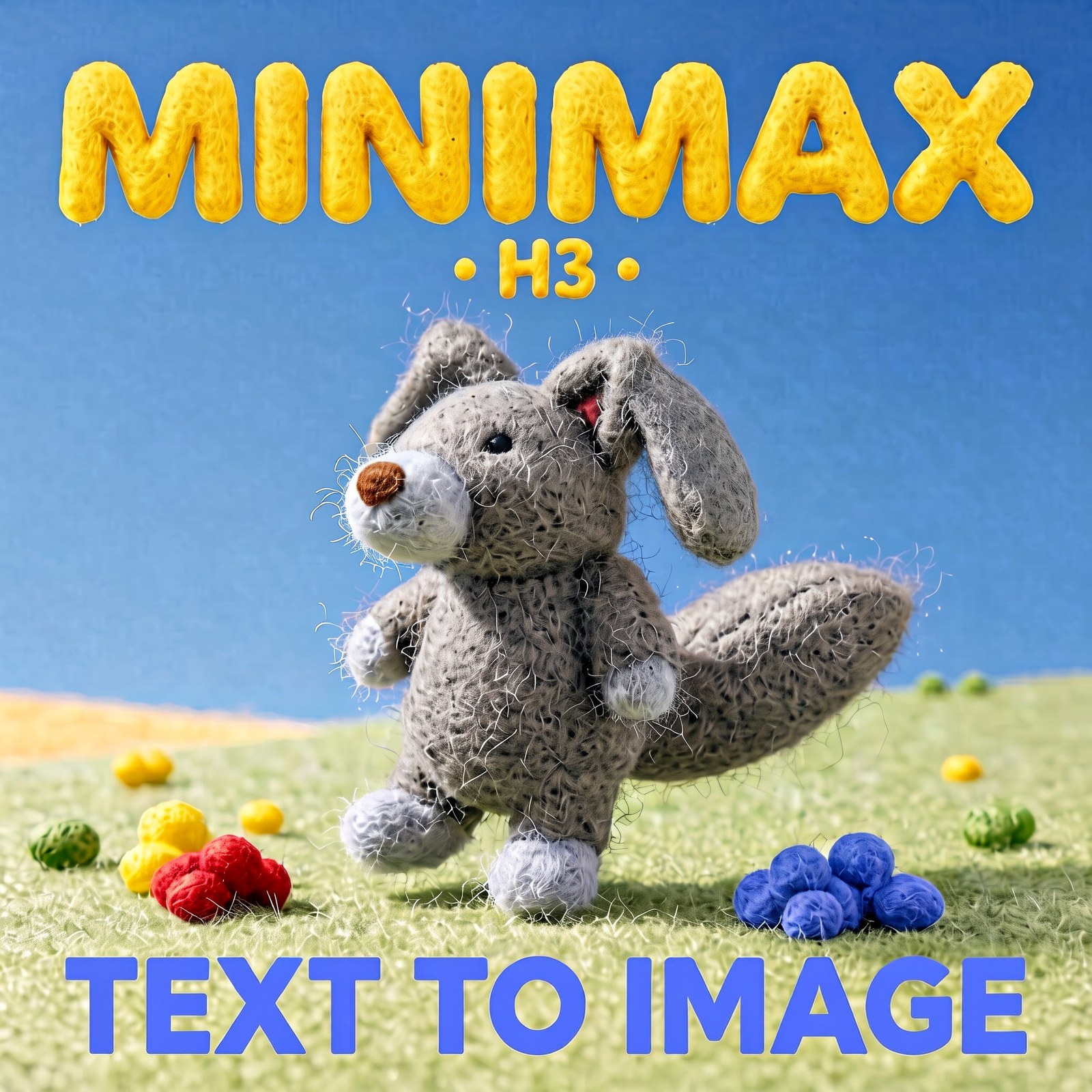
Editing was mixed. With one reference, we asked for the plush fox to become a grey rabbit and the lettering to stay. The rabbit arrived in the same pose and the lettering stayed, but the rabbit kept the fox's bushy tail.
With two references it failed. We asked it to put the fox from the first picture on the pier next to the fisherman from the second. It returned the fisherman alone, redrawn with harsh contrast, and no fox.
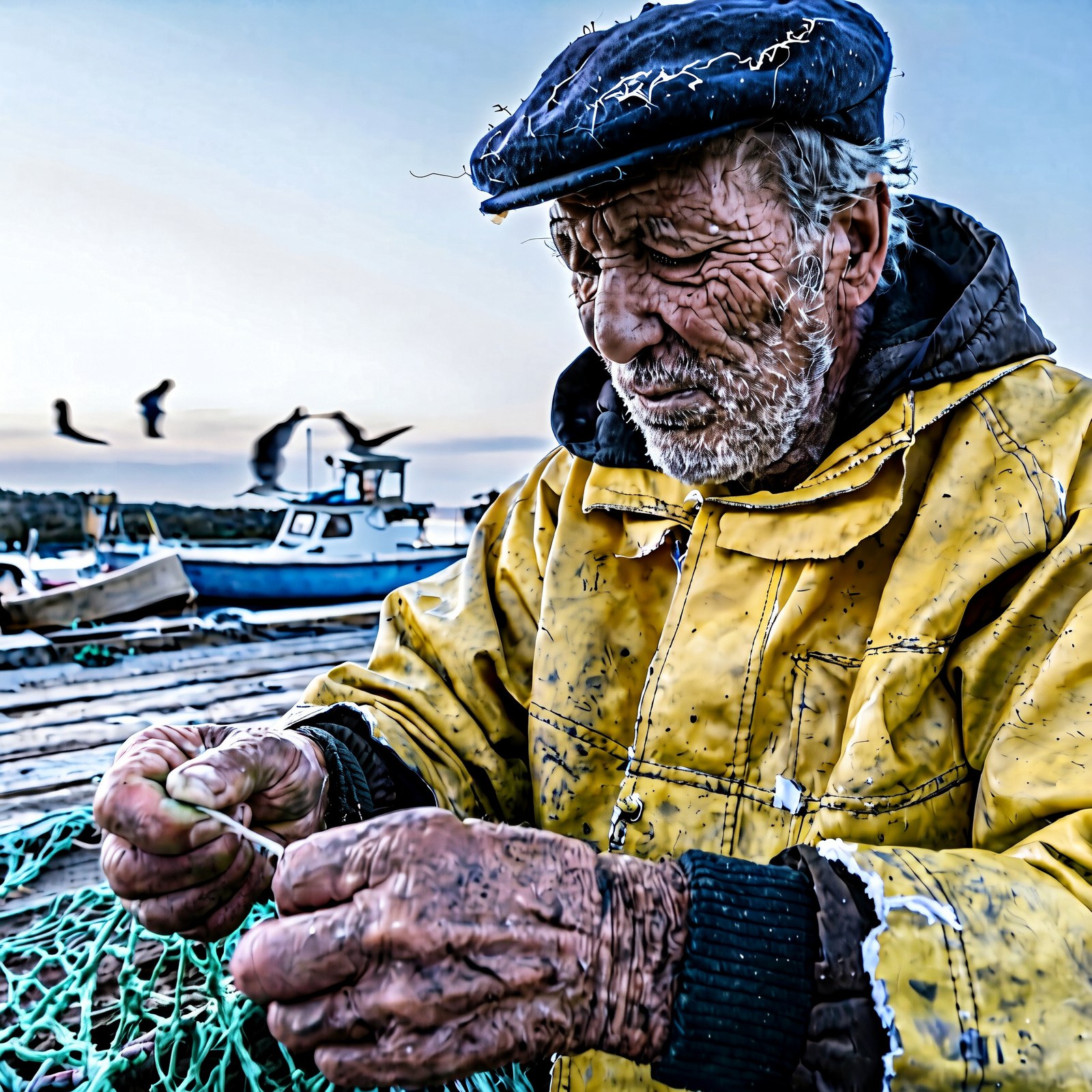
This is one try with one seed, so read it as behaviour we saw and not as a score. MiniMax's page claims "the strongest instruction following among open-source models" and shows an edit with ten references. The page has no benchmark table, and we could not check that claim.
Which GPU: an 8 GB memory cap passed, 4 seconds slower at 16 megapixels
The smallest memory budget that worked was 8 GB, and it returned the same JPEG as the uncapped run. Capped for an 8 GB card, the model peaked at 7.7 GB of GPU memory and took 48.9 seconds for the 4096 x 4096 image.
These were limits set on the A40, not smaller cards. A smaller card is usually also a slower chip, so expect longer times than the table. We tried to get real ones. No card of 24 GB or less was available that day, and the one RTX 4090 we started never became reachable.
| Cap set for a card of | Peak GPU memory | 2048 x 2048 | 4096 x 4096 |
|---|---|---|---|
| None (the full 48 GB card) | 30.9 GB | 10.4 to 10.8 s | 44.6 to 44.7 s |
| 24 GB | 24.1 GB | 13.8 s | 46.8 s |
| 16 GB | 15.8 GB | 17.4 s | 49.3 s |
| 12 GB | 11.8 GB | 15.8 s | 48.7 s |
| 8 GB | 7.7 GB | 15.0 s | 48.9 s |
Every cap added 2 to 5 seconds to the big render and 3 to 7 seconds to the 10-second draft. A smaller cap was not always slower. Each cap was run once, so the gaps between rows may be chance. We do not know why 16 GB was the slowest. ComfyUI keeps the whole model in the computer's own memory (system memory) and hands the card only the piece it needs next. Picture a band on a stage too small for all its guitars. The ones not being played wait on a rack at the side of the stage, and a tech hands over the next one between songs. The show is the same and each change costs a moment.
The rack has to be big enough, though. Our machine had 48 GB of system memory and ComfyUI reserved 31 GB of it for the model. We did not test a machine with 16 or 32 GB of system memory.
The license: no hosted service without MiniMax's written yes
The model is free to download, and the permission to use it is narrow. The model ships under its own Community License, and three of its terms decide whether you may deploy it at all. We are engineers, not lawyers, so here are the sentences themselves.
The first is section IV.1: "You shall obtain a separate, prior written authorization from MiniMax by sending a request through https://platform.minimax.io/console/license, if the Annualized Revenue of you and/or your affiliates exceeds 1 Million USD, or, you provide Hosted Service(s) to any Third Parties."
A hosted service is defined as making the model's functions available to third parties "including via application programming interfaces (APIs), web access, or any other electronic or remote means". An image feature that people outside your company use fits that wording. The revenue test counts your affiliates too, and the text does not define "Annualized Revenue". The permission has to come before you start. Nothing we read says how long it takes or what it costs.
The second is territory. The license applies worldwide except the "Excluded Territories", which it lists as "the European Union, the United Kingdom, the Republic of Korea and the United States of America". People there "are welcome to contact us about obtaining a license". Another clause forbids using the model or its outputs outside the covered territory. If your company or your servers sit in one of those four places, the text sends you to MiniMax before anything else.
That includes us. Our run was a short private evaluation by a company based in the EU, nobody outside it called the model, and we have not asked MiniMax for a license. Treat it as a measurement, not as a precedent.
The third is that the compressed copies do not escape any of this. The license covers any modification of the model, and Comfy-Org's own page quotes the authorization clause.
There are smaller duties as well: showing the name "MiniMax-H3-Image" in the interface of a commercial product, and not using the model or its outputs to improve another AI model. On the other side, MiniMax "claims no rights over the Outputs you generate".
On InferenceKey: ready in 135 seconds, and large images come back as JPEG
The card is yours by the hour, and a fresh machine was serving this model 135 seconds after we asked for it. Later restarts, with the files already on disk, took 68 to 72 seconds.
The obvious objection: ComfyUI already runs this model, and for one person at a desk it is the shorter path. We wanted an API that other programs can call. Since the compressed files only exist in ComfyUI's format, we wrote a small Python file that starts ComfyUI without its window and passes it each request. We tested a private copy of our platform, not the public service.
The platform served it without changes, with one exception you will hit: the size of the answer. A 16-megapixel image saved without loss is 20 to 30 MB, and the platform's result message cannot carry it. Worse, an oversized result is dropped silently and the caller waits five minutes for a timeout error. Status: open on the platform, to be tracked as a ticket. The example works around it by returning JPEG and lowering the quality until the image fits. Our 4096 x 4096 images came back at quality 85, between 1.9 and 2.7 MB.
Should you use it? Check the license first, then the clock
- Before anything: read section IV and the territory clause.
- Text in images (posters, menus, signs): yes on our samples. Check the framing at 16 megapixels.
- Large final images for internal work: yes once the license covers you, at about 45 seconds each on an A40.
- Fast drafts: 2048 x 2048 in about 10 seconds, knowing the large version will be a different picture.
- Edits that combine several pictures: not on our evidence. One reference mostly worked, two did not.
- A small card: promising and unproven. The memory caps passed down to 8 GB.
To make both posters and one edit on your own GPU, run python publish.py and python main.py from the MiniMax-H3-Image SDK example. It needs one NVIDIA card connected to InferenceKey and about 36 GB of free disk.
For engineers
Credits
- MiniMax: the model, its card, the optional prompt expander MiniMax-H3-Image-PE and the license. The licensor named in the text is Nanonoble Pte. Ltd.
- Comfy-Org: the repack we ran, the ComfyUI nodes (
comfy_extras/nodes_minimax_h3.py, first shipped in v0.45.0) and the two workflow templates (image_minimax_h3_image_t2i.json,image_minimax_h3_image_edit.json). ComfyUI's dynamic memory management did the work in the memory ladder. - Abiray: the GGUF conversions of Comfy-Org's pruned BF16 file (not tested here).
- The Qwen team: Qwen3-VL, the base of the MiniMax-H3 text encoder that the model reuses unchanged, and Qwen3.8-27B (Apache-2.0), the base of the prompt expander.
- The SGLang and vLLM-Omni teams: the official serving recipes and their published measurements.
- AI Search: the tutorial video where we spotted it (12 November 2026, 20:28).
- Our part: the custom backend that turns ComfyUI into an API on a worker, the measurements and the SDK example.
The model, from the authors' card
- Transformer: 33.1B parameters, dense single-stream DiT, 50 layers, hidden size 5376, 56 attention heads, FFN size 14336, 3D multimodal RoPE. BF16 with embedding, timestep and output layers in FP32. It follows the H3-Base design with the audio branch removed.
- Text encoder: the full Qwen3-VL text encoder of MiniMax-H3, unchanged. The DiT reads the hidden states of its 50th layer.
- VAE: CNN encoder and a 24-layer 2D ViT decoder, 16x spatial downsampling, 24 latent channels. With a 2x2 patch, each token covers 32 x 32 pixels.
- Distilled to 6 sampling steps with no classifier-free guidance. Working range about 4 to 20 MP, "generally gives the best results at around 16 MP".
- 16 MP sizes: 4096x4096, 4736x3552, 3552x4736, 5024x3360, 3360x5024, 5472x3072, 3072x5472, 6272x2688.
- Sizes on the card: repository payload 68.65 GB (
transformer/66.28 GB,vae/FP32 2.34 GB, small files), plus the 66.7 GB text encoder, about 135 GB in total. The card says the encoder is loaded fromMiniMaxAI/MiniMax-H3and is "not in this repository". The Hugging Face listing on 19 November also shows atext_encoder/folder and diffusers duplicates (204 GB for all files), so the card may be behind the repository. - The model expects a detailed English description of the whole image. The prompt expander (17.9 GB, fine-tuned from Qwen3.8-27B) is the local way to turn a short request into one. Its editing mode "is still under development".
- "State-of-the-art" and "the strongest instruction following among open-source models" are the authors' claims. The card has no benchmark table.
- Repository created 3 November 2026. The license file is dated 10 November 2026. We did not inspect which terms applied in between.
Files in the Comfy-Org repack (revision 89c63508)
| File | Size | Used |
|---|---|---|
diffusion_models/minimax_h3_image_pruned_w4a8.safetensors | 12.55 GB | yes |
text_encoders/qwen3vl_32b_minimax_h3_nvfp4_awq.safetensors | 15.69 GB | yes |
vae/minimax_h3_image_vae_fp16.safetensors | 1.17 GB | yes |
diffusion_models/minimax_h3_image_pruned_int8_convrot.safetensors | 20.98 GB | no |
diffusion_models/minimax_h3_image_pruned_bf16.safetensors | 40.23 GB | no |
text_encoders/qwen3vl_32b_minimax_h3_int8_convrot.safetensors | 27.14 GB | no |
text_encoders/qwen3.8_27b_minimax_h3_image_pe_w4a8_gptq.safetensors (prompt enhancer) | 17.29 GB | no |
text_encoders/qwen3.5_9b_w4a8_gptq.safetensors | 7.34 GB | no |
The pruned BF16 file is 40.23 GB against 66.28 GB for the official transformer. The card does not document what "pruned" removes. Abiray's GGUF files run from Q2_K (6.88 GB) to Q5_K_M (14.08 GB) and need ComfyUI v0.45.0 or later plus city96's ComfyUI-GGUF. The VRAM figures on that card are the uploader's and we did not measure them.
GPU and backend choice
- GPU: one NVIDIA A40, 48 GB (46,068 MiB), on our cloud. Container memory limit 48 GB, 100 GB local disk. We picked a 48 GB card because the three files plus working memory were expected to need about 30 GB. It is not a requirement: see the ladder.
- Backend: custom Python backend
minimax-h3-image-comfyui0.1.2. The quantized files are in ComfyUI's format, so the backend downloads ComfyUI v0.45.0, starts it headless on a loopback port and drives its HTTP API with the graph of the official template:UNETLoader,CLIPLoader(typeminimax),VAELoader,MiniMaxH3ImageConditioning,ConditioningZeroOut,KSampler(6 steps, euler, simple, cfg 1),VAEDecode,SaveImage. torch 2.14.1, comfy-kitchen 0.2.41, comfy-aimdo 0.6.0. - NVFP4 without Blackwell: on the A40, comfy-kitchen reported
Native ops: asym_w4a8_int8, ...andemulated ops: float8_e5m2, nvfp4, .... The W4A8 transformer has a native path and the NVFP4 text encoder ran emulated. No fallback file was needed. - Stack: a local InferenceKey manager, the same worker and API code as the hosted service. We did not call the hosted endpoint with this model.
Step by step
git clone https://github.com/inferencekey/inferencekey-sdk
cd inferencekey-sdk/examples/minimax-h3-image-comfyui-custom-backend-private-nvidia
python -m venv .venv && . .venv/bin/activate
pip install maturin requests Pillow
( cd ../../bindings/python && maturin develop --release )   # the SDK is not on PyPI yet: local build, needs a Rust toolchain
cp .env.example .env    # SDK token, API key, project slug, IK_WORKER_ID
export INFERENCEKEY_TENANT_ID=... INFERENCEKEY_USER_TOKEN=...   # tenant id and a dashboard session token, read by publish.py from the shell
python publish.py       # packages backend.py and uploads it to your tenant
IK_KEEP_ALIVE=1 python main.py
publish.py uploads only when both INFERENCEKEY_TENANT_ID and INFERENCEKEY_USER_TOKEN are set. Without them it writes the package to dist/, prints a note and exits with code 0: upload that .tar.gz from Dashboard, Custom backends, before you run main.py. The SDK build follows section 4 of the examples guide.
main.py ensures a fixed workload minimax-h3-image (task text2image, ready_timeout_secs 3600, request_timeout_secs 900) on your worker, waits until it is ready and makes three calls with seed 42: the template's poster prompt at 2048 x 2048, the same at 4096 x 4096, and an edit that sends the first image back as <Picture 1>. Without IK_KEEP_ALIVE=1 it deletes the workload on exit.
A request by hand:
curl -s https://cloud.inferencekey.com/endpoint/$INFERENCEKEY_PROJECT/minimax-h3-image/v1/images/generations \
  -H "Authorization: Bearer $INFERENCEKEY_API_KEY" \
  -H "Content-Type: application/json" \
  -d '{"model": "default", "prompt": "A detailed English description of the whole image", "size": "4096x4096", "seed": 42}'
Fields: prompt, size (default 2048x2048, sides in multiples of 32, up to about 20 MP), seed, image (a base64 string or a list of up to 16, referenced as <Picture 1>, <Picture 2> in the prompt), output_format (jpeg by default, png, webp). The response adds seconds, stage_seconds, vram_peak_mib, output_format and output_quality. Like the authors' servers, anything other than 6 steps, guidance 1 and no negative prompt returns a 400 (num_inference_steps: 20 was refused in 0.21 s).
Backend settings through the environment before main.py: H3_VRAM_LIMIT_GIB, H3_COMFY_ARGS, H3_DIT, H3_TEXT_ENCODER, H3_WARMUP. backend.py also reads H3_VAE, but main.py does not pass it through.
Time to ready
- Fresh worker: 135 s after
ensure(). Venv 31 s (6.8 GB), ComfyUI code 1.9 s, weights 23.5 s (29.4 GB to local disk), server start 21.0 s, warm-up 1024 x 1024 image 55.44 s, of which the first text encoder pass is 25.62 s. - Cached restarts: 68, 72, 72, 70 and 69 s. The warm-up stays at 55 to 59 s because the first text encoder pass takes 26 to 29 s each time.
Full timings (A40, no cap, seed 42 unless noted, one request at a time)
| Case | Whole graph s | Sampler s | Text encoder s | VAE decode s | Round trip s | Card peak MiB |
|---|---|---|---|---|---|---|
| 1024 x 1024 poster | 4.42 | 2.51 | 1.19 | 0.27 | 4.69 | 29,373 |
| 2048 x 2048 (9 calls: poster 6 calls over 3 seeds, portrait, board, menu) | 9.32 to 10.84 | 7.38 to 7.71 | 0.82 to 1.35 | 0.77 to 0.85 | 10.35 to 12.9 | 27,863 to 29,373 |
| 4096 x 4096 (7 calls: poster with 2 seeds, portrait, board) | 44.39 to 45.21 | 37.53 to 38.10 | 0.77 to 1.18 | 2.84 to 3.06 | 45.9 to 46.83 | 29,287 to 30,904 |
| 5472 x 3072 village | 43.88 | 36.86 | 0.81 | 3.01 | 45.59 | |
| Edit, 1 reference, 2048 x 2048 (3 calls) | 18.81 to 20.15 | 11.72 to 12.0 | 5.15 to 6.32 | 0.77 to 0.85 | 20.13 to 21.4 | 29,593 to 30,077 |
| Edit, 2 references, 2048 x 2048 | 28.07 | 16.7 | 9.44 | 0.78 | 29.86 | 30,493 |
- Per step: 0.34 s at 1 MP, 1.22 to 1.27 s at 4 MP, 6.2 to 6.3 s at 16 MP.
- ComfyUI writing its PNG adds 0.9 to 1.0 s at 4 MP and 2.9 to 3.2 s at 16 MP, inside the whole-graph time.
- Highest
nvidia-smisample of the whole session: 30,930 MiB. - The 10.6 s and 44.9 s printed on the comparison image are single runs inside these ranges.
Memory ladder
All rungs ran on the same A40 through the platform, with the same three calls and seed. H3_VRAM_LIMIT_GIB sets a hard torch.cuda.set_per_process_memory_fraction cap inside the ComfyUI process and passes --reserve-vram for the rest of the card. Peak is nvidia-smi memory.used sampled at 2 Hz during each request.
| Cap | Stands for | Peak | 4 MP / 16 MP / edit | Output | Real or emulated |
|---|---|---|---|---|---|
| none | A40 48 GB | 30,077 MiB (30,930 over the session) | 10.4 to 10.8 / 44.6 to 44.7 / 19.5 to 20.2 s | reference | real card |
| 23.4 GiB | 24 GB card | 24,089 MiB | 13.8 / 46.8 / 23.6 s | pixel-identical | emulated |
| 15.2 GiB | 16 GB card | 15,769 MiB | 17.4 / 49.3 / 26.7 s | pixel-identical | emulated |
| 11.2 GiB | 12 GB card | 11,771 MiB | 15.8 / 48.7 / 24.7 s | pixel-identical | emulated |
| 7.2 GiB | 8 GB card | 7,739 MiB | 15.0 / 48.9 / 24.0 s | pixel-identical | emulated |
| RTX 4090, real | not run: the machine never exposed SSH and was terminated after 3.1 min | real, failed before any work | |||
| RTX 3090, 3090 Ti, 5080, 4080, A4000, A5000, 2000 Ada, 4000 Ada, real | not run: no stock in two rounds |
- "Pixel-identical" means a mean absolute difference of 0.0 against the uncapped run, computed on the returned JPEGs (quality 85 at 16 MP), not on lossless output.
- Peaks sit 300 to 500 MiB above the torch cap (context and non-torch allocations). The narrative gives these MiB readings divided by 1,000 as GB: 30.9 (session high), 24.1, 15.8, 11.8 and 7.7. In GiB they are 30.2, 23.5, 15.4, 11.5 and 7.6.
- What the emulation does not cover: slower silicon, slower storage, and less system memory. The container had 48 GB of RAM and ComfyUI logged
Enabled pinned memory 31299. - Caps below 7.2 GiB were not tried. The ladder stopped at stock, not at a failure.
How the official routes compare (their numbers, not ours)
- SGLang keeps all components on the GPU only when it has at least 130 GiB available (tested on H200, B300, MI325X and MI350X). One H200: 1.934 s at 2048 x 2048 and 10.133 s at 4736 x 3552, warm pipeline medians without HTTP or PNG encoding. Peak reserved memory across its measured workflows on that card was about 93 GiB. One RTX PRO 6000 Blackwell: 3.434 s and 18.544 s. For 12 to 48 GB consumer cards it lists layerwise offload recipes that assume a 256 GB-class host and local NVMe and are not latency-measured. A capacity check passed on a B300 with an 8 GiB allocator limit and a 10.01 GiB whole-GPU peak.
- vLLM-Omni on one H200 at 2048 x 2048: 73.4 GiB peak and 3.2 s with the text encoder offloaded, 14.7 GiB peak and 8.3 s with layerwise offload of both. Full residency on one GPU is estimated at 135 GiB and was not measured. The recipe cites a community report of one RTX 4090 (24 GB) serving 1024 x 1024 and 6272 x 2688 with layerwise offload, and says it does not establish peak memory or throughput.
- These timings use different sizes and exclude parts of the round trip, so they are not directly comparable with ours.
Card commands, for reference:
sglang serve --model-path MiniMaxAI/MiniMax-H3-Image --host 0.0.0.0 --port 30000 --warmup-mode off
vllm serve MiniMaxAI/MiniMax-H3-Image --omni --host 0.0.0.0 --port 8000
More samples
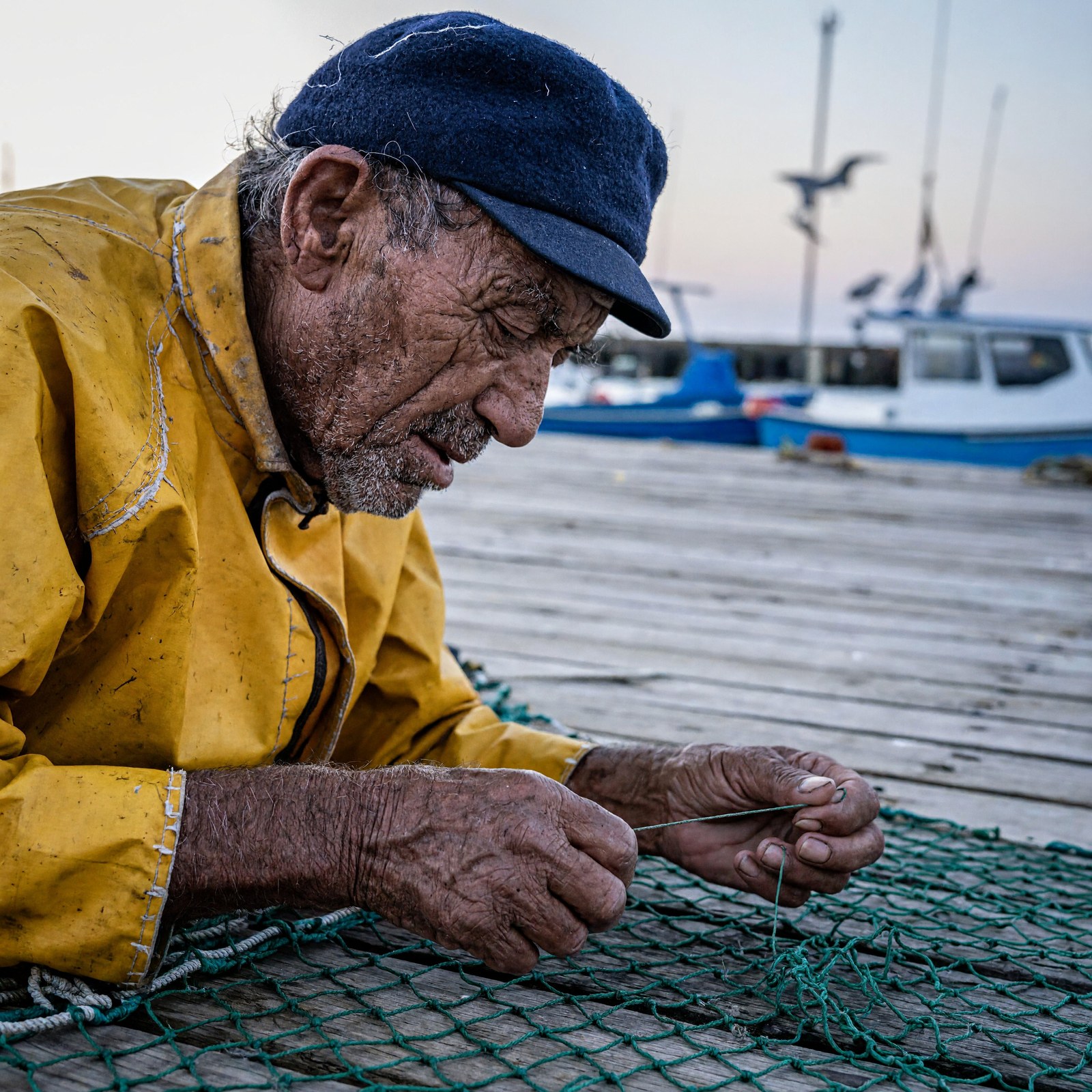
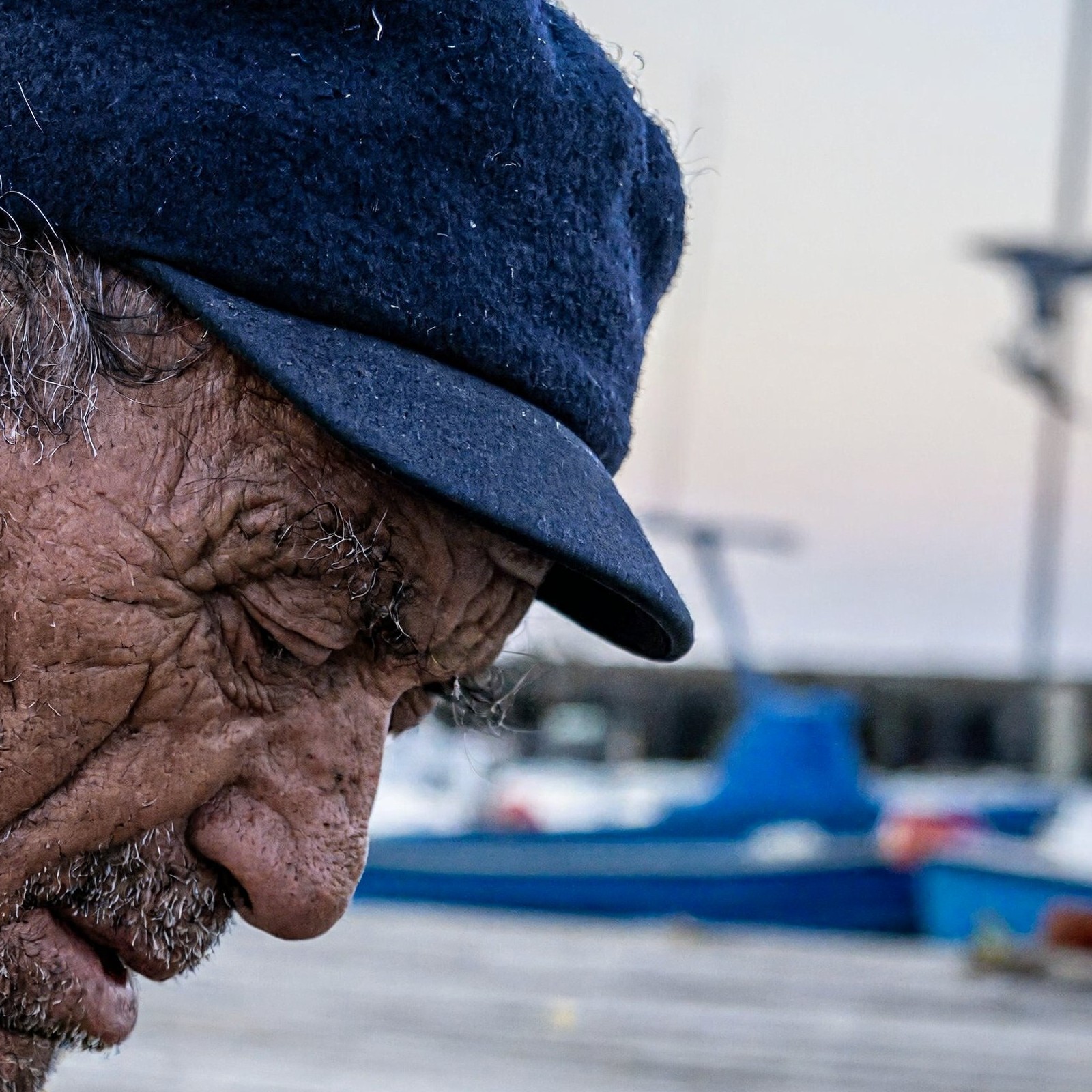
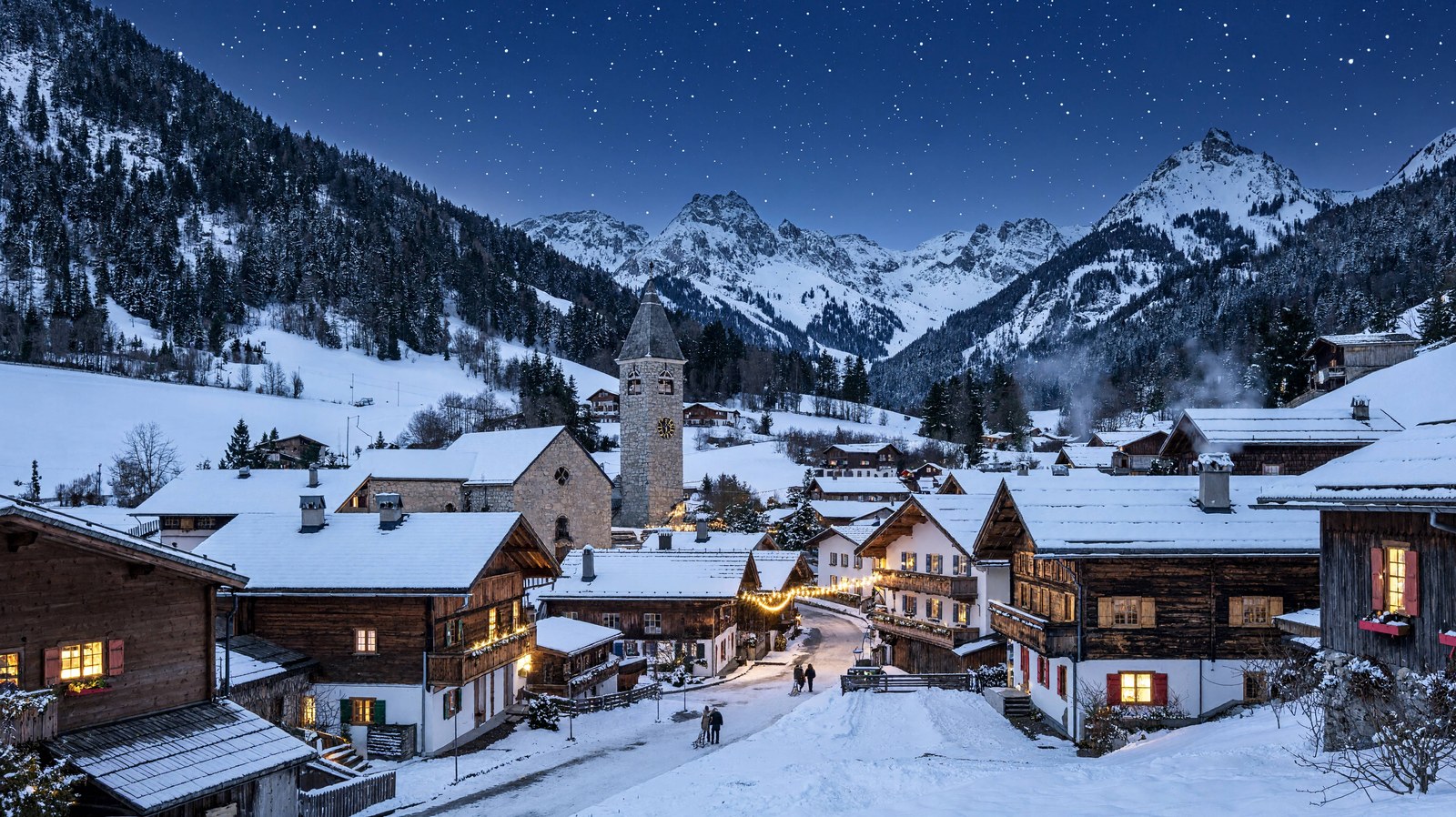
Prompts were ours except the poster, which is the prompt of Comfy-Org's template. One seed per case.
Demo video
A narrated walk-through of 3 minutes 15 seconds: what the model is (with images from MiniMax's model card, credited), the panel generating the poster and the menu, the size comparison and the memory ladder.
Remaining problems
- Large results are dropped (platform). With a 7.2 MB base64 JPEG the worker logged
job result refused by JetStream for good (code max_payload: max payload size exceeded: Payload size limit of 8388608 exceeded by message size of 14373067). The result message is a bit over twice the base64, so the usable limit is about 3.5 MB of base64. The caller gets504 inference_timeoutafter 300 s. Status: open, needs a ticket (fail fast, and a way to return large outputs). Worked around in the backend: JPEG with falling quality until under 3.4 MB of base64 (q95 at 4 MP, q85 at 4096 x 4096, q70 at 5472 x 3072). ensure()with onlyconfig.envchanged does not restart a custom backend (platform). Worker:reload_backend handle_load_model failed: unknown backend minimax-h3-image-comfyui, andwait_until_ready()stays at[0s] scheduling. Status: open, needs a ticket. Workaround:delete(), thenensure(). Publishing a new backend version does restart it.- Dashboard image tester. Its size list stops at 1024 x 1024 and its defaults (20 steps, guidance 4.5) get a 400 from this model. With 6 steps and guidance 1 it works (about 4.5 s). Status: documented in the example's README, tester unchanged.
- No real small card. Status: not retested. The ladder is emulated on the A40.
- Model behaviour. Fox tail on the rabbit, first reference ignored in the two-reference composition, logotype into the frame edges at 16 MP, a different composition for the same seed at a different size. Status: observed once each, on the compressed copy.
- Not tested: the GGUF and int8 files, the pruned BF16 transformer, the prompt expander, batches above 1, concurrent requests, the official SGLang and vLLM-Omni routes, and any comparison against the official BF16 weights.
License notes
From the LICENSE, "MiniMax-H3-Image Community License Agreement", dated 10 November 2026. This is a reading aid, not legal advice.
- IV.1 prior written authorization for revenue above 1 million USD (you and/or affiliates) or Hosted Services to Third Parties. Request URL in the license:
https://platform.minimax.io/console/license. Comfy-Org's card quoteshttps://platform.minimax.io/license. - I.8 Hosted Service: the model or its derivatives hosted or operated with functionality made available to Third Parties, "including via application programming interfaces (APIs), web access, or any other electronic or remote means". I.13 Third Party: anyone not under common control with you or MiniMax. I.11 Model Derivatives include any modification.
- Territory: the grant is "Solely within the Applicable Territory", worldwide minus the EU, the UK, the Republic of Korea and the USA. V.4: "You may not use, reproduce, modify, distribute, or display the MiniMax-H3-Image Works or any of their Outputs or results outside the Applicable Territory."
- IV.2 display "MiniMax-H3-Image" prominently in the interface of a commercial product. III.4 distributions need a NOTICE file. V.3 no use of the works or outputs to improve another AI model. V.5 safeguards and a reporting mechanism for anyone offering it to third parties. VI.4 no claim over outputs. Exhibit A prohibits military use and requires disclosing machine-generated content published in public.
- Our standing under it: a short private evaluation by an EU company on a private copy of our platform, with no third party calling the model and no license requested from MiniMax.
- Grant: non-exclusive, non-transferable, royalty-free, limited. Governing law and jurisdiction: Hong Kong SAR. The prompt expander is under the same agreement.
Sources
- Model card: https://huggingface.co/MiniMaxAI/MiniMax-H3-Image
- License: https://huggingface.co/MiniMaxAI/MiniMax-H3-Image/blob/main/LICENSE
- Prompt expander: https://huggingface.co/MiniMaxAI/MiniMax-H3-Image-PE
- Comfy-Org repack: https://huggingface.co/Comfy-Org/MiniMax-H3-Image
- GGUF conversions: https://huggingface.co/Abiray/MiniMax-H3-Image-GGUF
- SGLang cookbook: https://docs.sglang.io/cookbook/diffusion/MiniMax/MiniMax-H3-Image
- vLLM-Omni recipe: https://recipes.vllm.ai/MiniMaxAI/MiniMax-H3-Image
- Where we spotted it: https://www.youtube.com/watch?v=Er0740eVIEw (AI Search, 2026-11-12)
- SDK example: https://github.com/inferencekey/inferencekey-sdk/tree/main/examples/minimax-h3-image-comfyui-custom-backend-private-nvidia