Idol: one photo to 3D in 41 s on an RTX 3090, 3.5 s with Turbo, and it fits a real 8 GB card
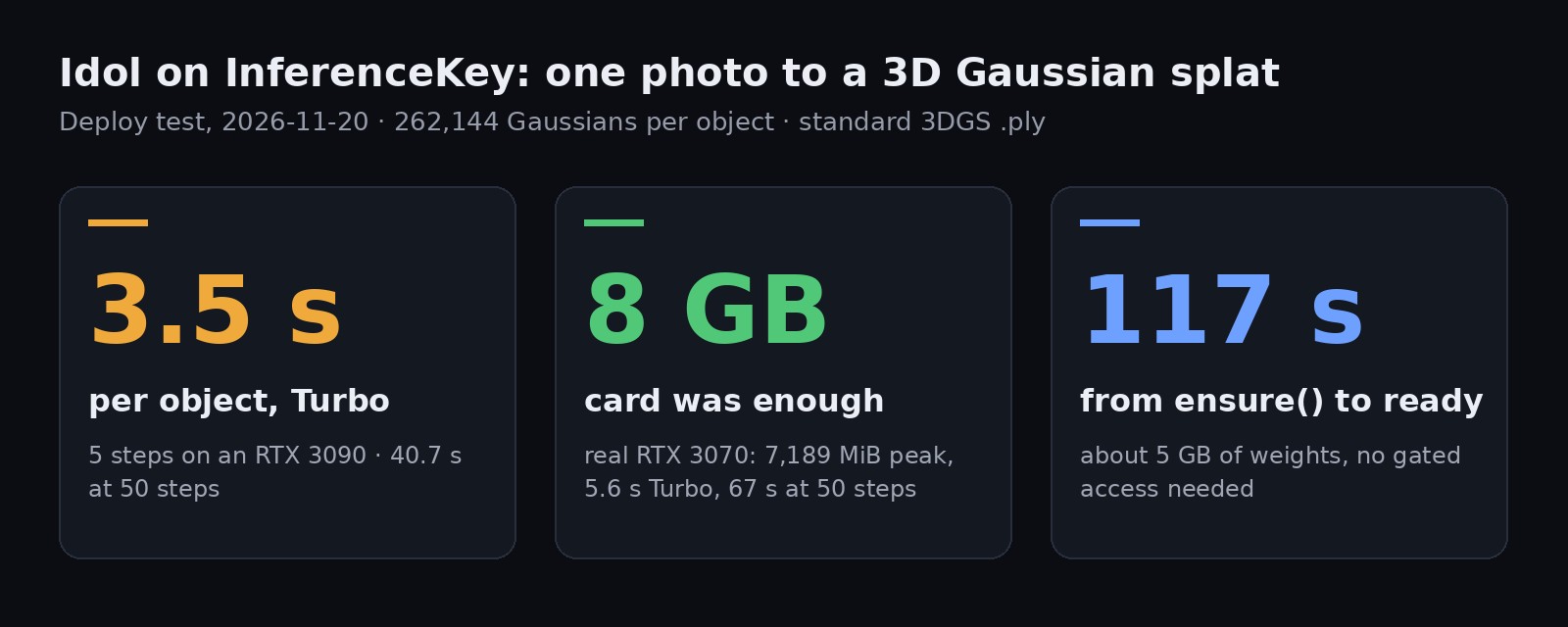
Idol turned one photo into a 3D splat in 40.7 s, or 3.5 s with Turbo, on an RTX 3090, and ran on a real 8 GB RTX 3070. Read the DINOv3 license first.
"Runs on consumer GPUs, using 7.2 GB of VRAM." That is the promise on Idol's model card: 7.2 GB of graphics card memory. Idol is an open model from Speridlabs that turns one picture of an object into a 3D model. On a 24 GB RTX 3090 on our cloud, a picture of a backpack became a 3D object in 40.7 seconds at full quality. The faster Idol Turbo took 3.5 seconds. A real 8 GB RTX 3070 ran it too, on default settings.
The memory promise roughly held: the 3090 peaked at 7,308 MiB. A 3D asset from a product photo now costs less than a cent of GPU time on a gaming card. The Idol SDK example puts the same setup on your own NVIDIA card. Two catches: the fast mode guesses worse at the back the photo never showed, and one helper model inside has its own license.
One photo in, a quarter of a million coloured dots out
Idol does not build a model out of triangles, like a video game asset. It writes a Gaussian splat: hundreds of thousands of small, soft, semi-transparent coloured blobs floating in space. Seen from any angle, they blend into the object. Think of a pointillist painting you can walk around. The default is 262,144 blobs, and it goes up to 1,048,576. It saves a standard splat file (.ply) that splat viewers open.
On the way, Idol cuts the object out of its background, frames it, and reads the picture with two helper models before its own network builds the 3D. Keep one distinction in mind for the rest of this post. Everything the picture shows, Idol can copy. Everything it does not show, such as the back of a backpack or the far side of a pot, it has to guess. The fast and slow modes differ mostly in how well they guess.
Alejandro Canada (project lead) and Chema Garabito built Idol at Speridlabs. Two helper models read the picture: Meta's DINOv3 and FLUX.2's picture compressor (VAE). The appendix credits the rest. Speridlabs put the weights and the code online on 28 October under Apache-2.0. By 20 November the model had 37,990 downloads and 2,529 likes.
Idol Turbo followed on 3 November. An outside developer, akhaliq, built it, and it now lives in the Speridlabs account. Idol refines the object in 50 passes, called steps. Turbo, a trained shortcut, needs 5. We spotted Idol in AI Search's video on 1 November.
Our test: a 24 GB card first, then a real 8 GB one
We ran the authors' own pipeline as an API on one RTX 3090 on our cloud, then repeated the key calls on a real RTX 3070. Every request went one at a time, with the same random starting point (seed 42) and 262,144 blobs unless noted.
We tried three of the authors' examples, among them the backpack. We also tried real photos: a terracotta planter, a gecko and a glass ball. To judge the results we rendered the returned files from new angles, including the back.
Each case ran with one seed, so read it as behaviour, not as a benchmark score. We did not rerun the authors' benchmark or timings, and ran no RTX 4090 and no datacenter card.
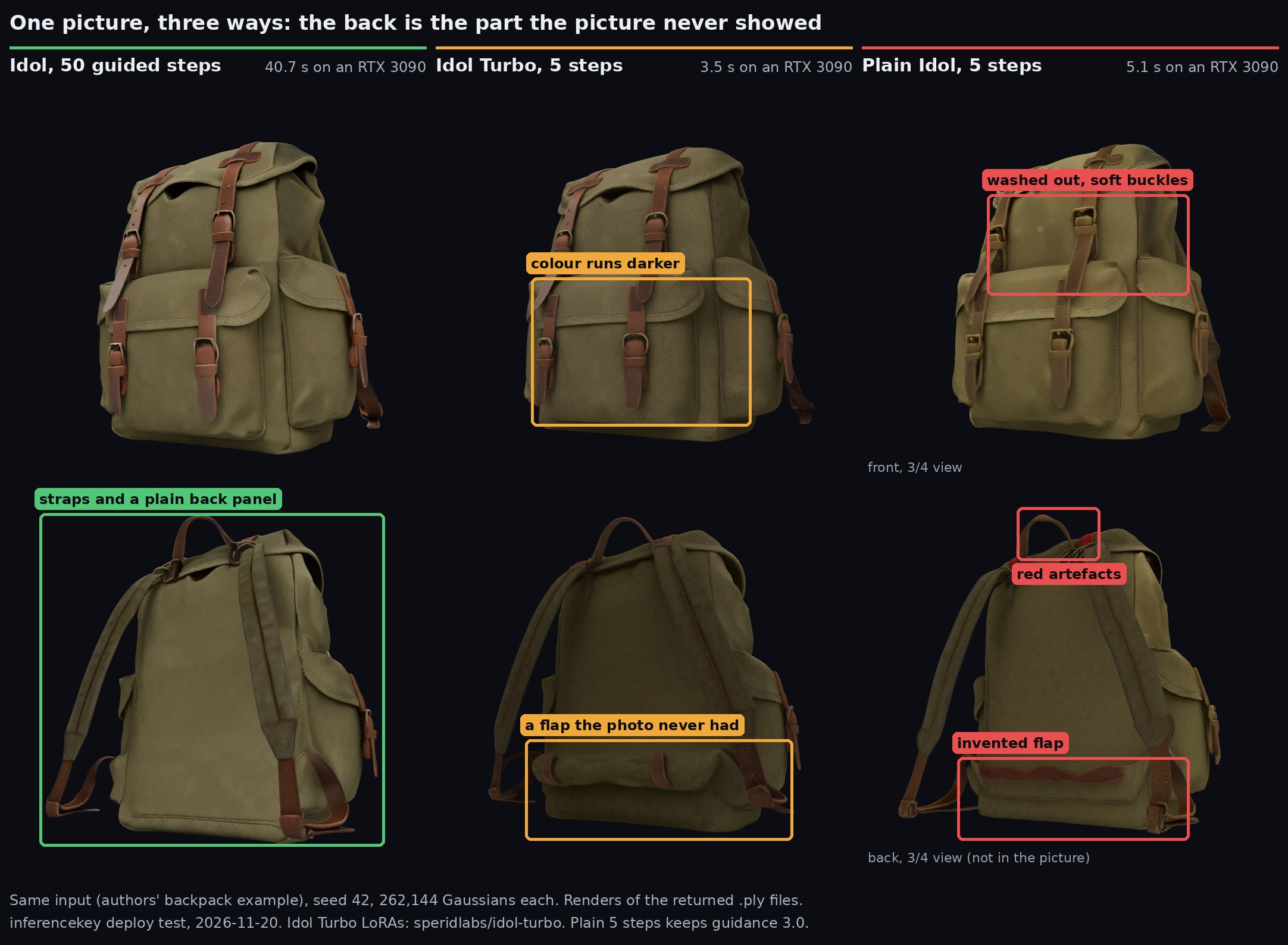
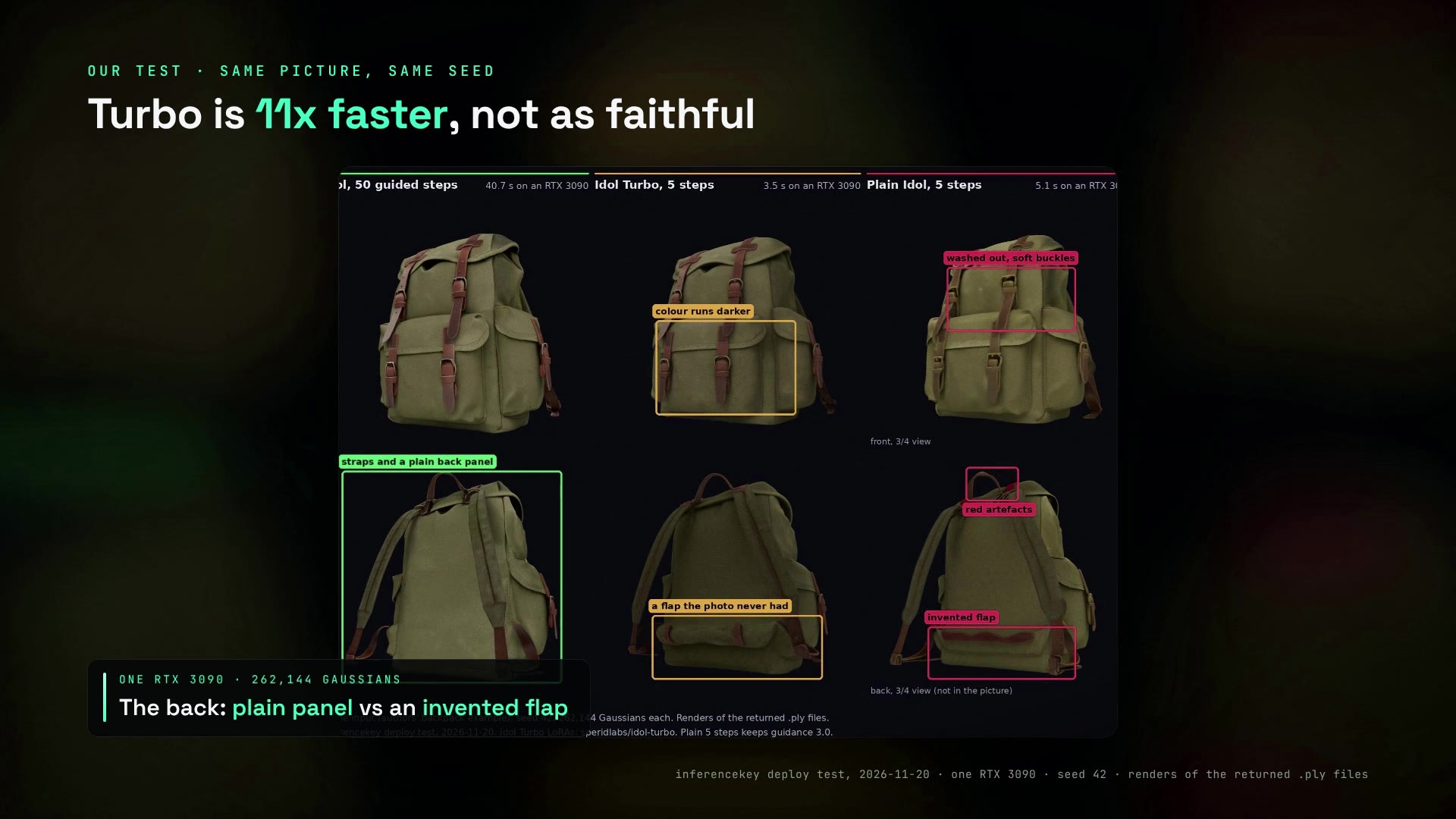
Turbo is 11 times faster and guesses worse at the back
| Mode on the RTX 3090 | Seconds per object | Front | Back (never in the picture) |
|---|---|---|---|
| Idol, 50 steps (default) | 40.7 | clean | straps and a plain back panel |
| Idol Turbo, 5 steps | 3.5 | close, colour darker | invents a flap at the bottom |
| Plain Idol, 5 steps | 5.1 | washed out, soft buckles | red artefacts, invented flap |
The backpack is the one sample we know Turbo never saw in training. The third row answers an obvious question: why not just run the normal model with fewer steps? Because it is slower than Turbo and clearly worse. Turbo's training is what makes five steps usable.
The Turbo card says as much: some objects come out softer than the full model, and the 50-step model stays the quality reference.
More detail barely moves the model's time. A million blobs instead of a quarter million added about 2 seconds, with the same memory. The file is the cost: 71.3 MB instead of 17.8, and about 11 seconds to download instead of 2.5.
The results also repeat. The same picture and seed gave an identical file six times on the 3090. A different card, the 3070, gave a slightly different file.
Solid objects from real photos work, glass and flat animals do not
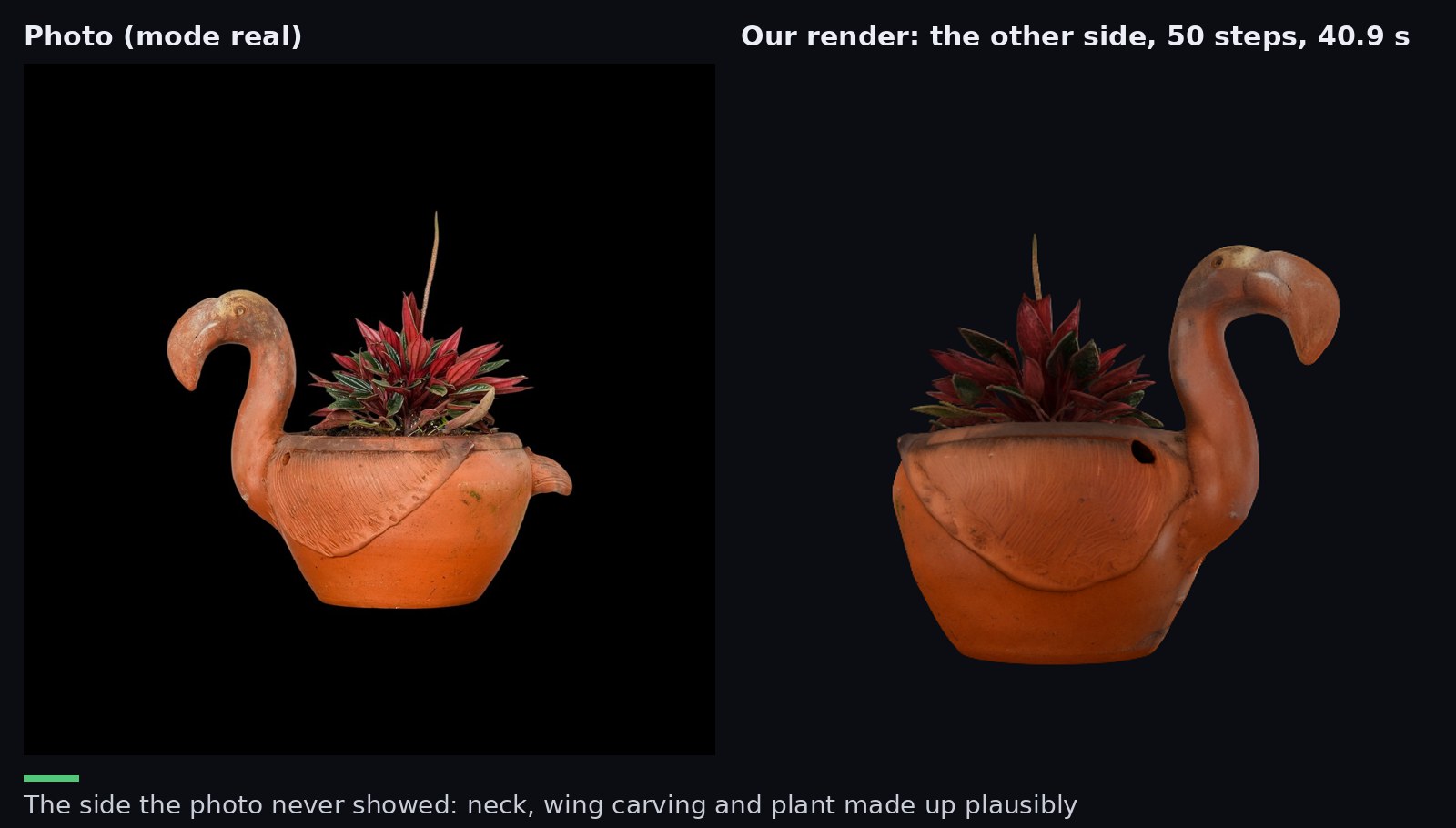
The terracotta planter worked. Its photo shows one side of a flamingo-shaped pot. The far side came out plausible: the long neck, the carved wing and the plant. For photos there is a real-photo mode that crops more loosely around the object.
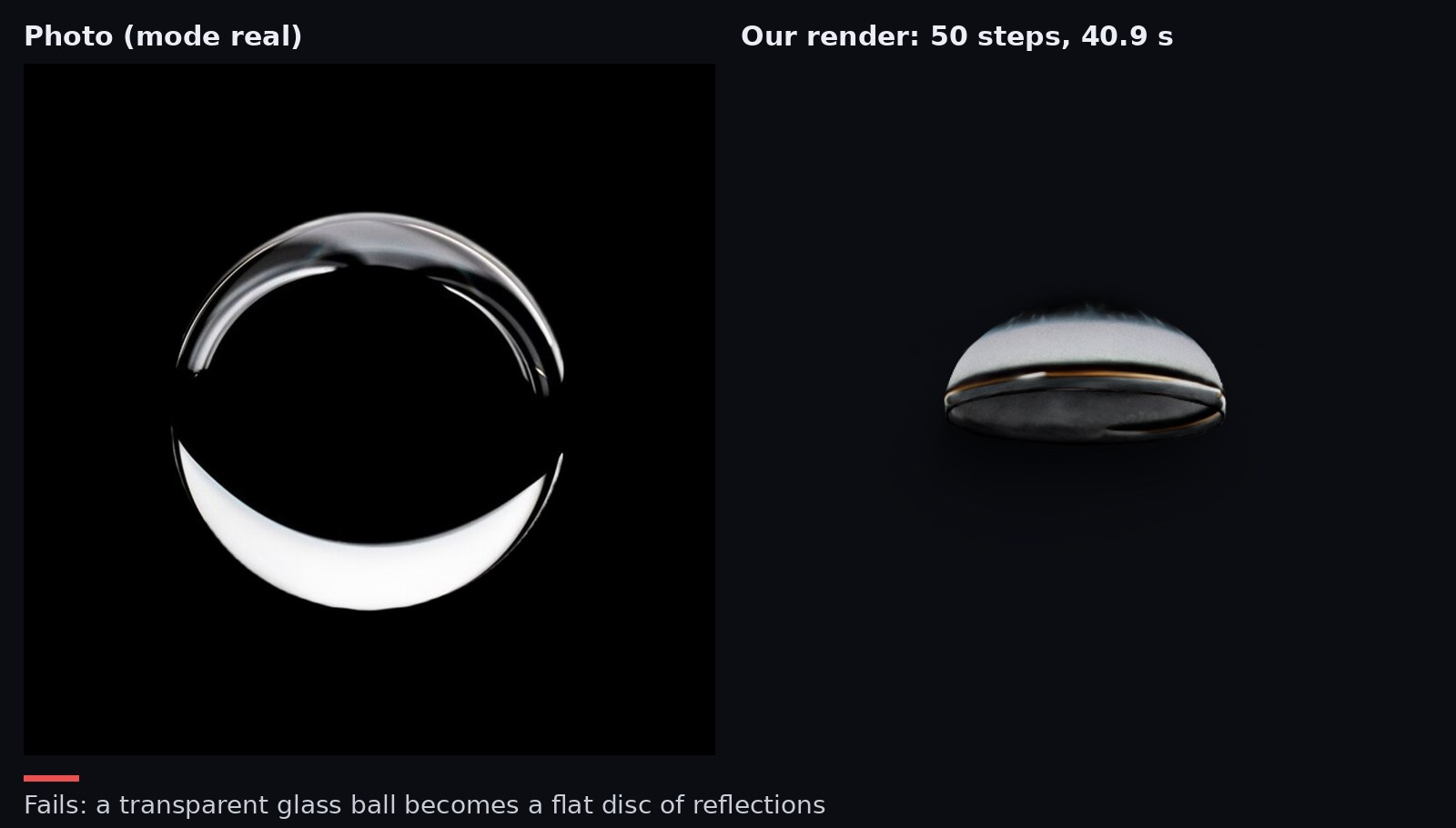
The gecko came out lumpy and squashed from a new angle. The glass ball failed: Idol turned it into a flat disc. One glass ball is not a test, but it is a warning for transparent objects. The planter, gecko and glass ball photos come from Wikimedia Commons under CC BY-SA 4.0. The appendix lists them.
Which GPU: a real 8 GB RTX 3070 is enough, at 67 seconds an object
The smallest card that worked was a real 8 GB RTX 3070, on default settings: 67 seconds an object instead of 41. The planter it made looked the same as the 3090's in our renders.
To look below 8 GB, we limited the 3090's memory to what a smaller card has.
| Card | How we tested it | Full quality / Turbo | Peak memory |
|---|---|---|---|
| RTX 3070, 8 GB | real card | 66.9 s / 5.6 s | 7,189 MiB |
| A 6 GB card | emulated: the 3090 limited to 6 GB, picture split in tiles | 40.7 s / 4.3 s | 5,699 MiB |
Idol uses about the same memory whatever you ask of it, so the 24 GB of the 3090 was headroom, not a requirement. Limited to the memory of a 12 GB and of an 8 GB card, the 3090 returned the same file, bit for bit.
Six gigabytes is where it gets tight. With the defaults, FLUX.2's picture compressor ran out of memory. It passed once our wrapper code made it work on the picture in 512-pixel pieces. The result looked the same in our renders. Tighter limits all failed.
A datacenter card buys speed, not the ability to run it. The authors publish a ladder at full quality: 3.4 seconds on a B300, 6.7 on an H100, 19.1 on an RTX 4090 and 46.2 on a 10 GB RTX 3080. Our 3090 sits close to their 3080.
Our reading of the license: commercial use looks allowed, with Meta's terms on one helper
Idol looks fine for commercial use, but one helper, DINOv3, comes with Meta's own terms, not Apache-2.0. Our reading, not legal advice: Idol, Turbo and the FLUX.2 VAE are Apache-2.0, and the background remover is MIT. The authors' code downloads both helpers from Hugging Face pages that require an access request.
DINOv3, from Meta, sits behind a form that asks for your name, date of birth, country and affiliation. Its DINOv3 License grants a worldwide, royalty-free right to use, copy, modify and distribute, with no ban on commercial use. It forbids uses that break trade-control rules, including military ones. It asks for credit in publications, and Meta may change the terms.
Black Forest Labs states the FLUX.2 VAE is Apache-2.0, though the authors' code fetches it from a page under a non-commercial license. An open Apache-2.0 download also carries it.
Comfy-Org repackages both helpers for the ComfyUI desktop tool, under an Apache-2.0 label. Meta's license says copies passed on stay under its agreement, wherever you download them from.
Our wrapper takes DINOv3 from Comfy-Org and the VAE from the open download. That skips the access form, not the terms. We spot-checked a few VAE tensors and did not compare either file byte by byte with the gated originals. We had no Hugging Face token, so we never tested the authors' route.
On InferenceKey: ready in 117 seconds, one loaded copy for both modes
One loaded copy of Idol served both full-quality and Turbo requests. A fresh 3090 reported ready 117 seconds after we asked for the model, about 5 GB of downloads included. With the files already cached, a restart took 28 seconds.
Part of those 117 seconds is a soundcheck. Idol speeds itself up by compiling its network for your card on the first image, which makes that first image slow. Our wrapper runs one short object in each mode before it reports ready, so your first real request does not wait.
ComfyUI already runs Idol from Comfy-Org's repackage, and that is the quicker route for one artist at one desk. Our goal was a service that other programs send photos to. So we wrote a custom backend: a small Python file that wraps the authors' code and plugs it into the platform. A photo goes in through the images API, and the .ply file comes back.
A thousand objects cost about 5.70 dollars of GPU time at full quality, or 49 cents with Turbo, on a 3090 rented at about 0.50 dollars an hour. An RTX 3070 at 0.13 dollars an hour: about 2.40 dollars per thousand, 20 cents with Turbo. These figures assume a busy card. Idle time and your own work are not counted.
The platform caps a single result at 8 MB, and a quarter-million-blob file is 17.8 MB. The backend returns the file in 2 MB parts that the caller fetches by id, and the example's main.py does that for you. It works while one copy of the model serves your requests, not yet when several share the load. Status: open on the platform, and the fix is to return large outputs through file storage.
Should you use it? For solid objects on a card you already have, yes
- A catalogue of solid products (pots, bags): yes, at the full 50 steps.
- Quick previews and many drafts: Turbo, as long as someone looks at the back.
- Glass and thin flat shapes: not on our samples.
- A small card: a real 8 GB RTX 3070 worked with the defaults.
- A commercial product: read the DINOv3 License before you ship.
To turn the authors' backpack or your own photo into two 3D files on your GPU, run python publish.py and then python main.py from the Idol SDK example. It needs an InferenceKey account, an NVIDIA card connected to it and, for now, a local build of the SDK.
For engineers
Credits
- Speridlabs (Alejandro Canada, project lead, and Chema Garabito): Idol, its model card, the idol-sdk with
IdolPipeline, the project page and the GPU ladder. The project page notes a partnership with fal to push Idol v1 to Idol Max. - akhaliq: Idol Turbo, the two phase LoRAs and the guidance-free sampler (
turbo.py), trained with ML Intern.akhaliq/idol-turbonow redirects to speridlabs/idol-turbo. - VAST-AI-Research: TripoSplat (code MIT-licensed), the model Idol is fine-tuned from.
- Meta: DINOv3 ViT-H+/16, the image encoder.
- Black Forest Labs: the FLUX.2 autoencoder, and FLUX.2 [klein] 4B, whose
vae/our backend uses. - ZhengPeng7: BiRefNet (MIT), the background remover.
- Comfy-Org: the ComfyUI repackage, source of our DINOv3 bf16 weights. onnx-community: the DINOv3
config.jsonwe pair with them. - AI Search: the video where we spotted Idol (1 November 2026).
- Our part: the custom backend that serves both modes as an API from open encoder sources, the memory ladder, the measurements and the SDK example.
The model, from the authors' cards
- Components per request: DiT 370.6M, octree decoder 50.8M, Gaussian decoder 237.3M, BiRefNet 220.7M (FP16), DINOv3 ViT-H+/16 840.6M (bf16, about 1.68 GB), FLUX.2 VAE 84.1M (bf16, FP32 checkpoint cast on load). About 1.80B parameters, 3.7 to 4.4 GB of weights, 7.2 GB peak. The project page's "0.66B parameters" counts the DiT and the two decoders only.
- Defaults: seed 42, 50 steps,
cfg_strength3.0,rescale_t3.0,num_gaussians262,144 (32,768 to 1,048,576, a multiple of 32),dinov3_dtypebf16 (fp32 costs 1.7 GB more). Modessynthetic(crop 1.2) andreal(crop 1.7). - Optimized sampling is on by default on CUDA (about 1.7x):
torch.compileof the denoiser, batched guided and unguided passes, cuDNN attention (sm80 and newer) with TF32. The first image in a process is slower while it compiles. - Idol Turbo, a distilled version: 5 steps, no CFG, 100 to 5 network evaluations (20x fewer). About 0.75 s on an H200 (0.66 s at 4 steps, about 1.0 s at 8). Two rank-32 phase LoRAs (slow high-noise and fast low-noise experts, switch at t=0.5), a Glance-style recipe (arXiv 2512.02899), 29.4M trainable parameters. v5 trained on 4,650 teacher records from 93 images, 2,000 steps (about 25 minutes on one H200). The backpack was not in its training set. Card status: some inputs softer than the teacher, colours can run warm at 4 steps, the ComfyUI two-stage split not run inside ComfyUI.
- Authors' GPU ladder (50 steps, 262,144 Gaussians, median over 8 images): B300 3.4 s, B200 3.6 s, H200 6.6 s, H100 6.7 s, RTX 5090 14.1 s, A100 16.3 s, L40S 16.6 s, RTX 4090 19.1 s, RTX 3080 10 GB 46.2 s, L4 54.6 s. Not reproduced.
- Authors' benchmark on 1x H100 (Idol / TRELLIS / TripoSplat / LGM): DINOv2 new views 0.781 / 0.754 / 0.743 / 0.575; CLIP 0.885 / 0.868 / 0.868 / 0.784; sharpness distance 0.81 / 0.97 / 1.03 / 1.22; request time 6.8 / 7.1 / 9.9 / 1.1 s. LGM has the highest PSNR (12.46 against Idol's 12.25). Not reproduced.
- Apple Silicon (MPS, eager): about 4 minutes for 10 steps and 65,536 Gaussians on an M4 MacBook Air, about 18 minutes for 50 steps and 262,144 (needs 24 GB). Not tested.
GPU and backend choice
- Main card: one RTX 3090 24 GB on our cloud (driver 595.112.07, CUDA 13.2). A 24 GB consumer card for headroom on the first run. Then a real RTX 3070 8 GB (driver 580.65.06, CUDA 13.0) for the smallest rung.
- Backend: custom Python backend
idol-image-to-3d0.1.3,task_typetext2image, so the workload answers on/v1/images/generationswith a passthrough body. It wrapsIdolPipelinefrom idol-sdk commit8db7003(torch 2.14.1;requires_python>=3.11,<3.13). No built-in backend serves Idol. - Encoders (
IDOL_ENCODERS=open, the default): DINOv3 bf16 fromComfy-Org/Idolshae907d8dc(clip_vision/dino_v3_vit_h_bf16.safetensors, 1,681,247,696 B, 615 tensors, loaded withoutput_loading_infoand refused on any missing key) plusconfig.jsonfromonnx-community/dinov3-vith16plus-pretrain-lvd1689m-ONNXshaf115b99b; FLUX.2 VAE fromblack-forest-labs/FLUX.2-klein-4Bshae7b7dc27vae/. The idol-sdk README documents this override ("flux2_vae": "/models/FLUX.2-klein-4B"), and commitffb4528letsIdolPipelinetake encoders from local folders. Local folders skiprequire_encoder_access.IDOL_ENCODERS=gatedwithHF_TOKENkeeps the authors' path; untested by us. - VAE check: range reads of the same tensors in Comfy-Org's fp32
flux2-vae.safetensorsand klein's bf16 VAE:bn.running_meanmax abs diff 2.4e-4,bn.running_var7.8e-3,encoder.conv_in.weight9.3e-4,decoder.conv_out.weight1.2e-4. That is bf16 rounding; Idol casts the VAE to bf16 on load anyway. We did not check whether Comfy-Org's files are byte-identical to the gated originals. setup(): pinned downloads, both modes loaded into one process, the authors' optimize path, the authors'patch_pipeline_for_turbofed the pinned LoRA, then a 2-step warm-up per mode so the first request does not compile.- Stack: a local InferenceKey manager, worker and nats-proxy, release builds from
origin/main103b1b3a. We did not call the hosted endpoint with this model.
Step by step
git clone https://github.com/inferencekey/inferencekey-sdk
cd inferencekey-sdk/examples/idol-image-to-3d-splat-custom-backend-private-nvidia
python -m venv .venv && . .venv/bin/activate
pip install maturin requests Pillow
( cd ../../bindings/python && maturin develop --release )   # the SDK is not on PyPI yet: local build, needs a Rust toolchain
cp .env.example .env    # INFERENCEKEY_SDK_TOKEN, INFERENCEKEY_API_KEY, INFERENCEKEY_PROJECT, IK_WORKER_ID
export INFERENCEKEY_TENANT_ID=... INFERENCEKEY_USER_TOKEN=...   # optional, read by publish.py
python publish.py                      # packages backend.py and uploads it as a custom backend
python main.py                         # the authors' backpack, 50 steps and Turbo
python main.py my-photo.jpg --real     # your own photograph
Without the tenant id and user token, publish.py leaves the package in dist/ for upload from Dashboard, Custom backends. The SDK build follows section 4 of the examples guide.
main.py ensures a fixed workload on your worker (ready_timeout_secs 2400, request_timeout_secs 900), passes the IDOL_* variables through config.env, waits until ready, makes a 50-step and a Turbo call on one picture, fetches every part of each .ply and checks its SHA-256. Outputs land in ./outputs (<name>-base.ply, <name>-turbo.ply and the image the model saw). Without IK_KEEP_ALIVE=1 it deletes the workload on exit.
A request by hand, from the example folder:
set -a; . ./.env; set +a   # loads INFERENCEKEY_PROJECT and INFERENCEKEY_API_KEY into the shell
curl -s https://cloud.inferencekey.com/endpoint/$INFERENCEKEY_PROJECT/idol/v1/images/generations \
  -H "Authorization: Bearer $INFERENCEKEY_API_KEY" \
  -H "Content-Type: application/json" \
  -d '{"model": "default", "image": "<base64 or data URL>", "mode": "real", "turbo": true, "seed": 42}'
Request fields: image or example (an idol-sdk example name), mode (synthetic or real), turbo, seed, steps, cfg_strength, rescale_t, num_gaussians, vae_tiling, offload_encoders, vram_limit_gib. The answer carries data[0].b64_json (the image the model saw), the predicted camera, seconds, stage_seconds, memory peaks, and the .ply as ply_b64 part 0 of parts, with ply_id and ply_sha256. Fetch the rest with {"ply_id": ..., "part": n}. Environment settings: IDOL_ENCODERS, IDOL_TURBO, IDOL_OPTIMIZE, IDOL_VAE_TILING, IDOL_OFFLOAD_ENCODERS, IDOL_VRAM_LIMIT_GIB, IDOL_WARMUP. From the dashboard's image tester, type an example name plus turbo, real or tiling (for example obj-backpack turbo; it answered in 4.0 s).
Time to ready
- RTX 3090, fresh worker: 117 s after
ensure(). Venv about 31 s; backend downloads 24.7 s, load 15.1 s (weights in VRAM 3,632 MiB), compile warm-up 22.3 s base and 17.0 s Turbo, setup 79.8 s. About 5 GB downloaded. Cached restarts: 28.2 to 28.3 s. - RTX 3070: 179 s (slower package install on that host); downloads 19.2 s, load 10.8 s, compile base 20.7 s. Inductor warned
Not enough SMs to use max_autotune_gemm mode.
Full timings (seed 42, one request at a time, 262,144 Gaussians unless noted)
| Card | Case | Model s | Sampling s | Round trip s | .ply parts fetch s | Card peak MiB |
|---|---|---|---|---|---|---|
| RTX 3090 | 50 steps, 9 runs, 7 objects | 40.51 to 41.15 | 39.45 to 39.87 | 41.4 to 42.0 | 2.4 to 2.7 | 7,308 (7,569 once) |
| RTX 3090 | Turbo, 7 objects | 3.46 to 3.71 (first after start 6.24) | 2.44 | 3.95 to 4.38 | 2.5 to 2.7 | 7,308 |
| RTX 3090 | plain Idol, 5 steps, CFG 3 | 5.12 | 4.05 | 5.58 | 2.46 | 7,308 |
| RTX 3090 | 1,048,576 Gaussians, 50 steps / Turbo | 42.54 / 5.10 | 39.84 / 2.43 | 43.5 / 6.5 | 11.0 / 10.3 | 7,310 / 7,312 |
| RTX 3070 | 50 steps (backpack, planter) | 66.87 to 67.07 | 65.39 to 65.53 | 69.8 to 78.7 | 10.3 to 11.3 | 7,189 |
| RTX 3070 | Turbo (backpack x3, planter) | 5.56 to 5.63 (first 7.26) | 4.07 | 7.1 to 9.0 | 6.8 to 13.9 | 7,189 |
| RTX 3070 | 1,048,576 Gaussians, Turbo | 8.26 | 4.09 | 10.5 | 32.7 | 7,189 |
- Other stages on the 3090: preprocess (BiRefNet and crop) 0.25 to 0.35 s, encoders 0.33 s, decode 0.41 to 0.44 s (2.03 s at 1M), PLY write 0.05 to 0.27 s.
- 0.79 s per step at 50 steps with batched guidance, 0.49 s per step with Turbo. Turbo speed-up: 11.3x on the 3090, 12.0x on the 3070.
- PyTorch allocated 5,223 MiB and reserved 6,958 MiB on the 3090;
nvidia-smisampled every second. - Determinism: the backpack
.plywas bit-identical across 6 runs on the 3090 (sha8e6becdc..., Turbofd86b6f0...). The 3070 gives different bits (528198a5...), as expected on another GPU. - Cost per object in the narrative is computed from these times and hourly prices (GPU time only), not measured: 3090 at 0.50 USD/h, 40.7 s ≈ 0.0057 USD and 3.5 s ≈ 0.00049 USD; 3070 at 0.13 USD/h, 66.9 s ≈ 0.0024 USD and 5.6 s ≈ 0.0002 USD.
Memory ladder
Caps are a per-request torch.cuda.set_per_process_memory_fraction on the RTX 3090 (vram_limit_gib); a nominal card gets about 0.8 GB less than its size for the CUDA context. Same backpack, seed 42, 262,144 Gaussians. Peak is the card's nvidia-smi memory.used.
| GPU or cap | Configuration | Peak | 50 steps / Turbo | Output | Real or emulated |
|---|---|---|---|---|---|
| RTX 3090 24 GB | defaults | 7,308 MiB | 40.7 / 3.5 s | reference | real |
| 11.2 GiB cap (12 GB card) | defaults | 7,312 MiB | 40.6 s | bit-identical | emulated |
| 7.2 GiB cap (8 GB card) | defaults | 7,310 MiB | 40.8 / 3.5 s | bit-identical | emulated |
| RTX 3070 8 GB | defaults | 7,189 MiB | 66.9 / 5.6 s | yes (planter renders checked) | real |
| 5.2 GiB cap (6 GB card) | defaults | no: CUDA out of memory. Tried to allocate 256.00 MiB ... 4.60 GiB is allocated by PyTorch (FLUX.2 VAE encoder) | emulated | ||
| 5.2 GiB cap | offload_encoders | no, same OOM (5,216 against 5,223 MiB allocated) | emulated | ||
| 5.2 GiB cap | vae_tiling, diffusers default tile 1024 (0.1.2) | no: diffusers tiles only inputs larger than 1024, and Idol's input is exactly 1024 | emulated | ||
| 5.2 GiB cap | vae_tiling, 512 px tiles (0.1.3) | 5,438 to 5,699 MiB | 40.7 / 4.3 s (1M: 42.4 s) | yes: mean abs pixel diff 4.7 and 4.3 of 255 against untiled renders | emulated |
| 4.5 GiB cap | defaults | no, OOM (Tried to allocate 392.00 MiB) | emulated | ||
| 3.4 GiB cap | tiling and offload | no: Tried to allocate 14.00 MiB ... 3.24 GiB allocated | emulated | ||
| 2.5 GiB cap | offload | no, OOM | emulated | ||
| RTX A2000 6 GB | not run: no stock, then no longer listed | real, not tried |
- Smallest real card that passed: RTX 3070 8 GB with the defaults. Smallest emulated: 6 GB with 512 px VAE tiles.
- Not tried on real hardware: any 6, 10, 12 or 16 GB card, the RTX 4090 and every datacenter card.
- The emulation does not cover slower silicon (the 3070 was 1.6x slower than the 3090) or less system RAM.
- The narrative quotes these peaks in MiB. The demo video labels the same peaks in decimal GB (7.7, 7.5 and 6.0 GB).
More samples
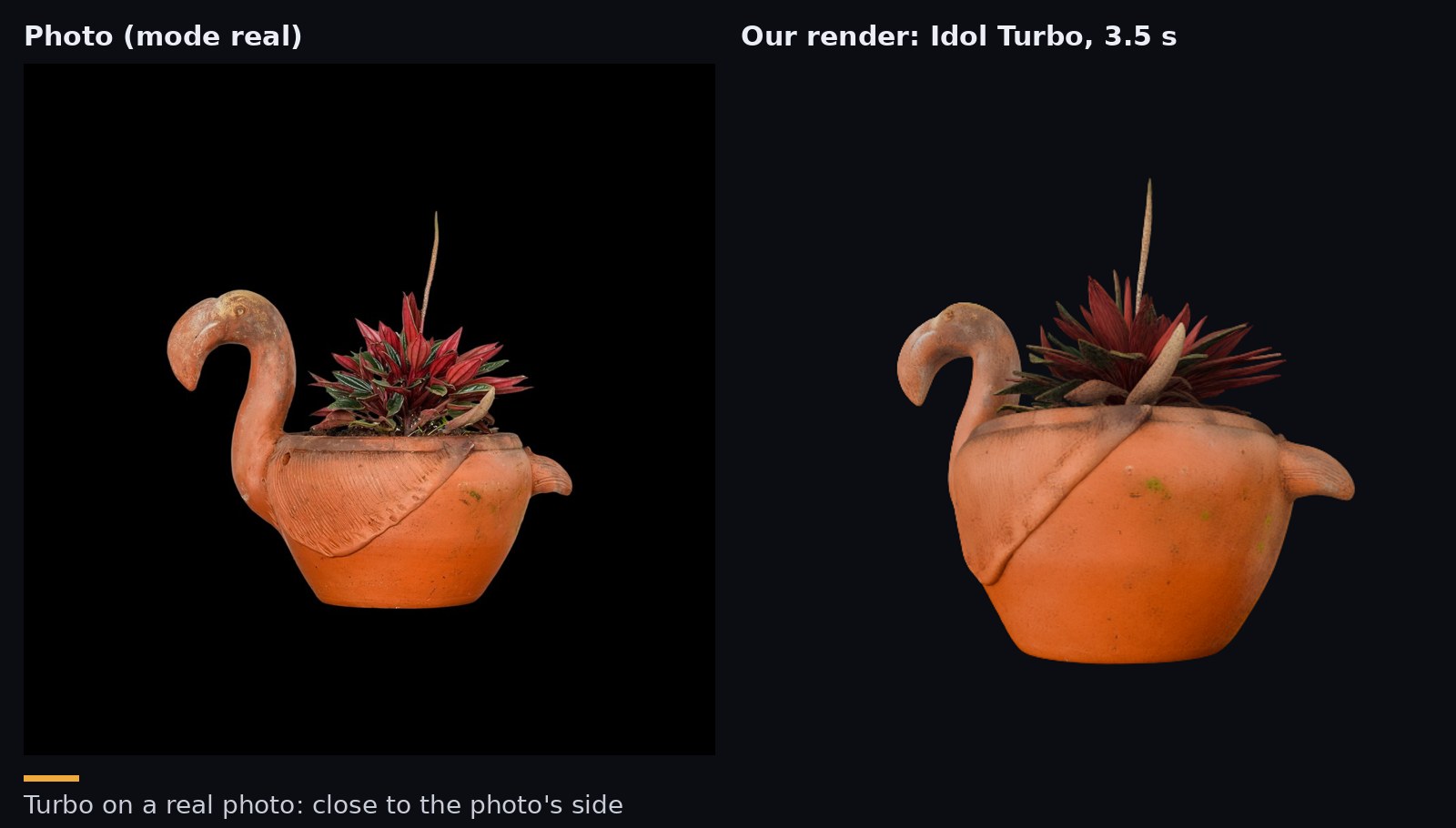
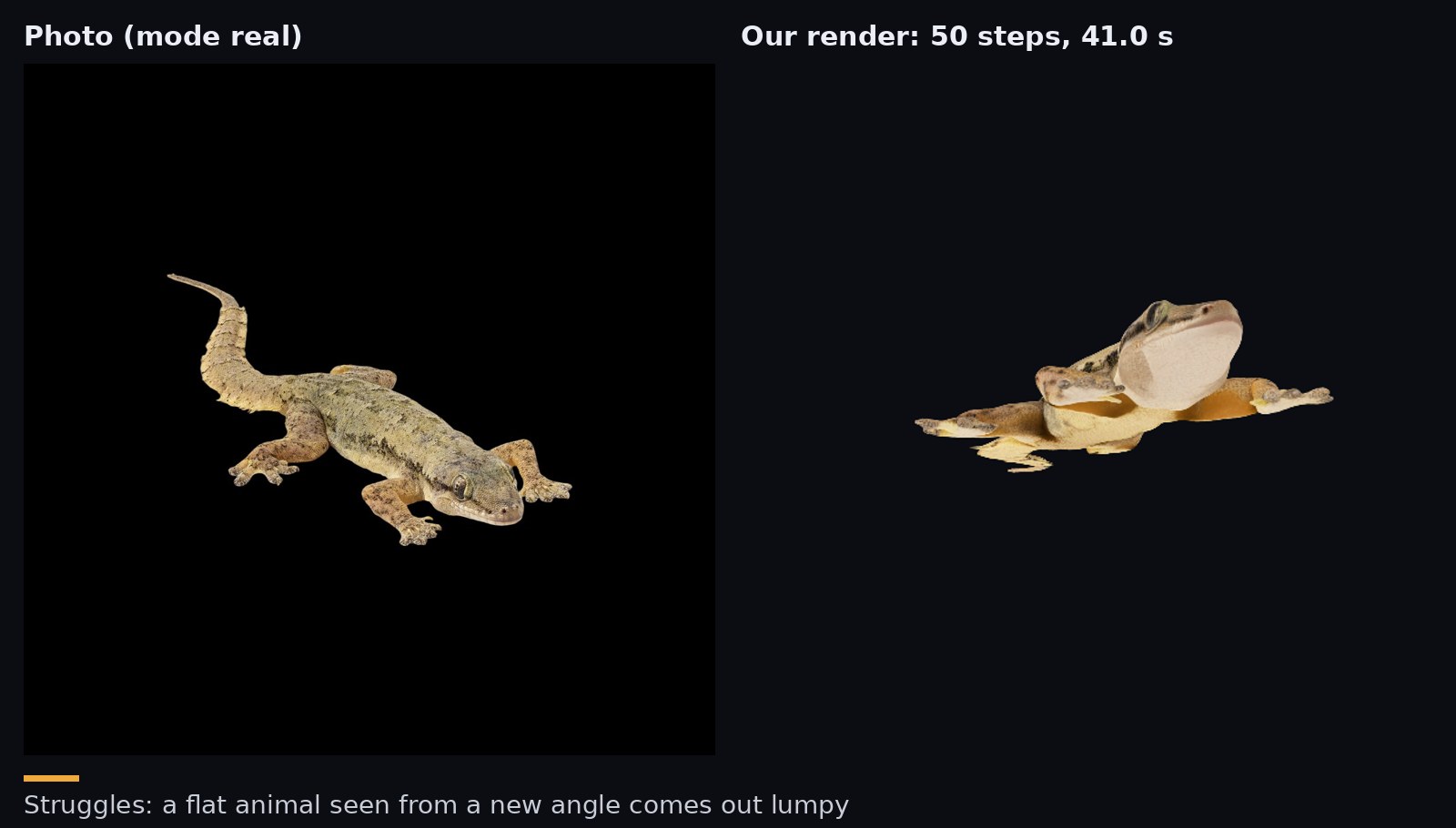
The planter, gecko and glass ball photos are from Wikimedia Commons, CC BY-SA 4.0: "Peperomia Caperata Cultivar Plant Flamingo Pot Aug25 A7CR 07079.jpg", "Hemidactylus platyurus (Flat-tailed House Gecko) on white background, focus stacking.jpg" and "Glaskugel -- 2022 -- 9849.jpg". Renders were made with gsplat.js 1.2.9 in headless Chromium from the returned .ply files, one view per image. One seed per case.
Demo video
A narrated walk-through of 3 minutes 24 seconds in three chapters: what Idol is (with the authors' own reel, credited "Source: Speridlabs, Idol model card"), photo to 3D on one card, and how small a card will do.
Remaining problems
- Large results (platform, open). One result is one message limited to 8 MB, which carries the payload about twice. A 262,144-Gaussian
.plyis 17.8 MB (68 bytes per Gaussian) and a 1M one 71.3 MB. The backend returns 2 MB parts (PART_BYTES2,000,000) fetched byply_id: fine with one fixed replica, broken with several replicas behind one endpoint. Needs large outputs through object storage. The README counts 9 parts at 262k and 36 at 1M, probably part 0 inline plus 8 or 35 fetched. config.envchanges do not restart a custom backend (platform, open). Workaround in the README:delete(), then runmain.pyagain. Not hit in this test, because the ladder used per-request caps.- Memory switches.
offload_encodersdid not lower the peak. diffusers'enable_tiling()does nothing at Idol's 1024 px input. Only forced 512 px tiles brought it under 6 GB. Status: documented,vae_tilingis the switch to use. - Our mistakes, fixed or harmless. In 0.1.0 a request that ran out of memory left its cap in place, so the next uncapped request failed too (fixed in 0.1.1 with
finally). Two kill commands matched our own shell. A render naming bug overwrote one view, which we re-labelled after looking at it. None changed the results. - Model behaviour. Turbo darker and inventing detail on hidden sides, transparent objects failing, thin flat animals lumpy. Observed once each.
- Not tested: the gated encoder path, concurrency, batches, the ComfyUI workflow, Apple Silicon, any 4090 or datacenter card, and a real card below 8 GB.
License notes
A reading aid, not legal advice.
speridlabs/idol,speridlabs/idol-turboandsperidlabs/idol-sdk: Apache-2.0, not gated. Idol'sconfig.jsonnamesfacebook/dinov3-vith16plus-pretrain-lvd1689mandblack-forest-labs/FLUX.2-devas encoders, andIdolPipelinecallsrequire_encoder_accessfor Hub repo ids before downloading.facebook/dinov3-vith16plus-pretrain-lvd1689m: gated manually (name, date of birth, country, affiliation), licensedinov3-license. The DINOv3 License (19 August 2025) grants a non-exclusive, worldwide, royalty-free license to use, reproduce, distribute and modify. Clause 1.b.i: redistributed DINO Materials and derivatives go under the same agreement, with a copy. Trade-control, ITAR and military-use prohibitions; acknowledgement in publications; California law; Meta may modify the terms.black-forest-labs/FLUX.2-dev: gated automatically under the FLUX Non-Commercial License; we could not read its full LICENSE.md. The flux2 README states the FLUX.2 autoencoder is released under Apache 2.0.FLUX.2-klein-4B: Apache-2.0, not gated; itsvae/config.jsonisAutoencoderKLFlux2with_name_or_pathblack-forest-labs/FLUX.2-dev.Comfy-Org/Idol: labelled Apache-2.0, not gated; holdsclip_vision/dino_v3_vit_h_bf16.safetensors,diffusion_models/idol_fp16,vae/flux2-vae.safetensorsandvae/idol_decoder_fp16. The label does not relicense the DINOv3 weights (clause 1.b.i).onnx-community/dinov3-vith16plus-pretrain-lvd1689m-ONNXis also taggeddinov3-license.- TripoSplat and BiRefNet GitHub repositories (code): MIT. We did not check the license of the TripoSplat weights.
Sources
- Idol model card: https://huggingface.co/speridlabs/idol
- Idol Turbo: https://huggingface.co/speridlabs/idol-turbo
- idol-sdk: https://github.com/speridlabs/idol-sdk
- Project page: https://speridlabs.com/research/idol
- Comfy-Org repackage: https://huggingface.co/Comfy-Org/Idol
- DINOv3: https://huggingface.co/facebook/dinov3-vith16plus-pretrain-lvd1689m and its license https://raw.githubusercontent.com/facebookresearch/dinov3/main/LICENSE.md
- FLUX.2 autoencoder license statement: https://github.com/black-forest-labs/flux2
- FLUX.2 [klein] 4B: https://huggingface.co/black-forest-labs/FLUX.2-klein-4B
- Where we spotted it: https://www.youtube.com/watch?v=IGICYFyP_EI (AI Search, 2026-11-01)
- SDK example: https://github.com/inferencekey/inferencekey-sdk/tree/main/examples/idol-image-to-3d-splat-custom-backend-private-nvidia