Ming-Image Design draws text-heavy screens in 7 seconds, on a card with 80 GB
inclusionAI's 6B design model needed 64.4 GiB on an A100 80GB, drew a 1024 screen in 6 to 7 s, and made one transparent PNG in six tries.
One line break decided whether our fox sticker came back as a clean cutout or as a white square. That is the fussiest part of Ming-Image-0.1-Design, inclusionAI's new open model for app screens, dashboards, slides and posters full of text. The number that matters is memory. Sold as 6B, it sounds like a 12 GB card. On one 80 GB NVIDIA A100 on our cloud it peaked at 64.4 GiB. If you deploy image models, that changes which card you rent. On that card it drew a 1024 x 1024 app screen in 6 to 7 seconds and a 2048 x 2048 poster in 36. Words you put in quotes mostly came out spelled right. It is MIT licensed, so you can ship what it makes. For mockups with real text on your own hardware, plan for an 80 GB card and check every transparent asset in code.
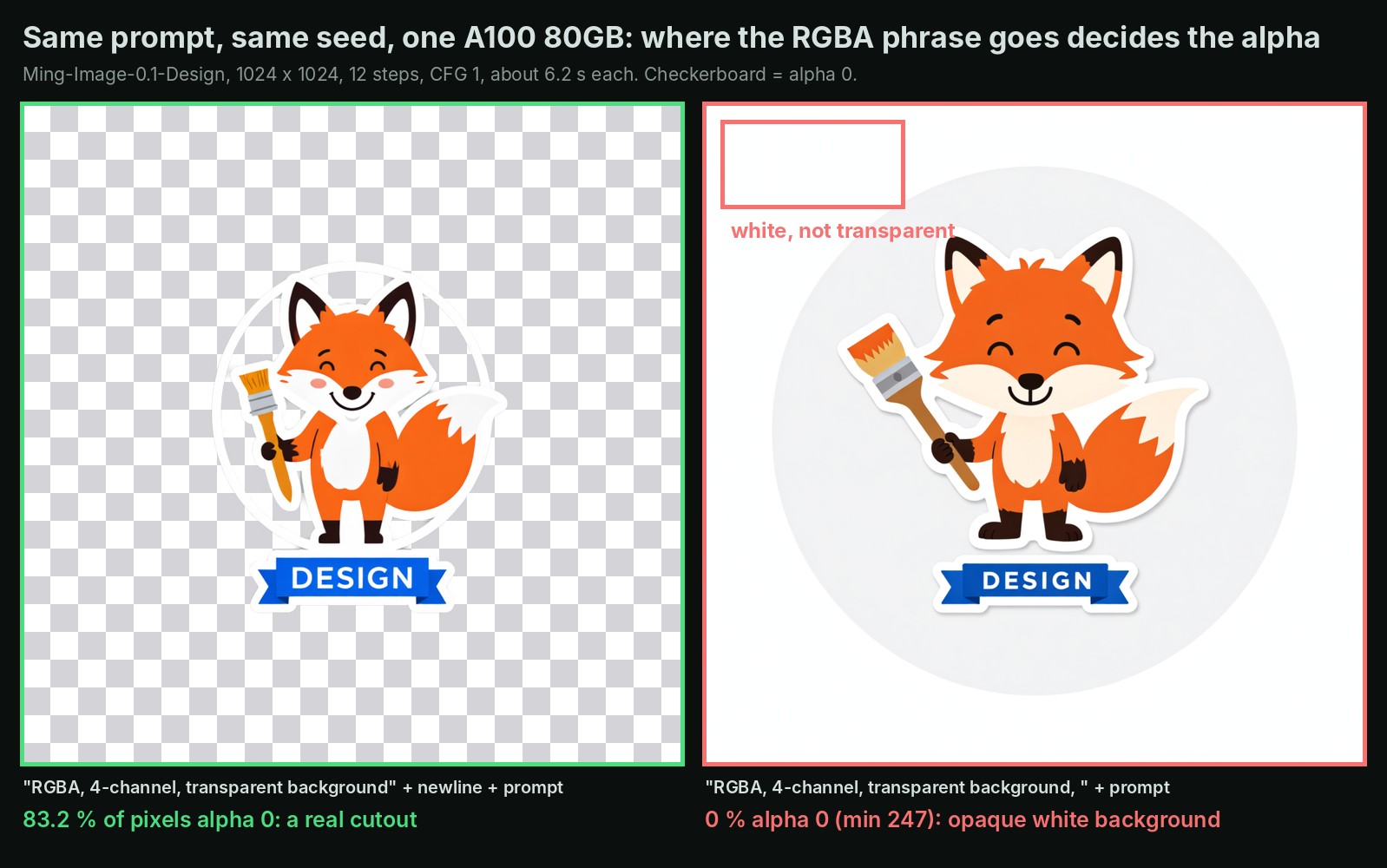
Same prompt, same random start. The line break is the only difference.
The 6B is only one member of the band
A gig poster names the singer. The van still carries the drums, the amps and the bass player. Ming-Image Design works the same way. The 6-billion-parameter part, the one that draws, is 12.3 GB on disk. Behind it sits a 34 GB language model that reads your prompt, a 6.2 GB connector and a small decoder. Altogether the repo is 52.9 GB.
The authors say so in their README: the minimum validated setup is "one GPU with at least 80 GiB of memory." The parameter count is the part that got repeated. We spotted the model in an AI Search news video, which called it 12 gigabytes, and our own catalog copied that number. We wanted the real one, so we ran it.
Fast enough for a design loop, at a fraction of a cent per screen
We kept the authors' validated setup: uncompressed model, 12 passes per picture, one request at a time, their own Python code underneath. We made 15 pictures with our own prompts, one try each.
| Size | Card time per picture | Peak card memory |
|---|---|---|
| 1024 x 1024 | 6.2 to 7.4 s | 50.45 GiB |
| 2048 x 2048 | 35.8 s | 64.4 GiB |
Four times the pixels cost about five times the time. Busy nonstop, one card would make about 400 to 500 screens an hour at 1024. An 80 GB A100 rents for about 1.4 to 1.8 dollars an hour, so a 1024 screen costs a quarter to half a cent, and a 2048 poster about 2 cents. That is an estimate from single pictures, not a sustained run.
Quoted words come out right, the rest is decoration
Short text you write in quotes is usually text you get. A concert poster got its band name and three city dates right. A slide titled "Q3 GPU spend" got every bar label right. A dashboard's three stat cards were perfect. Quoted text came out right in 5 of 7 layouts.
Text you leave to the model is a different story. Chart axes, subheadings and feature cards we did not spell out came back as convincing pseudo-words. Long lists slipped too: a 12-line café menu came back with two wrong prices and one coffee line we never asked for.
Transparency worked once in six prompt variants
Every image comes back as a PNG with an alpha channel, the layer that says how see-through each pixel is. That is the model's party trick: a sticker or logo that lands on a slide without a white box around it.
In practice it worked in one variant of six. The authors publish ten trigger phrases. With "RGBA, 4-channel, transparent background" on its own first line, the fox came back with 83.2 % of its pixels fully transparent, twice. With a comma instead of the line break, solid white. An app icon with the phrase on its own line also came back opaque, and so did three other phrase and subject combinations.
Who should care
- Teams that make mockups, slides or posters with text they can spell out: write every word you need in quotes.
- Anyone who needs menus, price lists or tables: read every line before it ships.
- Anyone who needs transparent assets: put the phrase on its own line and check the alpha layer in code. Our backend returns the share of transparent pixels with every image, so that check is one line.
- Teams with cards under 80 GB: plan on an 80 GB card for now. We planned a 24 GB emulation, and it never ran.
On InferenceKey, Ming ships as a Python script, not a server, so we wrapped it in a custom backend: a small program that loads the model once and answers requests. A program that already asks OpenAI for images can call this card instead. A restart after an update took 29 seconds. The authors' exact library versions do not run as listed on Python 3.11. Slightly newer ones fix it, and the SDK example ships those.
The honest limit: this is a behavior check with one try per prompt on one card type, not a quality benchmark.
Thanks to inclusionAI for building and releasing Ming-Image-0.1-Design under MIT, with the inference code and the transparency phrases, and to AI Search, where we spotted it. Our part was the custom backend, the deployment on InferenceKey, the dependency fixes and the measurements.
Read the full test, with every picture, the memory figures and the deployment steps, in our Research post.