Matrix-Game 4.0 repaints a blocky game at 101 fps on one RTX 5090, as long as it is their game
Matrix-Game 4.0 repainted a 48 fps castle take at 101 fps on one RTX 5090. The quality preset ran at 10 fps and invented a character.
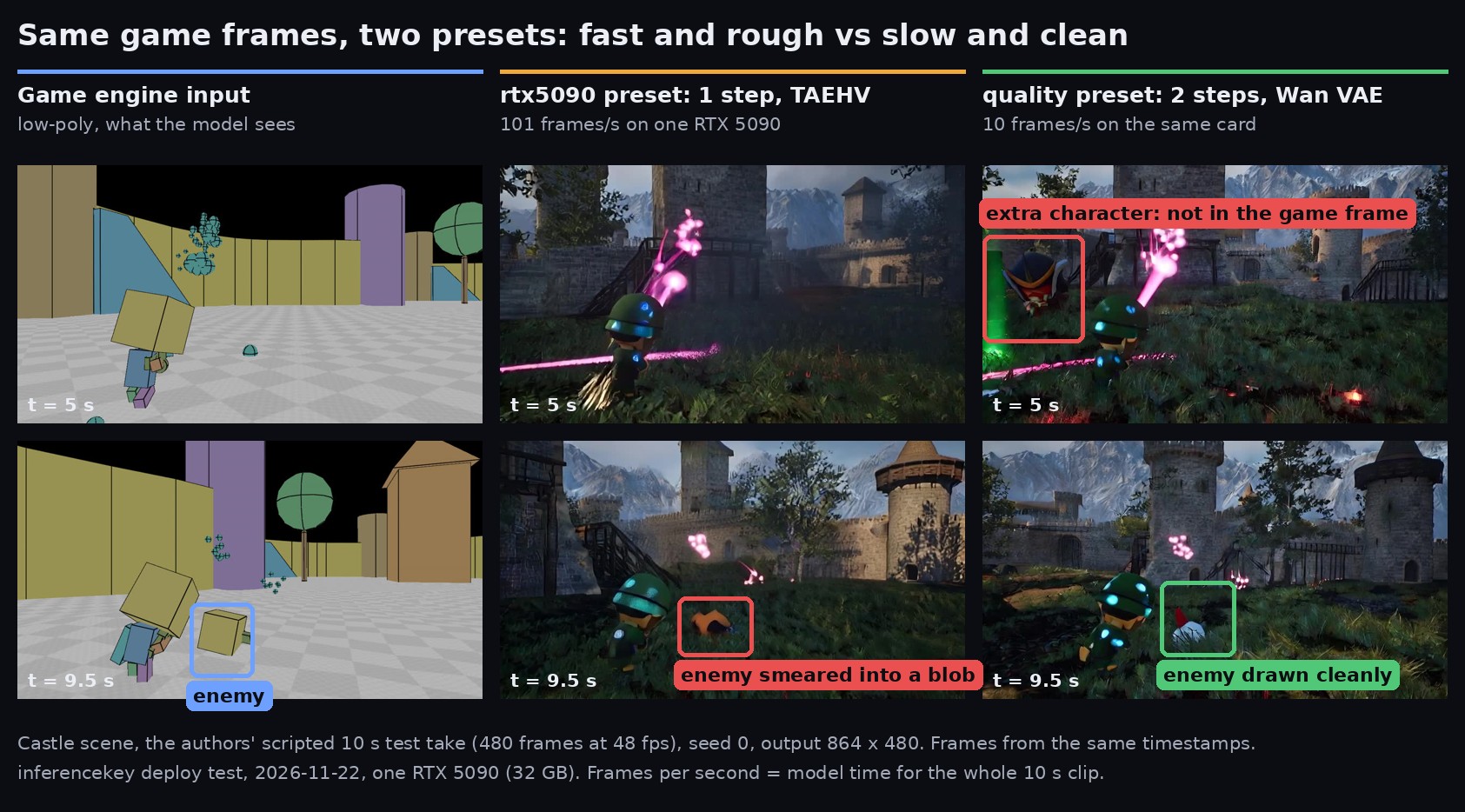
A game engine draws flat yellow walls, purple cylinders and a checkered floor. Matrix-Game 4.0, an open model from Skywork AI, turns them into stone walls, towers, grass and snowy mountains, four frames at a time, and leaves the rules to the engine. We ran it on one RTX 5090 gaming card on our cloud. Its fastest preset repainted a recorded 10-second castle take at 101 frames per second, about twice the 48 of the take itself.
For a team that deploys models, that changes the sizing question. This is not a video generator you queue jobs on. You size it like a game server: one card, and four new frames due every 83 milliseconds. The fast preset finished each batch in 40.
What you can do with it today: prototype on the authors' own scenes, or serve repainted recorded takes as an API on a GPU machine you control.
The engine plays the song, the model only mixes it
Matrix-Game 4.0 splits a game in two. The engine owns everything that has to be right: where the walls are, whether a bullet hits, what the W key does. The model owns only how it looks. Think of a live sound engineer: they decide how the band sounds in the room, but they cannot change the notes.
That is a different bet from the world models we tested before, Hy-Nomas and PAN 2. Those imagine the whole scene, so the model is also the physics. Here a wrong pixel never moves a wall.
The price is specialization. Each scene is its own trained model: Medieval Castle, Ancient Egypt and City Racing. Each expects the blocky frames of the authors' own game, from its camera angles. The training code and data are not released.
Skywork AI built the model, the game, the presets and the code, under Apache-2.0, on top of Alibaba PAI's Wan2.2-Fun-5B-Control and the Wan team's Wan2.2. The model card promises no frame rate and claims no benchmark, so we measured. Our part was the headless game recording, a backend that turns it into an API, the measurements and an SDK example.
101 frames per second fast, 10 detailed
We recorded the authors' scripted castle take, 480 frames at 48 frames per second, and rendered it with three of their presets on the same card. A 48 fps take gives the model an 83 ms slot for each batch of four frames (our arithmetic, not the authors'). Miss the slot and the picture falls behind the controls.
| Preset | Time per 4-frame batch | Speed | Against the 83 ms slot |
|---|---|---|---|
| rtx5090, tuned for this card | 40 ms | 101 fps | half the slot |
| realtime, the authors' datacenter pick | 85 to 105 ms | 38 to 47 fps | 2 to 22 ms over, per batch |
| quality, the authors' offline default | 396 ms | 10 fps | almost five times over |
These are model times: with video decoding and encoding included, the realtime preset took 18.5 seconds for the 10-second take, about 26 frames per second. The authors say encoding, network and browser decoding add delay on top. And a preset is not a per-request switch. Changing it reloads the model, which took 54 to 72 seconds each time, so pick one per machine.
Speed costs detail, and quality can invent
All three presets kept every character where the engine put it. At 9.5 seconds, the fast preset smeared the enemy into an orange blob. The quality preset drew the same enemy cleanly, but at 5 seconds it added a character on the left that is not in the game frame. The realtime preset made no mistake we saw.
For a game, the invented character is the worse error. A figure that is not there is one the player will try to shoot. The engine still decides hits, so gameplay stays correct, but what the player sees no longer matches the game.
A 16 GB budget fits with the right preset
We capped the memory of the same RTX 5090 to emulate smaller cards. A 24 GB budget ran realtime and quality. A 16 GB budget worked with rtx5080, the authors' preset for the 16 GB RTX 5080, which reads the fixed scene description once with a separate text model and then removes it from the card. A 12 GB budget failed: that text model weighs 11 GB on its own.
Do not read speed into the 16 GB result. It ran at 128 fps there, but that is the 5090's horsepower with less memory. The authors report about 42 fps on a real RTX 5080 with this preset.
On InferenceKey, the model runs as your own API through a custom backend, a Python file the platform runs on your GPU machine, with the authors' code unchanged. It was ready 116 seconds after the first call. One rough edge: our API refuses uploads over about 2 MB, so the SDK example sends the video in 1 MB parts.
Who should care
- Teams prototyping on the authors' scenes and camera paths: yes. On an RTX 5090 the fast preset repaints faster than the take was recorded.
- A live game today: only with the rtx5090 preset on an RTX 5090, and only after you measure the full path to the screen.
- Polished footage: the quality preset, offline, with an eye out for invented characters.
- Your own engine's frames or other scenes: not yet.
The honest limit: one recorded clip and one seed, smaller cards only emulated on the 5090, and no test of the live browser path or of the delay from key press to changed frame.
Read the full Matrix-Game 4.0 test in the Research post for every timing, the memory ladder and the steps to run it on your own card.