Matrix-Game 4.0 on one GPU: 101 fps fast, 10 fps detailed, on a recorded game take
Matrix-Game 4.0 repainted a recorded 48 fps game take at 101 fps on one RTX 5090. Quality ran at 10 fps; rtx5080 fit an emulated 16 GB budget.
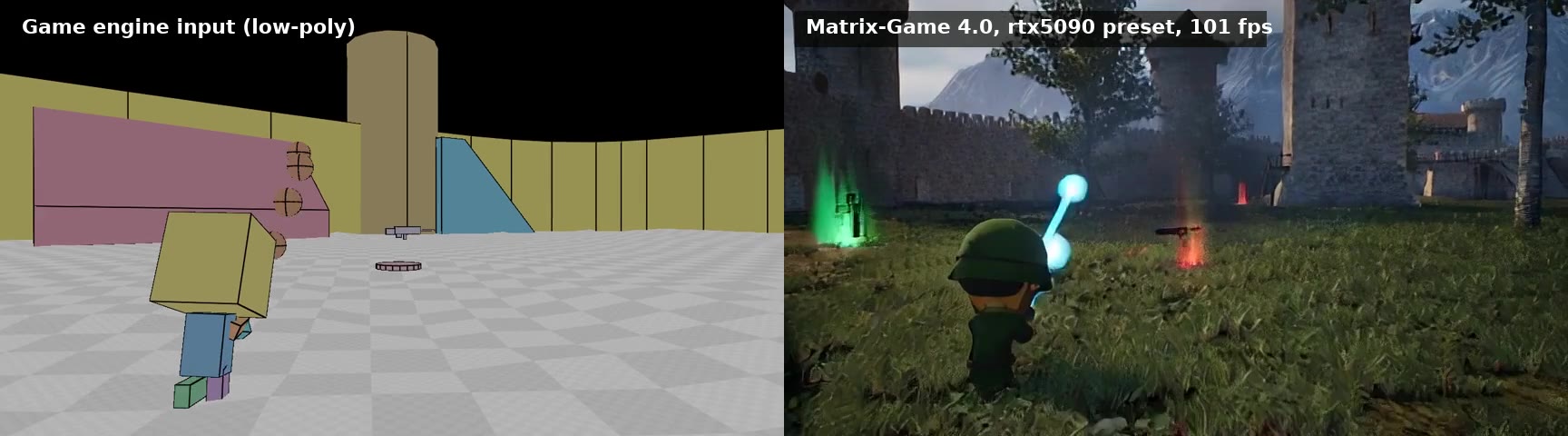
In Matrix-Game 4.0, an ordinary game engine runs the rules, the collisions and your key presses, and draws plain blocky frames. The model only repaints them as detailed 864 x 480 video, four frames at a time. We ran it on one RTX 5090 gaming card on our cloud. The authors' fastest preset repainted a 10-second castle take at 101 frames per second, about twice the frame rate of the recorded take. Their quality preset drew cleaner characters, at 10 frames per second. With the same card limited to 16 GB, the model still fit, using the authors' rtx5080 preset.
For a team that runs its own GPUs, this is a different job from generating video. You size it like a game server: one card, and four new frames to paint every 83 milliseconds. Our SDK example runs it on a GPU machine you control, on recorded takes rather than a live stream.
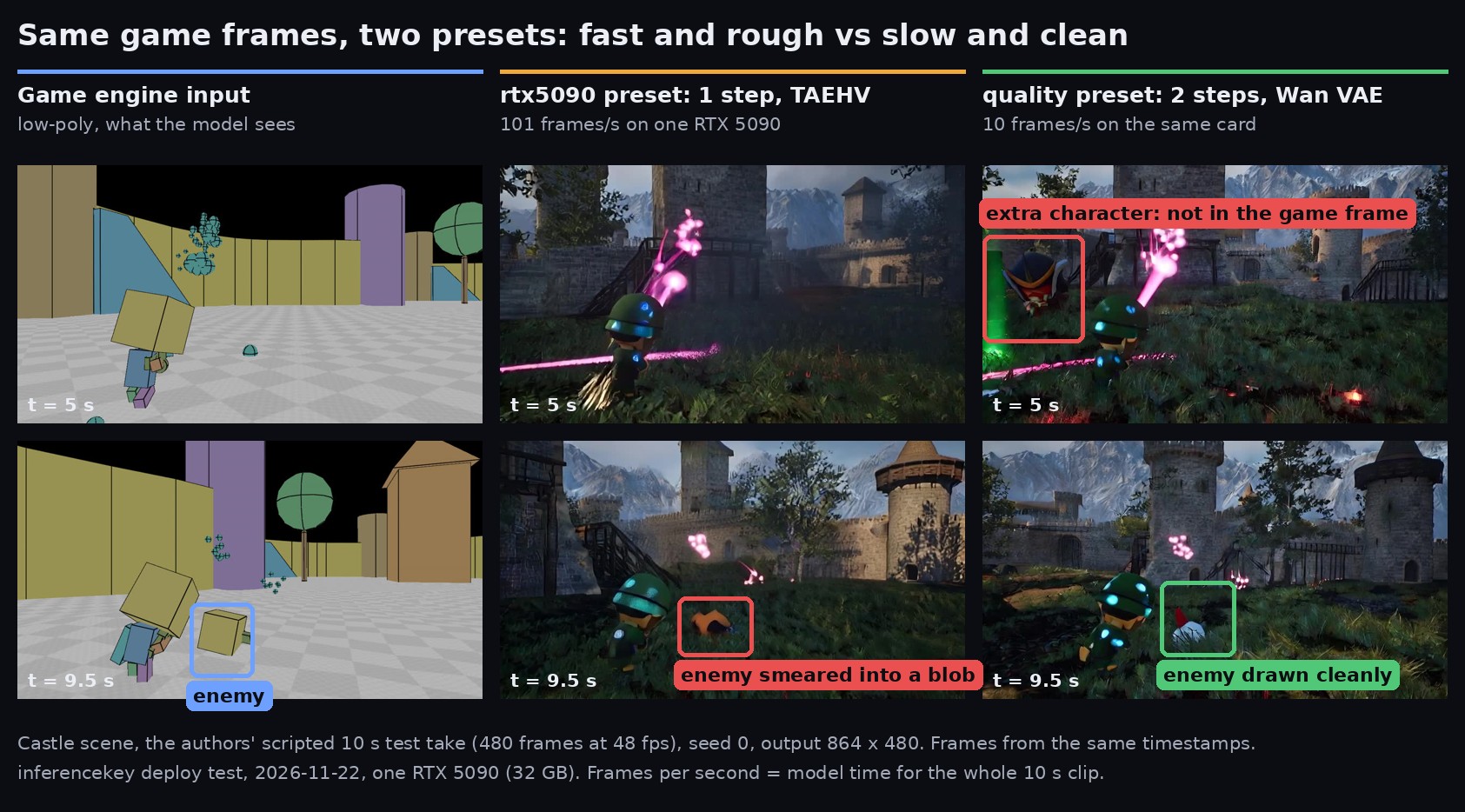
| Castle scene, recorded 10 s take at 48 fps | Speed | Card memory, rendering / loading |
|---|---|---|
| Fast preset for the RTX 5090, real card | 101 frames per second | 11.7 / 21.2 GiB |
| Authors' realtime preset (their datacenter pick), real card | 38 to 47 frames per second | 14.1 / 20.9 GiB |
| Quality preset, real card | 10 frames per second | 21.9 / 21.0 GiB |
| Smallest budget that worked | 16 GB, emulated, rtx5080 preset | 9.7 / 11.4 GiB |
| Ready to use after first request | 116 s |
The model card is blunt about what it does not promise: "There is no guaranteed frame rate, consumer-GPU memory fit, or exact scene reconstruction." It claims no benchmark. The authors' README gives speeds for three other cards. Their project page, still a preview, gives one RTX 5090 figure: 83 FPS. So we measured on that card ourselves. Our 101 fps is offline model time on one recorded clip, and the page does not say how its figure was measured, so the two are not directly comparable.
The game keeps the rules, the model only paints
Matrix-Game 4.0 draws a hard line through a game. The engine owns everything that has to be right: where the walls are, whether a bullet hits, what the W key does. The model owns only how it looks. In the authors' words on their project page, "Code builds the game, AI renders the world in real time".
Think of a comic book studio. The penciller decides where every character stands and what happens in each panel. The colorist makes it beautiful but cannot move the hero to another panel. Here the engine is the penciller. It draws flat yellow walls, purple cylinders and a checkered floor. The model is the colorist, and it turns them into stone walls, towers, grass and snowy mountains.
That sets it apart from the AI world models we covered before, Hy-Nomas and PAN 2. They imagine the whole scene and what happens in it, so the model is also the physics. If it gets a collision wrong, the world is wrong. Matrix-Game 4.0 never decides a collision: the model card says neural output does not change collision or gameplay.
The price of that design is specialization. Each scene has its own trained model: Medieval Castle, Ancient Egypt and City Racing. They expect the blocky frames of the authors' own game, from its camera angles. Feed one your own engine's frames and you are outside what it was trained for. The card warns that unseen geometry, fast camera moves and long sessions can make the picture drift.
Skywork AI built Matrix-Game 4.0, the game, the presets and the code that runs it, and released the weights and the game assets under Apache-2.0. It builds on Alibaba PAI's Wan2.2-Fun-5B-Control, which builds on the Wan team's Wan2.2 video model, all Apache-2.0. The authors' release notes date their RTX 5090 inference to 15 October and the presets for smaller cards to 16 October. We spotted it in an AI Search video, at 2:43.
Nothing in the input was ours: the authors' scripted castle take, three presets
The authors' game ships a 10-second recording mode for the castle: the player walks forward, turns, fires and switches weapons. We built the game in a container with no graphics card and recorded the take there, in about 25 seconds. That gave 480 blocky frames at 48 frames per second.
Then we sent the take to the castle model on one RTX 5090 with 32 GB of memory and rendered it with three of the authors' presets:
- rtx5090: one pass with a lighter copy of the same model, tuned by the authors for this card.
- realtime: one pass with the full-size model, the authors' pick for datacenter cards.
- quality: two passes and a slower, sharper conversion to pixels. The authors' offline default.
One clip, one run per preset, plus two repeats of realtime.
The fast preset finishes each chunk in half its time slot
The rtx5090 preset painted each four-frame chunk in 40 ms, half the 83 ms slot of a 48 fps take (our arithmetic, not the authors'). Miss the slot, and the picture falls behind the controls. The quality preset took 47 seconds for the 10-second take, so it cannot follow a live game on this card.
Here is how each preset kept time, by its typical chunk:
| Preset | Time per 4-frame chunk | Against the 83 ms slot |
|---|---|---|
| rtx5090 | 40 ms | half the slot |
| realtime | 85 to 105 ms | 2 to 22 ms over, per chunk |
| quality | 396 ms | almost five times over |
The first realtime render after start-up ran at 38 frames per second, two later ones at 47. We did not find why, so treat 38 to 47 as the range.
Two things change how you would build with it.
First, these are model times. Turning the input file into frames and the frames back into a video file runs on the processor, outside the model. With that included, the realtime render of 10 seconds took 18.5 seconds from start to finish, about 26 frames per second. The authors measure the same way, and they say video encoding, network transport and browser decoding add delay on top. Anyone who has played guitar through a laggy in-ear monitor knows that delay is what you feel.
Second, a preset is not a switch you flip per request. Changing it reloads the model, which took 54 to 72 seconds each time. Pick one per machine.
Speed costs detail: a smeared enemy against an invented one
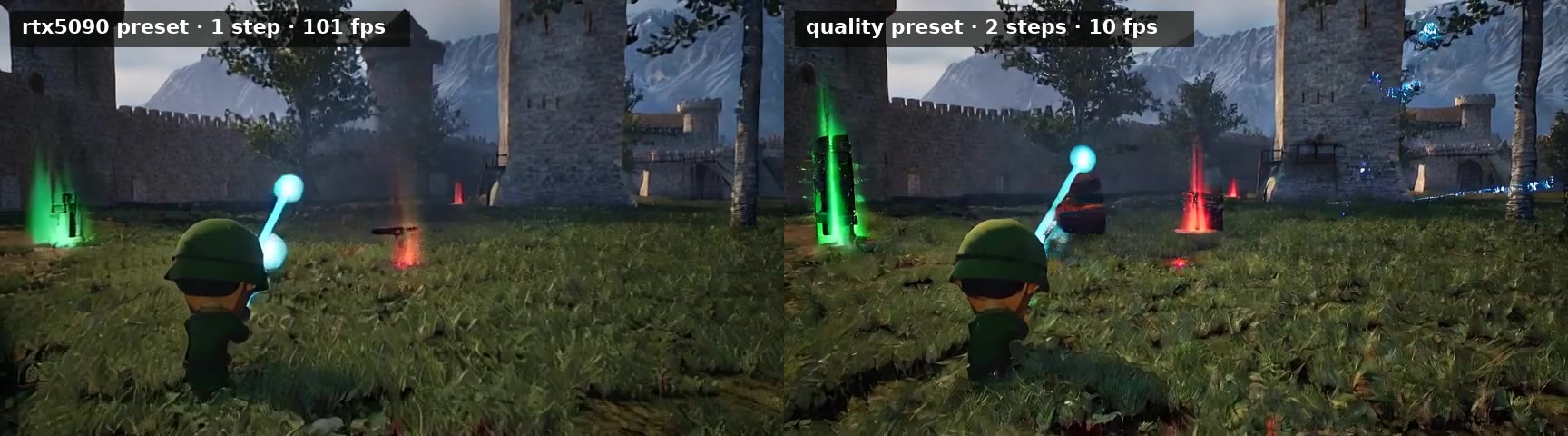
All three presets kept every character where the engine put it. The fast and the quality presets each made one clear mistake, and realtime made none we saw. Walls and towers are re-imagined rather than traced, as the card warns.
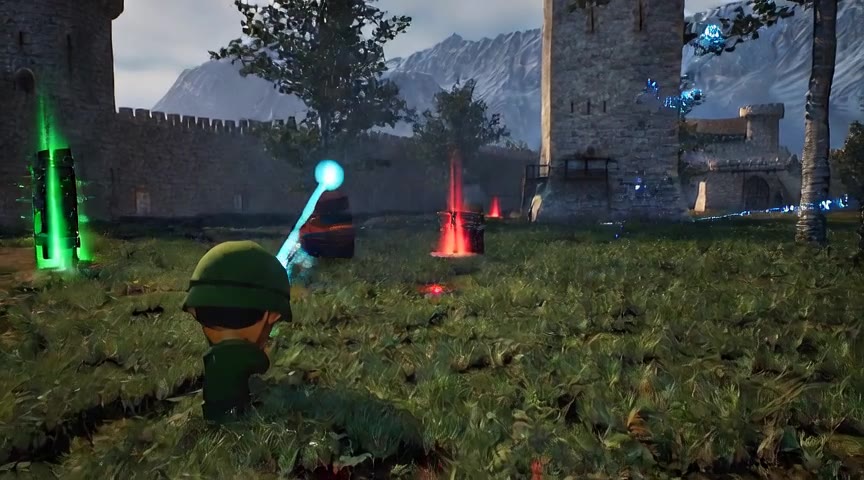
At 9.5 seconds, the fast rtx5090 preset smeared the enemy, a box character in the game frame, into an orange blob. The quality preset drew the same enemy cleanly. But at 5 seconds the quality preset added a character on the left that is not in the game frame at that moment. The key comparison image above marks all three.
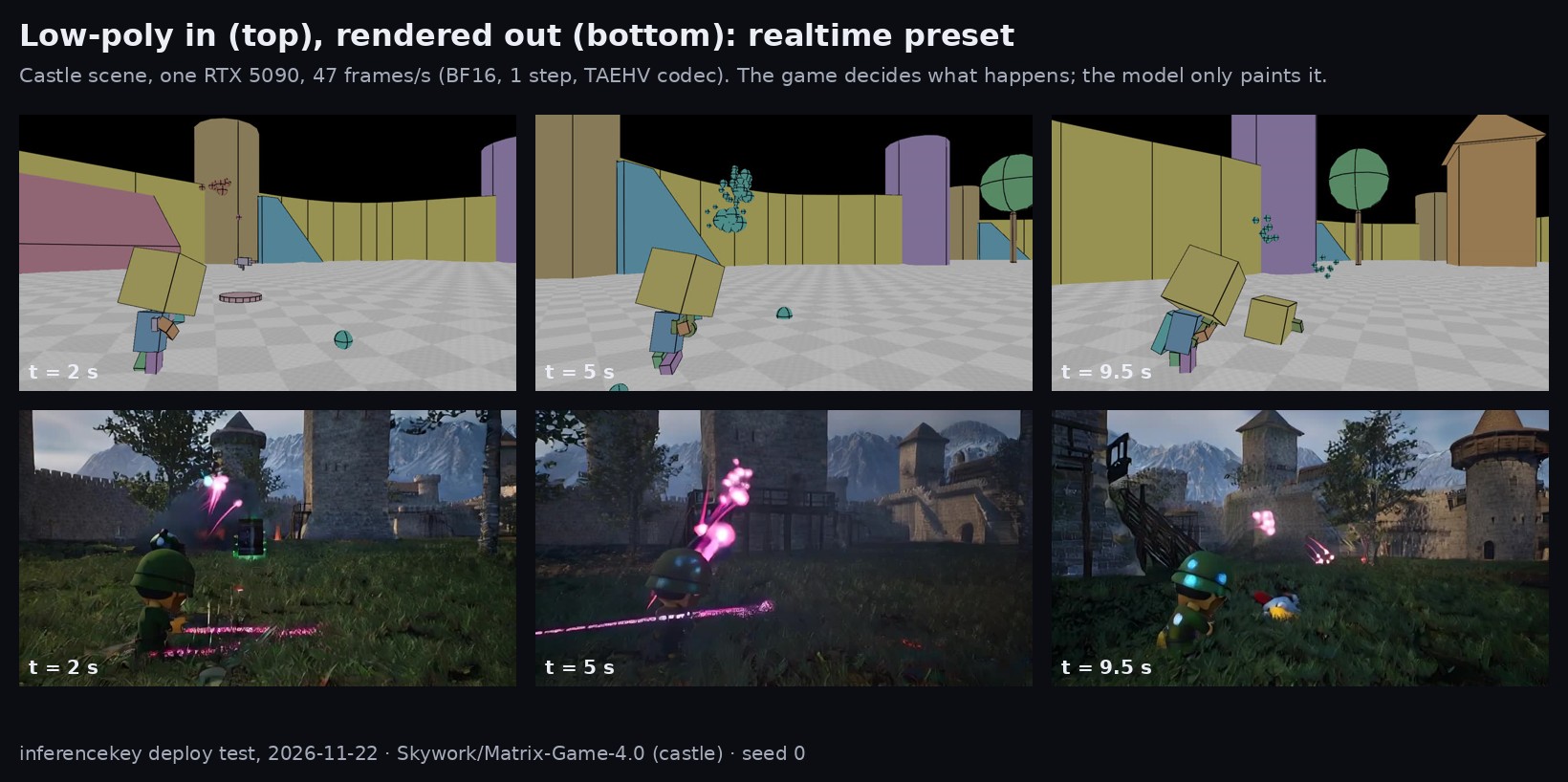
For a game, the added character is the worse error. A blob is ugly. A figure that is not there is a lie the player will try to shoot. The engine still decides hits, so gameplay stays correct, but what the player sees no longer matches the game. That is the real limit of a model that only paints.
Which GPU: a 16 GB budget fit with the right preset, 12 GB did not
The smallest memory budget that worked was 16 GB, with rtx5080, the authors' preset for the 16 GB RTX 5080. We got there by capping the memory of the same RTX 5090.
| Memory budget | Preset | Result | Real or emulated |
|---|---|---|---|
| 32 GB, RTX 5090 | all three above | works | real |
| 24 GB | realtime, 47 fps | works | emulated |
| 24 GB | quality, 10 fps | works | emulated |
| 16 GB | rtx5080 | works | emulated |
| 16 GB | realtime | out of memory while loading | emulated |
| 12 GB | rtx5080 | out of memory while loading | emulated |
The rtx5080 preset works by a simple trick. Before the painting starts, a separate text model reads the fixed scene description ("a third-person shooter game in a medieval castle...") once, and then it is removed from the card. The price is that those presets only take fixed descriptions, which the castle uses anyway.
That text model is also why 12 GB failed. It weighs 11 GB alone and has to fit on the card to read the description, so a 12 GB budget cannot hold it.
Do not read the speed in that 16 GB row as a promise. The rtx5080 preset ran at 128 frames per second there, but that is the 5090's horsepower with less memory. A real RTX 5080 has much less. The authors report about 42 frames per second on a real RTX 5080 with this preset.
On InferenceKey: a repainting API on one card, ready 116 seconds after the first call
Our custom backend, a Python file the platform runs on your GPU machine as an API, turned one card into a repainting service with the authors' code unchanged. Ours calls one fixed version of the authors' code. A program uploads a blocky game video, asks for a preset, and gets back the repainted video, a still frame, the timing of every chunk and the peak memory. From the dashboard's test button, a 2-second render came back in 4.4 seconds.
The fair objection: the authors already ship a browser demo for one player, streaming live. For one person at a desk who wants to play, that is the shorter path. Our backend answers a different need: renders that other programs request, on a machine you control.
There is one rough edge you will hit if you send video. Our API refuses any single upload over about 2 MB, so sending the video in 2 MB pieces failed. We cut the pieces to 1 MB and it worked. Status: fixed in the SDK example, which uploads in 1 MB parts. The limit itself stays on the platform.
Should you use it? Yes for the authors' scenes, not yet for your own game
- Prototyping on the authors' scenes and camera paths: yes. On an RTX 5090, the rtx5090 preset repaints faster than the take was recorded.
- A live game today: on an RTX 5090, only with the rtx5090 preset, and only after you measure the full path to the screen.
- Polished footage: the quality preset, offline, at about five seconds of GPU time per second of video, with an eye out for invented characters.
- Your own engine's frames or other scenes: no. Each scene is its own model, and the training code and data are not released.
- Which card: an RTX 5090 for everything. A 16 GB budget worked only in emulation, with the rtx5080 preset.
To repaint the authors' castle take on your own NVIDIA machine, upload the backend from the Matrix-Game 4.0 SDK example and run python main.py --input reference.mkv --preset realtime. It needs a take recorded with the authors' game and an RTX 5090, the card we tested. Smaller budgets worked only in emulation: 24 GB, or 16 GB with --preset rtx5080.
For engineers
Credits
- Skywork AI: Matrix-Game 4.0, the model card, the code (
Matrix-Game-4/), the native game with its scripted test takes, the presets and the project page. Scene weights, sink images and game assets under Apache-2.0. Technical report dated 2026-10-16 on the GitHub page (arXiv 2610.27999, not read by us). - Alibaba PAI: Wan2.2-Fun-5B-Control, the base model (Apache-2.0, about 5 billion parameters), a control fine-tune of Wan-AI/Wan2.2-TI2V-5B (Canny, Depth, Pose, MLSD and trajectory control, trained on 121 frames at 24 fps). The release pins revision
b8bc1a65ab71d054ba4636dc0dac104aa4df2686for the shared umT5-XXL encoder and Wan2.2 VAE. - Wan team: Wan2.2 TI2V 5B and its VAE, upstream Apache-2.0.
- Ollin Boer Bohan: TAEHV, the small open-source video encoder and decoder of the fast presets (MIT).
- Racing scene audio: includes CC0 and CC BY 3.0 material (per the card; we did not run Racing).
- AI Search: the video where we spotted it (chapter "Matrix-Game 4" at 2:43).
- Our part: the headless game recording, the custom backend, the measurements, the memory ladder and the SDK example.
Architecture (from the authors)
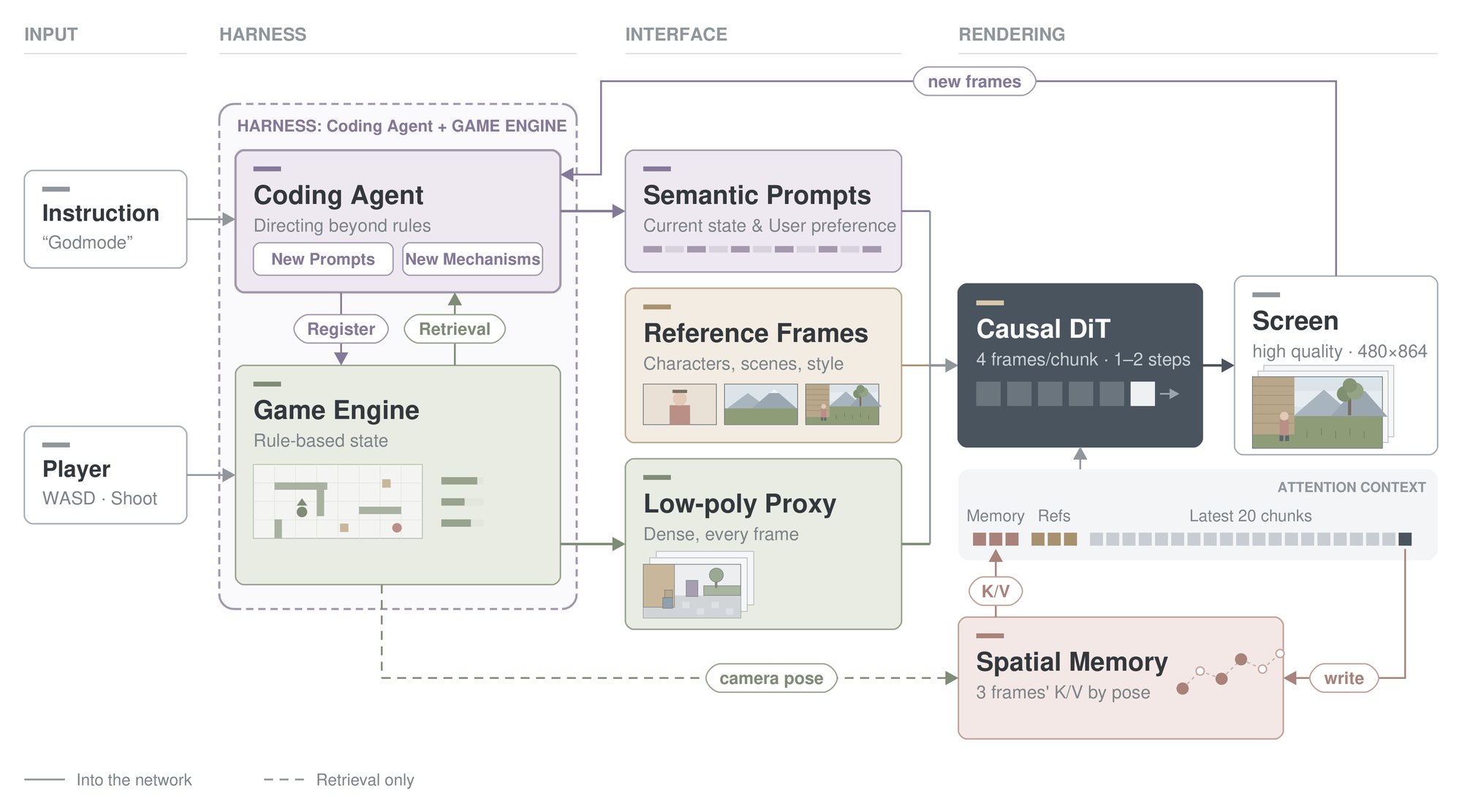
Figure: Skywork AI, Matrix-Game 4.0 project page (preview copy saved during our test).
| Part | Detail |
|---|---|
| Model | CausalWanModel ti2v, 30 layers, dim 3072, 24 heads, ffn 14336, in_dim 148, out_dim 48, text_len 512, text_dim 4096 |
| Parameters | 5,001,016,512 BF16 per scene checkpoint (Castle, Egypt, Racing). Needs the Matrix-Game 4.0 inference source, not a drop-in Diffusers pipeline. Training code and data not included |
| Output | 480 x 864 RGB. Startup chunk 1 RGB frame, then 4 RGB frames per latent chunk |
| Sampling | CFG 1, scheduler shift 5. Attention cache of 21 latent frames including the sink |
| quality preset | Wan VAE, 2 steps (1000, 500), native DiT |
| realtime preset | TAEHV, 1 step (1000), dit_runtime ring-fused, CUDA graphs |
| rtx5090 preset | DiT block linears converted to FP8 at load, embeddings and output head in BF16, PyTorch SDPA (rtx5090-sage: patched SageAttention 2.2.0) |
| rtx5080 / rtx5070ti presets | T5 encodes the prompt and is released before the DiT loads, so fixed prompts only. rtx5070ti-sage uses INT8 W8A8 linears |
| Castle prompt | fixed: "a third-person shooter game in a medieval castle ... realistic AAA game rendering ..." |
| Layers | HUD and sound stay separate, frame-aligned layers outside the model |
| Release | 4.0.0rc1, HF lastModified 2026-10-16 |
Preset choices: realtime, quality, baseline, rtx5090(-sage), rtx5080(-sage), rtx5070ti(-sage). The README says hardware selection is not automatic: realtime for A100, rtx5090 for RTX 5090, rtx5080 for RTX 5080, rtx5070ti for RTX 5070 Ti. The argparse default in scenes.py is realtime, while offline.py defaults to quality. The README also notes that --fps 40 "is a target capture cadence, not a throughput or latency guarantee".
Authors' figures, not reproduced by us:
| Source | Card | Preset | Reported |
|---|---|---|---|
| README | A100-SXM4-80GB | realtime (SDPA, ring/fused DiT, CUDA graphs) | about 38 to 39 fps Castle/Egypt fixed prompt, 38.5 Racing fixed, 28.9 Racing dynamic |
| README | RTX 5080 | rtx5080 / rtx5080-sage | about 42 fps, 9.6 GB / about 67 fps, 12.8 GB |
| README | RTX 5070 Ti | rtx5070ti / rtx5070ti-sage | about 41 fps, 9.2 GB / about 58 fps, 10.9 GB |
| Project page (preview copy) | RTX 5090 | 1-step denoising | 83 FPS, 48 ms to denoise one chunk, 112 ms key press to first reacting frame |
The project page labels itself "project page preview, content will be updated at release", so its figures may change.
Setup and why
- Model:
Skywork/Matrix-Game-4.0at sha2c531004, castle only. Resources 24.23 GB from the pinned release manifest: castle checkpoint 10.00 GB (825 tensors), umT5-XXL 11.36 GB, Wan2.2 VAE 2.82 GB, TAEHV 22.9 MB, tokenizer. All three scenes are about 44.2 GB. - GPU: one RTX 5090 32 GB (32,607 MiB), driver 595.112.07 (CUDA 13.2), on our cloud (InferenceKey Cloud), by the hour. First choice in our plan, and the authors publish a dedicated preset for it. 24 GB and 16 GB budgets were then emulated on the same card.
- Software: the authors' source at commit
51913b2b(2026-10-29), Python 3.12, torch 2.12.0+cu132, diffusers 0.39.0, transformers 5.17.0. Not Diffusers or vLLM: the weights only run through the authors' engine. - Input:
game/bin/MedievalCastleBBoxMap --offline-test --scene castle(seed 1729 in the take; renders used seed 0), built natively in an Ubuntu 24.04 Docker container with no GPU (ctest 6/6), recorded on Xvfb with Mesa llvmpipe in 24.6 s. Take: 480 frames, 1280 x 720, 48 fps, seed 1729, 0 dropped. Uploaded as H.264 yuv444 CRF 10 (9.4 MB). The model'scrop_and_resizemakes it 864 x 480. - Platform: custom Python backend
matrix-game-40.1.0 on a local InferenceKey manager, never production. Worker online 26 s after the machine was created.
Step by step with the SDK example
The example is examples/matrix-game-4-video-renderer-custom-backend-private-nvidia (commit 960911632f1b252e36a9aff2c209a84b0175073d on main). Files: backend.py, publish.py, main.py, requirements.txt, README.md, .env.example. It needs a local build of the SDK plus requests, and a .env with INFERENCEKEY_SDK_TOKEN, INFERENCEKEY_API_KEY, INFERENCEKEY_PROJECT and IK_WORKER_ID (your NVIDIA worker). MG4_HOME needs about 25 GB of local disk, not a network volume. We ran it with a driver for CUDA 13.2.
Record the input with the authors' game first:
# in Matrix-Game-4/ of github.com/SkyworkAI/Matrix-Game
python -m pip install -e '.[inference,server,download,test]'   # provides the matrix-game CLI
matrix-game download --manifest releases/game-assets.json \
  --repo-id Skywork/Matrix-Game-4.0 --repo-type model \
  --revision 2c53100457da7abcf0e966f75637c644d3423a63 \
  --scene castle --resources resources   # castle game assets, SHA-256 checked
bash scripts/build_game.sh
bash scripts/play.sh --scene castle      # F9 starts and stops a take; use reference.mkv, not ui.mkv
# or headless, the scripted 10 s take we used (xvfb-run hung for us, so start Xvfb by hand):
Xvfb :55 -screen 0 1280x720x24 &
MATRIX_GAME_DATA_DIR="$PWD/resources/game" DISPLAY=:55 game/bin/MedievalCastleBBoxMap --offline-test --scene castle
--offline-test is a flag in the game source (MainLinux.cpp), not documented in the README. Without MATRIX_GAME_DATA_DIR the game looks for its assets in game/assets, not in resources/game where the download put them (scripts/play.sh sets it for you). The take lands in resources/game/captures/session-*/take-1/reference.mkv, the file you pass to main.py. Our run also saved take-2 and take-3 of 48 frames each: use take-1.
Then deploy and render:
cp .env.example .env          # tokens, project, worker id
python publish.py             # once: uploads backend.py as a custom backend
python main.py --input reference.mkv --preset realtime
What the backend does:
setup()sparse-clonesMatrix-Game-4/at the pinned commit, downloads the scene's manifest files in 8 threads withhf_hub_download, verifies size and SHA-256, hard-links them intoresources/, and builds the engine with the authors'ModelComponentson one dedicated GPU thread (load, warm-up, CUDA graphs and renders all on that thread).process()takes a chunked upload, then a render withpreset,seed,secondsormax_frames, andvram_limit_gib(reloads the engine undertorch.cuda.set_per_process_memory_fraction). It runs the authors'frame_blocks+crop_and_resize+stream.pushloop.- Output: H.264 CRF 16 MP4 in 2 MB parts with SHA-256, the middle frame as
data[0].b64_json, per-chunk timings, PyTorch andnvidia-smipeaks.
The requests:
POST {base}/endpoint/{project}/matrix-game-castle/v1/images/generations
{"model": "default", "upload_id": "any-id", "part": 0, "parts": 10, "chunk_b64": "<1 MB of the video>"}
{"model": "default", "input_id": "c3dc2cd99355f2ac", "preset": "realtime", "seed": 0, "seconds": 10}
The last upload part answers {"status": "uploaded", "input_id"}. Dashboard tester words: realtime 2s.
Full measurements
All renders on the same 10 s input (480 frames, 121 chunks), seed 0, one request at a time through the local endpoint. Model time is measured by the backend per chunk and excludes video decode and encode.
| Run | Preset | Cap | Model s | Model fps | Median / max chunk ms | Round trip s | PyTorch reserved MiB | Card peak MiB |
|---|---|---|---|---|---|---|---|---|
| realtime-10s (first after setup) | realtime | none | 12.62 | 38.04 | 104.9 / 118.1 | 22 | 13,564 | 14,336 |
| quality-10s | quality | none | 47.16 | 10.18 | 395.9 | 110 (incl. 54.9 s reload) | 21,156 | 22,437 |
| rtx5090-10s | rtx5090 | none | 4.76 | 100.85 | 39.6 | 84 (incl. 72.1 s reload) | 11,176 | 12,006 |
| realtime-cap22-10s | realtime | 22.5 GiB | 10.31 | 46.56 | 86.3 / 92.6 | 72 (incl. reload) | 13,564 | 21,558 (load) |
| rtx5080-cap14-10s | rtx5080 | 14.5 GiB | 3.75 | 127.95 | 31.2 / 37.1 | 79 (incl. reload) | 9,056 | 9,900 |
| quality-cap22-10s | quality | 22.5 GiB | 46.97 | 10.22 | 395.4 | 111 (incl. reload) | 21,156 | 22,000 |
| realtime-10s-b | realtime | none | 10.18 | 47.15 | 85.4 | 71 (incl. reload) | 13,564 | 14,408 |
dashboard realtime 2s | realtime | none | 2.04 | 46.97 | 79.0 / 111.4 | 4.4 | 13,826 | 14,408 |
Engine loads (every preset change reloads):
| Preset (cap) | Engine load s | Weights on GPU GiB | Load card peak MiB |
|---|---|---|---|
| realtime (none), in setup | 63.7 | 9.37 | 21,394 |
| quality (none) | 54.9 | 10.66 | 21,500 |
| rtx5090 (none) | 72.1 | 8.89 | 21,690 |
| realtime (22.5 GiB) | 53.9 | 9.37 | 21,558 |
| rtx5080 (14.5 GiB) | 67.8 | 8.17 | 11,632 |
- Cold start: worker online 26 s after machine create; ready 116 s after
ensure()(venv about 25 s,setup()91.1 s: source 1.3 s, 24.23 GB downloaded and verified in 22.8 s, engine load and warm-up 63.7 s). - End to end for the realtime 10 s render (
wall_s): 18.51 s, 25.9 fps including CPU decode and H.264 encode. - Per-chunk budget at the 48 fps input: 4/48 s = 83.3 ms (our arithmetic).
- Upload of the 9.4 MB input: 10 requests of 1 MB.
- The first realtime render (38.04 fps) was slower than the two later ones (46.56, 47.15) with the same configuration.
VRAM ladder
Caps set with torch.cuda.set_per_process_memory_fraction on the RTX 5090 before the engine load, weights included. The CUDA context adds about 0.8 GB outside the cap.
| Target | Configuration | Output | Card peak | Time per 10 s clip (model) | Real or emulated |
|---|---|---|---|---|---|
| RTX 5090 32 GB | quality | ok | 22,437 MiB | 47.2 s (10.2 fps) | real |
| RTX 5090 32 GB | realtime | ok | 14,408 MiB run, 21,394 load | 10.2 to 12.6 s (38 to 47 fps) | real |
| RTX 5090 32 GB | rtx5090 | ok, enemy smeared at 9.5 s | 12,006 MiB run, 21,690 load | 4.8 s (101 fps) | real |
| 24 GB card (22.5 GiB cap) | realtime | ok, same look as uncapped | 21,558 MiB (load) | 10.3 s (46.6 fps) | emulated |
| 24 GB card (22.5 GiB cap) | quality | ok | 22,000 MiB | 47.0 s (10.2 fps) | emulated |
| 16 GB card (14.5 GiB cap) | rtx5080 (prompt encoded first, umT5 freed, FP8 linears) | ok | 9,900 MiB run, 11,632 load | 3.75 s (128 fps on 5090 compute) | emulated |
| 16 GB card (14.5 GiB cap) | realtime | OOM during load | emulated | ||
| 12 GB card (10.5 GiB cap) | rtx5080 | OOM during load | emulated |
The OOMs:
OutOfMemoryError: CUDA out of memory. Tried to allocate 80.00 MiB ... 14.50 GiB allowed; Of the allocated memory 14.46 GiB is allocated by PyTorch   (realtime, DiT + umT5 together)
OutOfMemoryError: CUDA out of memory. Tried to allocate 80.00 MiB ... 10.50 GiB allowed; Of the allocated memory 10.46 GiB is allocated by PyTorch   (rtx5080, umT5 alone is 11.4 GB in BF16)
Not tried: 12 GB with T5 on the CPU (the code has no such switch), real RTX 4090 or 4080 cards, the authors' live browser path, key press to changed frame latency, the SageAttention presets, the Ancient Egypt and Racing scenes, dynamic prompts. Whether the FP8 rtx5090/rtx5080 presets (tuned for sm_120) run on Ada (sm_89) is untested. The 128 fps of the 16 GB rung is RTX 5090 compute and does not carry over to a real 16 GB card, only the memory fit does.
Problems
- Upload HTTP 413. 2 MB raw parts (2.7 MB in base64) hit
HTTP 413: Failed to buffer the request body: length limit exceeded. The data plane caps request bodies at about 2 MB. Fixed in the client with 1 MB parts; the committed example uses 1 MB. - Second readiness wait hung. With the workload already ready, a second
ensure()+wait_until_ready()printedscheduling: worker assigned; checking readinessand never returned (about 5 min, killed). Endpoint calls worked at the same time. Status: open, not yet reproduced, so we do not know if it is SDK or manager side. Workaround: once the workload is ready, skip the secondensure()and call the endpoint directly. xvfb-runhung in the game container. Starting Xvfb by hand worked.- Local tooling on our own dev stack (a missing secret, an unreachable font host in the demo recorder) needed small fixes. Readers will not hit them.
- Hugging Face warned about unauthenticated requests. The 24 GB download still took 23 s.
- One clip, one seed. Quality notes are anecdotal: frames compared at 2, 5 and 9.5 s.
Demo video and samples
A narrated walk-through of 2 minutes 45 seconds: what Matrix-Game 4.0 is (with the authors' teaser, credited, and their FPS figures labelled "Reported by the authors, not reproduced by us"), the deployment on one card, our side-by-side renders and the memory ladder.
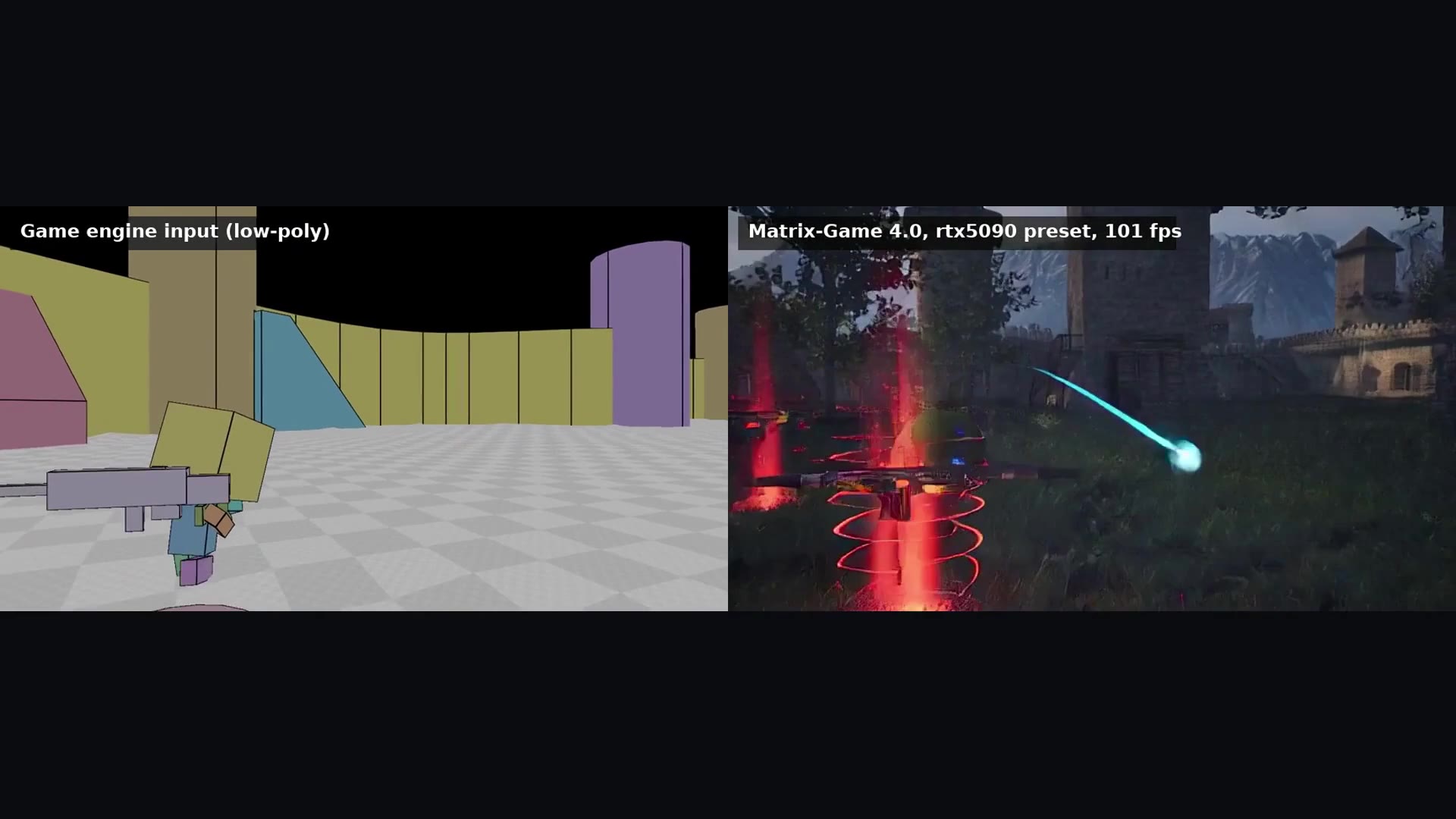
Low-poly game input next to the rtx5090 render, 10 s:
rtx5090 render next to the quality render, 10 s:
Quality render, 10 s:
Sources
- Model card: huggingface.co/Skywork/Matrix-Game-4.0
- Code: github.com/SkyworkAI/Matrix-Game (
Matrix-Game-4/, commit51913b2b) - Project page: matrix-game-v4-0.github.io/page
- Base model: alibaba-pai/Wan2.2-Fun-5B-Control
- Where we spotted it: AI Search, at 2:43
- Our example: inferencekey-sdk, matrix-game-4-video-renderer-custom-backend-private-nvidia