RelayVSR fits 4x video upscaling on a 24 GB card: six keyframes out of 72
RelayVSR took a 480p clip to 3416 x 1920 at 7.3 frames/s of GPU time on one RTX 4090, peaking at 20.4 GiB of its 24 GB.
Six frames out of 72. That is all RelayVSR's big model had to draw to turn a 3-second 480p film clip into 3416 x 1920 video on one RTX 4090 on our cloud. A small network filled in the other frames. The two models together needed about 10 seconds of GPU time, 7.33 frames per second, and peaked at 20.4 GiB of the card's 24 GB. For anyone who deploys models, that moves 4x video upscaling from a datacenter card to a 24 GB gaming card. An older RTX 3090 did the same job at about half the speed. What you can do with it today: run it on a 24 GB card of your own, keep the default keyframe spacing for faces and fast motion, and send short clips, because the slow part of the request is the CPU, not the GPU.
Clip: Tears of Steel (CC) Blender Foundation, mango.blender.org, CC BY 3.0.
A lead animator and an in-betweener
RelayVSR borrows the oldest trick in hand-drawn animation. A lead animator draws the key poses, and in-betweeners draw the frames that connect them.
Here the lead is a reference generator adapted from Wan2.2, an open video model from Wan-AI. It draws a detailed version of one frame every 15, the keyframes. The in-betweener is a small network of the authors' own design, 32 million parameters against the big model's 5 billion. It upscales every frame, looking at the low-resolution video and at the detailed keyframes on both sides. Most frames never touch the big model, and that is why one card is enough.
The work belongs to Xijun Wang, Xin Li, Zirui Lang, Suhang Yao, Haoran Li and Zhibo Chen, at the University of Science and Technology of China. They published the paper on 29 September 2026, with the code on GitHub and the weights on Hugging Face. Wan2.2 and both RelayVSR weight files are Apache-2.0, an open license that allows commercial use. The download is about 10.2 GB. We spotted it in the AI Search news video of 8 November. Our part: a backend that serves it as an API, the speed tests and the smallest-card test.
The authors report 29.29 frames per second at 1080p on an A100, a datacenter card, using 13.82 GB of memory. The fastest rival in their table reports 23.48 in 31.36 GB. Those are their numbers, not ours.
What one RTX 4090 did
| One RTX 4090, 3-second clip | Frames per second of GPU time | Peak GPU memory |
|---|---|---|
| 480p in, 3416 x 1920 out, keyframe every 15 frames | 7.33 | 20.4 GiB |
| Same, keyframe every 31 frames | 9.10 | 20.4 GiB |
| 270p in, 1920 x 1080 out, keyframe every 15 frames | 23.9 | 13.1 GiB |
The clip was 72 frames of Tears of Steel, the Blender Foundation's open short film, scaled down to 480p. Near-4K output ran roughly three times slower than the film plays. At 1080p the 4090 reached about 80% of the authors' A100 figure.
The output is clearly sharper than plain bicubic upscaling, the standard resize filter. Faces, hair, beard and the fabric of a jacket gain convincing detail. That detail is generated, plausible rather than recovered, so check it before you use it where fidelity matters.
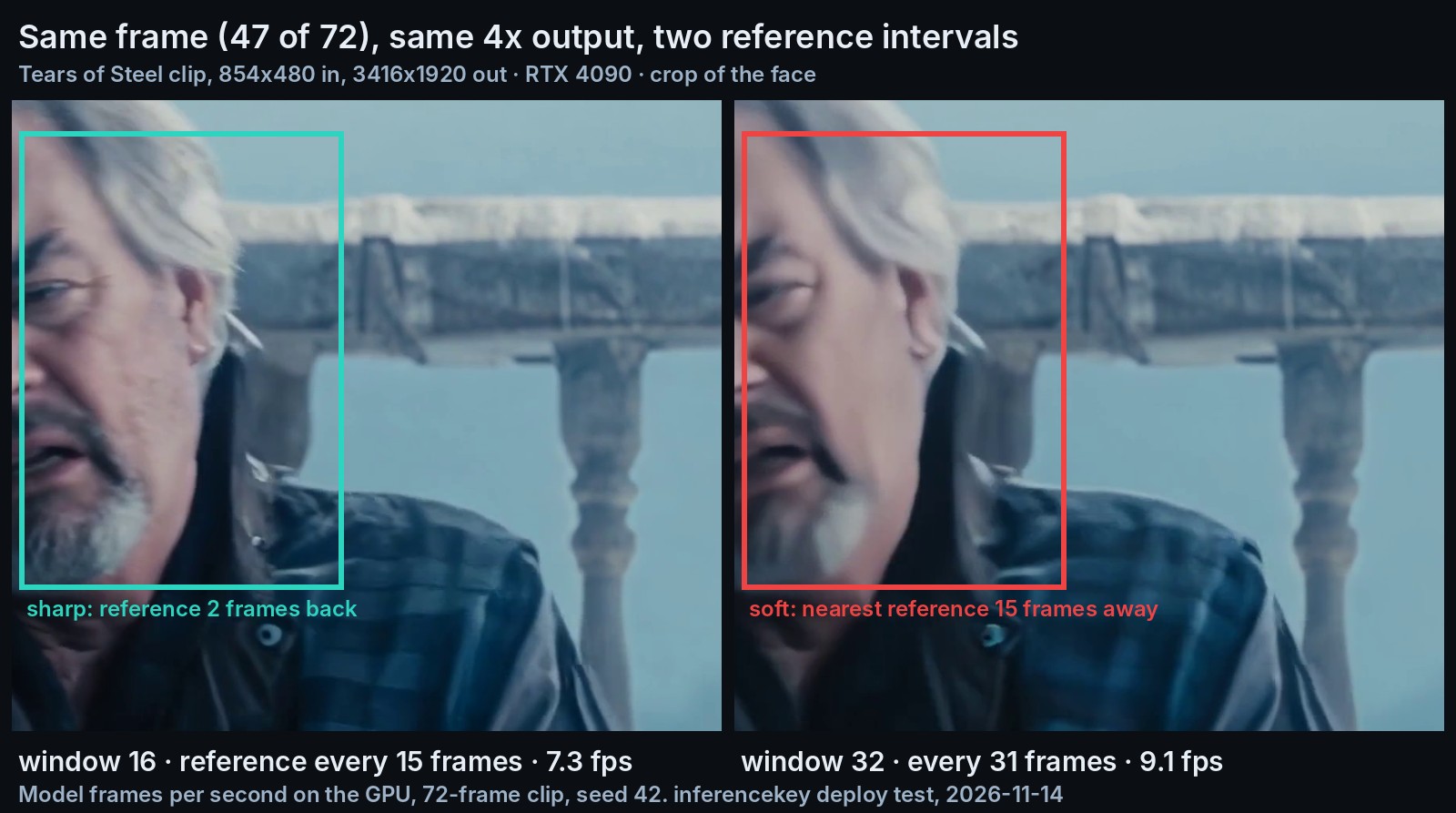
Spacing keyframes twice as far apart is one setting per request. It bought about a quarter more speed, 9.10 frames per second instead of 7.33. The image above shows the price. At frame 47 the nearest keyframe was 15 frames away, in the middle of a head turn, and the face went soft. With the default spacing, the last keyframe was 2 frames back and the face stayed sharp.
Which card, and where the time really goes
The smallest real card that worked was a 24 GB one. We tried to rent a real 16 GB card on our cloud, and every option we tried was out of stock. So we capped how much of the 4090's memory the model could use. Under a 16 GB budget, only 270p in and 1080p out fit, with output identical to the uncapped run. Under a 12 GB budget nothing fit: the big model alone takes 9.6 GiB.
On InferenceKey the model was serving 71.2 seconds after we asked for it, with the weights already on the machine's local disk. Nothing built in serves a video upscaler, so we wrote a custom backend: a small Python file that tells the platform how to load the model and answer requests. It runs a fixed version of the authors' code with their settings. This ran on a local copy of our stack, not the hosted service.
A 72-frame clip at 1920p took 26 to 41 seconds from request to answer, for 8 to 10 seconds of GPU work. The rest was the processor compressing 72 large frames into an MP4, twice, so the answer fits in one 8 MB message. At 1080p the whole round trip took 6.4 to 7.2 seconds. Status: open. Returning a download link instead would remove the second pass, and the example's README says to send long videos in chunks of 2 to 3 seconds.
Who should care
- Teams upscaling 480p to near-4K on their own hardware: a 24 GB card, a 4090 or, at half the speed, a 3090.
- 1080p output from low-resolution clips: a 16 GB budget fit in our emulated test.
- Faces and fast motion: keep a keyframe every 15 frames.
- Slow scenes, where speed matters most: every 31 frames is about a quarter faster.
- Audio: it is not copied, so put it back yourself.
The honest limit: we checked still frames of one clean clip against bicubic only, so this is a visual check, not a quality benchmark, and old or damaged footage is untested.
Read the speed tables, the memory ladder and the frame-by-frame comparison in the full RelayVSR test.